MagicMirror Forum
    • Recent
    • Tags
    • Unsolved
    • Solved
    • MagicMirror² Repository
    • Documentation
    • 3rd-Party-Modules
    • Donate
    • Discord
    • Register
    • Login
    A New Chapter for MagicMirror: The Community Takes the Lead
    Read the statement by Michael Teeuw here.

    Google Calendars not loading

    Scheduled Pinned Locked Moved Unsolved Troubleshooting
    28 Posts 7 Posters 14.7k Views 7 Watching
    Loading More Posts
    • Oldest to Newest
    • Newest to Oldest
    • Most Votes
    Reply
    • Reply as topic
    Log in to reply
    This topic has been deleted. Only users with topic management privileges can see it.
    • M Offline
      mspk @sdetweil
      last edited by

      @sdetweil I’ll try that. Funny aboutz the spam, I used the </> button…

      1 Reply Last reply Reply Quote 0
      • M Offline
        mspk @sdetweil
        last edited by

        @sdetweil

        pi@raspberrypi:~ $ free -m
                       total        used        free      shared  buff/cache   available
        Mem:             363         169          88          23         105         115
        Swap:           2047         227        1820
        
        
        S 1 Reply Last reply Reply Quote 0
        • S Do not disturb
          sdetweil @mspk
          last edited by

          @mspk said in Google Calendars not loading:

          Mem: 363

          weird that there is only 363… as its supposed to have 512…

          I have one here… I’ll power it up

          Sam

          How to add modules

          learning how to use browser developers window for css changes

          S 1 Reply Last reply Reply Quote 0
          • S Do not disturb
            sdetweil @sdetweil
            last edited by

            @mspk doc

            The installed RAM is 524,288KB.
            The usable RAM is 437,868 KB

            mine

                          total        used        free      shared  buff/cache   available
            Mem:             426         134         117          10         175         232
            Swap:             99           1          98
            

            Sam

            How to add modules

            learning how to use browser developers window for css changes

            M 1 Reply Last reply Reply Quote 0
            • M Offline
              mspk @sdetweil
              last edited by

              @sdetweil When I played around a bit, i gave the gpu 128MB, I guess thats why. Just set it back to 64, and now it shows 426 for me too. But the calendars are still not complete…
              The status right now is following:
              Calendar 1 seems to be complete.
              Calandar 2 is not loading at all.
              Calendar 3 seems complete (i guess for the one month that it shows in my module).
              Calendar 4 is there, but not updated (I changed the title).
              Calendar 5 is also missing.

              Do I need to reset something maybe?

              P.S.: It’ still slow.

              S 1 Reply Last reply Reply Quote 0
              • S Do not disturb
                sdetweil @mspk
                last edited by

                @mspk are u willing to share the url of one of the not loading cals…

                you can use chat here so no email flow…

                Sam

                How to add modules

                learning how to use browser developers window for css changes

                S M 2 Replies Last reply Reply Quote 0
                • S Do not disturb
                  sdetweil @sdetweil
                  last edited by

                  @mspk all of the urls worked without issue

                  so, try this
                  stop mm

                  cd ~/MagicMirror
                  npm install electron@28.1.1
                  

                  retry MM

                  Sam

                  How to add modules

                  learning how to use browser developers window for css changes

                  1 Reply Last reply Reply Quote 0
                  • M Offline
                    mspk @sdetweil
                    last edited by

                    @sdetweil Already did that a few hours ago, but nothing changed…

                    S 1 Reply Last reply Reply Quote 0
                    • S Do not disturb
                      sdetweil @mspk
                      last edited by

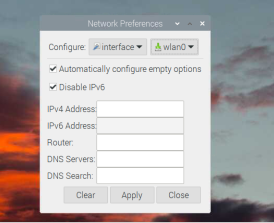
                      @mspk ok, one other thing, in the system network preferences, disable ipv6

                      desktop, menu top left, preferences, pi config, network.

                      the electron version is supposed to have the fix for this (trying to talk ipv6 to an ipv4 server… oops can’t connect)

                      Sam

                      How to add modules

                      learning how to use browser developers window for css changes

                      M 1 Reply Last reply Reply Quote 0
                      • M Offline
                        mspk @sdetweil
                        last edited by

                        @sdetweil 2393b7ef-d216-4bd2-9b96-8c1b05ef8ef8-image.png

                        also already done.

                        S 1 Reply Last reply Reply Quote 0
                        • S Do not disturb
                          sdetweil @mspk
                          last edited by

                          @mspk and rebooted???

                          from command line

                          ip addr
                          

                          Sam

                          How to add modules

                          learning how to use browser developers window for css changes

                          M 1 Reply Last reply Reply Quote 0
                          • M Offline
                            mspk @sdetweil
                            last edited by

                            @sdetweil

                            2: wlan0: <BROADCAST,MULTICAST,UP,LOWER_UP> mtu 1500 qdisc pfifo_fast state UP group default qlen 1000
                                link/ether d8:3a:dd:87:e0:80 brd ff:ff:ff:ff:ff:ff
                                inet 192.168.178.68/24 brd 192.168.178.255 scope global dynamic noprefixroute wlan0
                                   valid_lft 863889sec preferred_lft 755889sec
                                inet6 2a0b:9e00:116f:fe30:da3a:ddff:fe87:e080/64 scope global dynamic mngtmpaddr
                                   valid_lft 7085sec preferred_lft 3485sec
                                inet6 fe80::da3a:ddff:fe87:e080/64 scope link
                                   valid_lft forever preferred_lft forever
                            
                            
                            S 1 Reply Last reply Reply Quote 1
                            • S Do not disturb
                              sdetweil @mspk
                              last edited by

                              @mspk said in Google Calendars not loading:

                              inet6 2a0b:9e00:116f:fe30:da3a:ddff:fe87:e080/64 scope global dynamic mngtmpaddr
                              valid_lft 7085sec preferred_lft 3485sec
                              inet6 fe80::da3a:ddff:fe87:e080/64 scope link
                              valid_lft forever preferred_lft forever

                              still enabled

                              Sam

                              How to add modules

                              learning how to use browser developers window for css changes

                              M 1 Reply Last reply Reply Quote 0
                              • M Offline
                                mspk @sdetweil
                                last edited by

                                @sdetweil disabled it inside the sysctl.conf, dont know why it didn’t change

                                M 1 Reply Last reply Reply Quote 1
                                • M Offline
                                  mspk @mspk
                                  last edited by mspk

                                  wlan0: <BROADCAST,MULTICAST,UP,LOWER_UP> mtu 1500 qdisc pfifo_fast state UP group default qlen 1000
                                  link/ether d8:3a:dd:87:e0:80 brd ff:ff:ff:ff:ff:ff
                                  inet 192.168.178.68/24 brd 192.168.178.255 scope global dynamic noprefixroute wlan0
                                  valid_lft 863983sec preferred_lft 755983sec
                                  
                                  
                                  1 Reply Last reply Reply Quote 1
                                  • V Offline
                                    valentindey
                                    last edited by

                                    Hi,

                                    Is there any update on this?

                                    I seem to have the same (or similar) issue on a Raspberry Pi 3. For me it’s just one out of a few calendars that isn’t working and I also get the vulkan error message.
                                    The calendar has been working before but I can’t seem to trace it back to a recent change.
                                    I already started MM with node option --dns-result-order=ipv4first as the calendars come from a Nextcloud instance which does not support ipv6.

                                    S 1 Reply Last reply Reply Quote 0
                                    • S Do not disturb
                                      sdetweil @valentindey
                                      last edited by

                                      @valentindey we haven’t got a clear indication where the trouble is. is it in electron, ? or …

                                      did you try electron 28.1.1?

                                      npm install electron@28.1.1
                                      

                                      Sam

                                      How to add modules

                                      learning how to use browser developers window for css changes

                                      V 1 Reply Last reply Reply Quote 0
                                      • V Offline
                                        valentindey @sdetweil
                                        last edited by

                                        @sdetweil yes, I tried an older version and the newer version of electron. So far to no avail.

                                        Checking the logs I see that events are fetched from the calendar in question, so it’s something about displaying them.
                                        Also, running the exact same setup on another machine works perfectly fine.

                                        S 1 Reply Last reply Reply Quote 0
                                        • S Do not disturb
                                          sdetweil @valentindey
                                          last edited by

                                          @valentindey yeh, its weird for sure…

                                          lets go back to the prior parser

                                          cd ~/MagicMirror
                                          npm install node-ical@0.16.1
                                          

                                          and restart MagcMirror

                                          Sam

                                          How to add modules

                                          learning how to use browser developers window for css changes

                                          eniacE V 2 Replies Last reply Reply Quote 0
                                          • eniacE Offline
                                            eniac @sdetweil
                                            last edited by

                                            @sdetweil said in Google Calendars not loading:

                                            let`s go back to the prior parser
                                            cd ~/MagicMirror
                                            npm install node-ical@0.16.1

                                            and restart MagcMirror

                                            Does the Job. Thank you …
                                            S 1 Reply Last reply Reply Quote 1

                                            Hello! It looks like you're interested in this conversation, but you don't have an account yet.

                                            Getting fed up of having to scroll through the same posts each visit? When you register for an account, you'll always come back to exactly where you were before, and choose to be notified of new replies (either via email, or push notification). You'll also be able to save bookmarks and upvote posts to show your appreciation to other community members.

                                            With your input, this post could be even better 💗

                                            Register Login

                                            • 1
                                            • 2
                                            • 1 / 2
                                            • First post
                                              Last post
                                            Enjoying MagicMirror? Please consider a donation!
                                            MagicMirror created by Michael Teeuw.
                                            Forum managed by Sam, technical setup by Karsten.
                                            This forum is using NodeBB as its core | Contributors
                                            Contact | Privacy Policy