MagicMirror Forum
    • Recent
    • Tags
    • Unsolved
    • Solved
    • MagicMirror² Repository
    • Documentation
    • 3rd-Party-Modules
    • Donate
    • Discord
    • Register
    • Login
    A New Chapter for MagicMirror: The Community Takes the Lead
    Read the statement by Michael Teeuw here.

    MagicMirror no longer launches

    Scheduled Pinned Locked Moved Unsolved Troubleshooting
    38 Posts 4 Posters 8.8k Views 3 Watching
    Loading More Posts
    • Oldest to Newest
    • Newest to Oldest
    • Most Votes
    Reply
    • Reply as topic
    Log in to reply
    This topic has been deleted. Only users with topic management privileges can see it.
    • mumblebajM Offline
      mumblebaj Module Developer @RIKKO14
      last edited by

      @RIKKO14 Also, are there any errors where you start MM? If you start it using pm2 then the pm2 logs need to be checked. If NPM then check the terminal where you run npm from.

      Check out my modules at: https://github.com/mumblebaj?tab=repositories
      Check my blog-post: https://mumblebaj.xyz/
      Check my MM Container: https://hub.docker.com/repository/docker/mumblebaj/magicmirror/general

      R 1 Reply Last reply Reply Quote 0
      • R Offline
        RIKKO14 @mumblebaj
        last edited by

        @mumblebaj sorry I don’t anderstand what to do… can you give the scrip to write in my terminal ?

        mumblebajM 1 Reply Last reply Reply Quote 0
        • mumblebajM Offline
          mumblebaj Module Developer @RIKKO14
          last edited by

          @RIKKO14 How do you start MagicMirror?

          Check out my modules at: https://github.com/mumblebaj?tab=repositories
          Check my blog-post: https://mumblebaj.xyz/
          Check my MM Container: https://hub.docker.com/repository/docker/mumblebaj/magicmirror/general

          R 1 Reply Last reply Reply Quote 0
          • R Offline
            RIKKO14 @mumblebaj
            last edited by

            @mumblebaj with pm2

            mumblebajM 1 Reply Last reply Reply Quote 0
            • mumblebajM Offline
              mumblebaj Module Developer @RIKKO14
              last edited by

              @RIKKO14 You should then be able to run pm2 logs --lines 50 and that should return the details from the pm2 log. Hopefully it has any error details.

              Check out my modules at: https://github.com/mumblebaj?tab=repositories
              Check my blog-post: https://mumblebaj.xyz/
              Check my MM Container: https://hub.docker.com/repository/docker/mumblebaj/magicmirror/general

              S 1 Reply Last reply Reply Quote 0
              • S Do not disturb
                sdetweil @mumblebaj
                last edited by sdetweil

                @RIKKO14 because MagicMirror now uses a pm2 library inside, we have a version conflict…(I think)

                do

                sudo npm install pm2 -g
                

                then reboot

                Sam

                How to add modules

                learning how to use browser developers window for css changes

                R 1 Reply Last reply Reply Quote 0
                • R Offline
                  RIKKO14 @sdetweil
                  last edited by

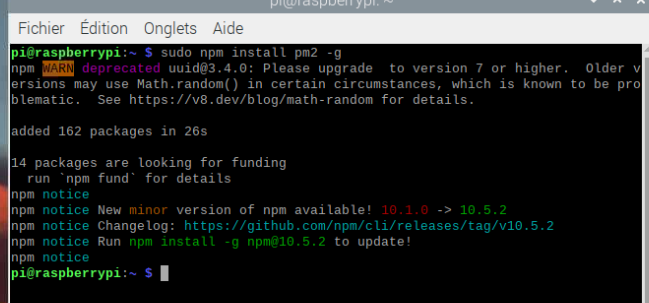
                  @sdetweil So, I do :

                  sudo npm install pm2 -g


                  Sans titre.png
                  then I reboot my Pi but the problem stile the same, I Have this screen :

                  Sans titre.png

                  S 1 Reply Last reply Reply Quote 0
                  • S Do not disturb
                    sdetweil @RIKKO14
                    last edited by sdetweil

                    @RIKKO14 your second screen is only the top.
                    open a terminal window and
                    do

                    pm2 stop all
                    pm2 flush 
                    pm2 status
                    

                    should show MagicMirror as the pgm to run

                    then do

                    pm2 start MagicMirror 
                    

                    wait

                    does it appear on screen?

                    if not do

                    pm2 stop all
                    pm2 logs --lines=50 >somefile.txt 
                     ctrl-c to stop log output
                    

                    show content of somefile.txt here

                    BR CAREFUL some log info will expose your calendar url…
                    edit somefile.txt and xxx out the private part.of url

                    Sam

                    How to add modules

                    learning how to use browser developers window for css changes

                    R 1 Reply Last reply Reply Quote 0
                    • R Offline
                      RIKKO14 @sdetweil
                      last edited by RIKKO14

                      @sdetweil

                      pi@raspberrypi:~ $ pm2 stop all
                      pm2 flush 
                      pm2 status
                      
                      >>>> In-memory PM2 is out-of-date, do:
                      >>>> $ pm2 update
                      In memory PM2 version: 5.2.2
                      Local PM2 version: 5.3.1
                      
                      [PM2] Applying action stopProcessId on app [all](ids: [ 0 ])
                      [PM2] [MagicMirror](0) ✓
                      ┌────┬────────────────────┬──────────┬──────┬───────────┬──────────┬──────────┐
                      │ id │ name               │ mode     │ ↺    │ status    │ cpu      │ memory   │
                      ├────┼────────────────────┼──────────┼──────┼───────────┼──────────┼──────────┤
                      │ 0  │ MagicMirror        │ fork     │ 567… │ stopped   │ 0%       │ 0b       │
                      └────┴────────────────────┴──────────┴──────┴───────────┴──────────┴──────────┘
                      [PM2] Flushing /home/pi/.pm2/pm2.log
                      
                      >>>> In-memory PM2 is out-of-date, do:
                      >>>> $ pm2 update
                      In memory PM2 version: 5.2.2
                      Local PM2 version: 5.3.1
                      
                      [PM2] Flushing:
                      [PM2] /home/pi/.pm2/logs/MagicMirror-out.log
                      [PM2] /home/pi/.pm2/logs/MagicMirror-error.log
                      [PM2] Logs flushed
                      
                      >>>> In-memory PM2 is out-of-date, do:
                      >>>> $ pm2 update
                      In memory PM2 version: 5.2.2
                      Local PM2 version: 5.3.1
                      
                      ┌────┬────────────────────┬──────────┬──────┬───────────┬──────────┬──────────┐
                      │ id │ name               │ mode     │ ↺    │ status    │ cpu      │ memory   │
                      ├────┼────────────────────┼──────────┼──────┼───────────┼──────────┼──────────┤
                      │ 0  │ MagicMirror        │ fork     │ 567… │ stopped   │ 0%       │ 0b       │
                      └────┴────────────────────┴──────────┴──────┴───────────┴──────────┴──────────┘
                      pi@raspberrypi:~ $ pm2 start MagicMirror 
                      
                      >>>> In-memory PM2 is out-of-date, do:
                      >>>> $ pm2 update
                      In memory PM2 version: 5.2.2
                      Local PM2 version: 5.3.1
                      
                      [PM2] Applying action restartProcessId on app [MagicMirror](ids: [ 0 ])
                      [PM2] [MagicMirror](0) ✓
                      [PM2] Process successfully started
                      ┌────┬────────────────────┬──────────┬──────┬───────────┬──────────┬──────────┐
                      │ id │ name               │ mode     │ ↺    │ status    │ cpu      │ memory   │
                      ├────┼────────────────────┼──────────┼──────┼───────────┼──────────┼──────────┤
                      │ 0  │ MagicMirror        │ fork     │ 567… │ online    │ 0%       │ 2.7mb    │
                      └────┴────────────────────┴──────────┴──────┴───────────┴──────────┴──────────┘
                      pi@raspberrypi:~ $ pm2 stop all
                      pm2 logs --lines=50 >somefile.txt 
                       ctrl-c to stop log output
                      
                      >>>> In-memory PM2 is out-of-date, do:
                      >>>> $ pm2 update
                      In memory PM2 version: 5.2.2
                      Local PM2 version: 5.3.1
                      [PM2] Applying action stopProcessId on app [all](ids: [ 0 ])
                      [PM2] [MagicMirror](0) ✓
                      ┌────┬────────────────────┬──────────┬──────┬───────────┬──────────┬──────────┐
                      │ id │ name               │ mode     │ ↺    │ status    │ cpu      │ memory   │
                      ├────┼────────────────────┼──────────┼──────┼───────────┼──────────┼──────────┤
                      │ 0  │ MagicMirror        │ fork     │ 567… │ stopped   │ 0%       │ 0b       │
                      └────┴────────────────────┴──────────┴──────┴───────────┴──────────┴──────────┘


                      S 1 Reply Last reply Reply Quote 0
                      • S Do not disturb
                        sdetweil @RIKKO14
                        last edited by

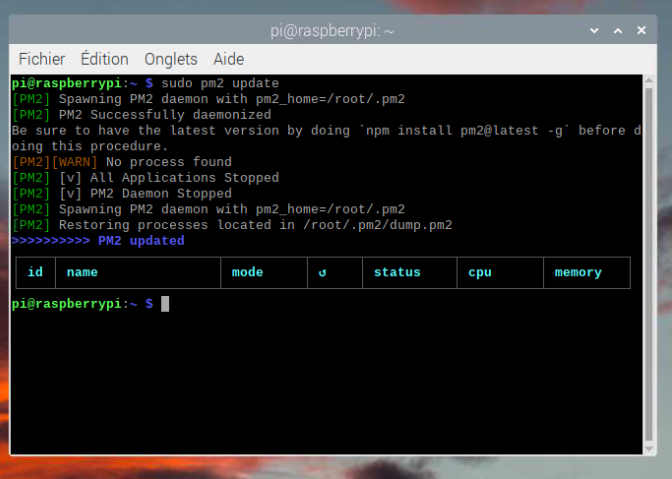
                        @RIKKO14 ok, do the

                        pm2 update as it says

                        probably have to do
                        sudo pm2 update
                        as it is installed globally in protected folders

                        Sam

                        How to add modules

                        learning how to use browser developers window for css changes

                        R 1 Reply Last reply Reply Quote 0
                        • R Offline
                          RIKKO14 @sdetweil
                          last edited by

                          @sdetweil Sans titre.png

                          S 1 Reply Last reply Reply Quote 0
                          • S Do not disturb
                            sdetweil @RIKKO14
                            last edited by

                            @RIKKO14 yes, it’s stupid. run the fixuppm2 script from my scripts page

                            Sam

                            How to add modules

                            learning how to use browser developers window for css changes

                            R 1 Reply Last reply Reply Quote 0
                            • R Offline
                              RIKKO14 @sdetweil
                              last edited by

                              @sdetweil this script : ?

                              bash -c  "$(curl -sL  https://www.dropbox.com/s/cy2z7lbkpifcbrk/fixuppm2.sh?dl=0)"
                              
                              
                              S 1 Reply Last reply Reply Quote 0
                              • S Do not disturb
                                sdetweil @RIKKO14
                                last edited by

                                @RIKKO14 no… from my git repo

                                https://github.com/sdetweil/MagicMirror_scripts

                                Sam

                                How to add modules

                                learning how to use browser developers window for css changes

                                R 1 Reply Last reply Reply Quote 0
                                • R Offline
                                  RIKKO14 @sdetweil
                                  last edited by

                                  @sdetweil so this one :

                                  bash -c "$(curl -sL https://raw.githubusercontent.com/sdetweil/MagicMirror_scripts/master/fixuppm2.sh)"
                                  
                                  S 1 Reply Last reply Reply Quote 0
                                  • S Do not disturb
                                    sdetweil @RIKKO14
                                    last edited by

                                    @RIKKO14 yes

                                    Sam

                                    How to add modules

                                    learning how to use browser developers window for css changes

                                    R 1 Reply Last reply Reply Quote 0
                                    • R Offline
                                      RIKKO14 @sdetweil
                                      last edited by

                                      @sdetweil
                                      Sans titre.png

                                      S 1 Reply Last reply Reply Quote 0
                                      • S Do not disturb
                                        sdetweil @RIKKO14
                                        last edited by

                                        @RIKKO14 and reboot

                                        Sam

                                        How to add modules

                                        learning how to use browser developers window for css changes

                                        R 1 Reply Last reply Reply Quote 0
                                        • R Offline
                                          RIKKO14 @sdetweil
                                          last edited by

                                          @sdetweil I reboot my Pi but It stile the same sceen…
                                          pm2 doesn’t launch…
                                          Sans titre.png

                                          S 1 Reply Last reply Reply Quote 0
                                          • S Do not disturb
                                            sdetweil @RIKKO14
                                            last edited by

                                            @RIKKO14 ok, show

                                            output of

                                            pm2 status
                                            pm2 logs --lines=50
                                            

                                            Sam

                                            How to add modules

                                            learning how to use browser developers window for css changes

                                            R 1 Reply Last reply Reply Quote 0

                                            Hello! It looks like you're interested in this conversation, but you don't have an account yet.

                                            Getting fed up of having to scroll through the same posts each visit? When you register for an account, you'll always come back to exactly where you were before, and choose to be notified of new replies (either via email, or push notification). You'll also be able to save bookmarks and upvote posts to show your appreciation to other community members.

                                            With your input, this post could be even better 💗

                                            Register Login

                                            • 1
                                            • 2
                                            • 1 / 2
                                            • First post
                                              Last post
                                            Enjoying MagicMirror? Please consider a donation!
                                            MagicMirror created by Michael Teeuw.
                                            Forum managed by Sam, technical setup by Karsten.
                                            This forum is using NodeBB as its core | Contributors
                                            Contact | Privacy Policy