Read the statement by Michael Teeuw here.
NPM problem "EBADENGINE" which I fail to solve
-
Hello everyone!
Since I updated Kristjan Esperanto’s fork of the module "PublicTransportHafas to the newest version I can’t get it to run. When I use the command “npm ci” after “git pull” I just get the following error messages:
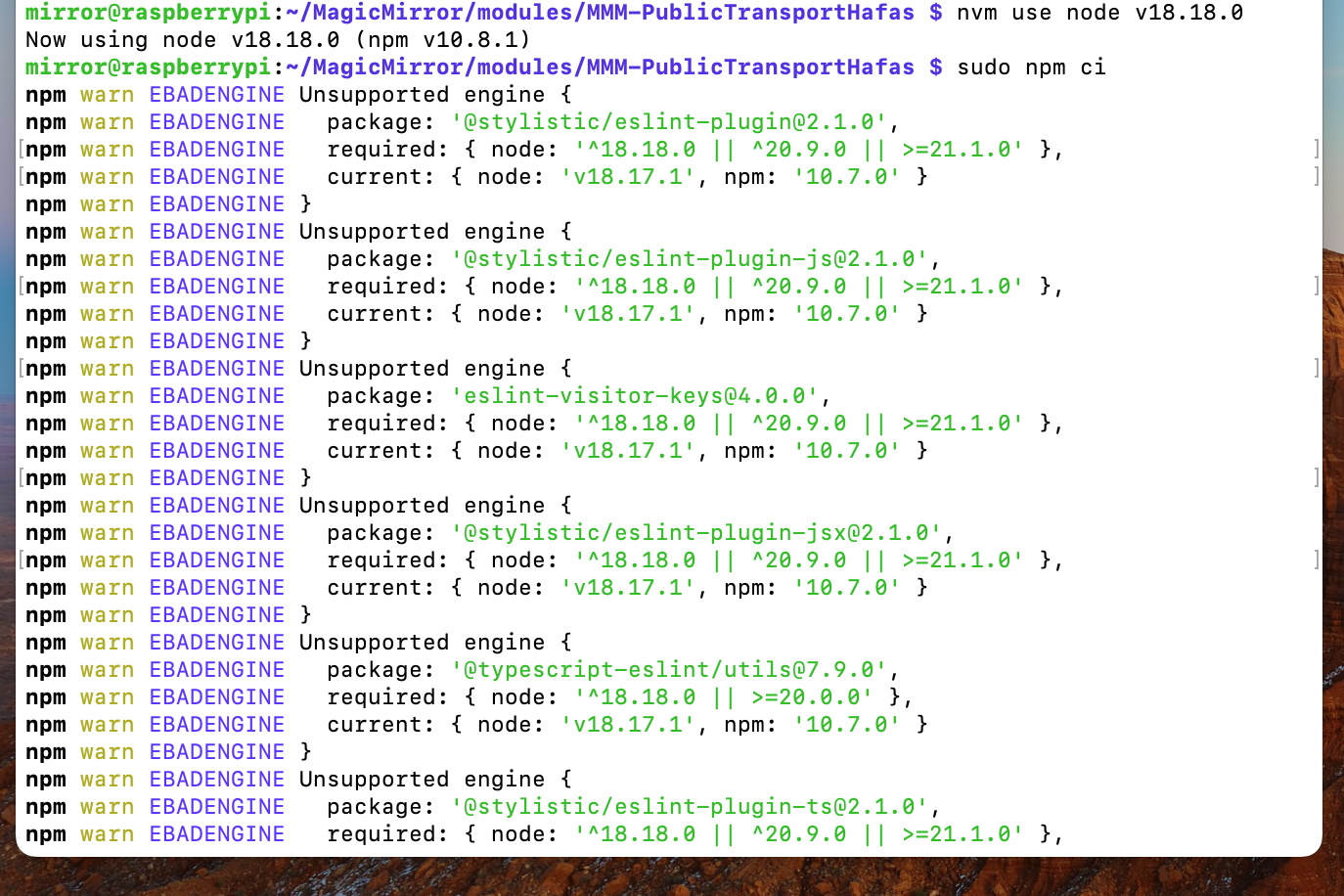
Note that I tried and updated the version of node.js to the required version (at least I think I did. It does’t seem to work the way I tried).
Is anyone here who has some experience troubleshooting such node problems? What am I missing? Please help, and Thank you in advance!
-
@Ix the module author says this is a bug in the lint checker…
do this, in the module folder
npm i @stylistic/eslint-plugin@1.8.1then npm install
-
-
Hello @sdetweil and thank you for your fast answer!
I tried and pasted your commands in my terminal. Sadly, it didn’t work…
Here’s what it says:mirror@raspberrypi:~/MagicMirror/modules/MMM-PublicTransportHafas $ node -v hash -r node -v v18.18.0 v18.18.0 mirror@raspberrypi:~/MagicMirror/modules/MMM-PublicTransportHafas $ sudo npm ci npm warn EBADENGINE Unsupported engine { npm warn EBADENGINE package: '@stylistic/eslint-plugin@2.1.0', npm warn EBADENGINE required: { node: '^18.18.0 || ^20.9.0 || >=21.1.0' }, npm warn EBADENGINE current: { node: 'v18.17.1', npm: '10.7.0' } npm warn EBADENGINE } npm warn EBADENGINE Unsupported engine { npm warn EBADENGINE package: '@stylistic/eslint-plugin-js@2.1.0', npm warn EBADENGINE required: { node: '^18.18.0 || ^20.9.0 || >=21.1.0' }, npm warn EBADENGINE current: { node: 'v18.17.1', npm: '10.7.0' } npm warn EBADENGINE } npm warn EBADENGINE Unsupported engine { npm warn EBADENGINE package: 'eslint-visitor-keys@4.0.0', npm warn EBADENGINE required: { node: '^18.18.0 || ^20.9.0 || >=21.1.0' }, npm warn EBADENGINE current: { node: 'v18.17.1', npm: '10.7.0' } npm warn EBADENGINE } npm warn EBADENGINE Unsupported engine { npm warn EBADENGINE package: '@stylistic/eslint-plugin-jsx@2.1.0', npm warn EBADENGINE required: { node: '^18.18.0 || ^20.9.0 || >=21.1.0' }, npm warn EBADENGINE current: { node: 'v18.17.1', npm: '10.7.0' } npm warn EBADENGINE } npm warn EBADENGINE Unsupported engine { npm warn EBADENGINE package: '@typescript-eslint/utils@7.9.0', npm warn EBADENGINE required: { node: '^18.18.0 || >=20.0.0' }, npm warn EBADENGINE current: { node: 'v18.17.1', npm: '10.7.0' } npm warn EBADENGINE } npm warn EBADENGINE Unsupported engine { npm warn EBADENGINE package: '@stylistic/eslint-plugin-ts@2.1.0', npm warn EBADENGINE required: { node: '^18.18.0 || ^20.9.0 || >=21.1.0' }, npm warn EBADENGINE current: { node: 'v18.17.1', npm: '10.7.0' } npm warn EBADENGINE } npm warn EBADENGINE Unsupported engine { npm warn EBADENGINE package: '@typescript-eslint/utils@7.9.0', npm warn EBADENGINE required: { node: '^18.18.0 || >=20.0.0' }, npm warn EBADENGINE current: { node: 'v18.17.1', npm: '10.7.0' } npm warn EBADENGINE } npm warn EBADENGINE Unsupported engine { npm warn EBADENGINE package: '@typescript-eslint/scope-manager@7.9.0', npm warn EBADENGINE required: { node: '^18.18.0 || >=20.0.0' }, npm warn EBADENGINE current: { node: 'v18.17.1', npm: '10.7.0' } npm warn EBADENGINE } npm warn EBADENGINE Unsupported engine { npm warn EBADENGINE package: '@typescript-eslint/types@7.9.0', npm warn EBADENGINE required: { node: '^18.18.0 || >=20.0.0' }, npm warn EBADENGINE current: { node: 'v18.17.1', npm: '10.7.0' } npm warn EBADENGINE } npm warn EBADENGINE Unsupported engine { npm warn EBADENGINE package: '@typescript-eslint/typescript-estree@7.9.0', npm warn EBADENGINE required: { node: '^18.18.0 || >=20.0.0' }, npm warn EBADENGINE current: { node: 'v18.17.1', npm: '10.7.0' } npm warn EBADENGINE } npm warn EBADENGINE Unsupported engine { npm warn EBADENGINE package: '@typescript-eslint/visitor-keys@7.9.0', npm warn EBADENGINE required: { node: '^18.18.0 || >=20.0.0' }, npm warn EBADENGINE current: { node: 'v18.17.1', npm: '10.7.0' } npm warn EBADENGINE } npm warn EBADENGINE Unsupported engine { npm warn EBADENGINE package: 'espree@10.0.1', npm warn EBADENGINE required: { node: '^18.18.0 || ^20.9.0 || >=21.1.0' }, npm warn EBADENGINE current: { node: 'v18.17.1', npm: '10.7.0' } npm warn EBADENGINE } npm warn EBADENGINE Unsupported engine { npm warn EBADENGINE package: 'eslint-visitor-keys@4.0.0', npm warn EBADENGINE required: { node: '^18.18.0 || ^20.9.0 || >=21.1.0' }, npm warn EBADENGINE current: { node: 'v18.17.1', npm: '10.7.0' } npm warn EBADENGINE } > mmm-publictransporthafas@2.1.1 prepare > [ -f node_modules/.bin/husky ] && husky || echo husky is not installed. added 436 packages, and audited 437 packages in 43s 155 packages are looking for funding run `npm fund` for details found 0 vulnerabilitiesIt’s as if it doesn’t recognize my used version of node…
-
@Ix
Install recent nodejs.
I don’t know how you have installed the current version of nodejs. So I cannot give you an exact advice.
Generally I prefer to manage node version withnvm -
@MMRIZE said in NPM problem "EBADENGINE" which I fail to solve:
Install recent nodejs.
I don’t know how you have installed the current version of nodejs. So I cannot give you an exact advice.Hey @MMRIZE 👋
I used the following command:
curl -o- https://raw.githubusercontent.com/nvm-sh/nvm/v0.39.7/install.sh | bashwhich I found here
this is “nvm” isn’t it?
-
@MMRIZE 1st line of 1st included message image shows his nvm command
says using 18.18.0
the npm ci says using 18.17.1
try npm i
I use n, which is a nodejs version of nvm
sudo mpn install n
n version
n list
n --help -
@sdetweil said in NPM problem "EBADENGINE" which I fail to solve:
try npm I
also tried this. same result :-/
-
@sdetweil said in NPM problem "EBADENGINE" which I fail to solve:
I use n, which is a nodejs version of nvm
sudo mpn install n
n version
n listI also tried this.
Here are the results:mirror@raspberrypi:~/MagicMirror/modules/MMM-PublicTransportHafas $ n list node/22.2.0 mirror@raspberrypi:~/MagicMirror/modules/MMM-PublicTransportHafas $ n version Error: invalid version 'version' -
@Ix version is the one you want to use
n 18
n 18.18
need sudo to change, as it write to /usr/local/bin which is protected
(as as nvm does)see
n --help -
I already tried and changed my used version to v18.18 via nvm (what obviously didn’t work)
Now I installed “n” and tried again with your method.
Here are the results:mirror@raspberrypi:~/MagicMirror/modules $ sudo n 18.18 installing : node-v18.18.2 mkdir : /usr/local/n/versions/node/18.18.2 fetch : https://nodejs.org/dist/v18.18.2/node-v18.18.2-linux-arm64.tar.xz copying : node/18.18.2 /usr/bin/n: Zeile 746: /usr/local/bin/node: Datei oder Verzeichnis nicht gefunden installed : (with npm 9.8.1)There is an error: “Datei oder Verzeichnis nicht gefunden” which translates into “File or directory not found” (Sry for my German OS 😅)
so there is another issue
-
@Ix said in NPM problem "EBADENGINE" which I fail to solve:
/usr/local/n/versions/node/18.18.2
does that directory exist?
I’ve never had any problem with n, on windows, linux or mac.
do a
which node
so we can see where it is coming from
-
@sdetweil said in NPM problem "EBADENGINE" which I fail to solve:
@Ix said in NPM problem "EBADENGINE" which I fail to solve:
/usr/local/n/versions/node/18.18.2
does that directory exist?
I’ve never had any problem with n, on windows, linux or mac.
yes I think:
mirror@raspberrypi:~/MagicMirror/modules $ cd /usr/local/bin
mirror@raspberrypi:/usr/local/bin $ ls
corepack  node  npm  npx
node is colored green in this ls
-
@Ix note its NOT usr/local/BIN its usr/local/N
(uppercase fore emphasis here) -
@sdetweil said in NPM problem "EBADENGINE" which I fail to solve:
@Ix said in NPM problem "EBADENGINE" which I fail to solve:
/usr/local/n/versions/node/18.18.2
does that directory exist?
I’ve never had any problem with n, on windows, linux or mac.
do a
which node
so we can see where it is coming from
here is the result from “a”:
mirror@raspberrypi:~/MagicMirror/modules/MMM-PublicTransportHafas $ n -a Error: missing -a|--arch value@sdetweil said in NPM problem "EBADENGINE" which I fail to solve:
@Ix note its NOT usr/local/BIN its usr/local/N
(uppercase fore emphasis here)yeah, but see the error message I posted above: it seems to get the directory wrong as well. sry for me being a newbie in this case
I really appreciate you helping me here!
edit:
file is there:mirror@raspberrypi:/usr/local/n/versions/node $ ls 18.18.2 22.2.0 -
@Ix no
do
which nodethis will tell the path to the first executable it finds
on my pi4 with node (from n)
is sayswhich node /usr/local/bin/nodeon my x64 box with n 18
it sayswhich node /usr/local/bin/node -
@sdetweil said in NPM problem "EBADENGINE" which I fail to solve:
@Ix no
do
which nodethis will tell the path to the first executable it finds
ah I over read that.
here’s the result:
mirror@raspberrypi:/usr/local/n/versions/node $ which node
/home/mirror/.nvm/versions/node/v18.18.0/bin/node
well that’s a completely different path… so what should I do now?
-
@Ix the module author says this is a bug in the lint checker…
do this, in the module folder
npm i @stylistic/eslint-plugin@1.8.1then npm install
-
-
@Ix not me… another user
-
I Ix has marked this topic as solved on
-
I Ix has marked this topic as solved on
Hello! It looks like you're interested in this conversation, but you don't have an account yet.
Getting fed up of having to scroll through the same posts each visit? When you register for an account, you'll always come back to exactly where you were before, and choose to be notified of new replies (either via email, or push notification). You'll also be able to save bookmarks and upvote posts to show your appreciation to other community members.
With your input, this post could be even better 💗
Register Login