MagicMirror Forum
    • Recent
    • Tags
    • Unsolved
    • Solved
    • MagicMirror² Repository
    • Documentation
    • 3rd-Party-Modules
    • Donate
    • Discord
    • Register
    • Login
    A New Chapter for MagicMirror: The Community Takes the Lead
    Read the statement by Michael Teeuw here.

    MMM-JsonTable - error and does not load

    Scheduled Pinned Locked Moved Solved Troubleshooting
    19 Posts 2 Posters 3.4k Views 2 Watching
    Loading More Posts
    • Oldest to Newest
    • Newest to Oldest
    • Most Votes
    Reply
    • Reply as topic
    Log in to reply
    This topic has been deleted. Only users with topic management privileges can see it.
    • S
      sdetweil @sankum
      last edited by sdetweil

      @sankum is MagicMirror configured to port 8080?

      not

      nhttp

      http://

      Sam

      How to add modules

      learning how to use browser developers window for css changes

      1 Reply Last reply
      Reply Quote 0
      • S
        sankum
        last edited by

        Sam, MagicMirror is configured to port 8080. nhtp was a typo. It is http://…
        As I said the file path and name are correct as I can read it in browser using file:/… (single slash). So not quite sure what is going on?

        S 1 Reply Last reply
        Reply Quote 0
        • S
          sdetweil @sankum
          last edited by

          @sankum what is your address: setting in config.js

          Sam

          How to add modules

          learning how to use browser developers window for css changes

          1 Reply Last reply
          Reply Quote 0
          • S
            sankum
            last edited by

            Sam,
            address: “localhost”,

            S 1 Reply Last reply
            Reply Quote 0
            • S
              sdetweil @sankum
              last edited by

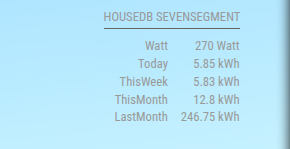
              @sankum I used the sample from the readme

              {
                "items": [
                  {
                    "name": "Watt",
                    "value": "270 Watt"
                  },
                  {
                    "name": "Today",
                    "value": "5.85 kWh"
                  },
                  {
                    "name": "ThisWeek",
                    "value": "5.83 kWh"
                  },
                  {
                    "name": "ThisMonth",
                    "value": "12.8 kWh"
                  },
                  {
                    "name": "LastMonth",
                    "value": "246.75 kWh"
                  }
                ]
              }
              

              in the module folder
              and this config (from the readme)

              {
                module: 'MMM-JsonTable',
                position: 'top_right',
                classes:'page1',
                header: 'HouseDB Sevensegment',
                config: {
                  url: 'http://localhost:8090/modules/MMM-JsonTable/foobar.json', // Required
                  arrayName: 'items' // Required---
                }
              }  
              

              and it displayed as expected
              Screenshot at 2025-07-01 06-22-52.png

              Sam

              How to add modules

              learning how to use browser developers window for css changes

              1 Reply Last reply
              Reply Quote 0
              • S
                sankum
                last edited by

                Thanks Sam.
                So do I need port 8090 based on your config?. In my config port definition I have:
                port: “8080”,

                Other than that I don’t see any difference. Do I need to change router setting? Any missing package you think? Thanks.

                S 1 Reply Last reply
                Reply Quote 0
                • S
                  sankum
                  last edited by

                  Hi Sam,

                  Never mind!! It is port 8080.
                  I copied the json file you have shown and it worked. So it must be my json file. I will try to figure out what is the difference. Thanks for your help.

                  S 1 Reply Last reply
                  Reply Quote 0
                  • S
                    sdetweil @sankum
                    last edited by

                    @sankum sorry intended to change that in
                    my post, too early

                    Sam

                    How to add modules

                    learning how to use browser developers window for css changes

                    1 Reply Last reply
                    Reply Quote 0
                    • S
                      sdetweil @sankum
                      last edited by

                      @sankum i use this online to to validate and format json

                      https://codebeautify.org/jsonvalidator

                      Sam

                      How to add modules

                      learning how to use browser developers window for css changes

                      1 Reply Last reply
                      Reply Quote 1
                      • S
                        sankum
                        last edited by

                        Thank you, Sam.

                        S 1 Reply Last reply
                        Reply Quote 0
                        • S
                          sdetweil @sankum
                          last edited by

                          @sankum did you get it fixed?

                          Sam

                          How to add modules

                          learning how to use browser developers window for css changes

                          1 Reply Last reply
                          Reply Quote 0
                          • S
                            sankum
                            last edited by

                            Sam, sorry I overlooked your question
                            Yes, I did get it fixed. Thanks.

                            S 1 Reply Last reply
                            Reply Quote 1
                            • S
                              sdetweil @sankum
                              last edited by

                              @sankum was it the file contents?

                              Sam

                              How to add modules

                              learning how to use browser developers window for css changes

                              1 Reply Last reply
                              Reply Quote 0
                              • S
                                sankum
                                last edited by

                                Sam,

                                Yes, it was the file content. I had copied it from the git example but obviously did something wrong.

                                1 Reply Last reply
                                Reply Quote 1
                                • S sdetweil has marked this topic as solved on

                                Hello! It looks like you're interested in this conversation, but you don't have an account yet.

                                Getting fed up of having to scroll through the same posts each visit? When you register for an account, you'll always come back to exactly where you were before, and choose to be notified of new replies (either via email, or push notification). You'll also be able to save bookmarks and upvote posts to show your appreciation to other community members.

                                With your input, this post could be even better 💗

                                Register Login

                                • 1 / 1
                                • First post
                                  Last post
                                Enjoying MagicMirror? Please consider a donation!
                                MagicMirror created by Michael Teeuw.
                                Forum managed by Sam, technical setup by Karsten.
                                This forum is using NodeBB as its core | Contributors
                                Contact | Privacy Policy