Read the statement by Michael Teeuw here.
DHT22 with Debian 12 Bookworm
-
Hello
Do anyone of you know a MM module to display the data of a DHT22 AM2302 temperature and humidty sensor on a Raspberry 4 with Debian 12 bookworm?It seems that it is not so trivial with this version and I am not sure that the provided DHT22 modules on https://modules.magicmirror.builders/ manage this PI OS version.
Thanks in advance and greeting !
Cédric -
@sdetweil and @wishmaster270 : Thank you for your inputs.
I finally tried this one https://github.com/ryck/MMM-DHT-Sensor, not listed on https://modules.magicmirror.builders/, but it works.
-
Hi,
I do not use a DHT11 at the moment but my MMM-Temperature should still work
https://github.com/Tom-Hirschberger/MMM-Temperature
Just checked the install process on a Debian Bookworm and it works fine.
-
hello @wishmaster270 , Ok, thanks, I will try!
-
hello @wishmaster270 ,
I could install and try your module.
The result is empty :
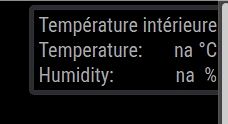
When I test it direct through the terminal as you describe in you module description, “error” is on “true”.

But, interesting, it finally works when I try another direct way as described on https://pimylifeup.com/raspberry-pi-humidity-sensor-dht22/, so that it seems, that everything should work.
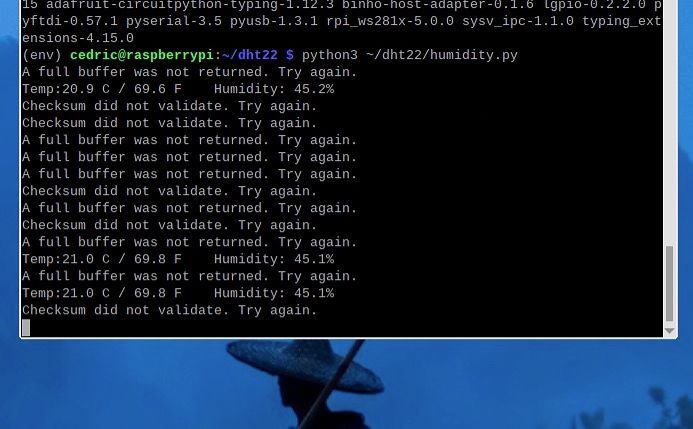 .
.Now, do you think that there suddenly could be an error in your module ?
Sorry for disturbing you with this kind of problem, but thank you anyway in advance if you can help me :-)
-
There are at least four modules on the list dealing with the DHT-22. J0n4e
MMM-DHT22, ckoutavas MMM-DHT, cslev MMM-loldht22. Just do a search for dht and they will pop up.Good luck
-
@RonR thanks!
-
@com1cedric
Hi. No problem. If I have time it try to help.It looks like there will installed two additional python libs in the venv in the tutorial you shared.
Maybe one of the libs is missing in the virtual environment my script creates.You can add them to the venv with:
cd ~/MagicMirror/modules/MMM-Temperature/scripts ./venvWrapper.py --venv-name py-venv --install-libs lgpio RPi.GPIO -
If you change line 25 in my dht11 script from
except:tofinally:you should see the whole error.But make sure to revert the change after the problem is fixed.
-
@wishmaster270 thanks, I will try this week-end and inform you. Could interest the other users.
-
@wishmaster270 I think the gpio setup changed in bookworm
-
@sdetweil and @wishmaster270 : Thank you for your inputs.
I finally tried this one https://github.com/ryck/MMM-DHT-Sensor, not listed on https://modules.magicmirror.builders/, but it works.
-
S sdetweil has marked this topic as solved on

Hello! It looks like you're interested in this conversation, but you don't have an account yet.
Getting fed up of having to scroll through the same posts each visit? When you register for an account, you'll always come back to exactly where you were before, and choose to be notified of new replies (either via email, or push notification). You'll also be able to save bookmarks and upvote posts to show your appreciation to other community members.
With your input, this post could be even better 💗
Register Login