Read the statement by Michael Teeuw here.
remote control help needed
-
hello
this might be a hard one but could anyone please help me with this module
I have been trying to add a module to the phone app but it is way beyond my understanding
I want to add my mmm jukebox to the module controls on phone
so that I can play/stop/next/previous /etc on my jukebox
I added the custom menu and it added menu items 1.2.3
but they do nothing…
any help really appreciated
thanks -
no joy at posting url in browser…
but the good news is… the app is now on my phone and jukebox is working
i was messing about on phone and config and I have no idea what i done
but I scanned the QR again and it connected.only trouble is ,now I am afraid I might mess it up again…
without your help there is no way I would have gotten this thing to work
so thank you so much sam, you are a geniusps … I have two MM setups, one in living room and one in bedroom
so now I am goin to try and put RC on other one…lol
wish me luckthanks again
tommyk -
@tommyk Update MMM-JukeBox and it should work now :)
-
It sounds like the menu is being added correctly, but the actions aren’t linked to MMM-Jukebox commands. Double-check that the menu items are sending the correct notifications or commands that MMM-Jukebox expects. Sharing your config would make it easier to spot the issue.
-
This minimal config works for me:
let config = { address: "0.0.0.0", port: 8080, ipWhitelist: [], modules: [ { module: "MMM-Remote-Control", position: "top_left", }, { module: "MMM-JukeBox", position: "top_left", } ] }; /*************** DO NOT EDIT THE LINE BELOW ***************/ if (typeof module !== "undefined") { module.exports = config; } -
@KristjanESPERANTO hi there
thanks for your reply and help.
well i got this working for 5 mins and it was just what i wanted
I played music and stopped it
then I refreshed the mirror and now the app wont work
it says there is an error with javascript
tried rescanning the qr code but same error
any ideas ?
thanks for helping
tommyk -
-
pig@raspberrypi:~ $ cd MagicMirror
pig@raspberrypi:~/MagicMirror $ npm run config:checkmagicmirror@2.36.0 config:check
node js/check_config.js[2026-06-09 05:20:06.900] [LOG] [utils] Loading config …
[2026-06-09 05:20:06.913] [INFO] [utils] Checking config file /home/pig/MagicMirror/config/config.js …
[2026-06-09 05:20:07.104] [INFO] [utils] Your configuration file doesn’t contain syntax errors :)
[2026-06-09 05:20:07.105] [INFO] [utils] Checking modules structure configuration …
[2026-06-09 05:20:07.228] [INFO] [utils] Your modules structure configuration doesn’t contain errors :)
pig@raspberrypi:~/MagicMirror $ -
@sdetweil
hi, will this helplet config = { address: "0.0.0.0", // Address to listen on, can be: // - "localhost", "127.0.0.1", "::1" to listen on loopback interface // - another specific IPv4/6 to listen on a specific interface // - "0.0.0.0", "::" to listen on any interface // Default, when address config is left out or empty, is "localhost" port: 8080, basePath: "/", // The URL path where MagicMirror² is hosted. If you are using a Reverse proxy // you must set the sub path here. basePath must end with a / ipWhitelist: [], // Set [] to allow all IP addresses // or add a specific IPv4 of 192.168.1.5 : // ["127.0.0.1", "::ffff:127.0.0.1", "::1", "::ffff:192.168.1.5"], useHttps: false, // Support HTTPS or not, default "false" will use HTTP httpsPrivateKey: "", // HTTPS private key path, only require when useHttps is true httpsCertificate: "", // HTTPS Certificate path, only require when useHttps is true language: "en", locale: "en-US", // this variable is provided as a consistent location // it is currently only used by 3rd party modules. no MagicMirror code uses this value // as we have no usage, we have no constraints on what this field holds // see https://en.wikipedia.org/wiki/Locale_(computer_software) for the possibilities logLevel: ["INFO", "LOG", "WARN", "ERROR"], // Add "DEBUG" for even more logging timeFormat: 24, units: "metric", modules: [ { module: "alert", }, { module: "updatenotification", position: "top_bar" }, { module: "clock", position: "top_left" }, { module: 'MMM-Facts', position: 'middle_center', config: { updateInterval: 25, fadeSpeed: 4, category: 'random', } }, { module: 'MMM-Remote-Control', position: 'top_right', // Required to show URL/QR code on mirror // you can hide this module afterwards from the remote control itself config: { customCommand: {}, // Optional, See "Using Custom Commands" below secureEndpoints: true, // Optional, See API/README.md // uncomment any of the lines below if you're gonna use it customMenu: "custom_menu.json", // Optional, See "Custom Menu Items" below apiKey: "9f233797-d0e5-42c2-bbcd-c92aa98b33e2" // Optional, See API/README.md for details // classes: {}, // Optional, See "Custom Classes" below // showModuleApiMenu: false, // Optional, disable the Module Controls menu // showNotificationMenu: true, // Optional, disable the Notification menu // QR Code options (new!) // showQRCode: true, // Optional, display QR code for easy mobile access (default: true) // QRCodeSize: 50, // Optional, size of QR code in pixels (default: 150) // qrCodePosition: "below" // Optional: // "below" - Show URL above, QR code below (default) // "above" - Show QR code above, URL below // "replace" - Show only QR code, no URL text } }, { module: "MMM-Carousel", position: "bottom_bar", config: { transitionInterval: 10000, showPageIndicators: true, showPageControls: true, ignoreModules: ["clock","newsfeed" , "MMM-JukeBox","Hello-Lucy", ], mode: "slides", slides: { main: ["calendar", "weather", ], "Slide 2": [ 'MMM-Pinfo', "MMM-ImagesPhotos", ], "Slide 3": ["MMM-WeeklySchedule","MMM-EasyPix",], "Slide 4": ['MMM-Facts','MMM-Remote-Control',], } } }, { module: "MMM-WeeklySchedule", position: "top_right", header: "The Rowans, weeklys events", config: { schedule: { timeslots: [ "morning", "time", "price", "afternoon", "time", "price"], lessons: { mon: [ "breakfast, bacon/sausage balm", "9.30-10.30", "£2.00","?","?", "?" ], tue: [ "butty van, pies, sandwich"," 12.00", "varied","?","?", "?" ], wed: [ "coffee morning, toast,tea cake", "9.30-10.30", "£1.50", "knit and knatter", "2.00-4.00", " free"], thu: [ "Chair yoga", "11.15-12.15", "£5.00", "dominos", " 2.00-4.00","£1.00" ], fri: [ "lunchoen club,- £5", "12pm", "bingo", "2pm-4pm" ], sat: [ "w/e , no staff" , "nothing" ], sun: [ "w/e ,no staff", "nothing"], } }, updateInterval: 1 * 60 * 60 * 1000, // every hour showNextDayAfter: "24:00" } }, { module: 'MMM-Pinfo', position: 'top_right', config: { debug: true, refresh: 5000, itemAlign: 'left', labelAlign: 'left', valueAlign: 'center', labelSize: null, containerSize: null, DEVICE: { labelModel: "Model", displayModel: true, orderModel: 1, labelSerial: 'Serial', displaySerial: true, orderSerial: 2 }, OS: { labelOs: 'OS', displayOs: true, orderOs: 3 }, NETWORK: { labelType: 'NET Type', displayType: false, orderType: 4, labelIPv4: 'IPv4', displayIPv4: true, orderIPv4: 5, labelIPv6: 'IPv6', displayIPv6: false, orderIPv6: 6, labelMac: 'MAC', displayMac: false, orderMac: 7 }, RAM: { labelRam: 'RAM', displayRam: true, orderRam: 8 }, STORAGE: { labelStorage: 'Storage', displayStorage: true, orderStorage: 9, }, CPU: { labelType: 'CPU Type', displayType: false, orderType: 10, labelUsage: 'CPU Usage', displayUsage: true, orderUsage: 11, labelTemp: 'CPU Temp', displayTemp: true, orderTemp: 12 }, UPTIME: { labelUptime: 'Uptime', displayUptime: true, orderUptime: 13 }, WARNING: { enable: false, interval: 1000 * 60 * 5, check: { CPU_TEMP: 65, CPU_USAGE: 75, RAM_USED: 80, STORAGE_USED: 80 } }, } }, { module: "MMM-ImagesPhotos", position: "middle_center", config: { opacity: 0.9, animationSpeed: 500, updateInterval: 5000, maxHeight: "700px", maxWidth:"700px", sequential: false // process the image list randomly } }, { module: "MMM-EasyPix", position: "middle_center", config: { picName: "candle2.webp", // Enter the picture file name. You can even use a direct internet URL to an image. maxWidth: "75%" // Size picture precisely. Retains aspect ratio. } }, { disabled: false, module: "Hello-Lucy", //position: "top_center", config: { keyword: 'HELLO LUCY', // keyword to activate listening for a command/sentence timeout: 15, // timeout listening for a command/sentence standByMethod: 'DPMS', // 'DPMS' = anything else than RPi or 'PI' microphone: "1,2", // run "arecord -l" card # and device # mine is "0,0" sounds: ["nolly4.mp3", "llucy.mp3"], // welcome sound at startup. Add several for a random greetings confirmationSound: "ding.mp3", // name and extension of sound file //startHideAll: true, // All modules start as hidden EXCEPT PAGE ONE // *** Page One is your default startup page *** This overrides startHideAll: true, // pageOneModules: ["Hello-Lucy","MMM-EasyPix"], // default modules to show on page one/startup // pageTwoModules: ["Hello-Lucy", "MMM-BMW-DS", "MMM-EventHorizon"], // modules to show on page two // pageThreeModules: ["Hello-Lucy", "MMM-Lunartic"], // modules to show on page three // pageFourModules: ["Hello-Lucy", "MMM-PC-Stats"], // modules to show on page four // pageFiveModules: ["Hello-Lucy", "MMM-Searchlight"], // modules to show on page five // pageSixModules: ["Hello-Lucy", "MMM-NOAA3"], // modules to show on page six //pageSevenModules: ["Hello-Lucy", "MMM-Recipe"], // modules to show on page seven // pageEightModules: ["Hello-Lucy", "MMM-rfacts"], // modules to show on page eight // pageNineModules: ["Hello-Lucy", "MMM-History"], // modules to show on page nine // pageTenModules: ["Hello-Lucy", "MMM-HardwareMonitor"] // modules to show on page ten } }, { module: "MMM-JukeBox", position: "bottom_center", // Explanation: choose any MagicMirror position config: { source: "file", // "file" | "USB" | "URL" usbPath: "D:/soundFiles", // Explanation: only used when source === "USB" allowedExtensions: [".mp3", ".wav", ".ogg", ".m4a"], pageSize: 20, // Explanation: number of buttons per page showControlBar: true, // NEW: use symbol bar; hides legacy Random button randomButtonText: "Random Play", // Explanation: label for the legacy random button (when control bar is off) stopButtonText: "Stop", // Explanation: label for the stop button infoText: "Select a number or use Random Play.", continueOnHide: true, // Explanation: true = audio continues when module hides syncUsbToLocal: false, // Explanation: optional backend copy from USB to ./soundFiles autostartRandomLoop: false // Explanation: true = auto start random loop on startup } }, { module: "newsfeed", position: "bottom_bar", config: { feeds: [ { title: "BBC News", url: "http://feeds.bbci.co.uk/news/rss.xml" } ], showSourceTitle: true, showPublishDate: true, broadcastNewsFeeds: true, broadcastNewsUpdates: true } }, { module: "weather", position: "top_right", config: { weatherProvider: "openmeteo", type: "current", lat: 53.48333, lon: -2.51667, } }, { module: "weather", position: "top_right", header: "Weather Forecast", config: { weatherProvider: "openmeteo", type: "forecast", lat: 53.48333, lon: -2.51667, } }, { module: "calendar", header: "US Holidays", position: "top_left", config: { calendars: [ { fetchInterval: 7 * 24 * 60 * 60 * 1000, symbol: "calendar-check", url: "https://ics.calendarlabs.com/76/mm3137/US_Holidays.ics" } ] } }, { module: "calendar", header: "UK Holidays", position: "top_left", config: { calendars: [ { symbol: "calendar-check", url: "webcal://www.calendarlabs.com/ical-calendar/ics/75/UK_Holidays.ics" } ] } }, ] }; /*************** DO NOT EDIT THE LINE BELOW ***************/ if (typeof module !== "undefined") { module.exports = config; } -
@tommyk the app on phone says syntax error?
can you open the app on a computer web browser so we can examine the browser logs?
once loaded(or not) open the developers window, consolectrl-shift-i, then select the console tab, maybe the javascript error is listed there
-
@sdetweil hi sam
how do I open app in pc browser ?
told you I was stupid lol
thanks for helping me -
sorry . think this is it
(index):1 Refused to apply style from ‘http://localhost:8080/config/custom.css’ because its MIME type (‘text/html’) is not a supported stylesheet MIME type, and strict MIME checking is enabled.
loader.js:230 Error on loading stylesheet: config/custom.css
(anonymous) @ loader.js:230
alert.js:45 Starting module: alert
updatenotification.js:19 Starting module: updatenotification -
@tommyk the module instructions, step 5
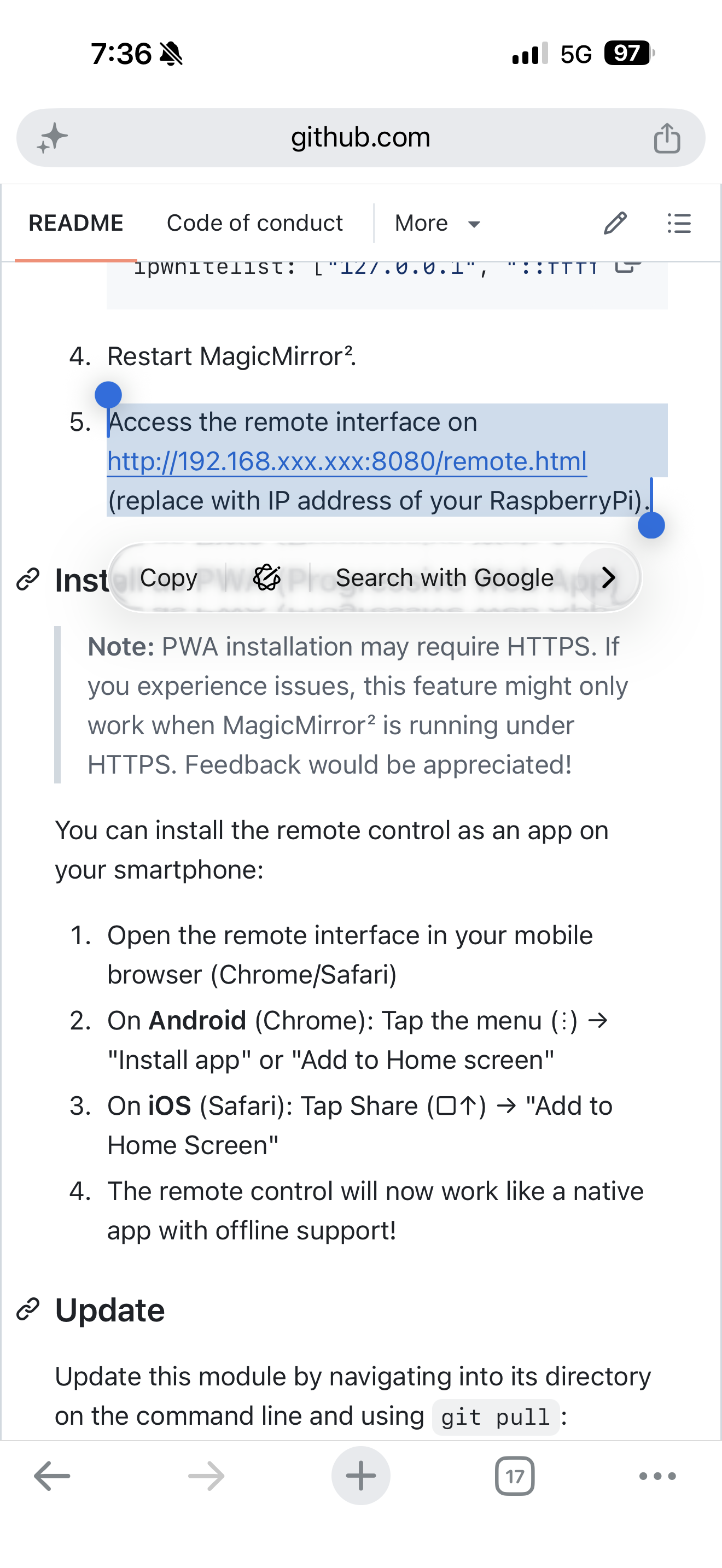
-
@tommyk you can get rid of these noise errors
Open a terminal window, and do
cd ~/MagicMirror
cd config
touch custom.css
Next time you start MagicMirror you won’t get those errors reported
If you use my/the scripted install, it does this for you
-
thanks for all your help guys but it just wont work for me ,which is a shame
because it looked like just what I was looking for, but I have tried and tried
I uninstalled the remote control module and reinstalled it but It wont open on my phone
for some reason, so its beginning to look like I am stuck with the keyboard.
of course I will keep trying because it is doin my head in…it worked for 5 minutes and then
stopped.
I may end up starting from scratch. with a new memory card and fresh OS install
but it wont beat me lol
cheers -
@tommyk I installed RC, and used the default config…
then started mm and used my MM address and port, from the same machine
http://localhost:8090/remote.htmland from my phone
http://sams:8090/remote.htmlboth worked find
you DO have address and ipWhitelist set as “0.0.0.0”, and [], respectively, correct…
this allows any host (phone, laptop,… system other than MM machine) to connect to the MM server
otherwise the connection will be refused/blocked -
yeah sam,
I am so confused, dont understand it
but thanks for all your help -
@tommyk mm is meant to be a closed system on the wall…
no one needs to access this, as its output only… SO
the default config says ONLY apps INSIDE this SAME machine can access the MM server
localhost is the name of the network connection (loop back)now, it so happens one could add controls to limit JUST ONE (or a few) machines too…
this is the ipWhitelistbut as we’ve seen that (output only with no external access) doesn’t work for a number of use cases.
remote control, my mmm-config, …SO, changing the config
address means listen for incoming requests on A network adapter, wifi OR ethernet…
address=“192.168.2.106” (for my desktop ethernet address)
but what if you have both? or more than one…
you can ONLY put ONE address there…
so there is a shortcut , “0.0.0.0”, means listen on ALL adapters, regardless their address…now… i’ll just make an example, not implying anything…
you built this thing, and if ANYONE in your house could get in and fiddle with the MM parts, or others,
they might take the system down or something else…
kids that don’t know, but LOVE to explore…!!
how can i keep THEM out…we I could limit access to ONLY MY phone, laptop,… then they couldn’t get in…
so you could put your phone and laptop ip addresses in the ipWhitelist:[] list
and then only YOU can get into the MM app system …the RemoteControl readme, mentions this change in the config…
-
@sdetweil yes, I understand what you are saying sam
but if I put 0.0.0.0 as per instructions anyone can access it, right ?
so I dont get why I cant
phone app says error with javascriptI am at my wits end lol
-
@tommyk only anyone on your home network… not anyone in the world…
I don’t know on the phone app… I didnt install the app…
-
@sdetweil yep right
there is only me using the mirror
so when I run MM
RC shows the bar code and ip address
when I scan code it tries to connect to app
it says… error when trying to to load javascript file

Hello! It looks like you're interested in this conversation, but you don't have an account yet.
Getting fed up of having to scroll through the same posts each visit? When you register for an account, you'll always come back to exactly where you were before, and choose to be notified of new replies (either via email, or push notification). You'll also be able to save bookmarks and upvote posts to show your appreciation to other community members.
With your input, this post could be even better 💗
Register Login