Read the statement by Michael Teeuw here.
GPU Memory/Image flicker/blinking
-
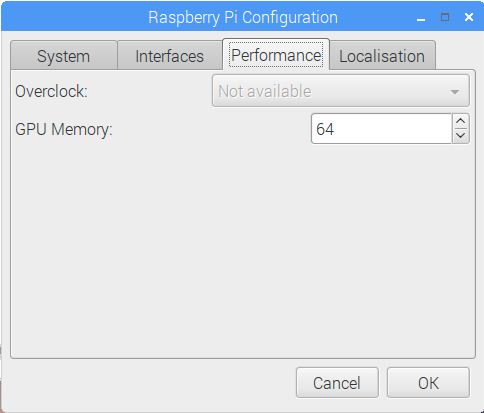
Above is my Pi3 setting. I suppose this is the default as I never changed it. I’m trying to troubleshoot a problem I am having with a module I am working on. I think this may have something to do with it but I am hesitant to change anything because my mirror works flawlessly, except when I introduce this module. I should mention that it does not affect any of the other modules when introduced.
I’m trying to create an animated gif effect with pictures that I am fetching from an API. I started with png files, then moved to jpg files, thinking it was the size of the file that was causing the problem. I even went so far as to fetch only thumbnails ( a dozen at 5kb each) but the problem persists. The problem being this: The images periodically flicker, or blink when displaying, ruining the smooth animated gif effect. I have
fadeSpeedandanimationSpeedboth set to 0. Even when therotateIntervalis set to 3-5 seconds, or more, the problem still arises. Note: When the pictures are cached in the browser after fetching, it seems to happen less often but it still happens. I’m only fetching the images every 30 minutes to avoid the necessity of an API key. Would that make a difference? Would fetching more often improve the performance? That doesn’t seem logical to me.I should also mention that this does not happen on a laptop that I have MM installed on. It works beautifully, even with the largest png files. Smooth as silk. No Flicker, no blink, just a seamless transition to the next image.
So, would increasing the GPU Memory likely help to alleviate this problem? Or is there another way, within the module itself that would help? In case it’s important, my System Load with this module running is 0.45 with 13% Free RAM
I’m reaching out to you all because I don’t want to bombard one single person with all my questions about making a module. I think he may be thinking, “What did I get myself into?” ;-)
-
This post is deleted! -
LOL noooooooooooooo… it’s a great question though!! May solve problems others may be having. I believe you could cache the images so when it loads may take care of that.
-
This post is deleted! -
@cowboysdude said in GPU Memory/Image flicker/blinking:
I believe you could cache the images so when it loads may take care of that.
Does this look like it might work? With some modification, of course.
function preloadImages(array) {
    if (!preloadImages.list) {
        preloadImages.list = [];
    }
    var list = preloadImages.list;
    for (var i = 0; i < array.length; i++) {
        var img = new Image();
        img.onload = function() {
            var index = list.indexOf(this);
            if (index !== -1) {
                // remove image from the array once it's loaded
                // for memory consumption reasons
                list.splice(index, 1);
            }
        }
        list.push(img);
        img.src = array[i];
    }
}
preloadImages(["url1.jpg", "url2.jpg", "url3.jpg"]);
Or perhaps this? Again, with some modification.
var images = [
'/path/to/image1.png',
'/path/to/image2.png'
];

$(images).each(function() {
var image = $('<img />').attr('src', this);
});
The quote that comes with this second example:
you can preload images using javascript by putting all of the images you want to preload into an array and putting all of the images in that array into hidden img elements, you effectively preload (or cache) the images. <
-
And last, but not least, this example, with some modification.
-
@Mykle1 getting info from a json file so we need to get the image names then put them in the array and call them before they load to precache or preload the image so when it’s time it just pops up :)
-
@cowboysdude
Yes, but the names will change every day -
@Mykle1 BTW, they can’t keep up with their own API. They skipped 3 days of images, MF’s! :-) And they only made 8 images available from yesterday. Grrr
-
@Mykle1 well need to find a stable source of pictures and that’s ok if the names change… won’t matter :)
-
I realize this is an old thread - but the rpi3 does have an OpenGL driver that you can install via raspi-config under “Advanced”
It does have a GPU - “Broadcom Video Core”
-Earle





Hello! It looks like you're interested in this conversation, but you don't have an account yet.
Getting fed up of having to scroll through the same posts each visit? When you register for an account, you'll always come back to exactly where you were before, and choose to be notified of new replies (either via email, or push notification). You'll also be able to save bookmarks and upvote posts to show your appreciation to other community members.
With your input, this post could be even better 💗
Register Login