Read the statement by Michael Teeuw here.
http request
-
is that correct ?
{
		module: 'MMM-HTTPRequestDisplay',
		position: 'bottom_bar',	// This can be any of the regions. Best results in left or right regions.
		header: 'MMM-HTTPRequestDisplay', // This is optional
		config: {
			accessToken: 'http://api.openweathermap.org/data/2.5/weather?q=London,uk&mode=xml',
			// See 'Configuration options' for more information.
		}
	},
Note from Moderator: Please use Markdown on code snippets for easier reading.
-
Sorry, I made a lot of mistakes on the README it seems.
Instead of
accessToken : "http://etc"use
httpRequestURL: "http://etc"apologies
-
no problemo,
with this config, black screen
modules: [ { module: 'MMM-HTTPRequestDisplay', position: 'bottom_bar', // This can be any of the regions. Best results in left or right regions. header: 'MMM-HTTPRequestDisplay', // This is optional config: { httpRequestURL: 'http://192.168.1.248:8889/status.xml', // See 'Configuration options' for more information. } }, -
Make sure that you’re not just copy and pasting blindly into your config file.
After each
modules: [
{
etc
},
Note the comma
,after the module. That comma should only be there if there are more modules.Likewise, if you’re pasting it last, you need to make sure the module before it has one, to let the script know there are more modules after the previous one.
So the pattern is
modules: [
{
   module: ‘firstModule’,
   config: {
   option : ""
   }
}, <<< COMMA HERE

modules: [
{
   module: ‘middleModule’,
   config: {
   option : ""
   }
}, <<< COMMA HERE

modules: [
{
   module: ‘last module’,
   config: {
   option : ""
   }
} <<<<< NO COMMA
hope that makes sense. hopefully that’s the problem.
-
This post is deleted! -
This post is deleted! -
Can you Zip up and upload your config file somewhere I can download it and I’ll take a look? Somewhere like pastebin.
-
Hey @acdacd2, please use proper Markdown when posting code. It really isn’t that hard to do and it makes it so much easier and pleasant for others to read, and possibly find errors quicker. Specifically you need to use back ticks before and after your code:
``` like so. Note that a back tick is not the same as the normal apostrophe, ` versus ' . ``` -
@KirAsh4 can you confirm MM startup with my module with this config file?
The module won’t show any results but MM should boot?
-
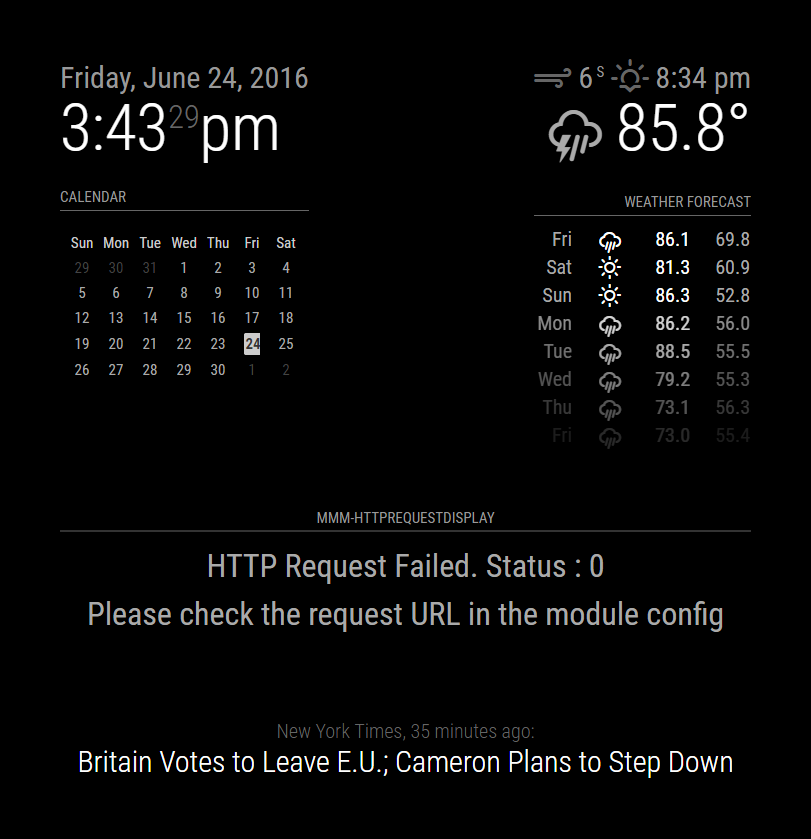
The file ‘status.xml’ doesn’t exist on my system, so it gets a 404 returned, however it does load up, and it does work.
-
I have the same message with my environment.
In a browse it’s ok -
Right, I have not tested this on an actual rpi … I’m at the office, so I’m running a serveronly setup. I can do an rpi test later, although I suspect it will still work, as opposed to resulting in a blank screen. It returns the error as expected when it can’t find the file.
-
with a browser on the pi, it’s also ok
-
@KirAsh4 I’ve isolated the issue as a Cross-Domain Access issue. Do you know of any particular way to make XMLHTTPRequests to external domains?
I wasn’t aware this would be an issue but apparently anybody who wants to use this and map to an external domain will have this issue unless they have a running PHP server that can store the XML results locally (or if they can access a server, they can add the line
Access-Control-Allow-Origin: *to their HTML headers.Any ideas?
-
XMLHTTPRequest. Look at how the
'currentweather'module does it in the'updateWeather()'function. -
Yeah that’s what I based my original request functionality on. The OpenWeather API response is CORS compatible due to the response header - this is why the example response works well. Outside of this domain though (say on http://www.w3schools.com/xml/cd_catalog.xml (or any other external server). This unfortunately makes problems - I’m still looking for a work-around.
-
Welcome to Javascript security issues.
-
This post is deleted! -
This post is deleted! -
This post is deleted!
Hello! It looks like you're interested in this conversation, but you don't have an account yet.
Getting fed up of having to scroll through the same posts each visit? When you register for an account, you'll always come back to exactly where you were before, and choose to be notified of new replies (either via email, or push notification). You'll also be able to save bookmarks and upvote posts to show your appreciation to other community members.
With your input, this post could be even better 💗
Register Login