Read the statement by Michael Teeuw here.
MMM-Rejseplanen - A departure board for Danish train and bus stations
-
Hi,
This is my first module
A departure board for Danish train and bus stations.I’m programming in PowerShell at work, so I thought how hard can it be to learn Javascript?
Boy! I was wrong!:laughing:
That language has a syntax that is hysterical
Well, with one hand in my hair (which is not too much of) and the other hand on the keyboard, some prayers to God, a large amount of coffee and coke a lot of Google search as well as even more useful inspiration from all the skilled programmers and the user of this forum. I has succeeded in making a useful piece of code.
And, is finally stable.:stuck_out_tongue_winking_eye:
Description:
Train and bus departure board for Danish stations (InterCity, LYN, REG, S-Tog, BUS, EXB (Express Buss), NB (Night bus), Telebus, Ferry and Metro)
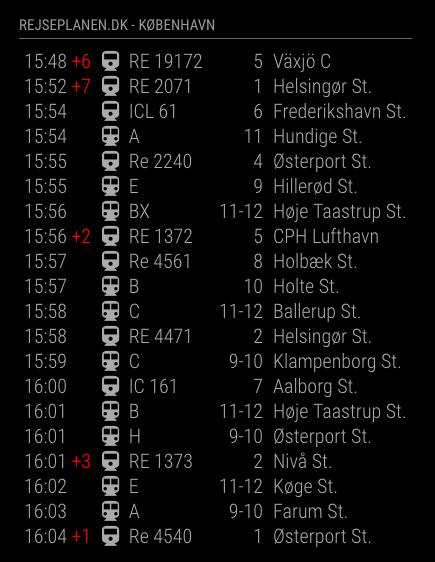
Monitoring your favorite local departure station, with the next 20 departure for the destination. The data are from the Danish Findrejsen.dk API
Screenshots:
Download:
Version 1.2.0
- Support for number of departures returned
Version 1.1.0
- Better support for Metro train (direction)
Version 1.0.0
- Frist release, stable version
-
Looking at your screenshot I thought “that looks very familiar” :)
Very nice work and thanks alot for the credits!
-
Hey! I found your module and its really close to what I’m after! I’d like to be able to see when the next Metro train is leaving from a certain station, and in which direction its going (end station). Basically what you can see shown here: http://intl.m.dk/#!/stations/stationer/noerreport The information apparently is sourced from Rejseplanen so I would assume the API would cover it.
If you have any hints on where to get started I’d be happy to hear them, I’ve got some basic experience with JavaScript but thought that you would be the best person to ask :)
-
@B3nihana
Hey
Just uploaded a new version, with a better support for Metro (direction). try it -
@Manmachine Thanks! I’ll check it out and get back to you, what a great community this is!
-
Trying the new version, I’m not sure I’m configuring the options correctly?
If I only want to show Metro, I choose “M” under vehicle, but somehow all transport modes are still shown in the Mirror frontend. Secondly, the Metro stops don’t seem to be available in your list, and I assume that is due to the API lacking them? Is there anyway around this?
Should it look something like this
                {
                module: 'MMM-Rejseplanen',
                position: 'top_left',
                header: 'Rejseplanen.dk',
                        config: {
                                stationID: "?",
                                stationName: "Forum",
                                vehicle: "M",
                                destfilter: ""
                        }
                },
I’d really appreciate any help you could provide!
-
The “hidden” features are in the destfilter:
Try the following,
Should give you all the Metro trains{ module: 'MMM-Rejseplanen', position: 'top_left', header: 'Rejseplanen.dk', config: { stationID: "8600646", stationName: "Nørreport", vehicle: "T", destfilter: "Metro" } },Or you can get all trains in one direction
		{
	module: 'MMM-Rejseplanen',
	position: 'top_left',
	header: 'Rejseplanen.dk',
		config: {
			stationID: "8600646",
			stationName: "Nørreport",
			vehicle: "T",
			destfilter: "Vanløse"
		}
	},
It was the easiest way to solve this, as well as the most flexible. Only require about 8 lines of code.
And I’m a lazy man. So less code is really nice
-
Is there any way to only get the next 5 or 10 departures instead of 20?
-
@kurios said in MMM-Rejseplanen - A departure board for Danish train and bus stations:
departures
You can now configure the number of returned departures in the new updated version 1.2.0. Between 1 and 20 as max.
-
Thank you for the plugin it is very nice and just what I needed for displaying bus lines in Aarhus.
For others that might want to use a Station ID that is not in the list you can find nearby stops to your coordinates by using this URL: http://xmlopen.rejseplanen.dk/bin/rest.exe/stopsNearby?coordX=id&coordY=id&maxRadius=1000&maxNumber=30
Example:
GPS coordinates
Latitude: 55.67310756519397
Longitude: 12.565741539001467 -
Hi
How can I add a red color for the bus icon?
Cant See what class to use in the css. -
Hejsa!
Thank you @Manmachine for your contribution!
I’m totally new to the concept and my purpose is to use it to GYST my daily workflow as a young entrepreneur(gyst = get your shit together)
Trying the module now with the current setup:
VirtualBox on macOS Mojave running Ubuntu MATE 1604LTS as a DevEnvironment.
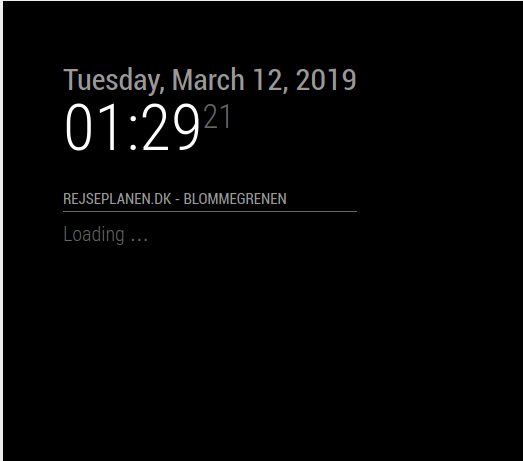
Latest MagicMirror only with the clock module on.Added station ID for Odense, Nørreport and my tiny bus station and nothing shows up. Only getting a Loading … response. Is the Rejseplanen API still functional with this module? Or is it maybe my setup to blame?
-
As to be expected the issue was with the setup - VM users should take that into account. Oddly the fix when I added another module using external info (horoscope) and rebooted the VM. Saw it had a hiccup with time and date sync within ubuntu. Sorted itself out. Rejseplanen train depatures from Odense Station load nicely but for some reason can’t figure out how to switch to Bus lines and show the lines that go through my stop or any other bus stop for that matter.
config:{
  stationID: "461112000",
  stationName: "Bilka",
  vehicle: "B",
  destfilter: "",
  departuresMax: 5
}
After Loading… for a while it returns this
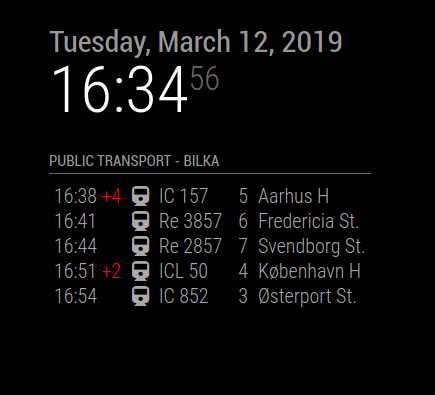
Which seems to be defaulting to Odense Station for some reason.
-
What happen to this Module :/
Is just what i needed…
-
@Impertus It still works fine. Runs on my mirror every day.
-
@MarkNygaard said in MMM-Rejseplanen - A departure board for Danish train and bus stations:
@Impertus It still works fine. Runs on my mirror every day.
Can you send that to me? Because there is No download link more. :/
På forhånd tak :)
-
@Impertus said in MMM-Rejseplanen - A departure board for Danish train and bus stations:
@MarkNygaard said in MMM-Rejseplanen - A departure board for Danish train and bus stations:
@Impertus It still works fine. Runs on my mirror every day.
Can you send that to me? Because there is No download link more. :/
På forhånd tak :)
https://github.com/poketcalulator/MMM-Rejseplanen
There you go :)
-
Like focaldistorsion I had a problem where the module kept saying Loading…
I installed the magic mirror as a docker container, running on a remote server. My solution was to check the docker log with:docker container logs mmThat returned an error regarding Request, which I fixed by running
npm i requestin the magic mirror container.
Thanks for an awesome module! -
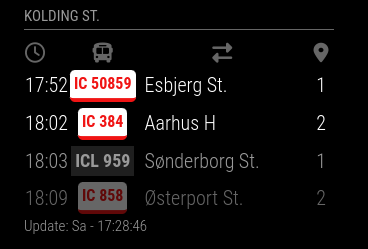
The module has not been updated for a long time and has very old dependencies. There is a module that can also use a Rejseplanen API and is actively developed by me: https://github.com/KristjanESPERANTO/MMM-PublicTransportHafas
It looks like this:
This is the configuration of it:
    {
      module: "MMM-PublicTransportHafas",
      position: "top_left",
      config: {
        hafasProfile: "rejseplanen",
        stationID: "8600083",
        stationName: "Kolding St.",
        timeToStation: 5,
        showAbsoluteTime: false
      }
    },



Hello! It looks like you're interested in this conversation, but you don't have an account yet.
Getting fed up of having to scroll through the same posts each visit? When you register for an account, you'll always come back to exactly where you were before, and choose to be notified of new replies (either via email, or push notification). You'll also be able to save bookmarks and upvote posts to show your appreciation to other community members.
With your input, this post could be even better 💗
Register Login