MagicMirror Forum
    • Recent
    • Tags
    • Unsolved
    • Solved
    • MagicMirror² Repository
    • Documentation
    • 3rd-Party-Modules
    • Donate
    • Discord
    • Register
    • Login
    A New Chapter for MagicMirror: The Community Takes the Lead
    Read the statement by Michael Teeuw here.

    MMM-MyCalendar

    Scheduled Pinned Locked Moved Utilities
    109 Posts 40 Posters 144.6k Views 38 Watching
    Loading More Posts
    • Oldest to Newest
    • Newest to Oldest
    • Most Votes
    Reply
    • Reply as topic
    Log in to reply
    This topic has been deleted. Only users with topic management privileges can see it.
    • ? Offline
      A Former User
      last edited by

      Hello everyone, do you know how i can add my google calender to my mirror please ??

      J 1 Reply Last reply Reply Quote 0
      • J Offline
        j.e.f.f Project Sponsor Module Developer @Guest
        last edited by

        @PCPAYN3 It works the same way you would do it for the default calendar module.

        Config details here:
        https://github.com/jclarke0000/MMM-MyCalendar

        which are more or less identical to configuring the default calendar:
        https://github.com/MichMich/MagicMirror/tree/develop/modules/default/calendar

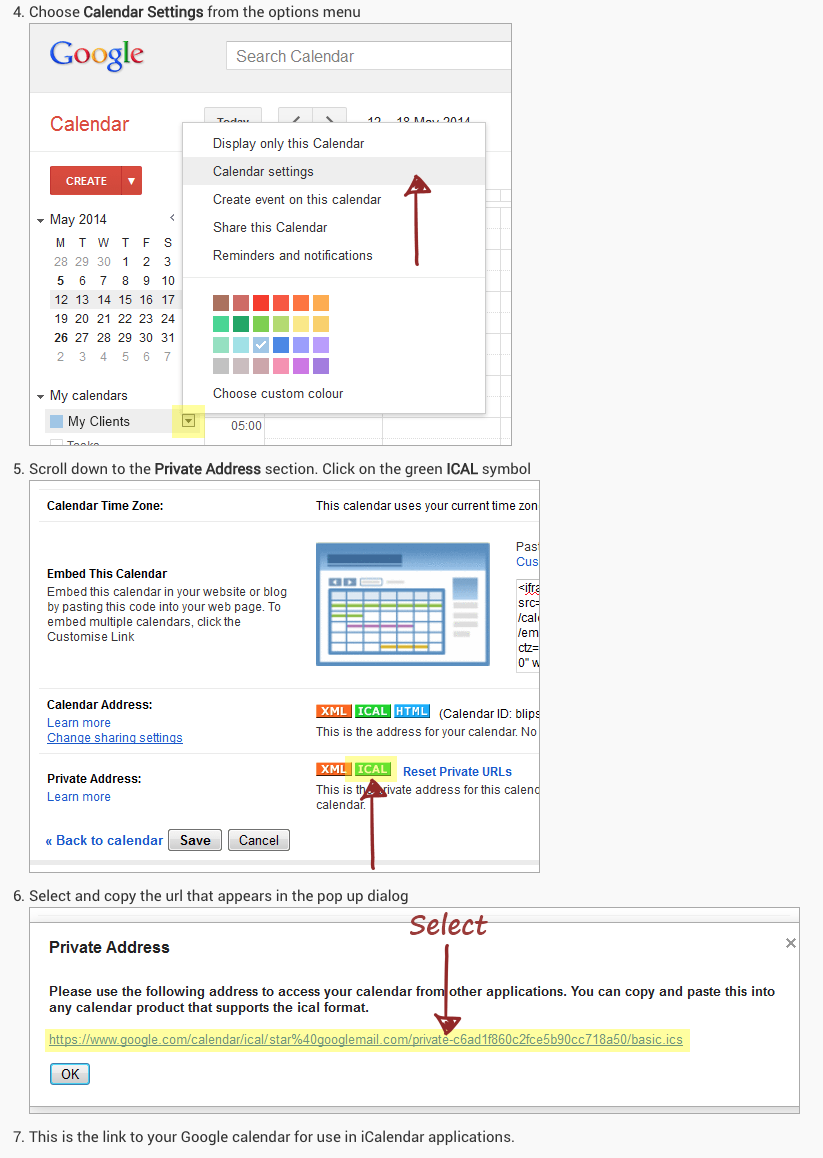
        The only tricky part is getting the ics link for your google calendar. See here for instructions:
        https://www.smsclientreminders.com/how_to_share_your_calendar_with_other_applications#google

        I hope this helps!

        • Jeff
        ? 1 Reply Last reply Reply Quote 0
        • kruemelK Offline
          kruemel
          last edited by

          @j-e-f-f thank you :-)

          1 Reply Last reply Reply Quote 0
          • ? Offline
            A Former User @j.e.f.f
            last edited by

            @j.e.f.f Thank you I will look into this.

            1 Reply Last reply Reply Quote 0
            • ? Offline
              A Former User @j.e.f.f
              last edited by

              @j.e.f.f I have tried to set this up and all I’m getting on the screen is the time & date at the top and then calendar loading ??

              J 1 Reply Last reply Reply Quote 0
              • J Offline
                j.e.f.f Project Sponsor Module Developer @Guest
                last edited by

                @PCPAYN3 are you trying to set up up your google calendar? Do you have the .ics link for it?

                ? 1 Reply Last reply Reply Quote 0
                • ? Offline
                  A Former User @j.e.f.f
                  last edited by

                  @j.e.f.f hi yes i am, and have the ics link.

                  J 1 Reply Last reply Reply Quote 0
                  • J Offline
                    j.e.f.f Project Sponsor Module Developer @Guest
                    last edited by

                    @PCPAYN3 can your post your config? Hide your ics link, but post the rest.

                    ? 1 Reply Last reply Reply Quote 0
                    • ? Offline
                      A Former User @j.e.f.f
                      last edited by

                      This post is deleted!
                      J 1 Reply Last reply Reply Quote 0
                      • J Offline
                        j.e.f.f Project Sponsor Module Developer @Guest
                        last edited by

                        @PCPAYN3 Two things:

                        1. Your config is trying to configure the default calendar module, not MMM-MyCalendar. The config for MMM-MyCalendar looks something like this:
                            {
                              module: "MMM-MyCalendar",
                              position: "top_left",
                              classes: "default everyone",
                              header: "Upcoming",
                              disabled: false,
                              config: {
                                colored: true,
                                maximumNumberOfDays: 30,
                                maximumEntries: 5,
                                fade: false,
                                maxTitleLength: 500,
                                useRelativeDates: false,
                                dayOfWeekFormat: "dddd",
                                timeFormat: "h:mm A",
                                dateFormat: "MMMM D",
                                joiningWord: "at",
                                urgency: 1,
                                calendars: [
                                  {
                                    url: "https://calendar.google.com/path/to/your/basic.ics",
                                    color: "#ffb350"
                                  },
                                  {
                                    url: "https://calendar.google.com/path/to/another/basic.ics",
                                    color: "#ff77d4"
                                  }
                                ]
                              }
                            },    
                        
                        1. You should delete your post above. It contains your private ICS link – this is what I meant for you to hide when I mentioned it above – as well as you app id for the weather module. That’s all information you should keep secret, and edit out before you post your config in the forum.
                        ? 1 Reply Last reply Reply Quote 0
                        • ? Offline
                          A Former User @j.e.f.f
                          last edited by

                          @j.e.f.f Hi jeff I have replaced the code as you said in the config file and still nothing :/ its showing the clock but nothing else on the page. Not even the loading anymore. Any ideas? & I think ive deleted my other post, it shows as greyed out now.

                          J 1 Reply Last reply Reply Quote 0
                          • J Offline
                            j.e.f.f Project Sponsor Module Developer @Guest
                            last edited by

                            @PCPAYN3 Can you confirm you installed the module by following these steps:

                            1. Navigate to the MagicMirror/modules directory
                            2. Execute git clone https://github.com/jclarke0000/MMM-MyCalendar.git
                            3. Add the relevant configuration to config.js
                            4. Restart Magic Mirror

                            And yes, your post shows as deleted.

                            ? 3 Replies Last reply Reply Quote 0
                            • ? Offline
                              A Former User @j.e.f.f
                              last edited by

                              @j.e.f.f Thanks @j-e-f-f no I didn’t do that, I have done it now. And trying it out. Sorry im new to this, and really appreciate your help.

                              1 Reply Last reply Reply Quote 0
                              • ? Offline
                                A Former User @j.e.f.f
                                last edited by

                                @j.e.f.f After reboot it is now showing the second calendar i entered for UK holidays but not the top one which was my google calendar :( any ideas?

                                1 Reply Last reply Reply Quote 0
                                • ? Offline
                                  A Former User @j.e.f.f
                                  last edited by

                                  @j.e.f.f Sorry to keep bothering you, i have everything on the screen now apart from the google calender. Can i embed in as an iframe on the html page? As i am familiar with html.

                                  J 1 Reply Last reply Reply Quote 0
                                  • J Offline
                                    j.e.f.f Project Sponsor Module Developer @Guest
                                    last edited by

                                    @PCPAYN3 google calendar should work – I’m using two separate google calendars with mine.

                                    You can confirm that you got your ics link by following these instructions?
                                    0_1508178715895_255553ea-d9fd-4b86-876a-b77aa2374741-image.png

                                    (full instructions here: https://www.smsclientreminders.com/how_to_share_your_calendar_with_other_applications#google)

                                    ? 1 Reply Last reply Reply Quote 0
                                    • ? Offline
                                      A Former User @j.e.f.f
                                      last edited by

                                      @j.e.f.f Hi jeff yes thats what ive done and got that link and still not showing. Do i edit the module to show this link? Or in the config file? As i tried to also edit the .js file in the MMM-Calendar module but it said permission denied when saving.

                                      1 Reply Last reply Reply Quote 0
                                      • ? Offline
                                        A Former User
                                        last edited by

                                        As I know, private calendar sharing works only in Google Calendar. If you want to use calendar in other application, you should use public calendar. (I might be wrong.)

                                        1 Reply Last reply Reply Quote 0
                                        • J Offline
                                          j.e.f.f Project Sponsor Module Developer
                                          last edited by j.e.f.f

                                          I worked with @PCPAYN3 over chat to figure out this issue. For anyone else this might help, the problem was as follows:

                                          The following error came up in the log:
                                          Error: dates lower than Thu Jan 01 1970 00:00:00 GMT-0500 (EST) are not supported

                                          A bit of Googling pointed me to this thread:
                                          https://forum.magicmirror.builders/topic/2208/calendar-shows-no-entries-after-mm-update/29?page=3

                                          Apparently the problem is that there is an entry in the calendar that has a date prior to Jan 1, 1970. The solution was to edit the following file:

                                          /home/pi/MagicMirror/node_modules/rrule-alt/lib/rrule.js

                                          and change the ORDINAL_BASE property on line 56 to an earlier date.

                                          example, I changed:
                                          ORDINAL_BASE: new Date(1970, 0, 1),

                                          to
                                          ORDINAL_BASE: new Date(1900, 0, 1),

                                          and then the calendar worked.

                                          Z B 2 Replies Last reply Reply Quote 3
                                          • Z Offline
                                            zzaidi148 @j.e.f.f
                                            last edited by

                                            @j.e.f.f Hi Jeff! I love your module and its been easily booting up nicely. However, I tried adding two of my google calendars on it, and as I booted the module it up, it loaded and said no upcoming events. While today I dont have any events, tomorrow I do. I set the max number of days in the future to a huge number but stilll nothing. Any ideas?

                                            J C 2 Replies Last reply Reply Quote 1

                                            Hello! It looks like you're interested in this conversation, but you don't have an account yet.

                                            Getting fed up of having to scroll through the same posts each visit? When you register for an account, you'll always come back to exactly where you were before, and choose to be notified of new replies (either via email, or push notification). You'll also be able to save bookmarks and upvote posts to show your appreciation to other community members.

                                            With your input, this post could be even better 💗

                                            Register Login

                                            • 1
                                            • 2
                                            • 3
                                            • 4
                                            • 5
                                            • 6
                                            • 3 / 6
                                            • First post
                                              Last post
                                            Enjoying MagicMirror? Please consider a donation!
                                            MagicMirror created by Michael Teeuw.
                                            Forum managed by Sam, technical setup by Karsten.
                                            This forum is using NodeBB as its core | Contributors
                                            Contact | Privacy Policy