MagicMirror Forum
    • Recent
    • Tags
    • Unsolved
    • Solved
    • MagicMirror² Repository
    • Documentation
    • 3rd-Party-Modules
    • Donate
    • Discord
    • Register
    • Login
    A New Chapter for MagicMirror: The Community Takes the Lead
    Read the statement by Michael Teeuw here.

    worldclock - nobody made this, so I did.

    Scheduled Pinned Locked Moved Productivity
    46 Posts 14 Posters 31.9k Views 14 Watching
    Loading More Posts
    • Oldest to Newest
    • Newest to Oldest
    • Most Votes
    Reply
    • Reply as topic
    Log in to reply
    This topic has been deleted. Only users with topic management privileges can see it.
    • N Offline
      ninjabreadman @Peter
      last edited by

      @Peter This should work:

      .worldclock {
        font-size: 73%; /* adjust value as needed */
      }
      

      Problem with config or JavaScript? Copy/paste it into JSHint.
      Check out the detailed walkthroughs on install, config, modules, etc.

      P 1 Reply Last reply Reply Quote 0
      • P Offline
        Peter @ninjabreadman
        last edited by

        @ninjabreadman thanks!
        It works fine.
        Peter

        1 Reply Last reply Reply Quote 0
        • C Offline
          cookblook
          last edited by

          Hello,

          very nice module. Is it possible to have the clocks horizontal instead of vertical?

          ? 1 Reply Last reply Reply Quote 0
          • ? Offline
            A Former User @cookblook
            last edited by

            @cookblook
            You can redefine CSS of .worldclockand.worldclock .world to arrange horizontally with flex things of CSS3.

            C 1 Reply Last reply Reply Quote 0
            • C Offline
              cookblook @Guest
              last edited by

              @sean like display: flex;? tried that but it didn’t work

              ? 1 Reply Last reply Reply Quote 0
              • ? Offline
                A Former User @cookblook
                last edited by A Former User

                @cookblook
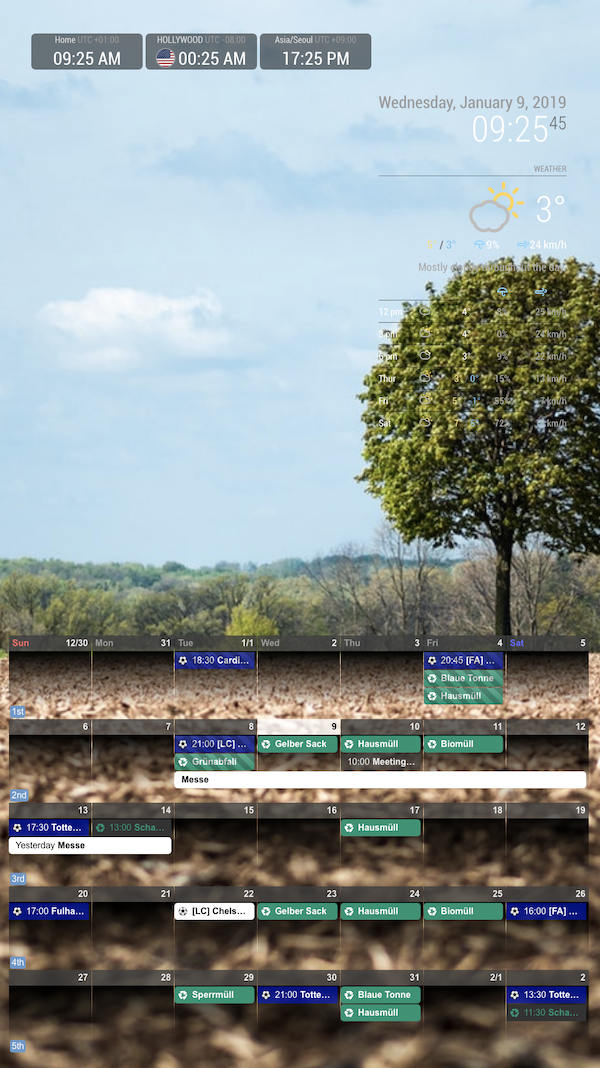
                This will work, add this into your css/custom.css

                .worldtime {
                  display:flex;
                  flex-direction:row;
                }
                
                .world{
                  width:200px;
                }
                

                0_1547022402965_sc.png

                1 Reply Last reply Reply Quote 0
                • C Offline
                  cookblook
                  last edited by

                  @sean Thanks!! That worked :-)

                  1 Reply Last reply Reply Quote 0
                  • BKeyportB Offline
                    BKeyport Module Developer
                    last edited by

                    Ulrich/Sean -

                    I’ve got a bug - supposedly it’s supposed to allow override of the time format per clock. I’m trying to get a 24 hour clock only on the UTC clock. “LT” is “hh:mm A” here…

                    Thanks!

                    {
                     module: "worldclock",
                     position: "top_left", 
                    config: { 
                     timeFormat: "LT", style: "left",
                     offsetTimezone: null,
                     clocks: [
                     {
                     title: "Local",
                     timezone: "America/Los_Angeles",
                     }, 
                    {
                     title: "UTC",
                     timezone: "UTC",
                     timeFormat: "HH:mm",
                     }, 
                     ]
                     },
                     },
                    

                    Thanks!

                    The "E" in "Javascript" stands for "Easy"

                    BKeyportB 1 Reply Last reply Reply Quote 0
                    • L Offline
                      Lagmin
                      last edited by

                      This post is deleted!
                      1 Reply Last reply Reply Quote 0
                      • BKeyportB Offline
                        BKeyport Module Developer @BKeyport
                        last edited by

                        I solved this. My fork is http://www.github.com/bkeyport/MMM-Worldclock if you’d like to use it. It’ll be fully supported, and I don’t plan to merge back into the original.

                        The "E" in "Javascript" stands for "Easy"

                        1 Reply Last reply Reply Quote 0
                        • A Offline
                          alanodoug
                          last edited by alanodoug

                          Hey guys,
                          is it possible to change the flag-icon? Because the flag i want to use doesnt exist.
                          Maybe i can use a image and put it in the folder?

                          Thx

                          1 Reply Last reply Reply Quote 0
                          • BKeyportB Offline
                            BKeyport Module Developer
                            last edited by BKeyport

                            No. The flags are hardcoded. I’m trying to figure out how it works, because I want to use a flag for UTC, which don’t have one either.

                            I’m about halfway there. I’ve figured out how to do everything but get the replacement flag into the right spot. It’ll display, but it’s not showing up at the right spot. Still crunching, will look more when time permits. . :|

                            The "E" in "Javascript" stands for "Easy"

                            1 Reply Last reply Reply Quote 0
                            • BKeyportB Offline
                              BKeyport Module Developer
                              last edited by BKeyport

                              @alanodoug said in worldclock - nobody made this, so I did.:

                              Hey guys,
                              is it possible to change the flag-icon? Because the flag i want to use doesnt exist.
                              Maybe i can use a image and put it in the folder?

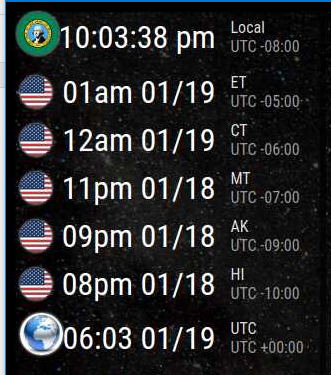
                              I’ve added the functionality to MMM-Worldclock. The supported version™

                              It’s not perfect, but it’s there.
                              Capture.PNG
                              Is created by:

                              		{
                              			module: "MMM-Worldclock",
                              			position: "top_left",
                              			config: {
                              				style: "right",
                              				offsetTimezone: null,
                              				clocks: [
                              					{
                              						title: "Local",
                              						timezone: "America/Los_Angeles",
                              						altflag: "washington.png",
                              						timeFormat: "hh:mm:ss a",
                              					},
                              					{
                              						title: "ET",
                              						timezone: "America/New_York",
                              						flag: "us",
                              						timeFormat: "hha MM/DD",
                              					},
                              					{
                              						title: "CT",
                              						timezone: "America/Chicago",
                              						flag: "us",
                              						timeFormat: "hha MM/DD",
                              					},
                              					{
                              						title: "MT",
                              						timezone: "America/Boise",
                              						flag: "us",
                              						timeFormat: "hha MM/DD",
                              					},
                              					{
                              						title: "AK",
                              						timezone: "America/Anchorage",
                              						flag: "us",
                              						timeFormat: "hha MM/DD",
                              					},
                              					{
                              						title: "HI",
                              						timezone: "Pacific/Honolulu",
                              						flag: "us",
                              						timeFormat: "hha MM/DD",
                              					},
                              					{
                              						title: "UTC",
                              						timezone: "UTC",
                              						timeFormat: "HH:mm MM/DD",
                              						altflag: "world.jpg"
                              					},
                              				]
                              			},
                              		},
                              

                              the module is located at http://www.github.com/BKeyport/MMM-Worldclock

                              Cheers!

                              I really need someone to help me with the CSS buildout. I’m not understanding how to get the icons down to the same size as the normal flags, and other little ticky stuff.

                              What I added was “altflag” in the code, and based it off of what Sean did originally.

                              The combo of JS and CSS is maddening me.

                              The "E" in "Javascript" stands for "Easy"

                              1 Reply Last reply Reply Quote 0
                              • A Offline
                                alanodoug
                                last edited by

                                Oh cool, that looks good.
                                is it not possible to create a custom css. Because in the worldclock.js is the link to the flags

                                loadCSS: function() {
                                    var css = [
                                      {
                                        id:'flag-icon-CSS',
                                        href: 'https://cdnjs.cloudflare.com/ajax/libs/flag-icon-css/2.8.0/css/flag-icon.min.css'
                                      }
                                    ]
                                

                                and there are a lot of flags, wich I can change it maybe?

                                But I cant find the svg.

                                Maybe someone can help?
                                Thanks a lot.

                                1 Reply Last reply Reply Quote 0
                                • BKeyportB Offline
                                  BKeyport Module Developer
                                  last edited by BKeyport

                                  Those SVGs are for the built in flags. I figured it would be “download and place the file in the module directory” for the custom flags… Like I have “world.jpg” and “washington.png” (or is it the other way).

                                  Just make sure the flag image is square, and use “altflag” rather than “flag” with the filename of the image file, and it’ll pick it up.

                                  (the requirements are hopefully temporary for the alternate flag image, I’m working on learning CSS in my spare time, and how to fix the image insert later)

                                  The "E" in "Javascript" stands for "Easy"

                                  1 Reply Last reply Reply Quote 0

                                  Hello! It looks like you're interested in this conversation, but you don't have an account yet.

                                  Getting fed up of having to scroll through the same posts each visit? When you register for an account, you'll always come back to exactly where you were before, and choose to be notified of new replies (either via email, or push notification). You'll also be able to save bookmarks and upvote posts to show your appreciation to other community members.

                                  With your input, this post could be even better 💗

                                  Register Login

                                  • 1
                                  • 2
                                  • 3
                                  • 3 / 3
                                  • First post
                                    Last post
                                  Enjoying MagicMirror? Please consider a donation!
                                  MagicMirror created by Michael Teeuw.
                                  Forum managed by Sam, technical setup by Karsten.
                                  This forum is using NodeBB as its core | Contributors
                                  Contact | Privacy Policy