Read the statement by Michael Teeuw here.
VoiceControl module
-
Hi! is it possible with this module to hide/show different modules or even switch profile with profile switcher?
Kind regards
-
Hello Guys , @alexyak .
I;m running this module and hot word detection is working ok, i used my own keyword and send notfication to other modules. I can see in console.log .MMM-temp-ds18b20 received a module notification: LUSTRO from sender: voicecontrolIn all my modules. but i’m unable to run for example script … I tried to modify node_helper.js
/* Magic Mirror
 * Module: voicecontrol
 *
 * By Alex Yaknin
 * MIT Licensed.
 */

const NodeHelper = require('node_helper');
const exec = require('child_process').exec;

module.exports = NodeHelper.create({
    start: function () {
        this.started = false;

    },

    socketNotificationReceived: function(notification, payload) {
                if (notification === "CONNECT") {
                        this.startRecognition(payload);
                        return;
                }
                if (notification === "LUSTRO"’) {
                        exec("/opt/vc/bin/tvservice -o", null);
                //      this.autosleep();
              }
        },
but it is not working … ;)
-
Hello everybody, I try to use this voicecontrol module AND mmm-alexa in the same time (mmm-alexa need to be trigger by a notification. That where voicecontrol is interesting at the moment) but because both the module use the mic, it doesn’t work.
If I put only one module at the time no problem. Both of them in the same time, voice control doesn’t work.
How can I use the same mic for two different module ? -
@romain , do you use voicecontrol module to run some scripts ? If so please let me know how to do it … ;) my module is detecting my voice … but i’m unable to run something … ;)
-
@disakos I didn’t use it to run script, I wanted it specificaly for mmm-alexa. However I did check that the other module received the notification It send.
I did that by writing my own useless module that only print the notification it received.
You need in your main file anotificationReceived: function(notification, payload, sender){ //Whatever you want to do },This is different to “socketNotificationReceived” , socket notification receive only deal with your node helper file. But “notificationReceived” catch notification send from a module to another.
With that in mind, you can add the notificationReceived thing to the module you want to control with the voicecontrol module or add whatever you need to it if it already exist
-
I did it, It wasn’t easy but it’s work, I can use voicecontrol and others voicecontrol driven module at the same time.
I had to change my /etc/asound.conf file again (yes, again. Because changing it already solve some of my issue on the past)before my file looked like this:
pcm.!default {
        type asym
        playback.pcm {
                type plug
                slave.pcm "hw:0,0"
        }
        capture.pcm {
                type plug
                slave.pcm "hw:1,0"
        }
}
Easy enough when you know what your doing (that wasn’t my case). this file is there to say what is the default device to playback and capture (A lot of application or software just use the default device so if the default configuration isn’t working for you, you need to change it for you.) In my cas ethe microphone is the “hw:1,0” and my speaker is the “hw:0,0”
That worked well when my microphone is used by one application at the time. However, not so much when it need to be used by multiple ones.
So my new /etc/asound.conf file is looking like this nowpcm.myTest { type dsnoop ipc_key 2241234 slave { pcm "hw:1,0" channels 1 } } pcm.!default { type asym playback.pcm { type plug slave.pcm "hw:0,0" } capture.pcm { type plug slave.pcm "myTest" } }instead of directly say that my input device is the “hw:1,0” I say it’s “myTest”, which is describe above. myTest’s type is “dsnoop” , that’s whats allow the michrophone to be use by multiple application at the same time. The ipc_key is there with a random value because when I tested with arecord, it asked me to put one. The channels is there because it was on the documentation ( http://alsa.opensrc.org/Dsnoop ) >.> not sure what it does though.
And there you go, after that I could use two voice control things at the time -
Hello,
I’m new here, and I need a little bit help…
I still don’t get the concept of this module for 100%, but I will describe my problem as accurate as possible.So I downloaded the module and installed python-pyaudio. I created a PMDL-File (here: http://filehorst.de/d/bDfbfCBE), tested it and saved it in the MagicMirror-Location (and many other locations…). I recorded it on the Pi btw, microphone is also still working.
I don’t know if I miss anything, but when I start the MM, the modules are totally fine, I keep saying my command (“Go to sleep”), but nothing happens. I also checked the dev-mode and set breakpoints…but like I said, I’m not 100% sure what every class is doing in particular. Here is my code, do I miss anything?
config.js
{
			module: "helloworld1",
			position: "bottom_right",	// This can be any of the regions.
			config: {
				// See 'Configuration options' for more information.
				text: "Hello world!"
			}
		},
		{
            module: 'voicecontrol',
            config: {
                models: [
                    {
                        keyword: "gotosleep",   // keyword
                        file: "GoToSleep.pmdl", // trained model file name
                        message: "gotosleep"   // notification message that's broadcast in the MagicMirror app
                    },
					{
                        keyword: "wake up",   // keyword
                        file: "Wake_up.pmdl", // trained model file name
                        message: "wake_up"   // notification message that's broadcast in the MagicMirror app
                    },
                ]
            }
        },
Voicecontrol.js
'use strict';

Module.register("voicecontrol", {

	// Default module config.

    defaults: {
		models: [
					{
						keyword: "gotosleep",   // keyword
						description: "Go To Sleep",
                        file: "GoToSleep.pmdl", // trained model file name
                        message: "gotosleep"   // notification message that's broadcast in the MagicMirror app
					},
					{
						keyword: "Hide Camera",
						description: "Say 'Hide Camera' to hide camera",
						file: "hideCamera.pmdl",
						message: "HIDE_CAMERA"
					},
					{
						keyword: "Selfie",
						description: "Say 'Selfie' when camera is visible",
						file: "selfie.pmdl",
						message: "SELFIE"
					},
				]
	},

    start: function() {

        this.sendSocketNotification("CONNECT", this.config);

    },

    getStyles: function() {
		return ['voicecontrol.css'];
	},

    socketNotificationReceived: function(notification, payload){
        if (notification === "KEYWORD_SPOTTED"){
            //Broadcast the message
            this.sendNotification(payload.message, {type: "notification"});
        }
	},

    getDom: function() {
        var wrapper = document.createElement("div");
        var header = document.createElement("header");
        header.innerHTML = "Voice Commands";
        wrapper.appendChild(header);
        var models = this.config.models;

        models.forEach(function(model) {
            var command = document.createElement("div");
            command.innerHTML = model.description;
            command.className = "small dimmed top";
            wrapper.appendChild(command);
        }, this);

        return wrapper;
    }

});
helloworld1.js (I wanted to log the notification to see if it works…)
Module.register("helloworld1",{ // Default module config. defaults: { text: "World!" }, start: function() { Log.log("Starting module: " + this.name); }, notificationReceived: function(notification, payload, sender) { if (notification === "gotosleep"){ Log.log("Go To Sleep"); } }, // Override dom generator. getDom: function() { var wrapper = document.createElement("div"); wrapper.innerHTML = this.config.text; return wrapper; } }); -
The code look’s fine to me at first glance. (You don’t need to have the
{ keyword: "gotosleep", // keyword description: "Go To Sleep", file: "GoToSleep.pmdl", // trained model file name message: "gotosleep" // notification message that's broadcast in the MagicMirror app },in both config file and the voice controle.js at the same time though. But that’s not an issue.)Maybe try to add a position for the voicecontrol module just to be sure the module itself doesn’t crash (If you add a position it should print the description of the words on screen. If nothing appear it probably mean something went wrong.)
If nothing wrong and thecd ~/MagicMirror/ ; DISPLAY=:0 npm start devdidnt show an error, maybe the issue is with your mic configuration. If the module dosn’t hear you it might not work.Add a
Log.log("Helloworld1 received " + notification);before the if in the helloword1.js . SO you print every single notification you receive and maybe add a Log in the socketNotificationReceive of voicecontrol.js to see if it spot your keywords at all.also, do you use your microphone with this module only or with multiple application ? Because by default, I think, a microphone can only be open by one thing at the time. So try toclose every application that use your microphone and run the mirror. If the that’s work you might to configure your microphone so it can be open in multiple application
-
im trying to get the module to work on my Magic Mirror but without any luck so far. I have a google maps API that opens in an iframe (iFrame reload module) which i currently have to click on my Magic Mirror to display. I am trying to instead have it open using voice control rather than clicking on it. Any ideas on how to get this to work?
-
@claudia first thing first. Did you made a snowboy word ? then did you put the file in your MagicMirror folder ? Then did you put it in your configuration (you should probably delete their example since they didn’t provide the file to go with it. inside the config from the voicecontrol.js too).
Then when you say the word, is the module picking it up and send the associate notification ?
You can know if the notification is sended by runing the mirror in dev mode so you can see the console and use some module to print the notification they receive (I think some default module do it already).When you got this part to work, you can proceed to the next step, which is catch the notification in the Iframe module
-
@romain thanks for getting back to me. I have made a snowboy word (showmap.pmdl) , as well as adding it into the magic mirror folder, and changing the config.js file and the voice control.js file accordingly.
To see if the module is picking up the word, how would you run the mirror in dev mode? I’m not sure how to do this.
Thanks again.
-
@claudia To run it in dev mode first close the current mirror. If you followed the autostart thing, it will be
pm2 stop mm. Then, you need to go in the MagicMirror folder.cd ~/MagicMirror/.
If you are directly on the raspberry, you need to write the following commandnpm start dev
If you accessing your raspberry from a remote location through ssh (or vnc), you’ll need to runDISPLAY=:0 npm start dev. the display thing is to told your raspberry the visual should be run on the raspberry screen.
The mirror should open allongside a browser. within the brower you’ll have few tab. One of the tab should be “console”. If it’s not selected, click on it.every "console.log(“message”) will appear on the console. and every Log.log(“message”) will appear directly on the terminal if I’m not mistaking.
when you finished with debug mode, you can close the mirror by sending the kill signal (press ctrl + c on your keyboard. If you are using a mac, I guess it would be command + c . Not sure about that). Or you can close the terminal window.
-
@romain so i am running it through VNC, however the command DISPLAY=:0 npm start dev didn’t work, and npm start dev did. Not sure if that makes a difference or not, but when i said the hot word, i received this error, so i guess that means the module is picking up my voice:
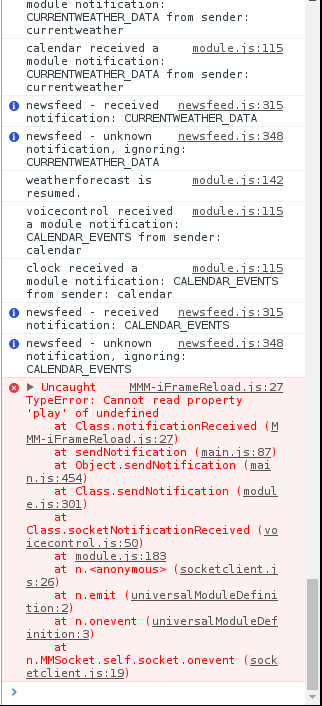
The way i tried to open the iFrame, which i suspect is wrong since it isn’t working, was to add this to the iFrame module:
 notificationReceived: function(notification, payload, sender) {

		if (notification === "SHOW_MAP"){
			http://localhost:8080/modules/MMM-iFrameReload/Maps.html
			this.media.play();
		}


	},
Thanks
-
@claudia It sure does look like the issue came from the IframeReload module indid. It seem that the “this.media” wasn’t initialized since it say that it’s “undefined”.
Where did you initialized that variable ? -
@romain woops, that seemed to be left over from a previous example and I’m not sure what to replace it with.
-
@claudia copy past the entire file so I can see If I know what to do here. Maybe do it as private message since it’s begin to not be about voicecontrol anymore
-
@DevilRev Hey, can you explain me, where you find this sensitiv setting??
Greets gismo2006
-
@Medo Not sure if you still have this issue, but I had this issue as well and managed to get the module to finally work, albeit in a way I am not sure I am completely happy with. But, based on reading a similar experience at https://www.raspberrypi.org/forums/viewtopic.php?t=136974 and doing some of the alsa.conf changes, I figured I didn’t have much to lose, and now my module works!
I edited alsa.conf by sudo nano /usr/share/alsa/alsa.conf
Then changed:
pcm.front cards.pcm.front to pcm.front cards.pcm.default (and followed suit for rear, etc.)
Now I don’t know what else this could have messed up, but it made this module work with the errors you show!
-
If someone can help:
I say: Show Camera, in terminal it indicates that it detects the word (! Hotword Detected)
but nothing happens.
Hello! It looks like you're interested in this conversation, but you don't have an account yet.
Getting fed up of having to scroll through the same posts each visit? When you register for an account, you'll always come back to exactly where you were before, and choose to be notified of new replies (either via email, or push notification). You'll also be able to save bookmarks and upvote posts to show your appreciation to other community members.
With your input, this post could be even better 💗
Register Login