Read the statement by Michael Teeuw here.
Config.js file Syntax
-
Hello Everyone,
I’ve been working on this “weekend project” for the past 3 weeks!!! ahahah
I started by having 0% clue of what I was doing to falling in love with the Terminal (Love/hate relationship)
I’m so close to complete my first Magic Mirror but I’m stuck in two places. The first is:
Keeps asking me to create and/or check my config.js file, I eliminated the config.js sample,
After using JSHint I found out that some lines might be wrong. Is someone so kind to give a quick peak for me? please and thank you:/* Magic Mirror Config Sample * * By Michael Teeuw http://michaelteeuw.nl * MIT Licensed. * * For more information how you can configurate this file * See https://github.com/MichMich/MagicMirror#configuration * */ var config = { port: 8080, ipWhitelist: ["10.0.0.231/24", "::ffff:10.0.0.1/112", "::1", "::ffff127.0.0.1/24"] // Set [] to allow all IP addresses // or add a specific IPv4 of 192.168.1.5 : // ["127.0.0.1", "::ffff:127.0.0.1", "::1", "::ffff:192.168.1.5"], // or IPv4 range of 192.168.3.0 --> 192.168.3.15 use CIDR format : // ["127.0.0.1", "::ffff:127.0.0.1", "::1", "::ffff:192.168.3.0/28"], }; language="en", timezone: true; units: "metric", modules: [ var time = { timeFormat: config.time.timeFormat || 24, dateLocation: '.date', timeLocation: '.time', updateInterval: 1000, intervalId: null }; /** * Updates the time that is shown on the screen */ time.updateTime = function () { var _now = moment(), _date = _now.format('dddd, LL'); $(this.dateLocation).html(_date); $(this.timeLocation).html(_now.format(this._timeFormat+':mm[]ss[]')); } time.init = function () { if (parseInt(time.timeFormat) === 12) { time._timeFormat = 'hh' } else { time._timeFormat = 'HH'; } this.intervalId = setInterval(function () { this.updateTime(); }.bind(this), 1000); }, var calendar = { eventList: [], calendarLocation: '.calendar', updateInterval: 1000, updateDataInterval: 60000, fadeInterval: 1000, intervalId: null, dataIntervalId: null, maximumEntries: config.calendar.maximumEntries || 10 } calendar.updateData = function (callback) { new ical_parser("calendar.php" + "?url="+encodeURIComponent(config.calendar.url), function(cal) { var events = cal.getEvents(); this.eventList = []; for (var i in events) { var e = events[i]; for (var key in e) { var value = e[key]; var seperator = key.search(';'); if (seperator >= 0) { var mainKey = key.substring(0,seperator); var subKey = key.substring(seperator+1); var dt; if (subKey == 'VALUE=DATE') { //date dt = new Date(value.substring(0,4), value.substring(4,6) - 1, value.substring(6,8)); } else { //time dt = new Date(value.substring(0,4), value.substring(4,6) - 1, value.substring(6,8), value.substring(9,11), value.substring(11,13), value.substring(13,15)); } if (mainKey == 'DTSTART') e.startDate = dt; if (mainKey == 'DTEND') e.endDate = dt; } } if (e.startDate == undefined){ //some old events in Gmail Calendar is "start_date" //FIXME: problems with Gmail's TimeZone var days = moment(e.DTSTART).diff(moment(), 'days'); var seconds = moment(e.DTSTART).diff(moment(), 'seconds'); var startDate = moment(e.DTSTART); } else { var days = moment(e.startDate).diff(moment(), 'days'); var seconds = moment(e.startDate).diff(moment(), 'seconds'); var startDate = moment(e.startDate); } //only add fututre events, days doesn't work, we need to check seconds if (seconds >= 0) { if (seconds = 60*60*24*2) { var time_string = moment(startDate).fromNow(); }else { var time_string = moment(startDate).calendar() } if (!e.RRULE) { this.eventList.push({'description':e.SUMMARY,'seconds':seconds,'days':time_string}); } e.seconds = seconds; } // Special handling for rrule events if (e.RRULE) { var options = new RRule.parseString(e.RRULE); options.dtstart = e.startDate; var rule = new RRule(options); // TODO: don't use fixed end date here, use something like now() + 1 year var dates = rule.between(new Date(), new Date(2016,11,31), true, function (date, i){return i < 10}); for (date in dates) { var dt = new Date(dates[date]); var days = moment(dt).diff(moment(), 'days'); var seconds = moment(dt).diff(moment(), 'seconds'); var startDate = moment(dt); if (seconds >= 0) { if (seconds = 60*60*24*2) { var time_string = moment(dt).fromNow(); } else { var time_string = moment(dt).calendar() } this.eventList.push({'description':e.SUMMARY,'seconds':seconds,'days':time_string}); } } } }; this.eventList = this.eventList.sort(function(a,b){return a.seconds-b.seconds}); // Limit the number of entries. this.eventList = this.eventList.slice(0, calendar.maximumEntries); if (callback !== undefined && Object.prototype.toString.call(callback) === '[object Function]') { callback(this.eventList); } }.bind(this)); } calendar.updateCalendar = function (eventList) { table = $('<table>').addClass('xsmall').addClass('calendar-table'); opacity = 1; for (var i in eventList) { var e = eventList[i]; var row = $('<tr>').css('opacity',opacity); row.append($('<td>').html(e.description).addClass('description')); row.append($('</td><td>').html(e.days).addClass('days dimmed')); table.append(row); opacity -= 1 / eventList.length; } $(this.calendarLocation).updateWithText(table, this.fadeInterval); } calendar.init = function () { this.updateData(this.updateCalendar.bind(this)); this.intervalId = setInterval(function () { this.updateCalendar(this.eventList) }.bind(this), this.updateInterval); this.dataIntervalId = setInterval(function () { this.updateData(this.updateCalendar.bind(this)); }.bind(this), this.updateDataInterval); }, var compliments = { complimentLocation: '.compliment', currentCompliment: '', complimentList: { 'morning': config.compliments.morning, 'afternoon': config.compliments.afternoon, 'evening': config.compliments.evening }, updateInterval: config.compliments.interval || 30000, fadeInterval: config.compliments.fadeInterval || 4000, intervalId: null }; /** * Changes the compliment visible on the screen */ compliments.updateCompliment = function () { var _list = []; var hour = moment().hour(); // In the followign if statement we use .slice() on the // compliments array to make a copy by value. // This way the original array of compliments stays in tact. if (hour >= 3 && hour < 12) { // Morning compliments _list = compliments.complimentList['morning'].slice(); } else if (hour >= 12 && hour < 17) { // Afternoon compliments _list = compliments.complimentList['afternoon'].slice(); } else if (hour >= 17 || hour < 3) { // Evening compliments _list = compliments.complimentList['evening'].slice(); } else { // Edge case in case something weird happens // This will select a compliment from all times of day Object.keys(compliments.complimentList).forEach(function (_curr) { _list = _list.concat(compliments.complimentList[_curr]).slice(); }); } // Search for the location of the current compliment in the list var _spliceIndex = _list.indexOf(compliments.currentCompliment); // If it exists, remove it so we don't see it again if (_spliceIndex !== -1) { _list.splice(_spliceIndex, 1); } // Randomly select a location var _randomIndex = Math.floor(Math.random() * _list.length); compliments.currentCompliment = _list[_randomIndex]; $('.compliment').updateWithText(compliments.currentCompliment, compliments.fadeInterval); } compliments.init = function () { this.updateCompliment(); this.intervalId = setInterval(function () { this.updateCompliment(); }.bind(this), this.updateInterval) }, var weather = { // Default language is Dutch because that is what the original author used lang: config.lang || 'nl', params: config.weather.params || null, iconTable: { '01d':'wi-day-sunny', '02d':'wi-day-cloudy', '03d':'wi-cloudy', '04d':'wi-cloudy-windy', '09d':'wi-showers', '10d':'wi-rain', '11d':'wi-thunderstorm', '13d':'wi-snow', '50d':'wi-fog', '01n':'wi-night-clear', '02n':'wi-night-cloudy', '03n':'wi-night-cloudy', '04n':'wi-night-cloudy', '09n':'wi-night-showers', '10n':'wi-night-rain', '11n':'wi-night-thunderstorm', '13n':'wi-night-snow', '50n':'wi-night-alt-cloudy-windy' }, temperatureLocation: '.temp', windSunLocation: '.windsun', forecastLocation: '.forecast', apiVersion: '2.5', apiBase: 'http://api.openweathermap.org/data/', weatherEndpoint: 'weather', forecastEndpoint: 'forecast/daily', updateInterval: config.weather.interval || 6000, fadeInterval: config.weather.fadeInterval || 1000, intervalId: null } /** * Rounds a float to one decimal place * @param {float} temperature The temperature to be rounded * @return {float} The new floating point value */ weather.roundValue = function (temperature) { return parseFloat(temperature).toFixed(1); } /** * Converts the wind speed (km/h) into the values given by the Beaufort Wind Scale * @see http://www.spc.noaa.gov/faq/tornado/beaufort.html * @param {int} kmh The wind speed in Kilometers Per Hour * @return {int} The wind speed converted into its corresponding Beaufort number */ weather.ms2Beaufort = function(ms) { var kmh = ms * 60 * 60 / 1000; var speeds = [1, 5, 11, 19, 28, 38, 49, 61, 74, 88, 102, 117, 1000]; for (var beaufort in speeds) { var speed = speeds[beaufort]; if (speed > kmh) { return beaufort; } } return 12; } /** * Retrieves the current temperature and weather patter from the OpenWeatherMap API */ weather.updateCurrentWeather = function () { $.ajax({ type: 'GET', url: weather.apiBase + '/' + weather.apiVersion + '/' + weather.weatherEndpoint, dataType: 'json', data: weather.params, success: function (data) { var _temperature = this.roundValue(data.main.temp), _temperatureMin = this.roundValue(data.main.temp_min), _temperatureMax = this.roundValue(data.main.temp_max), _wind = this.roundValue(data.wind.speed), _iconClass = this.iconTable[data.weather[0].icon]; var _icon = ''; var _newTempHtml = _icon + '' + _temperature + '°'; $(this.temperatureLocation).updateWithText(_newTempHtml, this.fadeInterval); var _now = moment().format('HH:mm'), _sunrise = moment(data.sys.sunrise*1000).format('HH:mm'), _sunset = moment(data.sys.sunset*1000).format('HH:mm'); var _newWindHtml = ' ' + this.ms2Beaufort(_wind), _newSunHtml = ' ' + _sunrise; if (_sunrise < _now && _sunset > _now) { _newSunHtml = ' ' + _sunset; } $(this.windSunLocation).updateWithText(_newWindHtml + ' ' + _newSunHtml, this.fadeInterval); }.bind(this), error: function () { } }); } /** * Updates the 5 Day Forecast from the OpenWeatherMap API */ weather.updateWeatherForecast = function () { $.ajax({ type: 'GET', url: weather.apiBase + '/' + weather.apiVersion + '/' + weather.forecastEndpoint, data: weather.params, success: function (data) { var _opacity = 1, _forecastHtml = ''; _forecastHtml += '<table>'; for (var i = 0, count = data.list.length; i < count; i++) { var _forecast = data.list[i]; _forecastHtml += '<tr>'; _forecastHtml += '<td>' + moment(_forecast.dt, 'X').format('ddd') + '</td>'; _forecastHtml += '<td></td>'; _forecastHtml += '<td>' + this.roundValue(_forecast.temp.max) + '</td>'; _forecastHtml += '<td>' + this.roundValue(_forecast.temp.min) + '</td>'; _forecastHtml += '</tr>'; _opacity -= 0.155; } _forecastHtml += '</table>'; $(this.forecastLocation).updateWithText(_forecastHtml, this.fadeInterval); }.bind(this), error: function () { } }); } weather.init = function () { if (this.params.lang === undefined) { this.params.lang = this.lang; } if (this.params.cnt === undefined) { this.params.cnt = 5; } this.intervalId = setInterval(function () { this.updateCurrentWeather(); this.updateWeatherForecast(); }.bind(this), this.updateInterval); }, // A lot of this code is from the original feedToJson function that was included with this project // The new code allows for multiple feeds to be used but a bunch of variables and such have literally been copied and pasted into this code and some help from here: http://jsfiddle.net/BDK46/ // The original version can be found here: http://airshp.com/2011/jquery-plugin-feed-to-json/ var news = { feed: config.news.feed || null, newsLocation: '.news', newsItems: [], seenNewsItem: [], _yqURL: 'http://query.yahooapis.com/v1/public/yql', _yqlQS: '?format=json&q=select%20*%20from%20rss%20where%20url%3D', _cacheBuster: Math.floor((new Date().getTime()) / 1200 / 1000), _failedAttempts: 0, fetchInterval: config.news.fetchInterval || 60000, updateInterval: config.news.interval || 5500, fadeInterval: 2000, intervalId: null, fetchNewsIntervalId: null } /** * Creates the query string that will be used to grab a converted RSS feed into a JSON object via Yahoo * @param {string} feed The original location of the RSS feed * @return {string} The new location of the RSS feed provided by Yahoo */ news.buildQueryString = function (feed) { return this._yqURL + this._yqlQS + '\'' + encodeURIComponent(feed) + '\''; } /** * Fetches the news for each feed provided in the config file */ news.fetchNews = function () { // Reset the news feed this.newsItems = []; this.feed.forEach(function (_curr) { var _yqUrlString = this.buildQueryString(_curr); this.fetchFeed(_yqUrlString); }.bind(this)); } /** * Runs a GET request to Yahoo's service * @param {string} yqUrl The URL being used to grab the RSS feed (in JSON format) */ news.fetchFeed = function (yqUrl) { $.ajax({ type: 'GET', datatype:'jsonp', url: yqUrl, success: function (data) { if (data.query.count > 0) { this.parseFeed(data.query.results.item); } else { console.error('No feed results for: ' + yqUrl); } }.bind(this), error: function () { // non-specific error message that should be updated console.error('No feed results for: ' + yqUrl); } }); } /** * Parses each item in a single news feed * @param {Object} data The news feed that was returned by Yahoo * @return {boolean} Confirms that the feed was parsed correctly */ news.parseFeed = function (data) { var _rssItems = []; for (var i = 0, count = data.length; i < count; i++) { _rssItems.push(data[i].title); } this.newsItems = this.newsItems.concat(_rssItems); return true; } /** * Loops through each available and unseen news feed after it has been retrieved from Yahoo and shows it on the screen * When all news titles have been exhausted, the list resets and randomly chooses from the original set of items * @return {boolean} Confirms that there is a list of news items to loop through and that one has been shown on the screen */ news.showNews = function () { // If all items have been seen, swap seen to unseen if (this.newsItems.length === 0 && this.seenNewsItem.length !== 0) { if (this._failedAttempts === 20) { console.error('Failed to show a news story 20 times, stopping any attempts'); return false; } this._failedAttempts++; setTimeout(function () { this.showNews(); }.bind(this), 3000); } else if (this.newsItems.length === 0 && this.seenNewsItem.length !== 0) { this.newsItems = this.seenNewsItem.splice(0); } var _location = Math.floor(Math.random() * this.newsItems.length); var _item = news.newsItems.splice(_location, 1)[0]; this.seenNewsItem.push(_item); $(this.newsLocation).updateWithText(_item, this.fadeInterval); return true; } news.init = function () { if (this.feed === null || (this.feed instanceof Array === false && typeof this.feed !== 'string')) { return false; } else if (typeof this.feed === 'string') { this.feed = [this.feed]; } this.fetchNews(); this.showNews(); this.fetchNewsIntervalId = setInterval(function () { this.fetchNews() }.bind(this), this.fetchInterval) this.intervalId = setInterval(function () { this.showNews(); }.bind(this), this.updateInterval); }, ] }; /*************** DO NOT EDIT THE LINE BELOW ***************/ if (typeof module !== "undefined") {module.exports = config;} ```</td></tr></table> -
Blink!
Your config.js.sample file was supposed to be copied and renamed to config.js. If you really have “eliminated” that file then you can use this. Copy and paste it into a new file, by itself, and name the file config.js and save. Put it in your config folder.
/* Magic Mirror Config file * * By Michael Teeuw http://michaelteeuw.nl * MIT Licensed. */ var config = { port: 8080, ipWhitelist: ["127.0.0.1", "::ffff:127.0.0.1", "::1"], // Set [] to allow all IP addresses. language: "en", timeFormat: 24, units: "metric", modules: [ { module: "alert", }, { module: "updatenotification", position: "top_bar" }, { module: "clock", position: "top_left" }, { module: "calendar", header: "US Holidays", position: "top_left", config: { calendars: [ { symbol: "calendar-check-o ", url: "webcal://www.calendarlabs.com/templates/ical/US-Holidays.ics" } ] } }, { module: "compliments", position: "lower_third" }, { module: "currentweather", position: "top_right", config: { location: "New York", locationID: "", //ID from http://www.openweathermap.org/help/city_list.txt appid: "YOUR_OPENWEATHER_API_KEY" } }, { module: "weatherforecast", position: "top_right", header: "Weather Forecast", config: { location: "New York", locationID: "5128581", //ID from http://www.openweathermap.org/help/city_list.txt appid: "YOUR_OPENWEATHER_API_KEY" } }, { module: "newsfeed", position: "bottom_bar", config: { feeds: [ { title: "New York Times", url: "http://www.nytimes.com/services/xml/rss/nyt/HomePage.xml" } ], showSourceTitle: true, showPublishDate: true } }, ] }; /*************** DO NOT EDIT THE LINE BELOW ***************/ if (typeof module !== "undefined") {module.exports = config;} -
@Mykle1 did that and when I open the Index.html it’s still showing me the same issue " create a config file - if you get this message while your config file is already created, your config file probably contains an error…"
I have a Raspberry pi b+
Have all node and npm installed and updated,-
Trying to run it in server mode only with "
node serveronlybut when I “point my browser” to ```
http://localhost:8080 I receive this message " Your device is not allowed to access your mirror, please check you config.js file…" -
Tried PM2 start mm… and says that "mm’s status is online, mode is fork, and that process is successfully started but I don’t see any Magic Mirror showing up.
-
tried npm start no luck
-
-
@amosh83 said in Config.js file Syntax:
@Mykle1 did that and when I open the Index.html it’s still showing me the same issue " create a config file - if you get this message while your config file is already created, your config file probably contains an error…"
The config.js file I posted works. I just tested it. It’s a copy of the config.js.sample file that comes with the installation of MM. Make a copy of yours and rename it and try that. If what I posted still reports that error then something is going wrong in the way that you are creating the config.js file using it, or where you are putting the file.
I have a Raspberry pi b+
Have all node and npm installed and updated,Trying to run it in server mode only with " node serveronly but when I “point my browser” to ```
http://localhost:8080 I receive this message " Your device is not allowed to access your mirror, please check you config.js file…"You likely need to whitelist the IP address of the computer you’re using to access the mirror. See this line in the config.js file that I posted originally.
ipWhitelist: ["127.0.0.1", "::ffff:127.0.0.1", "::1"], // Set [] to allow all IP addresses.Tried PM2 start mm… and says that "mm’s status is online, mode is fork, and that process is successfully started but I don’t see any Magic Mirror showing up.
pm2 start mmtakes a few moments to run the mirror, maybe longer on a Pi b+. I’d wait 30 seconds before cancelling that command.tried npm start no luck
Has to be run in the MagicMirror directory only.
Really, you should post your terminal errors and console errors.
-
@amosh83 - Well, progress. You have a
config.jsfile in the right place and it’s passing the syntax checks. Let’s start at basic functionality and move to a working mirror.First, edit your
config.jsto allow everyone to connect and see the interface. Change this line:
ipWhitelist: ["127.0.0.1", "::ffff:127.0.0.1", "::1"], // Set [] to allow all IP addresses.
to read like this:
ipWhitelist: [],Next, let’s turn off pm2 management:
pm2 stop mm
And finally, let’s start the server and see if you can get an interface:cd /home/pi/MagicMirror node serveronlyWatch for any lines that say “error”. Don’t worry about lines that say “warn”. Once the console stops spitting out lines of text, try to view your pi in your browser. If you’re using the browser on the pi, then
http://localhost:8080should work. If you’re using the browser on another computer, thenhttp://(pi ip address):8080should work. You should see a basic mirror interface in your web browser.Give it a go and let us know if you have any success. We’ll get the fullscreen interface up afterwards.
-
@bhepler hello, Thank you for the detailed instructions so far, that’s exactly the kind of guidance I needed based on my level of knowledge… I did all the steps and everything was going smooth until my last step where I see the usual black screen
“Magic Mirror2
Please create a config file.
See README for more information.
If you get this message while your config file is already
created, your config file probably contains an error.
Use a JavaScript linter to validate your file”here’s a copy of my current config.js file with the ipwhitelist edit you suggested…
 * MIT Licensed.
 */

var config = {
        port: 8080,
        ipWhitelist: [], // Set [] to allow all IP addresses.

        language: "en",
        timeFormat: 24,
        units: "metric",

        modules: [
                {
                        module: "alert",
                },
                {
                        module: "updatenotification",
                        position: "top_bar"
                },
                {
                        module: "clock",
                        position: "top_left"
                },
                {
                        module: "calendar",
                        header: "US Holidays",
                        position: "top_left",
                        config: {
                                calendars: [
                                        {
                                                symbol: "calendar-check-o ",
                                                url: "webcal://www.calendarlabs.com/templates/ical/US-Holidays.ics"
                                        }
                                ]
                        }
                },
                {
                        module: "compliments",
                        position: "lower_third"
                },
                {
                        module: "currentweather",
                        position: "top_right",
                        config: {
                                location: "New York",
                                locationID: "",  //ID from http://www.openweathermap.org/help/city_list.txt
                                appid: "YOUR_OPENWEATHER_API_KEY"
                        }
                },
                {
                        module: "weatherforecast",
                        position: "top_right",
                        header: "Weather Forecast",
                        config: {
                                location: "New York",
                                locationID: "5128581",  //ID from http://www.openweathermap.org/help/city_list.txt
                                appid: "YOUR_OPENWEATHER_API_KEY"
                        }
               },
                {
                        module: "weatherforecast",
                        position: "top_right",
                        header: "Weather Forecast",
                        config: {
                                location: "New York",
                                locationID: "5128581",  //ID from http://www.openweathermap.org/help/city_list.txt
                                appid: "YOUR_OPENWEATHER_API_KEY"
                        }
                },
                {
                        module: "newsfeed",
                        position: "bottom_bar",
                        config: {
                                feeds: [
                                        {
                                                title: "New York Times",
                                                url: "http://www.nytimes.com/services/xml/rss/nyt/HomePage.xml"
                                        }
                                ],
                                showSourceTitle: true,
                                showPublishDate: true
                        }
                },
        ]

};

/*************** DO NOT EDIT THE LINE BELOW ***************/
if (typeof module !== "undefined") {module.exports = config;}
thank you
-
That config is fine. I just tested it. I don’t mean to intrude but is your config,js file in the correct directory? MM should have no problem with that config, unless it couldn’t find it.
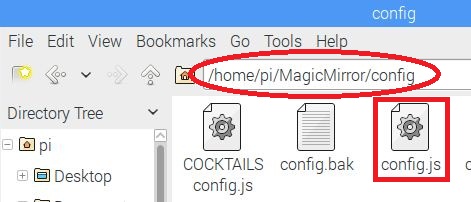
-
Huh, according to your config you use the same locationID that I do. Welcome to NYC! :-)
-
@Mykle1 Yes, the file is there, same directory as the one shown above
-
@Mykle1 I just didn’t modify a thing from that file, just to make it work, once I see it up and running I’ll slowly customize it. I’m in Pennsylvania :)
-
@bhepler said in Config.js file Syntax:
@amosh83 - Well, progress. You have a config.js file in the right place and it’s passing the syntax checks.
Maybe I should have paid more attention while reading. I see now that I asked something that you had already established. My bad.
I am extremely curious to see how MM can report
"Please create a config file. See README for more information. If you get this message while your config file is already created, your config file probably contains an error."when there is a working config in the proper directory. -
@amosh83 Did you post the exact config.js file. If so you’re missing a “/” on the first line.
-
-
@amosh83 said in Config.js file Syntax:
all I was missing was that “/”,
Ahh, you missed when you copied and pasted. That’s fairly common.
are you kidding me???
Now where have I heard this before? Oh yeah, I said it!
Enjoy your mirror
-
I’m having this exact problem, but I’ve used a linter to check for errors and there are none, and my file is in /var/www/html/MagicMirror/config/config.js, I have no idea what I’m doing wrong!
-
@jade said in Config.js file Syntax:
my file is in /var/www/html/MagicMirror/config/config.js,
Your installation of MM belongs as follows, and so the path to your config.js file
pi@raspberry ~/MagicMirror/config/config.js
Then we can work on your config.js if need be
-
@Mykle1 not necessarily, you can install the mirror in every directory you like
-
@strawberry-3.141 … except for directories with different read/write permissions. Not a linux expert, but I guess this includes /var/ in its default status!?
-
I was referring to this forums very own “Complete Setup Tutorial.” Specifically, this:
https://forum.magicmirror.builders/topic/236/complete-setup-tutorial/6I guess I shouldn’t assume that everyone follows the installation procedure.
-
@Mykle1 said in Config.js file Syntax:
Your installation of MM belongs as follows, and so the path to your config.js file
pi@raspberry ~/MagicMirror/config/config.js
When I first started using Linux I was taught the very bad habit of switching to the root user and doing everything as root, so I moved the file into where it needs to be in /home/pi but I still have the same problem
var config = {
    port: 8080,
    ipWhitelist: [],
    language: "en",
    timeFormat: 24,
    units: "metric",
    modules: [
        {
            module: "clock",
            position: "top_left"
        },
        {
            module: "calendar",
            header: "CWG  Pi",
            position: "top_left",
            config: {
                calendars: [
                    {
                        symbol: "calendar-check-o ",
                        url: "https://calendar.google.com/calendar/ical/cwgpi2017%40gmail.com/private-b287e4ebe0e8f5d66665e0c83f9e3fa0/basic.ics"
                    }
                ]
            }
        },
        {
            module: "compliments",
            position: "lower_third",
            updateInterval: 3600000,
            config: {
                compliments: {
                    morning: [
                        "Valar Morghulis",
                        "Valar Dohaeris",
                        "When You Play The Game Of Thrones You Win Or You Die",
                        "Where Is The God Of Tits And Wine?"
                    ],
                    afternoon: [
                        "Sometimes, Those With The Most Power Have The Least Grace",
                        "A Mind Needs Books Like A Sword Needs A Whetstone",
                        "Chaos Isn't A Pit, Chaos Is A Ladder",
                        "A Lion Doesn't Concern Himself With The Opinions Of Sheep"
                    ],
                    evening: [
                        "The Night Is Dark And Full Of Terrors",
                        "Night Gathers And Now My Watch Begins",
                        "Winter Is Coming",
                        "Power Resides Where Men Believe It Resides. It's A Trick, A Shadow On The Wall, And A Very Small Man Can Cast A Very Large Shadow"
                    ]
                }
            }
        },
        {
            module: "currentweather",
            position: "top_right",
            config: {
                location: "Corby",
                locationID: "2652381",  //ID from http://www.openweathermap.org/help/city_list.txt
                appid: "39ab36a3fa513354fbe406263f175c07"
            }
        }
    ]
};
Everything is ok according to jslint but something has got to be not working. Incidentally if I use the sample file and don’t change anything I have the same problem.



Hello! It looks like you're interested in this conversation, but you don't have an account yet.
Getting fed up of having to scroll through the same posts each visit? When you register for an account, you'll always come back to exactly where you were before, and choose to be notified of new replies (either via email, or push notification). You'll also be able to save bookmarks and upvote posts to show your appreciation to other community members.
With your input, this post could be even better 💗
Register Login