MagicMirror Forum
    • Recent
    • Tags
    • Unsolved
    • Solved
    • MagicMirror² Repository
    • Documentation
    • 3rd-Party-Modules
    • Donate
    • Discord
    • Register
    • Login
    A New Chapter for MagicMirror: The Community Takes the Lead
    Read the statement by Michael Teeuw here.

    MMM-Strava

    Scheduled Pinned Locked Moved Health
    activity trackerhealthstrava
    138 Posts 34 Posters 257.4k Views 35 Watching
    Loading More Posts
    • Oldest to Newest
    • Newest to Oldest
    • Most Votes
    Reply
    • Reply as topic
    Log in to reply
    This topic has been deleted. Only users with topic management privileges can see it.
    • lavolp3L Offline
      lavolp3 Module Developer @ianperrin
      last edited by

      @ianperrin Confirmed! Chart is not rotating anymore.
      However it might be worth to think about several rotating charts. Like for weekdays and a range of several months?

      How to troubleshoot modules
      MMM-soccer v2, MMM-AVStock

      I 1 Reply Last reply Reply Quote 0
      • I Offline
        ianperrin @lavolp3
        last edited by

        @lavolp3 said in MMM-Strava:

        @ianperrin … it might be worth to think about several rotating charts. Like for weekdays and a range of several months?

        Good idea, could you add it as an issue in the Github repository so I don’t forget it?

        "Live as if you were to die tomorrow. Learn as if you were to live forever." - Mahatma Gandhi

        1 Reply Last reply Reply Quote 0
        • H Offline
          hattlegr @ianperrin
          last edited by

          @ianperrin I too am stuck on the authorization; I am not sure where to get a valid “web address” and “call back domain “ from to complete the API Application on the strava site To obtain my client ID and client secret numbers The local Host:8080/MMM-Strava/auto does bring up the same screen you posted, but the authorization process fails, I presume because I don’t have the correct client information.

          I lavolp3L 2 Replies Last reply Reply Quote 0
          • I Offline
            ianperrin @hattlegr
            last edited by

            @hattlegr thanks for testing and sorry to hear you’re having issues. Perhaps you can post your config and any logs from the mirror.

            "Live as if you were to die tomorrow. Learn as if you were to live forever." - Mahatma Gandhi

            H 1 Reply Last reply Reply Quote 0
            • H Offline
              hattlegr @ianperrin
              last edited by

              @ianperrin

              Here is my config file

              {
              			module: "MMM-Strava",
              			position:  "bottom_right",
              			config: {
              				client_id: "6054923"
              				// client_secret: "tokin"
              			}
              		},
              

              I got my client ID using the last series of numbers from the Strava URL after I log in.

              I am not sure how to get through the Strava API application. to get client secret code.

              Here is the error i get after running authorise from my localhost:8080 URL

              {"message":"Bad Request","errors":[{"resource":"Application","field":"client_id","code":"invalid"}]}
              
              1 Reply Last reply Reply Quote 0
              • lavolp3L Offline
                lavolp3 Module Developer @hattlegr
                last edited by

                @hattlegr said in MMM-Strava:

                I am not sure where to get a valid “web address” and “call back domain “ from to complete the API Application on the strava site To obtain my client ID and client secret numbers

                On your personal Strava API website (strava.com/settings/api), you need to set a “callback domain” for your project. What did you set?

                How to troubleshoot modules
                MMM-soccer v2, MMM-AVStock

                H 1 Reply Last reply Reply Quote 0
                • H Offline
                  hattlegr @lavolp3
                  last edited by

                  @lavolp3 I am not sure how to setup a call back domain.

                  lavolp3L 1 Reply Last reply Reply Quote 0
                  • lavolp3L Offline
                    lavolp3 Module Developer @hattlegr
                    last edited by

                    @hattlegr You need to create an application in your strava account to use this module. Have you done that?

                    1. Go to www.strava.com/settings/api
                    2. Create an application. As far as I understand the only really important value is the callback domain. I GUESS (!!) this would need to be http://localhost OR the hostname (or IP) of your magicmirror, something like http://magicmirror
                    3. Then you get a client secret and access token, which you need for the further procedure.

                    How to troubleshoot modules
                    MMM-soccer v2, MMM-AVStock

                    I 1 Reply Last reply Reply Quote 0
                    • I Offline
                      ianperrin @lavolp3
                      last edited by ianperrin

                      @lavolp3 said in MMM-Strava:

                      @hattlegr You need to create an application in your strava account to use this module. Have you done that?

                      1. Go to www.strava.com/settings/api
                      2. Create an application. As far as I understand the only really important value is the callback domain. I GUESS (!!) this would need to be http://localhost OR the hostname (or IP) of your magicmirror, something like http://magicmirror
                      3. Then you get a client secret and access token, which you need for the further procedure.

                      The easiest way to authorise the module is

                      1. On the My API Application page update the application by entering localhost as the callback domain.

                      2. Once the Strava API application is updated, copy the client id and client secret from the same page, then use these to update the module configuration in the config.js file and restart the Magic Mirror.

                      3. Finally, on the Pi itself, browse to http://localhost:8080/MMM-Strava/auth/ and follow the steps.

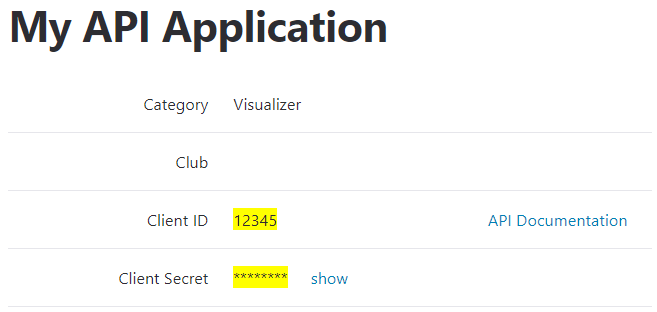
                      If it helps, here are the settings I’ve been using to test the module:
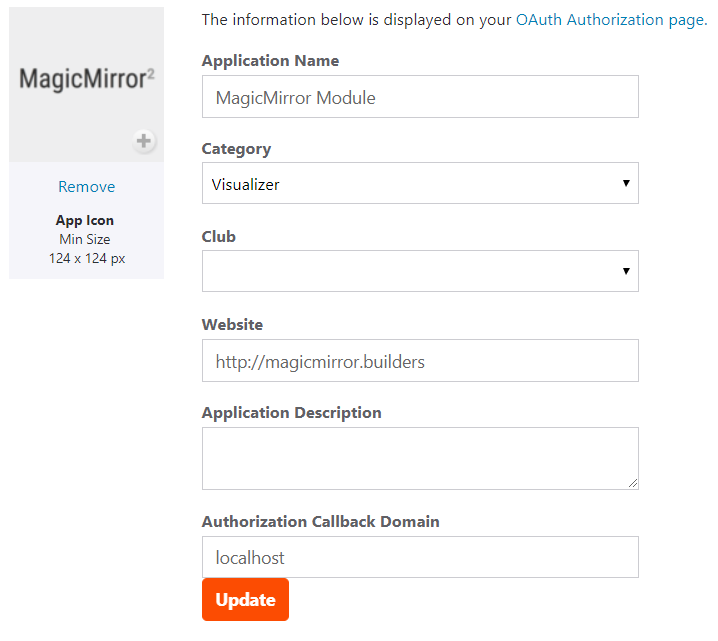
                      Strava-API-Application-Settings.png

                      Strava-API-Application-Client-Details.png

                      "Live as if you were to die tomorrow. Learn as if you were to live forever." - Mahatma Gandhi

                      H 1 Reply Last reply Reply Quote 0
                      • H Offline
                        hattlegr @ianperrin
                        last edited by

                        @ianperrin The description above is very good and I have successfully got through this process.

                        I have added my new Client ID and Client-secret to the config file.
                        When I run my magicmirror I am asked to follow link to strava/auth.
                        I am able to select the module and click the authorize button. This brings me to an the authorize page with the three check boxes as described, when I click on the authorize button it brings me to the Stava login page. I am able to login, but the screen takes me to my dashboard page. with no home / back / close buttons. (it replaces the MM page). So I can’t get out of this stage.

                        Out of interest, I tried opening a browser using localhost:8080 once MM is running and get the same screen. When I click on the authorize button in the browser environment the process works fine and I am eventually taken back to the MM page and the strava data is working. However, when I shut down and star again the authorization is forgotten.

                        I 1 Reply Last reply Reply Quote 0
                        • I Offline
                          ianperrin @hattlegr
                          last edited by

                          @hattlegr okay so we’re making progress. What is the output in the log file or the debug console in the browser? Once you’ve authorised the module, was a tokens.json file created in the MMM-Strava module folder?

                          "Live as if you were to die tomorrow. Learn as if you were to live forever." - Mahatma Gandhi

                          H 1 Reply Last reply Reply Quote 0
                          • H Offline
                            hattlegr @ianperrin
                            last edited by

                            @ianperrin No, there is no file called tokens.json

                            I 1 Reply Last reply Reply Quote 0
                            • I Offline
                              ianperrin @hattlegr
                              last edited by

                              @hattlegr how about the logs or debug console?

                              "Live as if you were to die tomorrow. Learn as if you were to live forever." - Mahatma Gandhi

                              H 2 Replies Last reply Reply Quote 0
                              • H Offline
                                hattlegr @ianperrin
                                last edited by

                                @ianperrin Sorry, I can’t find any logs or sure what a debug console is.

                                I 1 Reply Last reply Reply Quote 0
                                • I Offline
                                  ianperrin @hattlegr
                                  last edited by

                                  @hattlegr okay, so the Magic Mirror creates logs in two places.

                                  1. On the Pi itself. If you use pm2 to start your mirror, these can be viewed by running pm2 logs mm

                                  2. In the browser console. These can be viewed in the browser’s Developer Tools (usually activated by CTRL-SHIFT-i).

                                  Let us know what you find.

                                  "Live as if you were to die tomorrow. Learn as if you were to live forever." - Mahatma Gandhi

                                  1 Reply Last reply Reply Quote 0
                                  • H Offline
                                    hattlegr @ianperrin
                                    last edited by

                                    @ianperrin Here is the log after installing --production.

                                    0 info it worked if it ends with ok
                                    1 verbose cli [ '/usr/bin/node', '/usr/bin/npm', 'install', '--production' ]
                                    2 info using npm@5.6.0
                                    3 info using node@v9.11.2
                                    4 verbose npm-session 72bb8575f86ed6c8
                                    5 silly install runPreinstallTopLevelLifecycles
                                    6 silly preinstall MMM-Strava@2.0.0-BETA
                                    7 info lifecycle MMM-Strava@2.0.0-BETA~preinstall: MMM-Strava@2.0.0-BETA
                                    8 silly install loadCurrentTree
                                    9 silly install readLocalPackageData
                                    10 silly install loadIdealTree
                                    11 silly install cloneCurrentTreeToIdealTree
                                    12 silly install loadShrinkwrap
                                    13 silly saveTree MMM-Strava@2.0.0-BETA
                                    14 verbose stack SyntaxError: Unexpected token < in JSON at position 9216
                                    14 verbose stack     at JSON.parse (<anonymous>)
                                    14 verbose stack     at module.exports (/usr/lib/node_modules/npm/lib/utils/parse-json.js:3:15)
                                    14 verbose stack     at BB.join (/usr/lib/node_modules/npm/lib/install/read-shrinkwrap.js:31:20)
                                    14 verbose stack     at tryCatcher (/usr/lib/node_modules/npm/node_modules/bluebird/js/release/util.js:16:23)
                                    14 verbose stack     at Holder$3._callFunction (eval at generateHolderClass (/usr/lib/node_modules/npm/node_modules/bluebird/js/release/join.js:92:16), <anonymous>:14:44)
                                    14 verbose stack     at Holder$3.checkFulfillment (eval at generateHolderClass (/usr/lib/node_modules/npm/node_modules/bluebird/js/release/join.js:92:16), <anonymous>:29:30)
                                    14 verbose stack     at Promise.eval (eval at thenCallback (/usr/lib/node_modules/npm/node_modules/bluebird/js/release/join.js:14:16), <anonymous>:6:20)
                                    14 verbose stack     at Promise._settlePromise (/usr/lib/node_modules/npm/node_modules/bluebird/js/release/promise.js:566:21)
                                    14 verbose stack     at Promise._settlePromise0 (/usr/lib/node_modules/npm/node_modules/bluebird/js/release/promise.js:614:10)
                                    14 verbose stack     at Promise._settlePromises (/usr/lib/node_modules/npm/node_modules/bluebird/js/release/promise.js:693:18)
                                    14 verbose stack     at Promise._fulfill (/usr/lib/node_modules/npm/node_modules/bluebird/js/release/promise.js:638:18)
                                    14 verbose stack     at Promise._settlePromise (/usr/lib/node_modules/npm/node_modules/bluebird/js/release/promise.js:582:21)
                                    14 verbose stack     at Promise._settlePromise0 (/usr/lib/node_modules/npm/node_modules/bluebird/js/release/promise.js:614:10)
                                    14 verbose stack     at Promise._settlePromises (/usr/lib/node_modules/npm/node_modules/bluebird/js/release/promise.js:693:18)
                                    14 verbose stack     at Promise._fulfill (/usr/lib/node_modules/npm/node_modules/bluebird/js/release/promise.js:638:18)
                                    14 verbose stack     at /usr/lib/node_modules/npm/node_modules/bluebird/js/release/nodeback.js:42:21
                                    15 verbose cwd /home/pi/MagicMirror/modules/mmm-strava
                                    16 verbose Linux 4.9.80-v7+
                                    17 verbose argv "/usr/bin/node" "/usr/bin/npm" "install" "--production"
                                    18 verbose node v9.11.2
                                    19 verbose npm  v5.6.0
                                    20 error Unexpected token < in JSON at position 9216
                                    21 verbose exit [ 1, true ]
                                    
                                    H 1 Reply Last reply Reply Quote 0
                                    • H Offline
                                      hattlegr @hattlegr
                                      last edited by

                                      @hattlegr Note the error on line 20 related to a token which could be a possible reason MM does not remember the authorization.

                                      I 1 Reply Last reply Reply Quote 0
                                      • I Offline
                                        ianperrin @hattlegr
                                        last edited by

                                        @hattlegr it sounds like you’ve got at least a couple of issues here. One relating to the install of the module and another related to the authorisation process. Let’s take them one at a time.

                                        What command are you running to install the module and which directory are you in at the time?

                                        "Live as if you were to die tomorrow. Learn as if you were to live forever." - Mahatma Gandhi

                                        H 1 Reply Last reply Reply Quote 0
                                        • H Offline
                                          hattlegr @ianperrin
                                          last edited by

                                          @ianperrin I went right back to the beginning and started the installation again to ensure I save each step.
                                          During the process I picked up on an error I did not follow up on. After installing --production I had to run ‘npm audit fix’

                                          After running this I tried the authentication again. This time the process did add the token.js file to the MMM=Strava module.

                                          I believe it is working now. I have logged off and rebooted to confirm and the Strava module was working correctly.

                                          
                                          pi@raspberrypi:~/MagicMirror/modules/MMM-Strava $ git checkout develop && git pull
                                          Branch develop set up to track remote branch develop from origin.
                                          Switched to a new branch 'develop'
                                          Already up-to-date.
                                          pi@raspberrypi:~/MagicMirror/modules/MMM-Strava $ npm install --production
                                          npm WARN conflict A git conflict was detected in package-lock.json. Attempting to auto-resolve.
                                          npm WARN conflict To make this happen automatically on git rebase/merge, consider using the npm-merge-driver:
                                          npm WARN conflict $ npx npm-merge-driver install -g
                                          npm WARN deprecated nomnom@1.8.1: Package no longer supported. Contact support@npmjs.com for more info.
                                          added 55 packages from 67 contributors and audited 3075 packages in 32.396s
                                          found 1 moderate severity vulnerability
                                            run `npm audit fix` to fix them, or `npm audit` for details // Was important to run this command to make authentication process work correctly
                                          
                                          
                                          pi@raspberrypi:~/MagicMirror/modules/MMM-Strava $ npm audit fix
                                          npm WARN deprecated nomnom@1.8.1: Package no longer supported. Contact support@npmjs.com for more info.
                                          added 537 packages from 583 contributors in 92.726s
                                          fixed 1 of 1 vulnerability in 3075 scanned packages
                                          pi@raspberrypi:~/MagicMirror/modules/MMM-Strava $ npm audit
                                                                                                                          
                                                                 === npm audit security report ===                        
                                                                                                                          
                                          found 0 vulnerabilities
                                           in 3075 scanned packages
                                          pi@raspberrypi:~/MagicMirror/modules/MMM-Strava $
                                          
                                          // Config 
                                          {
                                          			module: "MMM-Strava",
                                          			position:  "center",
                                          			config: {
                                          				client_id: "3---6",
                                          				client_secret: "f22b--------------------0d9f7",
                                          				mode: "chart",
                                          				auto_rotate: "true",
                                          				units: "imperial"
                                          			}
                                          
                                          1 Reply Last reply Reply Quote 0
                                          • lavolp3L Offline
                                            lavolp3 Module Developer @ianperrin
                                            last edited by

                                            @ianperrin said in MMM-Strava:

                                            @zerodegree79 , @Val07300, @ctatos (and others I may have missed).

                                            A new (beta) version of the module with support for Strava’s new authentication flow is available.

                                            Just wanted to report that the module is working fine until now using the development branch.

                                            What I would like to implement is some kind of a record panel showing the fastest 1k, 5k, 10k for running 20k, 40k, for cycling etc.
                                            I can’t see this in the API. Does anyone know a way to extract these values?

                                            How to troubleshoot modules
                                            MMM-soccer v2, MMM-AVStock

                                            1 Reply Last reply Reply Quote 0

                                            Hello! It looks like you're interested in this conversation, but you don't have an account yet.

                                            Getting fed up of having to scroll through the same posts each visit? When you register for an account, you'll always come back to exactly where you were before, and choose to be notified of new replies (either via email, or push notification). You'll also be able to save bookmarks and upvote posts to show your appreciation to other community members.

                                            With your input, this post could be even better 💗

                                            Register Login

                                            • 1
                                            • 2
                                            • 3
                                            • 4
                                            • 5
                                            • 6
                                            • 7
                                            • 1 / 7
                                            • First post
                                              Last post
                                            Enjoying MagicMirror? Please consider a donation!
                                            MagicMirror created by Michael Teeuw.
                                            Forum managed by Sam, technical setup by Karsten.
                                            This forum is using NodeBB as its core | Contributors
                                            Contact | Privacy Policy