Read the statement by Michael Teeuw here.
MMM-forecast-io -- Localized up to the minute weather
-
This module adds super localized, up to the minute weather using the forecast.io API – the same service that powers the Dark Sky App.
It will tell you exactly when the rain will start or stop.
-
@dmcinnes - Looks good.
There was a fork(?) of the original Magic Mirror (version 1) code which replaced the standard weather module using data from Dark Sky’s forecast.io API - see https://github.com/jangellx/MagicMirror
This included a graph of temperature/rain, a forecast for the week ahead and a summary of current weather - see https://github.com/jangellx/MagicMirror#important-installation-note
Code seems to be contained in https://github.com/dmcinnes/MMM-forecast-io/blob/master/MMM-forecast-io.js
Any chance your MM² module could be extended to include this too?
-
Wow that looks great! Particularly the weather forecast.
I looked at creating a graph since the data is all right there in the response. I might as well see I can port the code over to this module! -
Forecast.io API has been rebranded as darksky.net: http://blog.darksky.net/introducing-darksky-net/
I’ve updated this module with the default URLs, otherwise it doesn’t seem to support the redirect properly.
I’m continuing to work on this module, more soon!
-
@dmcinnes said in MMM-forecast-io -- Localized up to the minute weather:
Wow that looks great! Particularly the weather forecast.
I looked at creating a graph since the data is all right there in the response. I might as well see I can port the code over to this module!Just wanted to say thanks for the great module, and ask if you were planning on implementing the graph like the abovepicture? As it looks really awesome!
-
@Les sure thing! I am working on a precipitation graph and I have a forecast set up. Check out the weather-forecast branch for a work in progress:
https://github.com/dmcinnes/MMM-forecast-io/tree/weather-forecast -
@dmcinnes Testing it out. Got 2 questions…
- is it possible to activate the chart yet? (if so how)
- does the 7 day forecast work? I have showForcast: “true” in config.js but it is not displayed. Is there something else I have to set?
-
@Les the rain graph should show up when the API responds with “minutely”, when there’s minute-by-minute rain data.
Not sure why the forecast isn’t showing, it should appear by default. I’ll have to look at it later today. -
Just for reference, this is what i have in config.js
                {
                    module: 'MMM-forecast-io',
                    position: 'top_right',
                    config: {
                      showForecast: 'true',
                      // See 'Configuration options' for more information.
                      apiKey: 'keyvalue',  // Dark Sky $
                      // Only required if geolocation doesn't work:
                      latitude:   43.955907,
                      longitude: -78.906245,
                        updateInterval: 600000
                        }
                },
Note from admin: Please use Markdown on code snippets for easier reading!
-
Hi, I’m trying to use this module but it keep showing an error on the config file.
Here is the code->
{
      module: 'MMM-forecast-io',
      position: 'top_right',  // This can be any of the regions.
      config: {
        // See 'Configuration options' for more information.
        apiKey: 'my api key' // Dark Sky API key.
        // Only required if geolocation doesn't work:
        latitude:   37.1468,
        longitude: -8.5846
      }
    },
When I remove this code part the config works, so all the rest is ok.
I already have cloned the module on git to the newest version.
Can someone help me?..
Note from admin: Please use Markdown on code snippets for easier reading!
-
There is a comma missing after your apiKey
-
@Les make sure you’re on the right branch:
git checkout weather-forecast -
@yawns Thanks, it was the comma. I miss it.
-
@dmcinnes I was in the main branch. Now I got the graph and full forecast…Thanks!
I don’t know if this is because your still working on it, or whether it’s just my setup but the days are on top of the icons. If it’s just my setup then I’m guessing adding some padding in the css file would do the trick.
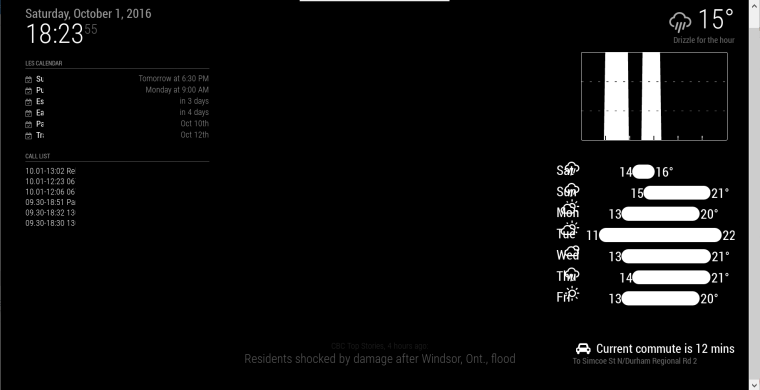
-
@Les yeah still working on it :) My testing config file had the “small” class, though I’m surprised it looks so bad without it.
-
@Les thanks for the screenshot!
-
@dmcinnes No Problem. Thanks for the great module…can’t wait to see it when it’s complete. :)
-
Hi,
Can’t wait for the finished weather module ;-).
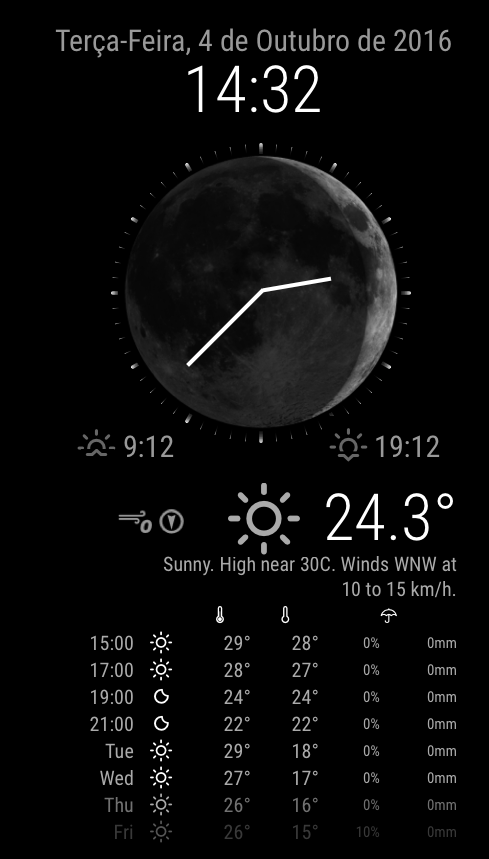
I’ve been thinking about screen optimisation and I’ve tried working on module code to make something like this “photoshopped” image, but my skills on JS are very, very limited :-(.
I think that would be a nice add-on a “fusion” of the MMM-moon-phases module (with a bigger moon image), a analog clock (with a minimalist face) and the a weather/forecast module.
What do you think?
-
@paulocarrasco said in MMM-forecast-io -- Localized up to the minute weather:
Hi,
…
I think that would be a nice add-on a “fusion” of the MMM-moon-phases module (with a bigger moon image), a analog clock (with a minimalist face) and the a weather/forecast module.What do you think?
Just my 2 cents, but the picture looks amazing. I also like that you showed a few temperatures from later in the day before giving the future day forecasts. Daily percipitation % is also a great idea. :)
However, for the purpose of screen real estate may I suggest making things switchable (on/off). So for example, date/time at the top. then moon/analog cloock. Then current weather, then forecast. So people can pick what is important to them… And this is just me, but I like having the current weather at the top So the moon/clock is distracting to me. if I could move it (I know I’m asking for a lot…but if I could move it to the bottom…would look great, and still give me info in the order of priority I need.) Anyways, just take this as once persons views :) Good luck with your module, can’t wait to see it when it’s complete! -
Looking forward to try this module too. It looks very nice

Hello! It looks like you're interested in this conversation, but you don't have an account yet.
Getting fed up of having to scroll through the same posts each visit? When you register for an account, you'll always come back to exactly where you were before, and choose to be notified of new replies (either via email, or push notification). You'll also be able to save bookmarks and upvote posts to show your appreciation to other community members.
With your input, this post could be even better 💗
Register Login