MagicMirror Forum
    • Recent
    • Tags
    • Unsolved
    • Solved
    • MagicMirror² Repository
    • Documentation
    • 3rd-Party-Modules
    • Donate
    • Discord
    • Register
    • Login
    A New Chapter for MagicMirror: The Community Takes the Lead
    Read the statement by Michael Teeuw here.

    MMM-forecast-io -- Localized up to the minute weather

    Scheduled Pinned Locked Moved Utilities
    127 Posts 36 Posters 221.9k Views 38 Watching
    Loading More Posts
    • Oldest to Newest
    • Newest to Oldest
    • Most Votes
    Reply
    • Reply as topic
    Log in to reply
    This topic has been deleted. Only users with topic management privileges can see it.
    • S Offline
      shavesophere
      last edited by

      great module! I’m curious to know how to configure it for “small”… i can’t find any clue in the documentation apart from trying to fiddle around with the .css. thanks!

      D 1 Reply Last reply Reply Quote 0
      • D Offline
        dmcinnes Module Developer @shavesophere
        last edited by

        @shavesophere thanks! You can add the ‘small’ class to the module’s classes in the config.js.

        S 1 Reply Last reply Reply Quote 0
        • D Offline
          dmcinnes Module Developer
          last edited by

          I’ve just pushed an update to the module. Previously if there was a network error the module would get “stuck” and no longer update. This is now fixed!

          [card:dmcinnes/MMM-forecast-io]

          1 Reply Last reply Reply Quote 1
          • S Offline
            shavesophere @dmcinnes
            last edited by

            @dmcinnes forgive me I’m a noob when it comes to classes in javascript… you you be so kind as to post the code that needs altering?

            D 1 Reply Last reply Reply Quote 0
            • D Offline
              dmcinnes Module Developer @shavesophere
              last edited by

              @shavesophere sorry I wasn’t too descriptive!
              Here’s the example from the repo with the added ‘small’ class, forth line from the top:

                {
                  module: 'MMM-forecast-io',
                  position: 'top_right',  // This can be any of the regions.
                  classes: 'small',
                  config: {
                    // See 'Configuration options' for more information.
                    apiKey: 'abcde12345abcde12345abcde12345ab', // Dark Sky API key.
                    // Only required if geolocation doesn't work:
                    latitude:   16.77532,
                    longitude: -3.008265
                  }
               }
              

              Hope that helps!

              S 1 Reply Last reply Reply Quote 1
              • S Offline
                shavesophere @dmcinnes
                last edited by

                @dmcinnes ah i see! much obliged. keep up the good work!

                1 Reply Last reply Reply Quote 0
                • R Offline
                  Rian9771
                  last edited by

                  Hello, has something changed to this module? I have clones the repo twice but i still don’t see the graph being displayed. Did ‘git checkout weather-forecast’ as mentioned but still a no go. I can see everything else but the graph. I am on debian, node serveronly, Firefox.

                  D 1 Reply Last reply Reply Quote 0
                  • D Offline
                    dmcinnes Module Developer @Rian9771
                    last edited by

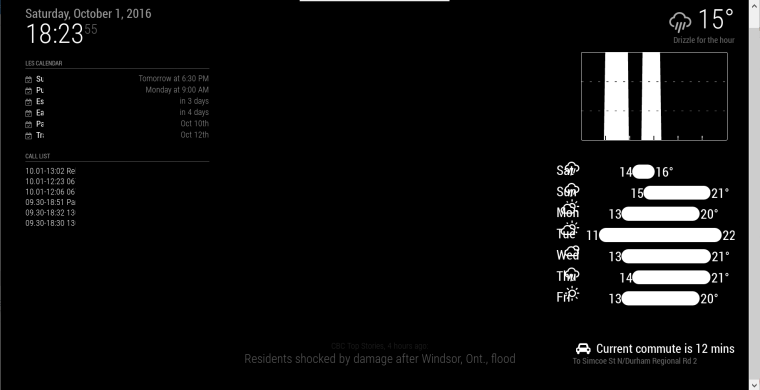
                    Hi @Rian9771 the rain graph only appears when there’s rain happening in the next hour.

                    1 Reply Last reply Reply Quote 0
                    • P Offline
                      phrazelle
                      last edited by

                      Hello! Thanks for your time with this module!

                      I would like to customize the weather icons. I am able to change the overall color of the icons with CSS, but taking that a step further, is there a way to alter sections of the icons instead of the icon as a whole?

                      I.e. wi-day-cloudy with an orange sun poking out from a grey cloud.

                      I see that the icons are pulled from the erikflowers github repository, but I don’t see where they are pulling from within the module. Based on most of these weather modules using the same iconset, I’m guessing they’re being pulled from that repo directly.

                      My initial thought was to extract from the module, recolor with Photoshop and then replace the icons in the module. Is that possible? Would I just make a whole new set, store locally and change the path somewhere in the JS?

                      strawberry 3.141S 1 Reply Last reply Reply Quote 0
                      • strawberry 3.141S Offline
                        strawberry 3.141 Project Sponsor Module Developer @phrazelle
                        last edited by

                        @phrazelle the css is located in the magicmirror vendor folder

                        Please create a github issue if you need help, so I can keep track

                        P 1 Reply Last reply Reply Quote 0
                        • P Offline
                          phrazelle @strawberry 3.141
                          last edited by

                          @strawberry-3.141 Thanks for the info!

                          After looking through there, it looks like the module pulls the icons as a font file. I believe that would mean that CCS customization would be overall to each displayed character. So there would be no way to color segments of each character (like an orange sun poking out from a grey cloud) because the stylization would apply to the character as a whole.

                          Am I assessing at that correctly?

                          1 Reply Last reply Reply Quote 0
                          • ooom416354O Offline
                            ooom416354
                            last edited by

                            Great module!! One question, is there anyway to make the length of the temperature bars a bit smaller? I suppose because the NY weather is so erratic right now it is making the bars wider but was just curious if I can shrink them a bit to save some space. thanks!

                            D 1 Reply Last reply Reply Quote 0
                            • ooom416354O Offline
                              ooom416354
                              last edited by

                              also it could just be me but I keep seeing the rain icon next to the temperature even though there’s no rain in the forecast for today (the small icon by the days of the week shows nothing but sun). Anything I can do to check that icon to see if it is an issue?

                              1 Reply Last reply Reply Quote 0
                              • B Offline
                                bminer1
                                last edited by paviro

                                Im getting the below when i try to install:

                                pi@raspberrypi:~/MagicMirror/modules $ git pull https://github.com/dmcinnes/MMM-forecast-io.git
                                From https://github.com/dmcinnes/MMM-forecast-io
                                 * branch            HEAD       -> FETCH_HEAD
                                
                                *** Please tell me who you are.
                                
                                Run
                                
                                  git config --global user.email "you@example.com"
                                  git config --global user.name "Your Name"
                                
                                to set your account's default identity.
                                Omit --global to set the identity only in this repository.
                                
                                fatal: empty ident name (for <pi@raspberrypi.(none)>) not allowed
                                pi@raspberrypi:~/MagicMirror/modules $ 
                                

                                How do i fix this in order to install?


                                Note from admin: Please use Markdown on code snippets for easier reading!

                                morozgrafixM 1 Reply Last reply Reply Quote 0
                                • morozgrafixM Offline
                                  morozgrafix Moderator @bminer1
                                  last edited by morozgrafix

                                  @bminer1 it seems that you are trying to pull instead of clone (and git is not globally configured on your system and doesn’t recognize you)

                                  try running this command instead: git clone https://github.com/dmcinnes/MMM-forecast-io.git

                                  1 Reply Last reply Reply Quote 1
                                  • B Offline
                                    bminer1
                                    last edited by

                                    noob mistake. Installed now. Thanks!!
                                    I feel like an idiot. This machine will not beat me!!

                                    1 Reply Last reply Reply Quote 0
                                    • B Offline
                                      bminer1
                                      last edited by

                                      I’m not getting any graph for precipitation. Will it only be there if there is rain/snow in the next x amount of hours?

                                      morozgrafixM 1 Reply Last reply Reply Quote 0
                                      • morozgrafixM Offline
                                        morozgrafix Moderator @bminer1
                                        last edited by

                                        @bminer1 I believe that default setting is not to show precipitation graph, unless there is a prediction for rain or snow in next hour. I think it takes data from minutely weather forecast supplied by DarkSky.

                                        1 Reply Last reply Reply Quote 0
                                        • FlatPepsiF Offline
                                          FlatPepsi
                                          last edited by

                                          I love the simplicity of MMM-Forecast.io, and yet wanted more from the graph. The default graph seems to be aimed at minutely weather for the near future.

                                          Earlier in this thread there was a graph example from dmcinnes’s mirror:
                                          https://github.com/jangellx/MagicMirror#important-installation-note
                                          Sadly, the code from that mirror’s graph is a totally different approach than the main branch of forecast.io. Stealing code was not an option, so I had to write a bunch from scratch.

                                          For my own use, I’ve rewritten a lot of the graph- and added in a few goodies, like:
                                          -Graph now shows 36 hours of forecast
                                          -Day/night shading in graph
                                          -Temperature line in graph with labels
                                          -Precip intensity graph is now blue.
                                          -Graph has freezing blue line, and hot 80 degree line.
                                          -Wind speed is an option to turn on/off
                                          -Sunrise/Sunset is an option to turn on/off
                                          -Included notes for easy color icons, via “Color-icons.md”

                                          my new weather graph

                                          Feel free to play with my branch:
                                          https://github.com/FlatPepsi17/MMM-forecast-io/tree/FlatPepsi17-GraphUpgrade

                                          Known limitation: non-Fahrenheit units will probably look funny, as the graph scaling & hot/cold lines are not unit aware.

                                          D 1 Reply Last reply Reply Quote 0
                                          • D Offline
                                            dmcinnes Module Developer @ooom416354
                                            last edited by

                                            @ooom416354 sorry about taking so long to reply! You can shrink the module a bit by using the MagicMirror’s size classes. I normally have mine set as “small”.

                                            {
                                              module: 'MMM-forecast-io',
                                              classes: 'small'
                                              ...
                                            }
                                            
                                            1 Reply Last reply Reply Quote 0

                                            Hello! It looks like you're interested in this conversation, but you don't have an account yet.

                                            Getting fed up of having to scroll through the same posts each visit? When you register for an account, you'll always come back to exactly where you were before, and choose to be notified of new replies (either via email, or push notification). You'll also be able to save bookmarks and upvote posts to show your appreciation to other community members.

                                            With your input, this post could be even better 💗

                                            Register Login

                                            • 1
                                            • 2
                                            • 3
                                            • 4
                                            • 5
                                            • 6
                                            • 7
                                            • 1 / 7
                                            • First post
                                              Last post
                                            Enjoying MagicMirror? Please consider a donation!
                                            MagicMirror created by Michael Teeuw.
                                            Forum managed by Sam, technical setup by Karsten.
                                            This forum is using NodeBB as its core | Contributors
                                            Contact | Privacy Policy