Read the statement by Michael Teeuw here.
MMM-Lunartic
-
That’s the return from my API for the data. The image comes from the USNO API
-
@Mykle1 now the image is not loading…
-
@Stoffbeuteluwe said in MMM-Lunartic:
now the image is not loading…
Yes, I see. The USNO API is having trouble at the moment. “api.usno.navy.mil refused to connect.”
I will see what i can find out.
in the meantime, you can use the MMM-Lunartic.js file that is inside the ‘temporary fix’ folder in the module folder. This will give you pictures until the api becomes functional again
-
@Mykle1 ok thanks
-
@Mykle1 Thanks. I set it to “animation” and it is working now.
Check out my modules at: https://github.com/mumblebaj?tab=repositories
Check my blog-post: https://mumblebaj.xyz/
Check my MM Container: https://hub.docker.com/repository/docker/mumblebaj/magicmirror/general -
@mumblebaj said in MMM-Lunartic:
Thanks. I set it to “animation” and it is working now.
yes because that uses a local .gif file that is included with the module.the alternate module.js file also uses local pix for just such an occasion. either will work. for now, the the usno api is still being a pain in the butt
-
@Mykle1 No problem. Thanks for a really nice module.
Check out my modules at: https://github.com/mumblebaj?tab=repositories
Check my blog-post: https://mumblebaj.xyz/
Check my MM Container: https://hub.docker.com/repository/docker/mumblebaj/magicmirror/general -
@mumblebaj said in MMM-Lunartic:
Thanks for a really nice module.
My pleasure. I’ll keep an eye on the USNO API. It’s still has issues.
-
@Mykle1 Now it works …
-
@Stoffbeuteluwe said in MMM-Lunartic:
Now it works …
Yes, the USNO API is working again so you can get the most current images of the moon and its phases. So, rename the temporary fix .js file (if you are using it) and use the original MMM-Lunartic.js file again.
-
@Mykle1 Thanks for helping and your nice modules
-
I am using the current view of the moon. I have the module working. I just need to remove the line over the moon image and center the text that states “Moon Phase” to line it up in the center over the moon image.
-
These entries in your custom.css file should help you with that. Adjust the values to your satisfaction
.MMM-Lunartic .xsmall.bright { font-size:22px; } .MMM-Lunartic img.photo { /* display: none; uncomment if you don't want an image */ width: 100%; /* adjust size of moon picture */ margin-left: 0px; /* Precisely align moon picture with these */ margin-right: 0px; margin-top: 0px; /* -41px for current. -21px for animation or static. */ margin-bottom: -11px; /* -51px for current. -21px for animation or static. */ } -
@Mykle1 Thanks.
I have currently adjusted those settings from within my Lunartic.css file and they do change where the text and moon image are positioned. I cannot find a way to remove the horizontal line over the moon image.
I currently only have a main.css file, but I am assuming I can just create a blank custom.css file and place it in the MagicMirror/css directory and that will work?
-
@BD0G said in MMM-Lunartic:
I cannot find a way to removed the horizontal line over the moon image.
Can you post a pic of the “horizontal line over the moon image?” I assume you’re not talking about the text.
I currently only have a main.css file, but I am assuming I can just create a blank custom.css file and place it in the MagicMirror/css directory and that will work?
You should already have a custom.css file in your css folder. Any modifications to css should be done within that file. It is not recommended that you make any changes to the main.css file.
-
I have no custom.css file that was created during the install. I used the new installer script from @sdetweil when I installed my MagicMirror software.
Here is a picture of the line I am referring to. It is below the text and above the moon image.
https://www.dropbox.com/s/k1un0q2ofu6w02c/20191118_161043.jpg?dl=0I think a centered text that reads “Moon Phase” and no line would be more aesthetically pleasing.
-
@BD0G there is one in ~/MagicMirror/css, it used to contain this
/***************************************************** * Magic Mirror * * Custom CSS * * * * By Michael Teeuw http://michaelteeuw.nl * * MIT Licensed. * * * * Add any custom CSS below. * * Changes to this files will be ignored by GIT. * *****************************************************/ body { } -
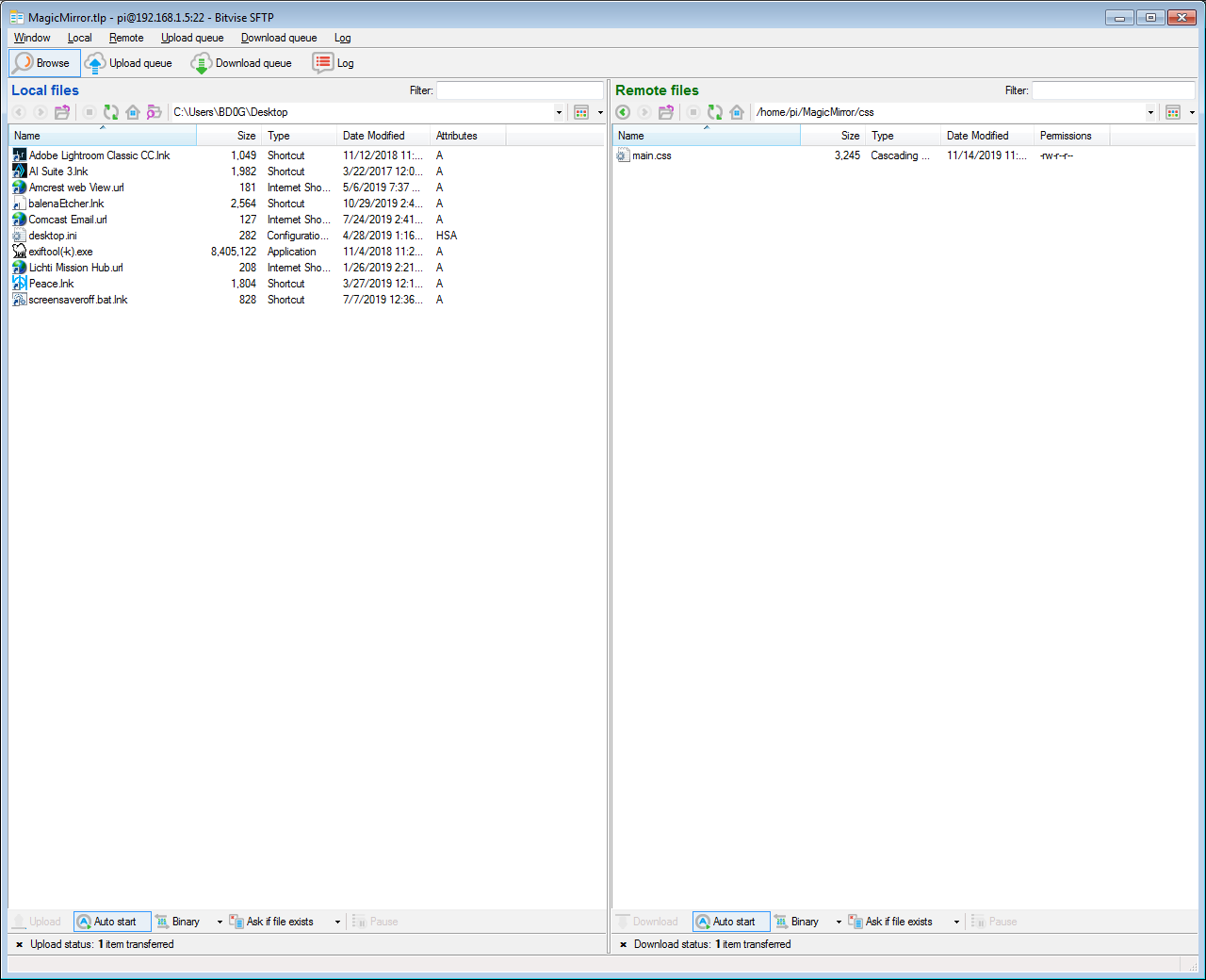
@sdetweil Sam - Where is this file located . I have looked and looked.
Here is the only file listed under MagicMirror/css
-
~/MagicMirror/css
-
@BD0G weird… its still part of the repo, so it should have been installed
I just checked and did a git clone, and the file is present




Hello! It looks like you're interested in this conversation, but you don't have an account yet.
Getting fed up of having to scroll through the same posts each visit? When you register for an account, you'll always come back to exactly where you were before, and choose to be notified of new replies (either via email, or push notification). You'll also be able to save bookmarks and upvote posts to show your appreciation to other community members.
With your input, this post could be even better 💗
Register Login