MagicMirror Forum
    • Recent
    • Tags
    • Unsolved
    • Solved
    • MagicMirror² Repository
    • Documentation
    • 3rd-Party-Modules
    • Donate
    • Discord
    • Register
    • Login
    A New Chapter for MagicMirror: The Community Takes the Lead
    Read the statement by Michael Teeuw here.

    MMM-CalendarExt

    Scheduled Pinned Locked Moved Productivity
    198 Posts 45 Posters 232.9k Views 45 Watching
    Loading More Posts
    • Oldest to Newest
    • Newest to Oldest
    • Most Votes
    Reply
    • Reply as topic
    Log in to reply
    This topic has been deleted. Only users with topic management privileges can see it.
    • ? Offline
      A Former User @Smotx
      last edited by

      @smotx Sorry, it can’t without source modifying.

      1 Reply Last reply Reply Quote 0
      • J Offline
        jimmysmalls
        last edited by

        I can’t seem to figure out why I don’t have the start times on my calendar. I’m really liking it other than that. I’m sure it’s probably something simple but I’m open to feeling stupid after the time I’ve spend trying to figure it out haha

        {
              module: 'MMM-CalendarExt',
              position: "lower_third", // ignore this.
              config: {
                system: {
                  show: ['month'],
                  locale: 'en',
        	  showEmptyView: 1,
                },
                views: {
                  month: {
                    position:'lower_third',
        	    showWeeks: 0,
        	    onlyStartingTime:1,
                  },
                },
                calendars :[
                  {
        
        ? 1 Reply Last reply Reply Quote 0
        • ? Offline
          A Former User @jimmysmalls
          last edited by

          @jimmysmalls
          By default, time of month/week view is hidden because there might be not enough space.
          Add this into your css/custom.css;

          .CALEXT .tableStyle .eventTime {
             display: block;
             order: 3; // when you want to display time under the event title. 
          }
          
          J 1 Reply Last reply Reply Quote 0
          • J Offline
            jimmysmalls @Guest
            last edited by

            @sean
            That did the trick, thank you! One other quick question that maybe I’m overlooking the answer to in the documentation but is there a way to have it show the time on a 12 hour format instead of 24?

            ? 1 Reply Last reply Reply Quote 0
            • ? Offline
              A Former User @jimmysmalls
              last edited by

              @jimmysmalls
              use timeFormat: "hh:mm A" instead timeFormat: "HH:mm"
              If you don’t want AM/PM indicator, just use "hh:mm"

              1 Reply Last reply Reply Quote 0
              • J Offline
                JKTitanium @Vauxdvihl
                last edited by

                @vauxdvihl

                Hi, Sorry I new here. Do I need a seperate Calender for each icon/emoj? Can I use Rules for one single Calendar?

                ? 1 Reply Last reply Reply Quote 0
                • ? Offline
                  A Former User @JKTitanium
                  last edited by

                  @jktitanium
                  Symbol is fixed per calendar.
                  However each event style(color or font except symbol) could be variable by condition.

                  1 Reply Last reply Reply Quote 0
                  • F Offline
                    Frek
                    last edited by

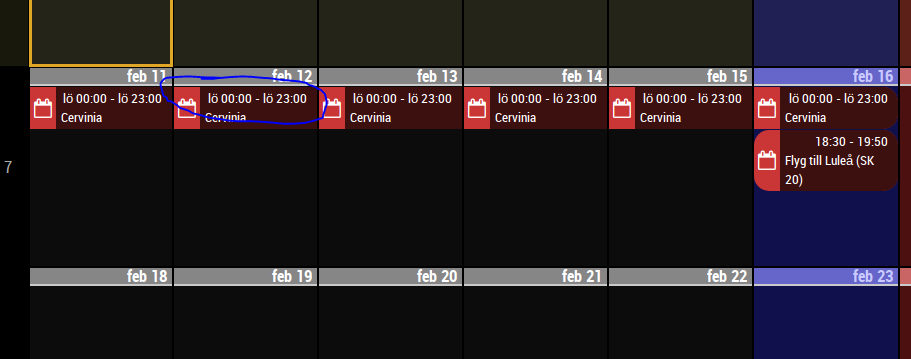
                    Hi. In weeks view with event time displayed, is there a way to remove the starting time and ending time on full day events?
                    0_1549320903648_da4dccb1-46e9-422e-9dff-2d527b4c6fa4-image.png

                    ? 1 Reply Last reply Reply Quote 0
                    • ? Offline
                      A Former User @Frek
                      last edited by

                      @frek
                      Add this into your css/custom.css;

                      .CALEXT .tableStyle .eventTime {
                      display: none;
                      }

                      F 1 Reply Last reply Reply Quote 0
                      • F Offline
                        Frek @Guest
                        last edited by

                        @sean
                        Thx for the reply.
                        I already have this in my css to display time, that I want:

                        div.CALEXT .tableStyle .eventTime {
                        display:block;
                        font-weight:normal;
                        font-size:70%;
                        }

                        But I was wondering if on full day events its possible to only show title, not the time

                        ? 1 Reply Last reply Reply Quote 0
                        • ? Offline
                          A Former User @Frek
                          last edited by

                          @frek

                          div.CALEXT .tableStyle .fulldayevent .eventTime {
                            display:none;
                          }
                          

                          Try this.

                          F 1 Reply Last reply Reply Quote 0
                          • F Offline
                            Frek @Guest
                            last edited by

                            @sean
                            tried adding i to my custom.css and no change. my .css looks like:

                             /*****************************************************
                             * Magic Mirror                                      *
                             * Custom CSS                                        *
                             *                                                   *
                             * By Michael Teeuw http://michaelteeuw.nl           *
                             * MIT Licensed.                                     *
                             *                                                   *
                             * Add any custom CSS below.                         *
                             * Changes to this files will be ignored by GIT. *
                             *****************************************************/
                            
                             body {
                              margin: 10px;
                              height: calc(100% - 20px);
                              width: calc(100% - 20px);	
                             }
                             div.CALEXT .tableStyle .fulldayevent .eventTime {
                              display:none;
                             }
                             div.CALEXT .tableStyle .eventTime {
                              display:block;
                              font-weight:normal;
                              font-size:70%;
                             }
                             .CALEXT .tableStyle td.slot {
                              max-height:200px;
                              height:200px;
                             }
                             .CALEXT .tableStyle {
                              margin:0;
                              max-width: 100%;
                             }
                            
                            ? 1 Reply Last reply Reply Quote 0
                            • ? Offline
                              A Former User @Frek
                              last edited by

                              @frek said in MMM-CalendarExt:

                              div.CALEXT .tableStyle .fulldayevent .eventTime {
                              display:none;
                              }
                              div.CALEXT .tableStyle .eventTime {
                              display:block;
                              font-weight:normal;
                              font-size:70%;
                              }
                              .CALEXT .tableStyle td.slot {
                              max-height:200px;
                              height:200px;
                              }
                              .CALEXT .tableStyle {
                              margin:0;
                              max-width: 100%;
                              }

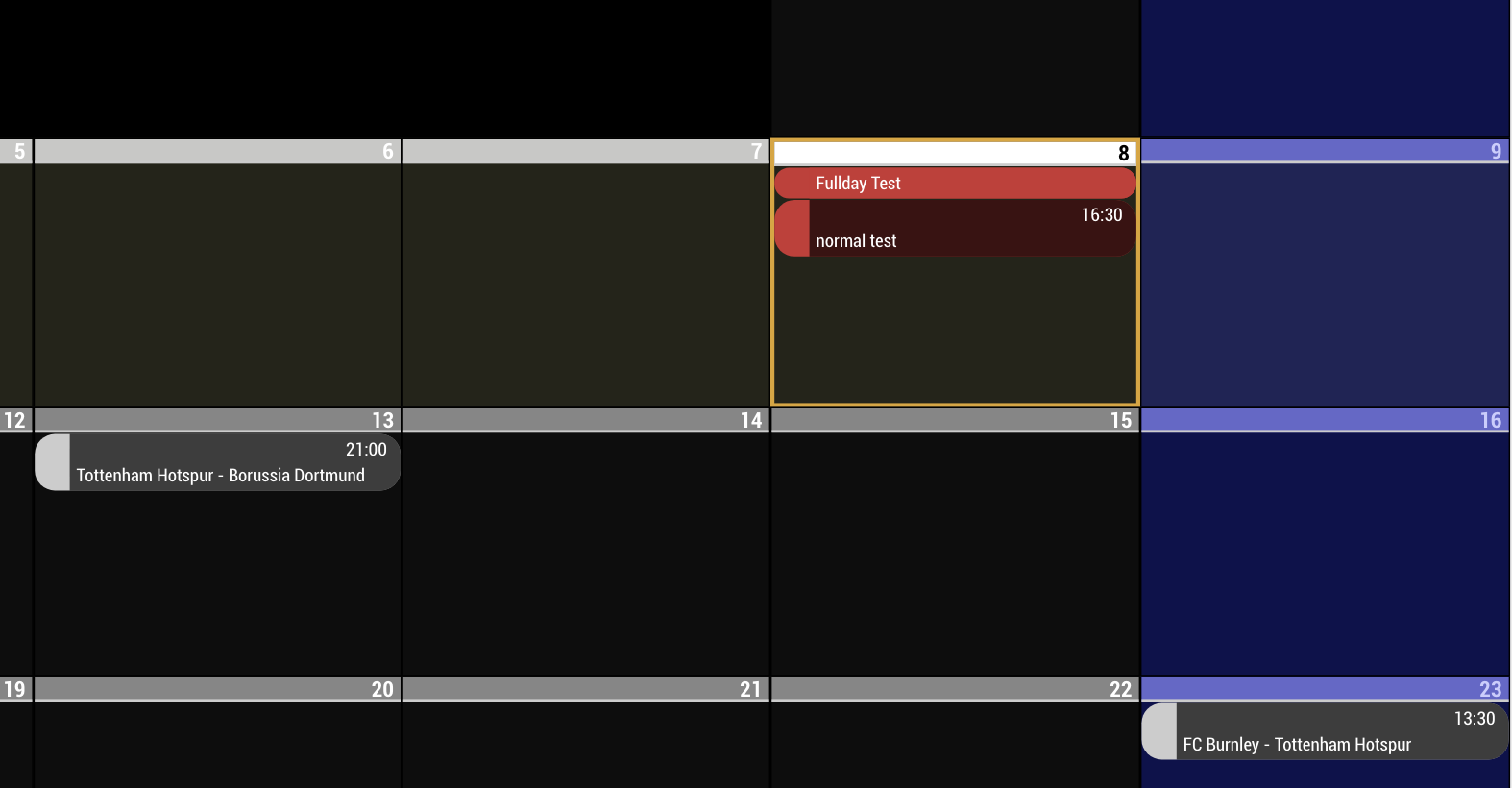
                              I tested with your CSS but it works as expectation.
                              0_1549613462811_test1111.png

                              F 1 Reply Last reply Reply Quote 0
                              • F Offline
                                Frek @Guest
                                last edited by

                                @sean ah suck… my test calendar didnt have a full day event… just a long normal event. Google calandar tricked me by showing me it as a fullday event in their app…No wonder why it didnt work… thx for the help =)

                                1 Reply Last reply Reply Quote 0
                                • G Offline
                                  goalie2k
                                  last edited by

                                  Is it possible to make the event time display on the SAME line as the event title?

                                  ? 1 Reply Last reply Reply Quote 0
                                  • ? Offline
                                    A Former User @goalie2k
                                    last edited by

                                    @goalie2k
                                    Of course possible by adjusting CSS
                                    Add this into your css/custom.css

                                    .CALEXT .event .eventContainer {
                                      display: flex;
                                      flex-direction: row;
                                      flex-wrap: wrap;
                                    }
                                    
                                    
                                    .CALEXT .eventTime {
                                      order: 2;
                                      width: 30%;
                                    }
                                    
                                    .CALEXT .eventContent {
                                      order: 1;
                                      width: 70%;
                                    }
                                    

                                    It will show like this.
                                    0_1554273563144_test.png

                                    G 1 Reply Last reply Reply Quote 1
                                    • G Offline
                                      goalie2k @Guest
                                      last edited by

                                      @Sean said in MMM-CalendarExt:

                                      order: 2;
                                      width: 30%;

                                      YOU ROCK! Thank you!

                                      1 Reply Last reply Reply Quote 0
                                      • S Offline
                                        Subintro
                                        last edited by

                                        Hey does anyone know how to change text on the calendars?

                                        I’m using the ‘Current’ event, but it looks kind of confusing as it says ‘In 50 minutes’, which makes it seem like the event is in 50 minutes, but really ends in 50 minutes

                                        ? 1 Reply Last reply Reply Quote 0
                                        • ? Offline
                                          A Former User @Subintro
                                          last edited by A Former User

                                          @Subintro

                                          With MMM-CalendarExt, it’s not so easy. You just use useRelative:0 to display normal time. Anyway “CURRENT” event will not be thing of “START IN FUTURE”, It is already started and be a kind of “END IN FUTURE” things. “CURRENT” means that.

                                          How about using MMM-CalendarExt2? That is new build-up and the feature can be configurable and customizable by configuration.
                                          https://github.com/eouia/MMM-CalendarExt2/wiki/Event-Time#2-relative

                                          S 1 Reply Last reply Reply Quote 0
                                          • S Offline
                                            Subintro @Guest
                                            last edited by

                                            @Sean

                                            Oh nice, I’ll check it out. Hopefully wont have to change too much with my config

                                            1 Reply Last reply Reply Quote 0

                                            Hello! It looks like you're interested in this conversation, but you don't have an account yet.

                                            Getting fed up of having to scroll through the same posts each visit? When you register for an account, you'll always come back to exactly where you were before, and choose to be notified of new replies (either via email, or push notification). You'll also be able to save bookmarks and upvote posts to show your appreciation to other community members.

                                            With your input, this post could be even better 💗

                                            Register Login

                                            • 1
                                            • 2
                                            • 6
                                            • 7
                                            • 8
                                            • 9
                                            • 10
                                            • 8 / 10
                                            • First post
                                              Last post
                                            Enjoying MagicMirror? Please consider a donation!
                                            MagicMirror created by Michael Teeuw.
                                            Forum managed by Sam, technical setup by Karsten.
                                            This forum is using NodeBB as its core | Contributors
                                            Contact | Privacy Policy