Read the statement by Michael Teeuw here.
MMM-Formula1 - Formula 1 Standings
-
I’m still not able to show two modules, one for drivers and one for constructors. When i disable one module the other works…but when i try to use both only the first one works?? How are people showing both?
{ module: 'MMM-Formula1', //disabled: true, classes: 'PAGE2', position: 'top_right', header: 'F1 Driver Standings', config: { maxRows: 12 } }, { module: 'MMM-Formula1', //disabled: true, classes: 'PAGE2', position: 'top_right', header: 'F1 Constructor Standings', config: { type: 'CONSTRUCTOR' } }, -
Did anyone find the 2018 season Formula 1 ICS?
Peter -
@Peter from what i can see in the code is, that the module generates its own ics and doesn’t use a 3rd party ics. The data it uses therefore seems to be already updated, so by changing the season in config to 2018 you should be fine.
season: 2018or you wait until the default value'current'gets changed automatically to2018here http://ergast.com/api/f1/current -
@strawberry-3.141 it works now (season set to 2018).
But as soon as I try to change the flag-checkered color in my custom css the calendar entries for Formula 1 are gone.
Any advice?
Peter -
@Peter what did you put in custom css
-
@strawberry-3.141 solved!
There was an extra space in my config file just before flag-checkered.
Thanks for your help!
Peter -
I can’t make the Calendar work … what am I doing wrong?
-Also, any way to have the formulaE? I saw that it uses almost the same API: https://ergast.com/mrd/formula-e-series-support/
Thanks !
{ module: 'MMM-Formula1', position: 'top_right', header: 'F1 Standings', config: { //calendar: 'true', grayscale: false, season: 2018, showFooter: true, calendar: true, maxRows: 7 // Optional configuration options - see https://github.com/ianperrin/MMM-Formula1#configuration-options } }, { module: "calendar", header: "F1-Schedule", position: "top_right", config: { calendars: [ { // maximumEntries: 4, // symbol: "calendar-check-o ", // url: "webcal://www.calendarlabs.com/templates/ical/US-Holidays.ics", symbol: 'flag-checkered', url: 'http://localhost:8080/MMM-Formula1/schedule.ics' } ] } },``` -
Does anybody see the new 2018 standings after yesterdays races?
I don’t and I even don’t see the next races in my calendar any more.Peter
-
@Peter Hey Peter, I just checked and mine is working ok and showing today’s results.
If yours are still not showing anything, send us your config code of this module and we can try to help you out
-
Problem solved: localhost 8080 was in use with another module I was experimenting with.
It works fine now.
Thanks!
Peter@fabbr -
@Peter it’s worth noting that the API isn’t immediately updated following each race so hang in there, the data usually updates by the end of the same day of the race
-
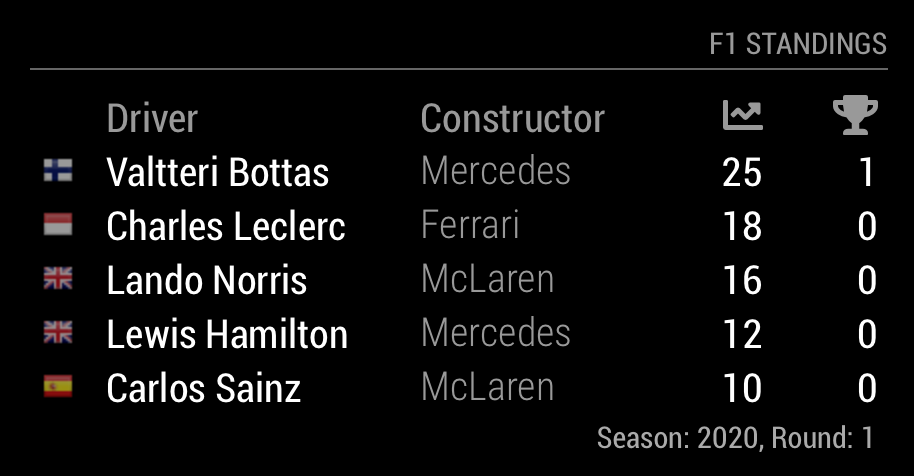
I am missing the country flag of Charles Leclerc (Monaco).
Can somebody give me a hint how to fix this?
Peter -
@Peter just checking whether you are using the latest version of the module? If not, try updating
I added a fix last year to support Monegasque as a nationality for Charles Leclerc.
-
@ianperrin Thanks! That solved the problem!
-
@Mar Hi, bit of a long shot but did you ever solve this problem?
I too can only display one module at a time.
Cheers
-
@ianperrin for some reason the calendar is not showing up.
I did all the steps from the github page including the localhost:8080 link and a update but is not working.
Is it for you still working?
EDIT:
The command log shows:
Create new calendar fetcher for url: http://localhost:8080/MMM-Formula1/schedule.ics - interval: 3000000
Calendar Error, could not fetch calendar: url: http://localhost:8080/MMM-Formula1/schedule.ics…
error: invalid url: “http://localhost:8080/MMM-Formula1/schedule.ics” -
Module is working great for me, but I like to align the drivers name’s .
how do I do that.
thanx

Hello! It looks like you're interested in this conversation, but you don't have an account yet.
Getting fed up of having to scroll through the same posts each visit? When you register for an account, you'll always come back to exactly where you were before, and choose to be notified of new replies (either via email, or push notification). You'll also be able to save bookmarks and upvote posts to show your appreciation to other community members.
With your input, this post could be even better 💗
Register Login