Read the statement by Michael Teeuw here.
MMM-Hue
-
Monitor your Philips Hue Lights using MMM-Hue
This is my first attempt at developing anything like this, so hopefully it helps someone
At the moment, all you need to enter is your bridge IP Address and your user ID.
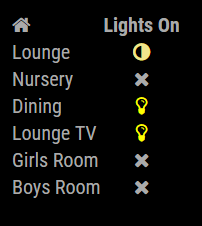
The module displays the status of each room/group set up on your bridge.
MMM-Hue can be found here:https://github.com/MitchSS/MMM-Hue
I’d also light to thank @strawberry-3-141 for their help with this!
-
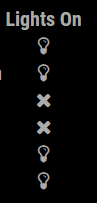
I’ve changed the config so that the user can toggle between coloured icons or the standard font colour of the mirror.
-
This post is deleted! -
Hi @darrene - did you manage to sort your issue?
You’re right, you have to create your account in the bridge first.
The link in the readme should take you to the correct page, which walks you through creating the account.
http://www.developers.meethue.com/documentation/getting-startedGive me a shout if you have any problems

-
Thanks @Mitchfarino - it was user-error. I visited the developer page rather than clicking on the link you provided :) I deleted my previous post in shame after I realised my error.
All sorted now. It’s fabulous. Thanks for sharing your code with the community by the way!
-
Hi @Mitchfarino, I was just wondering if you’d considered extending the module to control lighting schedules?
It suddenly struck me that as the mirror is always on and stays in the house, it might be very really cool (not to mention useful when you’re away) to have a capability in the module to turn on/off dim lights on a hardcoded schedule or time/day combo.
From there it could even be a short hop to link it up the the MMM-RemoteControl module, to set schedules remotely.
-
Hi @darrene
Do you mean you want to be able to control the lights/schedules from your mirror?
How would you interact with it to create them etc?
I think at the moment the remote control only allows you show or hide modules, I’m not sure what future developments are in the pipeline though ( @Jopyth will know more on that)
-
Not directly - I think it’d be a lot of work and as you say, would need a way of interfacing with the mirror. At the end of all that you could just use The Hue/Elgato Eve/Siri app to do the same thing.
What I wondered though, was if something like MMM-Schedule was installed, it’d be really easy to put a schedule in the config.js to turn specific lights on and off on certain schedules - it could send the notification schedule which MMM-Hue could react to. It’d mean you/the mirror could schedule the lighting schemes automatically to run while you were away from home.
If MMM-Hue could react to a HUE_LIGHT_ON and HUE_LIGHT_OFF notification, perhaps with a light-ID and Brightness value as the payload, that’d do the trick wouldn’t it?
A scheduling GUI would be uber-cool, but hard-coding the config.js would be enough for most, I’d have thought…
It’s on my (very long) list of things to have a go at, if I get a chance :)
-
Hi @Mitchfarino
Like your MMM-Hue module but will admit getting it to work was a little bit more tricky then what I had anticipated.
My version 1.0 Hue hub setup controlling a 9 individual bulbs. I did not set up the bulbs as part of a groups.
Wanted to share just a few simple findings to help others to get your module to work even better.
Inspecting your code in MMM-Hue.js I found that you had a this.lightsorgroups hardcoded to “groups”. As a result of this my Hue setup was presented as just the Home icon with ‘Lights On’ as the status.
Changing the hardcoded this.lightsorgroups to “lights” did result in a similar display as shown in your first post however all the named lights showed the X (fa-times) icon for the status even though lights were on, others off an others unreacheable.
So I made a further minor change on line 69 and changed it to:
lightstatus.classList.add("fa", this.result[lamps[i]].state.reachable ? (this.result[lamps[i]].state.on ? "fa-lightbulb-o" : "fa-adjust" ) : "fa-times");Keep up the good work.
-
Hi @Clogs
Thanks for your feedback, I’m sorry I haven’t been able to update the module to account for individual lights
As you have noticed it is in the code, I just didn’t expose it to the config.
I’m going to pick it up soon, and will update in this thread.
Thanks for letting me know, and for giving me the nudge I need to get it updated
-
Hello @Mitchfarino
Im trying to make your module “clickable” :-)
could you help me with that ?
Module.register(“MMM-Hue”, {
defaults: {
    bridgeip: "",
    userid: "",
    colour: true
},
// Define required scripts.
getScripts: function () {
    return [this.file("js/jquery.js")];
},
getStyles: function () {

    return ["font-awesome.css", "MMM-Hue.css"];
},
// Define start sequence.
start: function () {
    //These will be moved to config in a later release
    this.lightsorgroups = "groups";
    this.updateInterval = 60 * 100; // 10000 updates every 10 minutes
    this.animationSpeed = 2 * 1000;
    this.initialLoadDelay = 0;
    //end
    var result = false;
    this.url = "http://" + this.config.bridgeip + "/api/" + this.config.userid + "/" + this.lightsorgroups;
    this.getData();
    setInterval(() => {
        this.getData();
    }, this.updateInterval);
},

// Override dom generator.
getDom: function () {
    var wrapper = document.createElement("div");
    //alert("http://" + this.config.bridgeip + "/api/" + this.config.userid + "/" + this.config.lightsorgroups);

    if (this.result) {

        var table = document.createElement("table");
        table.classList.add("small", "table", "align-left");

        table.appendChild(this.createLabelRow());

        var lamps = Object.keys(this.result);

        for (var i = 0; i < lamps.length; i++) {

            var row = document.createElement("tr");
            var room = document.createElement("td");
            room.innerHTML = this.result[lamps[i]].name;;
            row.appendChild(room);
            var lightsallLabel = document.createElement("td");
            lightsallLabel.classList.add("centered");

            var lightstatus = document.createElement("i");
            //lightstatus.classList.add(“fa”, this.result[lamps[i]].state.reachable ? (this.result[lamps[i]].state.on ? “fa-lightbulb-o” : “fa-adjust” ) : “fa-times”);

	buttonlightstatus[i] = false;  // CUSTOM
	buttonlight[i] = document.createElement("span");  // CUSTOM
	//var buttonlightstatus[i] = false;  // CUSTOM
	//var buttonlight[i] = document.createElement("span");  // CUSTOM

	//weatherbutton.className = "wi wi-day-rain-mix navbar";
	//var forecast = MM.getModules().withClass('weatherforecast');

	if(this.result[lamps[i]].state.all_on)
	{
	lightstatus.classList.add("fa-lightbulb-o")
	buttonlightstatus[i] = true;
	}
	else if (this.result[lamps[i]].state.any_on)
	{
	lightstatus.classList.add("fa-adjust")
	buttonlightstatus[i] = true;
	}
	else {
	lightstatus.classList.add("fa-times")
	buttonlightstatus[i] = false;
	};

	// lightstatus.classList.add("fa", this.result[lamps[i]].state.all_on ? "fa-lightbulb-o" : (this.result[lamps[i]].state.any_on ? "fa-adjust" : "fa-times"));  // CUSTOM
            if (this.config.colour) {

                if (this.result[lamps[i]].state.all_on) {
                    lightstatus.classList.add("lights-all-on")
                }
                else {
                    if (this.result[lamps[i]].state.any_on) {
                        lightstatus.classList.add("lights-partial-on")
                    }
                }
            }
            ;
            lightsallLabel.appendChild(lightstatus);
    		wrapper.appendChild(buttonlight[i]);  //CUSTOM
            row.appendChild(lightsallLabel);

            table.appendChild(row);

        }
        wrapper.appendChild(table);
       										//CUSTOM
        		$(buttonlight[i]).on("click", function(){
					if(buttonlightstatus[i]){
					alert('its work');
					putJSON(t"http://" + this.config.bridgeip + "/api/" + this.config.userid + "/lights/" + buttonlightstatus[i] +"/state , ({'on':false});
						buttonlightstatus[i] = false;
					}else{
					putJSON(t"http://" + this.config.bridgeip + "/api/" + this.config.userid + "/lights/" + buttonlightstatus[i] +"/state , ({'on':true});
					buttonlightstatus[i] = true;
						}
					});

    } else {
        wrapper.innerHTML = "No Data returned";
    }
    return wrapper;
},

createLabelRow: function () {

    var labelRow = document.createElement("tr");

    var roomiconlabel = document.createElement("th");
    var typeIcon = document.createElement("room");
    typeIcon.classList.add("fa", "fa-home");
    roomiconlabel.appendChild(typeIcon);
    labelRow.appendChild(roomiconlabel);

    var lightsonlabel = document.createElement("th");
    lightsonlabel.classList.add("centered");
    var typeIcon = document.createElement("lightson");
    //typeIcon.classList.add("fa", "fa-lightbulb-o");
    typeIcon.innerHTML = "Lights On";
    lightsonlabel.appendChild(typeIcon);
    labelRow.appendChild(lightsonlabel);

    var lightsonlabel = document.createElement("th");
    lightsonlabel.classList.add("centered");

    return labelRow;
}
,
getData: function () {
    $.getJSON(this.url, (data) => {
        this.result = data;
        this.updateDom();
    });
},
});
my brigde is in Amsterdam and im in Belgium for Christmas :-)
-
Would it be possible to display the wake up and sleep times of the bulbs/groups? Is that supported by the api?
I use my hue lights to wake me up in the morning. Some days I need to wake up at 5am others 6am. I find myself forgetting to change the wake up time in the app. If I could display the wake up time on my MM2, I would remember to change the wake up time which would be perfect. -
@Mitchfarino : I did a pull-request for Indonesian translation and showLabel option to your MMM-Hue module.
-
hi!
show only when on does not work for me… any tip? thanks!
-
Would it be possible to have the icons match the color of the lights and/or display an icon for each light in the room?
-
Can anyone assist me in configuring the module correctly?
I have it set up, but having trouble filtering out more than one group via hideGroupsWithString
Currently, I have
hideGroupsWithString: "Custom group for $lights"and that works, but I’m not sure how to add more groups to the string correctly.I know this is an old thread, but any help would be appreciated.
Thanks
-
Hi just installing this module and have set all id and ip correct and the only thing i have changed is made it bottom_left in the css file but i have nothing showing up when i load.
what am i doing wrong ?
-
@sirdizzle said in MMM-Hue:
Can anyone assist me in configuring the module correctly?
I have it set up, but having trouble filtering out more than one group via hideGroupsWithString
Currently, I have
hideGroupsWithString: "Custom group for $lights"and that works, but I’m not sure how to add more groups to the string correctly.I know this is an old thread, but any help would be appreciated.
Thanks
Same question here.
I want to hide my dimmer and hgrp.
Thanks for help
-
i ended up getting the Hue Module to work as preset config options. if i turn on the lights there is a long delay in showing on the Magic Mirror, but it does show after a while in our bedroom group. i have 6 bulbs in our bedroom group so if i change the Hue config file from groups to lights and restart the MM all the lights and names show up with an “x” and its impossible to get the MM to show the lights are ON … any help > as i want to add several bulbs arond the house NOT on a schedule and at a glance see where things are…
-
Hello there,
I am experiencing issues with getting MMM-hue to show on the screen.
I have successfully created a hue bridge user id, so maybe my config is wrong?{ module: 'MMM-Hue', position: 'top_right', config:{ bridgeip: "192.168.xxx.xxx", userid: "MY-ID-OF-HUE-BRIDGE", colour: false } },Can anyone help?
Thanks,


Hello! It looks like you're interested in this conversation, but you don't have an account yet.
Getting fed up of having to scroll through the same posts each visit? When you register for an account, you'll always come back to exactly where you were before, and choose to be notified of new replies (either via email, or push notification). You'll also be able to save bookmarks and upvote posts to show your appreciation to other community members.
With your input, this post could be even better 💗
Register Login