Read the statement by Michael Teeuw here.
Blank Screen on Pi 1 after successful Install
-
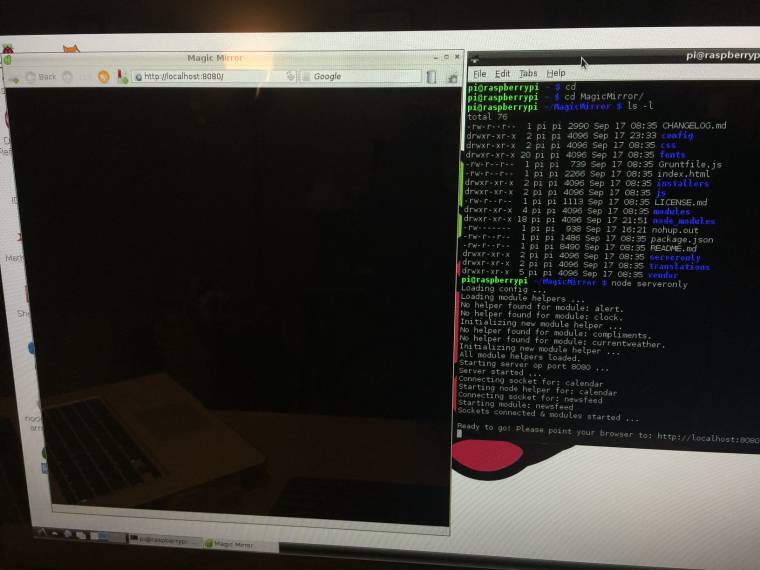
I have a Raspberry Pi 1. MM2 is successfully installed. i get a blank black screen after node serveronly start. I’m using the default config file from the update.
apt-get update and apt-get upgrade - done
git pull - doneUpdated local to US, timezone to Pacific.
In the config file, I changed the language from en to en-us and blank without any success.
Any help will be greatly appreciated.
-
Are you able to see if there is any js/console errors? (I’m new myself) perhaps view on another computer on the network?
-
Have you tried accessing the MM-interface on an other device? So if you enter “http://IP_OF_YOUR_PI:8080” in the browser of your computer for instance, does it work? I had a similar problem, where the interface only worked on other devices…
But you know that electron is not working on the RPi 1 right? So you will probably have a hard time trying to get this to work yourself on a Pi1… -
@bharathvenkat i use MM with
node serveronlyand a Midori Browser on my Raspberry PI B. Theoretically it should work on your RPi. Like Mr.Meeseeks (btw rick and morty is awesome) proposed, open the developer console in the browser and check if there is some code.@pagoa he is using
node serveronly. With this command electron is not used. -
I’m also having this issue. I was getting the intro/setup your config screen. I got the donfig setup and wrestled with file permissions to get it copied. Relaunched and now I’ve got a black screen. The source of the page has the Magic Mirror stuff in it. Don’t know what’s wrong. Any advice?
-
@chase what pi version? Are you running it in server mode? Any JavaScript errors in console? What browser?
-
I’m using an original model A. It is running in server mode, no javascript errors besides one below the don’t edit line in the config file. Any browser. Tried from multiple devices including the Pi itself. Thanks!
-
Which node.js Version is installed? Maybe this is the problem.
-
v0.10.29
-
Try a newer node version.
Here is a blog post (unfortunately in german) how to install the latest version. Deinstall the node before you install the newer version.
http://www.benjaminroesner.com/blog/node-js-raspberry-pi-installieren/#variante2 -
Thanks for the blog post! I’m now on 4.2.1, but I’m still getting a black screen after a boot. Here’s a picture from chrome. I would attach a picture of the actual thing, but it’s a monitor with a black screen.

I really appreciate all the help
-
Should the url contain the port?
192.168.0.7:8080? -
Just got back home and gave that a shot. I get a refused to connect error there.
-
Maybe i found the problem. I am working on a FHEM module for MM. I changed the
config.jsand had a wrong module name in it. After reload the screen was black.
@chase please check yourconfig.jsfor spelling or json format errors. -
I’ll give it a look over. Also just for reference I followed this tutorial to set it up https://www.reddit.com/r/raspberry_pi/comments/3oktfu/magic_mirror_how_to/
-
I couldn’t find anything, but I did find something strange. I pulled my config file out and once again got the please setup your file screen. So I made a copy config file and replaced it’s contents with the sample config file code and reuploaded it. Black screen again. Should that have shown something?
-
@chase Yes. The sample config file should at least show you the clock and the basic compliments. If you update it with your openweathermap key it should show you weather. Curious.
Also, yes the URL should contain the 8080 port.
MichMich usually recommends this tutorial: Complete Setup Tutorial
-
I have the same issue. it seems that information is out of range in Midori. Chromium shows everything on the left side.
Iceweasel works fine. No ideas how to run in full screen mode.
kweb - black window, nothing.
From other devices in network works fine. -
@Kisaua i have the mirror running on a RPi B with Fullscreen Midori. Check your Node version and Midori version.
Here is a Midori autostart tutorial with kiosk mode. http://www.benjaminroesner.com/blog/autostart-midori-browser-vollbild-kiosk-mode-via-konsole-ohne-desktop/ -
node v.4.2.1 and i have tried with node v.6.7.0
Midori 0.4.3
Hello! It looks like you're interested in this conversation, but you don't have an account yet.
Getting fed up of having to scroll through the same posts each visit? When you register for an account, you'll always come back to exactly where you were before, and choose to be notified of new replies (either via email, or push notification). You'll also be able to save bookmarks and upvote posts to show your appreciation to other community members.
With your input, this post could be even better 💗
Register Login