MagicMirror Forum
    • Recent
    • Tags
    • Unsolved
    • Solved
    • MagicMirror² Repository
    • Documentation
    • 3rd-Party-Modules
    • Donate
    • Discord
    • Register
    • Login
    A New Chapter for MagicMirror: The Community Takes the Lead
    Read the statement by Michael Teeuw here.

    MMM-FRITZ-Box-Callmonitor

    Scheduled Pinned Locked Moved Troubleshooting
    99 Posts 27 Posters 117.2k Views 26 Watching
    Loading More Posts
    • Oldest to Newest
    • Newest to Oldest
    • Most Votes
    Reply
    • Reply as topic
    Log in to reply
    This topic has been deleted. Only users with topic management privileges can see it.
    • O Offline
      ostfilinchen
      last edited by

      Hi all,

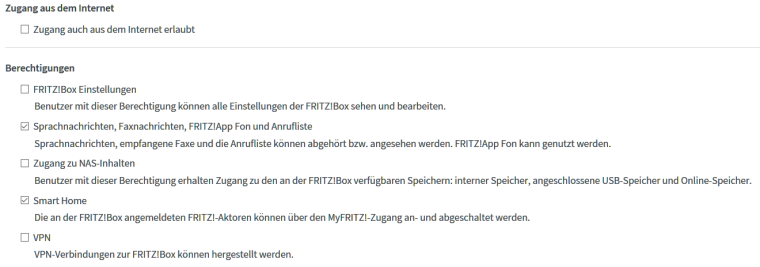
      i create an user and Password on the Fritz.box-Interface with these Settings:0_1474191737271_fritzbox_raspi.PNG

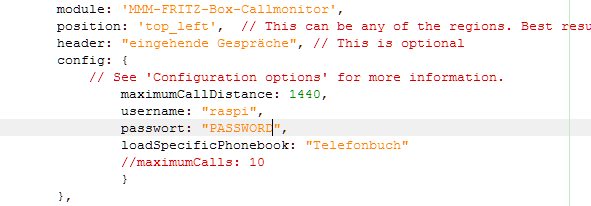
      The config-file Looks like this: 0_1474191877945_fritzbox_config.PNG

      If i get an Call, i see always the number, not the Name of the Caller. In the readme of this module it’s descriped this part:
      —>>> The latter will also load recently missed calls, which happened before you started your mirror.

      This is also not working for me.

      Has anyone else this Problems?

      Regards, Daniel

      1 Reply Last reply Reply Quote 0
      • J Offline
        Jopyth Moderator
        last edited by

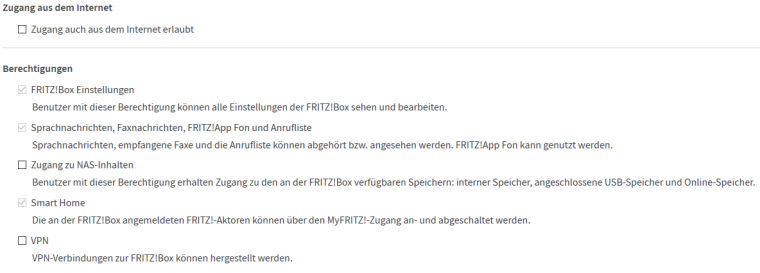
        The user needs rights to read and write FRITZ!Box Settings (FRITZ!Box Einstellungen). Otherwise it seems to be right. Can you activate this and try again?
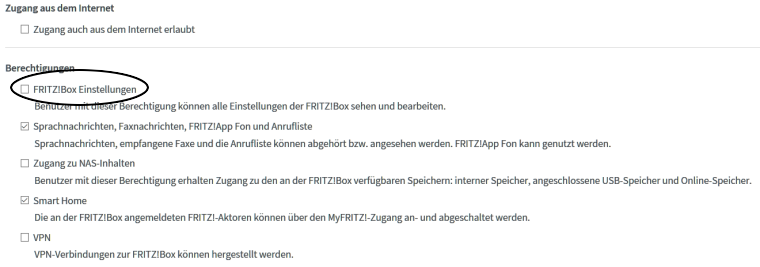
        0_1475047646485_settings.png

        On a side note: loadSpecificPhonebook is currently not used in the code, so you may remove it. It just loads all available phonebooks from the FRITZ!Box.

        Please post again if you encounter any problems.

        Helpful sticky: How to troubleshoot

        O 1 Reply Last reply Reply Quote 1
        • O Offline
          ostfilinchen @Jopyth
          last edited by

          @Jopyth: that doesn’t work. The mirror Shows me the Number, not the Name of the caller.

          J 1 Reply Last reply Reply Quote 0
          • J Offline
            Jopyth Moderator @ostfilinchen
            last edited by Jopyth

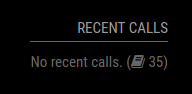
            @ostfilinchen Can you add showContactsStatus: true, in the config, and see if it successfully loads your contacts? Either a small warning sign should appear after you restart your mirror, or a number showing how many contacts are loaded.

            If the contacts load correctly, please look at the format your numbers are in the phonebook, e.g. are they like +12 (345) 678901 or 0012345678901… (do not post the real number)? I have experienced some problems with certain formatting as well, however have not had time to fix it in the code, instead I replaced my numbers in the FRITZ!Box, and always used the format 0123 4567891.

            If there is a warning sign, please have a look at the logs (if you start it with pm2 you can do pm2 logs --lines 100 mm) and search for an error related to the Callmonitor.

            Helpful sticky: How to troubleshoot

            O 1 Reply Last reply Reply Quote 0
            • O Offline
              ostfilinchen @Jopyth
              last edited by

              @Jopyth if i Set the Contact Status to true, nothing happens. There’s no Icon and the logs displays no error.

              J 1 Reply Last reply Reply Quote 0
              • J Offline
                Jopyth Moderator @ostfilinchen
                last edited by Jopyth

                @ostfilinchen You might have on older version can you try to use git pull and see if it updates (note: you must do this inside the MMM-FRITZ-Box-Callmonitor folder. Also you can check the date of your version with git show, it should show this:

                commit 9a35b1a74811a2e7c31edb35d59bab010dd5f991
                Merge: 08633e0 bfee1e5
                Author: Paul-Vincent Roll <paviro@me.com>
                Date:   Fri Sep 23 11:26:47 2016 +0200


                Helpful sticky: How to troubleshoot

                1 Reply Last reply Reply Quote 0
                • O Offline
                  ostfilinchen
                  last edited by

                  this output i have also…

                  must i activate the vcard-option to show how many contacts loaded?

                  J 1 Reply Last reply Reply Quote 0
                  • J Offline
                    Jopyth Moderator @ostfilinchen
                    last edited by Jopyth

                    @ostfilinchen Please check your config again. Is your password empty (i.e. the empty string password: "")? That would not work, but otherwise it should. I did a clean install and this config works for me:

                    {
                    	module: 'MMM-FRITZ-Box-Callmonitor',
                    	position: 'bottom_right',
                    	header: "Recent calls",
                    	config: {
                    		username: "EXAMPLE_USER",
                    		password: "EXAMPLE_PASSWORD",
                    		showContactsStatus: true
                    	}
                    },
                    

                    Result:
                    0_1475355100926_Screenshot from 2016-10-01 22:50:16.png
                    If I type a wrong password, it shows an error:

                    
                    config: {
                    	username: "EXAMPLE_USER",
                    	password: "WRONG_EXAMPLE_PASSWORD",
                    	howContactsStatus: true
                    }
                    [...]
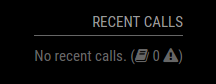
                    

                    0_1475355180491_Screenshot from 2016-10-01 22:52:25.png

                    If you can not see either of these results, and you say your version is up-to-date, then I am little bit out of guesses. Maybe you can try complete removing the module, and downloading it again?

                    Helpful sticky: How to troubleshoot

                    garblefluxG 1 Reply Last reply Reply Quote 0
                    • O Offline
                      ostfilinchen
                      last edited by

                      i have an fresh Installation and i don’t get this Output. If i set vcard to true, then it Shows me the little book with spinning arrows. The Password and user is set.

                      J 1 Reply Last reply Reply Quote 0
                      • J Offline
                        Jopyth Moderator @ostfilinchen
                        last edited by Jopyth

                        @ostfilinchen Please check if your option is German passwort (does not work) or password (English).

                        Helpful sticky: How to troubleshoot

                        O 1 Reply Last reply Reply Quote 0
                        • O Offline
                          ostfilinchen @Jopyth
                          last edited by

                          @Jopyth it’s password

                          J 2 Replies Last reply Reply Quote 0
                          • J Offline
                            Jopyth Moderator @ostfilinchen
                            last edited by Jopyth

                            @ostfilinchen Damn. Because I saw this in your first post. :( This was my last hope.

                            Edit: Can you post the output of git status one more time? Just to make sure everything is fine with your module.

                            Helpful sticky: How to troubleshoot

                            1 Reply Last reply Reply Quote 0
                            • J Offline
                              Jopyth Moderator @ostfilinchen
                              last edited by Jopyth

                              @ostfilinchen In this case what we can try is some do-it-yourself debugging, i.e. add a line above line 56 of your node_helper.js

                              console.log(this.config.password); // should show your password as entered in config
                              console.log(this.config.password !== ""); // should show true
                              

                              Also change line 197:

                              console.log("Reading " + files.length + " files from python script" ); // should probably show Reading 5 files from python script
                              

                              This should add the corresponding output to your server output pm2 logs --lines 100 mm.

                              Helpful sticky: How to troubleshoot

                              1 Reply Last reply Reply Quote 0
                              • O Offline
                                ostfilinchen
                                last edited by

                                oh man. I’m so stupid… i wrote really passwort instead of password…

                                now it work’s. Thanks for your great help @Jopyth!!!

                                1 Reply Last reply Reply Quote 1
                                • K Offline
                                  kwaeksler
                                  last edited by kwaeksler

                                  hi :-)
                                  i also have a problem with my phonebook. When i get a phone call it shows only the number of the caller, not a name.

                                  i get a small warning sign and an “unknown error”
                                  my config looks like:

                                  	{
                                          module: 'MMM-FRITZ-Box-Callmonitor',
                                          position: 'top_right', 
                                          header: "Anrufliste", 
                                          config: {
                                  			username: "************",
                                  			password: "*************************",
                                  			showContactsStatus: true,
                                  			reloadContactsInterval: 1,
                                  			deviceFilter: ["Wohnzimmer"]
                                          }
                                  	},
                                  

                                  Could you help me? :-)
                                  Thanks in advanced,
                                  Kwaeksler

                                  edit: FRITZ!Box User Settings:

                                  0_1484262880303_fritzbox.PNG

                                  O 1 Reply Last reply Reply Quote 0
                                  • O Offline
                                    ostfilinchen @kwaeksler
                                    last edited by

                                    @kwaeksler Do u have a other IP Address for the fritzbox? Do you have activate the callmonitor with #965 from a connected Phone (Not the fon-app)?

                                    K 1 Reply Last reply Reply Quote 0
                                    • T Offline
                                      thk
                                      last edited by

                                      Hi,
                                      Is there a way to show internal calls?
                                      For external calls it´s working fine.

                                      But I couldn´t get it to work for internal calls from a locally connected SIP phone…

                                      1 Reply Last reply Reply Quote 0
                                      • K Offline
                                        kwaeksler @ostfilinchen
                                        last edited by

                                        @ostfilinchen said in MMM-FRITZ-Box-Callmonitor:

                                        @kwaeksler Do u have a other IP Address for the fritzbox? Do you have activate the callmonitor with #965 from a connected Phone (Not the fon-app)?

                                        IP Adress for the box is 192.168.178.1 and yes i activated the callmonitor with my Siemens phone.

                                        1 Reply Last reply Reply Quote 0
                                        • O Offline
                                          ostfilinchen
                                          last edited by

                                          The Best way to find errors is to Start the mirror with npm start dev directly on the pi. On the right side you find Infos about the error.

                                          K 1 Reply Last reply Reply Quote 0
                                          • K Offline
                                            kwaeksler @ostfilinchen
                                            last edited by

                                            @ostfilinchen said in MMM-FRITZ-Box-Callmonitor:

                                            The Best way to find errors is to Start the mirror with npm start dev directly on the pi. On the right side you find Infos about the error.

                                            Mhm… i dont get any warnings or errors in the console

                                            O 1 Reply Last reply Reply Quote 0

                                            Hello! It looks like you're interested in this conversation, but you don't have an account yet.

                                            Getting fed up of having to scroll through the same posts each visit? When you register for an account, you'll always come back to exactly where you were before, and choose to be notified of new replies (either via email, or push notification). You'll also be able to save bookmarks and upvote posts to show your appreciation to other community members.

                                            With your input, this post could be even better 💗

                                            Register Login

                                            • 1
                                            • 2
                                            • 3
                                            • 4
                                            • 5
                                            • 1 / 5
                                            • First post
                                              Last post
                                            Enjoying MagicMirror? Please consider a donation!
                                            MagicMirror created by Michael Teeuw.
                                            Forum managed by Sam, technical setup by Karsten.
                                            This forum is using NodeBB as its core | Contributors
                                            Contact | Privacy Policy