Read the statement by Michael Teeuw here.
GIF update from URL with MMM-EyeCandy
-
Weather radar is a tough thing to solve, but I stumbled across a solution if I can get a module like MM-EyeCandy to do an update pull from the URL.
	{
        module: "MMM-EyeCandy",
        position: "bottom_right",
        config: {
            maxWidth: "50%", // Sizes the images. Retains aspect ratio.
            //style: "1",            // 1 - 52 or use ownImagePath to override style
            ownImagePath: "https://icons.wxug.com/data/weather-maps/radar/united-states/united-states-current-radar-animation.gif", // ex: "modules/MMM-EyeCandy/pix/YOUR_PICTURE_NAME.jpg", or internet url to image
            //ownImagePath: "https://icons.wxug.com/data/weather-maps/radar/united-states/san-antonio-texas-region-current-radar-animation.gif",
            updateInterval: 10 * 60 * 1000,
        }
    },
It does not appear the updateInterval is working unless it is throwing the following error when isolated.
Whoops! There was an uncaught exception…
TypeError: Cannot read property ‘hash’ of null
at /home/pi/MagicMirror/modules/default/updatenotification/node_helper.js:68:31
at Git. (/home/pi/MagicMirror/node_modules/simple-git/src/git.js:1482:10)
at done (/home/pi/MagicMirror/node_modules/simple-git/src/git.js:1354:21)
at ChildProcess. (/home/pi/MagicMirror/node_modules/simple-git/src/git.js:1379:16)
at emitTwo (events.js:106:13)
at ChildProcess.emit (events.js:191:7)
at Process.ChildProcess._handle.onexit (internal/child_process.js:215:12)
MagicMirror will not quit, but it might be a good idea to check why this happened. Maybe no internet connection?
If you think this really is an issue, please open an issue on GitHub: https://github.com/MichMich/MagicMirror/issuesAny ideas?
-
-
I think this should work; add the following at the bottom of the
startfunction inMMM-EyeCandy.js:start: function () { ... // ADDED: Schedule update timer setInterval(function() { self.updateDom(self.config.fadeSpeed || 0); // use config.fadeSpeed or revert to zero }, this.config.updateInterval); }, // this was line 83Problem with config or JavaScript? Copy/paste it into JSHint.
Check out the detailed walkthroughs on install, config, modules, etc. -
Thanks ninja. I was a little tied up last night with yesterday’s Nor’Easter slamming NYC late into the evening. If you don’t mind, I’ll just incorporate that into the module when I get home from work. :-)
Peace!
-
Thanks again but the problem still exists. Let me explain what I’ve done so far.
- Added your setInterval(function().
- Tried to seed the url of the .gif file with a timestamp but that was rejected with a 404 error.
- Added a timestamp div/tag so I could check if the module was actually updating. It is.
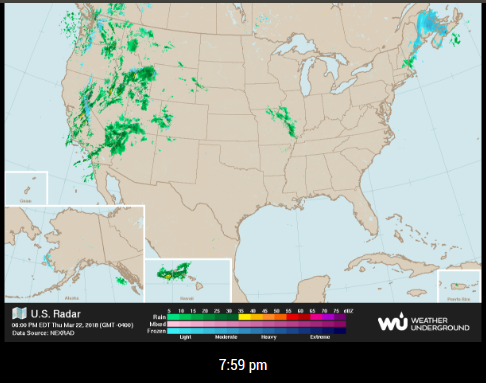
This url is not refreshing upon updateDom but the timestamp is.
https://icons.wxug.com/data/weather-maps/radar/united-states/united-states-current-radar-animation.gifI’m lost. :-/
-
@Mykle1 How did you seed the url with a timestamp? When I visit
https://icons.wxug.com/data/weather-maps/radar/united-states/united-states-current-radar-animation.gif?1521767776, I get the image returned (not a404).Problem with config or JavaScript? Copy/paste it into JSHint.
Check out the detailed walkthroughs on install, config, modules, etc. -
Like this, because I need the seed to change. Feel free to tell me what I’m doing wrong. Hehe :-)
var getTimeStamp = new Date().getTime(); img.src = "https://icons.wxug.com/data/weather-maps/radar/united-states/united-states-current-radar-animation.gif&seed=" + getTimeStamp; pic.appendChild(img); wrapper.appendChild(pic); -
@Mykle1 Yep, just needs to be a
?before the first parameter. Anything after gets appended with an&, e.g.https://icons.wxug.com/data/weather-maps/radar/united-states/united-states-current-radar-animation.gif?seed=1521767776&otherseed=4846528&page=2.Making your code the following:
... // img creation, etc
var getTimeStamp = new Date().getTime();
img.src = "https://icons.wxug.com/data/weather-maps/radar/united-states/united-states-current-radar-animation.gif?seed=" + getTimeStamp;
pic.appendChild(img);
wrapper.appendChild(pic);
Problem with config or JavaScript? Copy/paste it into JSHint.
Check out the detailed walkthroughs on install, config, modules, etc. -
@ninjabreadman said in GIF update from URL with MMM-EyeCandy:
Making your code the following:
That did the trick. The .gif file is refreshing to reflect the new data when it changes.
Thanks for the lesson. I do appreciate the help.
Peace!
-
I will post the update on github shortly. Thanks to our friend, @ninjabreadman, the module now works as it should.
EDIT:
A
git pullin the /MagicMirror/modules/MMM-EyeCandy folder will fix you up. Please take note of the changes to the config.js entry. Also, please take into account that the url you gave only updates itself about every 15 minutes. -
Made the changes and did some testing this AM with no results.
-Was able to pull update and verify changes in EyeCandy.js were reflected.
-Updated config.js to reflect the example as well.
-Tracked my radar url for time stamp over time for change and no results.See some commented code, do I need to uncomment as test?
-
@JRWJR said in GIF update from URL with MMM-EyeCandy:
Made the changes and did some testing this AM with no results.
WTH?
I’m testing it right now. I will report shortly
-
Umm, it’s working fine here. The radar from your url has updated twice in the last 42 minutes and the module reflects those changes.
The update interval for the module is now 2 minutes but you won’t see changes to your radar url for 15 minute periods. That’s the url, not the module. Is that what you are talking about?
-
@Mykle1 Once issue pm2 restart mm or reboot, it will download\load gif from url and play only that loop.
I am going to isolate and maybe move to a new MM2 load to test. Will report back.
-
@JRWJR said in GIF update from URL with MMM-EyeCandy:
Will report back.
Ok, but my test has been running for over 3 hours now and the module is working as expected. Have you changed anything in the module files?
-
I just used your solution in another module I am playing with. My thanks again.
Peace!
-
@Mykle1 Works great! I have no clue what the conflict is but will finish out my build and see if anything crops up. Thanks!
I now have a great weather radar live feed!
-
That’s good news. Have fun! :-)
-
FYI… I totally rebuilt the MM and test the EyeCandy module as reported and the update worked fine.
After a completed my full build, it would do an initial load of GIF but then would not update.
I also have Google traffic modules not working as previous and think maybe there is a conflict.
I did briefly isolate in the config file, just EyeCandy and the update issue persisted.
I am going to try and take out modules from folder a few at a time to see until I can get an RCA.
Just wanted to give you an update to the reproduced issue in my build.
-
I am greedy. I want what I should not ask.
It is updating just fine.
What is not updating is when I use multiple modules by copy folder, rename folder\js file and module name inside. I even attempted to change some of the vars to emulate a new module to no success.
Would like to have 3 gif maps in cycle for City, State\Regional and National weather radar.
Have a similar problem with how to scale MMM-GoogleMapsTraffic, but that is a whole more complex module it seams.
At least I can work with one and maybe schedule them to work when there is an interest in that level of radar detail.

Hello! It looks like you're interested in this conversation, but you don't have an account yet.
Getting fed up of having to scroll through the same posts each visit? When you register for an account, you'll always come back to exactly where you were before, and choose to be notified of new replies (either via email, or push notification). You'll also be able to save bookmarks and upvote posts to show your appreciation to other community members.
With your input, this post could be even better 💗
Register Login