Read the statement by Michael Teeuw here.
Changing icons of the modules Current Weather and Weather Forecast
-
@Manu85 well it’s running…so no return to command line, ctrl-c to stop
but, the message here says you didn’t stop the one running by pm2, do
pm2 stop all
-
@sdetweil now I have this
pi@MagicMirror:~ $ cd ~/MagicMirror/ pi@MagicMirror:~/MagicMirror $ pm2 stop all [PM2] Applying action stopProcessId on app [all](ids: [ 0 ]) [PM2] [mm](0) ✓ ┌────┬────────────────────┬──────────┬──────┬───────────┬──────────┬──────────┐ │ id │ name │ mode │ ↺ │ status │ cpu │ memory │ ├────┼────────────────────┼──────────┼──────┼───────────┼──────────┼──────────┤ │ 0 │ mm │ fork │ 0 │ stopped │ 0% │ 0b │ └────┴────────────────────┴──────────┴──────┴───────────┴──────────┴──────────┘ pi@MagicMirror:~/MagicMirror $ -
@Manu85 yes, now
cd ~/MagicMirror npm start -
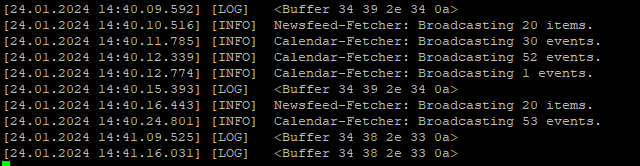
@sdetweil ok it’s done but I have the impression that the page adds new lines every 20 seconds, I’ll give you a screenshot, please tell me what you need or what to do please
-
@Manu85 I was looking for the error from the calendar module. it would have been right near the top
-
@sdetweil towards this place?
pi@MagicMirror:~ $ cd ~/MagicMirror pi@MagicMirror:~/MagicMirror $ npm start > magicmirror@2.23.0 start /home/pi/MagicMirror > DISPLAY="${DISPLAY:=:0}" ./node_modules/.bin/electron js/electron.js [24.01.2024 14:30.00.848] [LOG] Starting MagicMirror: v2.23.0 [24.01.2024 14:30.00.868] [LOG] Loading config ... [24.01.2024 14:30.00.876] [DEBUG] config template file not exists, no envsubst [24.01.2024 14:30.00.889] [LOG] Loading module helpers ... [24.01.2024 14:30.00.892] [WARN] No /home/pi/MagicMirror/js/../modules/MMM-Logg ing/MMM-Logging.js found for module: MMM-Logging. [24.01.2024 14:30.00.894] [LOG] No helper found for module: MMM-Logging. [24.01.2024 14:30.00.895] [LOG] No helper found for module: clock. [24.01.2024 14:30.00.927] [LOG] Initializing new module helper ... [24.01.2024 14:30.00.929] [LOG] Module helper loaded: MMM-PiTemp [24.01.2024 14:30.00.983] [LOG] Initializing new module helper ... [24.01.2024 14:30.00.985] [LOG] Module helper loaded: MMM-OneCallWeather [24.01.2024 14:30.00.990] [LOG] Initializing new module helper ... [24.01.2024 14:30.00.991] [LOG] Module helper loaded: MMM-DHT [24.01.2024 14:30.01.443] [LOG] Initializing new module helper ... [24.01.2024 14:30.01.444] [LOG] Module helper loaded: calendar [24.01.2024 14:30.01.445] [LOG] No helper found for module: MMM-SmartWebDispla y. [24.01.2024 14:30.01.447] [LOG] No helper found for module: MMM-ISS-Live. [24.01.2024 14:30.01.496] [LOG] Initializing new module helper ... [24.01.2024 14:30.01.496] [LOG] Module helper loaded: newsfeed [24.01.2024 14:30.01.497] [LOG] All module helpers loaded. [24.01.2024 14:30.01.520] [LOG] Starting server on port 8080 ... [24.01.2024 14:30.01.533] [WARN] You're using a full whitelist configuration to allow for all IPs [24.01.2024 14:30.01.554] [LOG] Server started ... [24.01.2024 14:30.01.556] [LOG] Connecting socket for: MMM-PiTemp [24.01.2024 14:30.01.558] [LOG] Starting module helper: MMM-PiTemp [24.01.2024 14:30.01.559] [LOG] Connecting socket for: MMM-OneCallWeather [24.01.2024 14:30.01.561] [LOG] Connecting socket for: MMM-DHT [24.01.2024 14:30.01.561] [LOG] Starting module helper: MMM-DHT [24.01.2024 14:30.01.562] [LOG] Connecting socket for: calendar [24.01.2024 14:30.01.563] [LOG] Starting node helper for: calendar [24.01.2024 14:30.01.564] [LOG] Connecting socket for: newsfeed [24.01.2024 14:30.01.565] [LOG] Starting node helper for: newsfeed [24.01.2024 14:30.01.566] [LOG] Sockets connected & modules started ... [24.01.2024 14:30.02.129] [LOG] Launching application. -
@sdetweil then I have lines with “calendar” but there are my https addresses: from the iPhone, maybe I shouldn’t put them on the forum?
-
@Manu85 correct or mass change them in a text editor first…
I don’t know anything more about the module itself. I used a bad apikey and it produced an error in the data you are looking at now
I used a good key, and the module displayed using the sample config. I just used my API key. no other change
-
@sdetweil
and There you go ! if you want I can give you my key in a private messagepi@MagicMirror:~ $ cd ~/MagicMirror pi@MagicMirror:~/MagicMirror $ npm start > magicmirror@2.23.0 start /home/pi/MagicMirror > DISPLAY="${DISPLAY:=:0}" ./node_modules/.bin/electron js/electron.js [24.01.2024 14:30.00.848] [LOG] Starting MagicMirror: v2.23.0 [24.01.2024 14:30.00.868] [LOG] Loading config ... [24.01.2024 14:30.00.876] [DEBUG] config template file not exists, no envsubst [24.01.2024 14:30.00.889] [LOG] Loading module helpers ... [24.01.2024 14:30.00.892] [WARN] No /home/pi/MagicMirror/js/../modules/MMM-Logg ing/MMM-Logging.js found for module: MMM-Logging. [24.01.2024 14:30.00.894] [LOG] No helper found for module: MMM-Logging. [24.01.2024 14:30.00.895] [LOG] No helper found for module: clock. [24.01.2024 14:30.00.927] [LOG] Initializing new module helper ... [24.01.2024 14:30.00.929] [LOG] Module helper loaded: MMM-PiTemp [24.01.2024 14:30.00.983] [LOG] Initializing new module helper ... [24.01.2024 14:30.00.985] [LOG] Module helper loaded: MMM-OneCallWeather [24.01.2024 14:30.00.990] [LOG] Initializing new module helper ... [24.01.2024 14:30.00.991] [LOG] Module helper loaded: MMM-DHT [24.01.2024 14:30.01.443] [LOG] Initializing new module helper ... [24.01.2024 14:30.01.444] [LOG] Module helper loaded: calendar [24.01.2024 14:30.01.445] [LOG] No helper found for module: MMM-SmartWebDispla y. [24.01.2024 14:30.01.447] [LOG] No helper found for module: MMM-ISS-Live. [24.01.2024 14:30.01.496] [LOG] Initializing new module helper ... [24.01.2024 14:30.01.496] [LOG] Module helper loaded: newsfeed [24.01.2024 14:30.01.497] [LOG] All module helpers loaded. [24.01.2024 14:30.01.520] [LOG] Starting server on port 8080 ... [24.01.2024 14:30.01.533] [WARN] You're using a full whitelist configuration to allow for all IPs [24.01.2024 14:30.01.554] [LOG] Server started ... [24.01.2024 14:30.01.556] [LOG] Connecting socket for: MMM-PiTemp [24.01.2024 14:30.01.558] [LOG] Starting module helper: MMM-PiTemp [24.01.2024 14:30.01.559] [LOG] Connecting socket for: MMM-OneCallWeather [24.01.2024 14:30.01.561] [LOG] Connecting socket for: MMM-DHT [24.01.2024 14:30.01.561] [LOG] Starting module helper: MMM-DHT [24.01.2024 14:30.01.562] [LOG] Connecting socket for: calendar [24.01.2024 14:30.01.563] [LOG] Starting node helper for: calendar [24.01.2024 14:30.01.564] [LOG] Connecting socket for: newsfeed [24.01.2024 14:30.01.565] [LOG] Starting node helper for: newsfeed [24.01.2024 14:30.01.566] [LOG] Sockets connected & modules started ... [24.01.2024 14:30.02.129] [LOG] Launching application. [24.01.2024 14:30.03.091] [LOG] Create new calendarfetcher for url: http://p31 -caldav.icloud.com/published/2/xxxxxxxxxxxxxxxxxxxxxxxxxxxxxxxxxxxxxxxxxxxxxxxxxx xxxxxxxxxxxxxxxxxxxxxxxxxxxxxxxxxxxxxxxxxxxxxxxxxxxxxxxxxxxxxxxxxxxxxxx - Interval: 300000 [24.01.2024 14:30.03.239] [LOG] Use existing calendarfetcher for url: http://p 31-caldav.icloud.com/published/xxxxxxxxxxxxxxxxxxxxxxxxxxxxxxxxxxxxxxxxxxxxxxxxxx xxxxxxxxxxxxxxxxxxxxxxxxxxxxxxxxxxxxxxxxxxxxxxxxxx [24.01.2024 14:30.03.242] [INFO] Calendar-Fetcher: Broadcasting 0 events. [24.01.2024 14:30.03.304] [LOG] Use existing calendarfetcher for url: http://p 31-caldav.icloud.com/published/xxxxxxxxxxxxxxxxxxxxxxxxxxxxxxxxxxxxxxxxxxxxxxxxxx xxxxxxxxxxxxxxxxxxxxxxxxxxxxxxxxxxxxxxxxxxxxxxxxxx [24.01.2024 14:30.03.305] [INFO] Calendar-Fetcher: Broadcasting 0 events. [24.01.2024 14:30.03.332] [LOG] Use existing calendarfetcher for url: http://p 31-caldav.icloud.com/published/xxxxxxxxxxxxxxxxxxxxxxxxxxxxxxxxxxxxxxxxxxxxxxxxxx xxxxxxxxxxxxxxxxxxxxxxxxxxxxxxxxxxxxxxxxxxxxxxxxxx [24.01.2024 14:30.03.334] [INFO] Calendar-Fetcher: Broadcasting 0 events. [24.01.2024 14:30.03.363] [LOG] Use existing calendarfetcher for url: http://p 31-caldav.icloud.com/published/2/xxxxxxxxxxxxxxxxxxxxxxxxxxxxxxxxxxxxxxxxxxxxxxxxxx xxxxxxxxxxxxxxxxxxxxxxxxxxxxxxxxxxxxxxxxxxxxxxxxxx [24.01.2024 14:30.03.364] [INFO] Calendar-Fetcher: Broadcasting 0 events. [24.01.2024 14:30.03.454] [LOG] <Buffer 33 38 2e 36 0a> [24.01.2024 14:30.03.487] [LOG] <Buffer 33 38 2e 36 0a> [24.01.2024 14:30.03.780] [LOG] <Buffer 33 39 2e 32 0a> [24.01.2024 14:30.03.786] [LOG] <Buffer 33 38 2e 36 0a> [1910:0124/143004.059795:ERROR:viz_main_impl.cc(186)] Exiting GPU process due to errors during initialization [24.01.2024 14:30.04.733] [INFO] Calendar-Fetcher: Broadcasting 1 events. [24.01.2024 14:30.05.129] [INFO] Calendar-Fetcher: Broadcasting 1 events. [24.01.2024 14:30.05.511] [INFO] Calendar-Fetcher: Broadcasting 1 events. [1960:0124/143005.738916:ERROR:gpu_memory_buffer_support_x11.cc(44)] dri3 extens ion not supported. [24.01.2024 14:30.06.010] [INFO] Calendar-Fetcher: Broadcasting 1 events. [24.01.2024 14:30.06.422] [INFO] Calendar-Fetcher: Broadcasting 1 events. [1915:0124/143006.476783:ERROR:command_buffer_proxy_impl.cc(128)] ContextResult::kTransientFailure: Failed to send GpuControl.CreateCommandBuffer. [24.01.2024 14:30.08.902] [LOG] Create new calendarfetcher for url: http://p59-caldav.icloud.com/published/2/Mjc4MDY5NzE3Mjc4MDY5N_JWXRaX8nNLZE61rkC12OfzlWCbJPUrEhN49IHC1yeFEfqRieBnpAKrz592KXN_zwHa5Dxxxxxxxxxxxxxxxxxxxxxx - Interval: 300000 [24.01.2024 14:30.08.913] [LOG] Create new calendarfetcher for url: http://p59-caldav.icloud.com/published/2/Mjc4MDY5NzE3Mjc4MDY5N_JWXRaX8nNLZE61rkC12Oezk-6Zk6G2LUSDrRp2bRFAAjCfbogwDyaNVcEuy93NRhkNwxxxxxxxxxxxxxxxxxxxxxx - Interval: 300000 [24.01.2024 14:30.08.932] [LOG] Create new calendarfetcher for url: http://p59-caldav.icloud.com/published/2/Mjc4MDY5NzE3Mjc4MDY5N_JWXRaX8nNLZE61rkC12OfgZxxxxxxxxxxxxxxxxxxxxxx - Interval: 300000 [24.01.2024 14:30.08.949] [LOG] Create new calendarfetcher for url: http://p59-caldav.icloud.com/published/2/Mjc4MDY5NzE3Mjc4MDY5N_JWXRaX8nNLZE61rkC12OePs9rEDFlPWmcxSIoYt08bLzn0pT5tIY8RoNmxxxxxxxxxxxxxxxxxxxxxxxxxxx - Interval: 300000 [24.01.2024 14:30.08.954] [LOG] Create new calendarfetcher for url: http://p31-caldav.icloud.com/published/2/MTc3NjQyNjU0MTMxNzc2NCCpXXOtdiDoAXKHLKt4Oj6_ewf91iJc_kxBk1CQkLk01-XUuYBYg3p2pxxxxxxxxxxxxxxxxxxxxxxxxxxxxxxxxxx- Interval: 300000 [24.01.2024 14:30.09.043] [LOG] Create new newsfetcher for url: https://www.lepoint.fr/rss.xml - Interval: 300000 [24.01.2024 14:30.09.060] [LOG] Create new newsfetcher for url: https://www.sudouest.fr/sport/rugby/top14/rss.xml - Interval: 300000 [24.01.2024 14:30.09.500] [LOG] <Buffer 34 30 2e 38 0a> [24.01.2024 14:30.09.528] [LOG] <Buffer 34 30 2e 38 0a> [24.01.2024 14:30.09.883] [INFO] Newsfeed-Fetcher: Broadcasting 20 items. [24.01.2024 14:30.10.539] [INFO] Calendar-Fetcher: Broadcasting 30 events. [24.01.2024 14:30.10.692] [INFO] Calendar-Fetcher: Broadcasting 52 events. [24.01.2024 14:30.10.853] [INFO] Calendar-Fetcher: Broadcasting 6 events. [24.01.2024 14:30.11.062] [INFO] Calendar-Fetcher: Broadcasting 1 events. [24.01.2024 14:30.11.361] [LOG] node received [24.01.2024 14:30.11.366] [ERROR] Whoops! There was an uncaught exception... [24.01.2024 14:30.11.381] [ERROR] ReferenceError: fetch is not defined at Class.socketNotificationReceived (/home/pi/MagicMirror/modules/MMM-OneCallWeather/node_helper.js:55:9) at Socket.<anonymous> (/home/pi/MagicMirror/js/node_helper.js:107:11) at Socket.emit (node:events:513:28) at Socket.emitUntyped (/home/pi/MagicMirror/node_modules/socket.io/dist/typed-events.js:69:22) at /home/pi/MagicMirror/node_modules/socket.io/dist/socket.js:703:39 at process.processTicksAndRejections (node:internal/process/task_queues:78:11) [24.01.2024 14:30.11.385] [ERROR] MagicMirror² will not quit, but it might be a good idea to check why this happened. Maybe no internet connection? [24.01.2024 14:30.11.387] [ERROR] If you think this really is an issue, please open an issue on GitHub: https://github.com/MichMich/MagicMirror/issues [24.01.2024 14:30.15.968] [INFO] Calendar-Fetcher: Broadcasting 53 events. [24.01.2024 14:30.16.101] [INFO] Newsfeed-Fetcher: Broadcasting 20 items. [24.01.2024 14:31.09.080] [LOG] <Buffer 34 34 2e 30 0a> [24.01.2024 14:31.09.817] [LOG] <Buffer 34 34 2e 30 0a> [24.01.2024 14:32.09.327] [LOG] <Buffer 34 35 2e 36 0a> [24.01.2024 14:32.10.533] [LOG] <Buffer 34 36 2e 32 0a> [24.01.2024 14:33.09.083] [LOG] <Buffer 34 36 2e 37 0a> [24.01.2024 14:33.10.985] [LOG] <Buffer 34 37 2e 32 0a> [24.01.2024 14:33.14.210] [LOG] Use existing calendarfetcher for url: http://p31-caldav.icloud.com/published/2/MTc3NjQyNjU0MTMxNzc2NCCpXXOtdiDoAXKHLKt4Oj6GgL9NpRNOQgp80OvSwCbMOeFv6iEbO0MA1xxxxxxxxxxxxxxxxxxxxxxxxxxxxxxxxxx [24.01.2024 14:33.14.211] [INFO] Calendar-Fetcher: Broadcasting 1 events. [24.01.2024 14:33.14.235] [LOG] Use existing calendarfetcher for url: http://p31-caldav.icloud.com/published/2/MTc3NjQyNjU0MTMxNzc2NCCpXXOtdiDoAXKHLKt4Oj6GgL9NpRNOQgp80OvSwCbMOeFxxxxxxxxxxxxxxxxxxxxxxxxxxxxxxxxxxxxxxxxxxxxxx [24.01.2024 14:33.14.238] [INFO] Calendar-Fetcher: Broadcasting 1 events. [24.01.2024 14:33.14.249] [LOG] Use existing calendarfetcher for url: http://p31-caldav.icloud.com/published/2/MTc3NjQyNjU0MTMxNzc2NCCpXXOtdiDoAXKHLKt4Oj6GgL9NpRNOQgp80OvSwCbMOeFv6xxxxxxxxxxxxxxxxxxxxxxxxxxxxxxxxxxxxxxxxxxxx [24.01.2024 14:33.14.251] [INFO] Calendar-Fetcher: Broadcasting 1 events. [24.01.2024 14:33.14.259] [LOG] Use existing calendarfetcher for url: http://p31-caldav.icloud.com/published/2/MTc3NjQyNjU0MTMxNzc2NCCpXXOtdiDoAXKHLKt4Oj6GgL9NpRNOQgp80OvSwCbMOeFv6xxxxxxxxxxxxxxxxxxxxxxxxxxxxxxxxxxxxxxxxxxxx [24.01.2024 14:33.14.261] [INFO] Calendar-Fetcher: Broadcasting 1 events. [24.01.2024 14:33.14.269] [LOG] Use existing calendarfetcher for url: http://p31-caldav.icloud.com/published/2/MTc3NjQyNjU0MTMxNzc2NCCpXXOtdiDoAXKHLKt4Oj6GgL9NpRNOQgp80OvSwCbMOeFv6ixxxxxxxxxxxxxxxxxxxxxxxxxxxxxxxxxxxxxxxxxxxx [24.01.2024 14:33.14.272] [INFO] Calendar-Fetcher: Broadcasting 1 events. [24.01.2024 14:33.15.372] [INFO] Calendar-Fetcher: Broadcasting 1 events. [24.01.2024 14:33.15.917] [INFO] Calendar-Fetcher: Broadcasting 1 events. [24.01.2024 14:33.16.540] [INFO] Calendar-Fetcher: Broadcasting 1 events. [24.01.2024 14:33.17.077] [INFO] Calendar-Fetcher: Broadcasting 1 events. [24.01.2024 14:33.17.738] [INFO] Calendar-Fetcher: Broadcasting 1 events. [24.01.2024 14:34.09.353] [LOG] <Buffer 34 37 2e 38 0a> [24.01.2024 14:34.11.524] [LOG] <Buffer 34 38 2e 33 0a> [24.01.2024 14:35.08.106] [LOG] Use existing calendarfetcher for url: http://p31-caldav.icloud.com/published/2/MTc3NjQyNjU0MTMxNzc2NCCpXXOtdiDoAXKHLKt4Oj6_ewf91iJc_kxBk1CQkLk01-XUuYBYg3p2pAldo6BZKxxxxxxxxxxxxxxxxxxxxxx [24.01.2024 14:35.08.107] [INFO] Calendar-Fetcher: Broadcasting 6 events. [24.01.2024 14:35.08.116] [LOG] Use existing calendarfetcher for url: http://p31-caldav.icloud.com/published/2/MTc3NjQyNjU0MTMxNzc2NCCpXXOtdiDoAXKHLKt4Oj6_ewf91iJc_kxBk1CQkLk01-XUuYBYg3p2pAldo6BZKxxxxxxxxxxxxxxxxxxxxxxx [24.01.2024 14:35.08.117] [INFO] Calendar-Fetcher: Broadcasting 6 events. [24.01.2024 14:35.08.121] [LOG] Use existing calendarfetcher for url: http://p31-caldav.icloud.com/published/2/MTc3NjQyNjU0MTMxNzc2NCCpXXOtdiDoAXKHLKt4Oj6_ewf91iJc_kxBk1CQkLk01-XUuYBYg3p2pAldo6BZKxxxxxxxxxxxxxxxxxxxxxxxx [24.01.2024 14:35.08.122] [INFO] Calendar-Fetcher: Broadcasting 6 events. [24.01.2024 14:35.08.166] [LOG] Use existing calendarfetcher for url: http://p31-caldav.icloud.com/published/2/MTc3NjQyNjU0MTMxNzc2NCCpXXOtdiDoAXKHLKt4Oj6_ewf91iJc_kxBk1CQkLk01-XUuYBYg3p2pAldo6BZKxxxxxxxxxxxxxxxxxxxxxxxx [24.01.2024 14:35.08.167] [INFO] Calendar-Fetcher: Broadcasting 6 events. [24.01.2024 14:35.08.173] [LOG] Use existing calendarfetcher for url: http://p31-caldav.icloud.com/published/2/MTc3NjQyNjU0MTMxNzc2NCCpXXOtdiDoAXKHLKt4Oj6_ewf91iJc_kxBk1CQkLk01-XUuYBYg3p2pAldo6BZKxxxxxxxxxxxxxxxxxxxxxxxxxxx [24.01.2024 14:35.08.187] [INFO] Calendar-Fetcher: Broadcasting 6 events. [24.01.2024 14:35.09.261] [INFO] Calendar-Fetcher: Broadcasting 6 events. [24.01.2024 14:35.09.457] [INFO] Calendar-Fetcher: Broadcasting 6 events. [24.01.2024 14:35.09.473] [LOG] <Buffer 34 38 2e 39 0a> [24.01.2024 14:35.09.567] [INFO] Calendar-Fetcher: Broadcasting 6 events. [24.01.2024 14:35.09.722] [INFO] Calendar-Fetcher: Broadcasting 6 events. [24.01.2024 14:35.09.965] [INFO] Calendar-Fetcher: Broadcasting 6 events. [24.01.2024 14:35.10.211] [INFO] Newsfeed-Fetcher: Broadcasting 20 items. [24.01.2024 14:35.11.303] [INFO] Calendar-Fetcher: Broadcasting 30 events. [24.01.2024 14:35.11.793] [INFO] Calendar-Fetcher: Broadcasting 52 events. [24.01.2024 14:35.12.334] [INFO] Calendar-Fetcher: Broadcasting 1 events. [24.01.2024 14:35.12.363] [LOG] <Buffer 34 39 2e 34 0a> [24.01.2024 14:35.16.283] [INFO] Newsfeed-Fetcher: Broadcasting 20 items. [24.01.2024 14:35.20.779] [INFO] Calendar-Fetcher: Broadcasting 53 events. [24.01.2024 14:36.09.256] [LOG] <Buffer 34 38 2e 39 0a> [24.01.2024 14:36.12.996] [LOG] <Buffer 34 39 2e 39 0a> [24.01.2024 14:37.09.270] [LOG] <Buffer 34 39 2e 34 0a> [24.01.2024 14:37.13.489] [LOG] <Buffer 34 39 2e 39 0a> [24.01.2024 14:38.09.169] [LOG] <Buffer 35 30 2e 35 0a> [24.01.2024 14:38.13.988] [LOG] <Buffer 34 39 2e 39 0a> [24.01.2024 14:38.14.452] [LOG] Use existing calendarfetcher for url: http://p31-caldav.icloud.com/published/2/MTc3NjQyNjU0MTMxNzc2NCCpXXOtdiDoAXKHLKt4Oj6GgL9NpRNOQgp80OvSwCbMOeFv6iEbO0MA15jIKExxxxxxxxxxxxxxxxxxxxxxxxxxxxx [24.01.2024 14:38.14.457] [INFO] Calendar-Fetcher: Broadcasting 1 events. [24.01.2024 14:38.14.470] [LOG] Use existing calendarfetcher for url: http://p31-caldav.icloud.com/published/2/MTc3NjQyNjU0MTMxNzc2NCCpXXOtdiDoAXKHLKt4Oj6GgL9NpRNOQgp80OvSwCbMOeFv6iEbO0MA15jIKExxxxxxxxxxxxxxxxxxxxxxxxxxxx [24.01.2024 14:38.14.471] [INFO] Calendar-Fetcher: Broadcasting 1 events. [24.01.2024 14:38.14.485] [LOG] Use existing calendarfetcher for url: http://p31-caldav.icloud.com/published/2/MTc3NjQyNjU0MTMxNzc2NCCpXXOtdiDoAXKHLKt4Oj6GgL9NpRNOQgp80OvSwCbMOeFv6iEbO0MA15jIKExxxxxxxxxxxxxxxxxxxxxxxxxxxxxxx [24.01.2024 14:38.14.489] [INFO] Calendar-Fetcher: Broadcasting 1 events. [24.01.2024 14:38.14.500] [LOG] Use existing calendarfetcher for url: http://p31-caldav.icloud.com/published/2/MTc3NjQyNjU0MTMxNzc2NCCpXXOtdiDoAXKHLKt4Oj6GgL9NpRNOQgp80OvSwCbMOeFv6iEbO0MA15jIKExxxxxxxxxxxxxxxxxxxxxxxxxxxxxxxxx [24.01.2024 14:38.14.501] [INFO] Calendar-Fetcher: Broadcasting 1 events. [24.01.2024 14:38.14.516] [LOG] Use existing calendarfetcher for url: http://p31-caldav.icloud.com/published/2/MTc3NjQyNjU0MTMxNzc2NCCpXXOtdiDoAXKHLKt4Oj6GgL9NpRNOQgp80OvSwCbMOeFv6iEbO0MA15jIKExxxxxxxxxxxxxxxxxxxxxxxxxxxxxxx [24.01.2024 14:38.14.519] [INFO] Calendar-Fetcher: Broadcasting 1 events. [24.01.2024 14:38.15.574] [INFO] Calendar-Fetcher: Broadcasting 1 events. [24.01.2024 14:38.16.265] [INFO] Calendar-Fetcher: Broadcasting 1 events. [24.01.2024 14:38.16.801] [INFO] Calendar-Fetcher: Broadcasting 1 events. [24.01.2024 14:38.17.287] [INFO] Calendar-Fetcher: Broadcasting 1 events. [24.01.2024 14:38.17.803] [INFO] Calendar-Fetcher: Broadcasting 1 events. [24.01.2024 14:39.09.340] [LOG] <Buffer 34 39 2e 34 0a> [24.01.2024 14:39.14.471] [LOG] <Buffer 34 39 2e 34 0a> [24.01.2024 14:40.08.101] [LOG] Use existing calendarfetcher for url: http://p31-caldav.icloud.com/published/2/MTc3NjQyNjU0MTMxNzc2NCCpXXOtdiDoAXKHLKt4Oj6_ewf91iJc_kxBk1CQkLk01-XUuYBYg3p2pAldo6BZKxxxxxxxxxxxxxxxxxxxxx [24.01.2024 14:40.08.102] [INFO] Calendar-Fetcher: Broadcasting 6 events. [24.01.2024 14:40.08.120] [LOG] Use existing calendarfetcher for url: http://p31-caldav.icloud.com/published/2/MTc3NjQyNjU0MTMxNzc2NCCpXXOtdiDoAXKHLKt4Oj6_ewf91iJc_kxBk1CQkLk01-XUuYBYg3p2pAldo6BZKxxxxxxxxxxxxxxxxxxxxxxx [24.01.2024 14:40.08.125] [INFO] Calendar-Fetcher: Broadcasting 6 events. [24.01.2024 14:40.08.133] [LOG] Use existing calendarfetcher for url: http://p31-caldav.icloud.com/published/2/MTc3NjQyNjU0MTMxNzc2NCCpXXOtdiDoAXKHLKt4Oj6_ewf91iJc_kxBk1CQkLk01-XUuYBYg3p2pAldo6BZKxxxxxxxxxxxxxxxxxxxxxxxxx [24.01.2024 14:40.08.137] [INFO] Calendar-Fetcher: Broadcasting 6 events. [24.01.2024 14:40.08.143] [LOG] Use existing calendarfetcher for url: http://p31-caldav.icloud.com/published/2/MTc3NjQyNjU0MTMxNzc2NCCpXXOtdiDoAXKHLKt4Oj6_ewf91iJc_kxBk1CQkLk01-XUuYBYg3p2pAldo6BZKxxxxxxxxxxxxxxxxxxxxxxxx [24.01.2024 14:40.08.144] [INFO] Calendar-Fetcher: Broadcasting 6 events. [24.01.2024 14:40.08.147] [LOG] Use existing calendarfetcher for url: http://p31-caldav.icloud.com/published/2/MTc3NjQyNjU0MTMxNzc2NCCpXXOtdiDoAXKHLKt4Oj6_ewf91iJc_kxBk1CQkLk01-XUuYBYg3p2pAldo6BZKxxxxxxxxxxxxxxxxxxxxxxx [24.01.2024 14:40.08.151] [INFO] Calendar-Fetcher: Broadcasting 6 events. [24.01.2024 14:40.08.771] [INFO] Calendar-Fetcher: Broadcasting 6 events. [24.01.2024 14:40.09.154] [INFO] Calendar-Fetcher: Broadcasting 6 events. [24.01.2024 14:40.09.337] [INFO] Calendar-Fetcher: Broadcasting 6 events. [24.01.2024 14:40.09.459] [INFO] Calendar-Fetcher: Broadcasting 6 events. [24.01.2024 14:40.09.572] [INFO] Calendar-Fetcher: Broadcasting 6 events. [24.01.2024 14:40.09.592] [LOG] <Buffer 34 39 2e 34 0a> [24.01.2024 14:40.10.516] [INFO] Newsfeed-Fetcher: Broadcasting 20 items. [24.01.2024 14:40.11.785] [INFO] Calendar-Fetcher: Broadcasting 30 events. [24.01.2024 14:40.12.339] [INFO] Calendar-Fetcher: Broadcasting 52 events. [24.01.2024 14:40.12.774] [INFO] Calendar-Fetcher: Broadcasting 1 events. [24.01.2024 14:40.15.393] [LOG] <Buffer 34 39 2e 34 0a> [24.01.2024 14:40.16.443] [INFO] Newsfeed-Fetcher: Broadcasting 20 items. [24.01.2024 14:40.24.801] [INFO] Calendar-Fetcher: Broadcasting 53 events. [24.01.2024 14:41.09.525] [LOG] <Buffer 34 38 2e 33 0a> [24.01.2024 14:41.16.031] [LOG] <Buffer 34 38 2e 33 0a> [24.01.2024 14:42.09.212] [LOG] <Buffer 34 38 2e 33 0a> [24.01.2024 14:42.16.668] [LOG] <Buffer 34 38 2e 33 0a> [24.01.2024 14:43.09.112] [LOG] <Buffer 34 37 2e 32 0a> [24.01.2024 14:43.14.619] [LOG] Use existing calendarfetcher for url: http://p31-caldav.icloud.com/published/2/MTc3NjQyNjU0MTMxNzc2NCCpXXOtdiDoAXKHLKt4Oj6GgL9NpRNOQgp80OvSwCbMOeFv6iEbO0MA15jIKExxxxxxxxxxxxxxxxxxxxxxxxxxxxxxxxx [24.01.2024 14:43.14.619] [INFO] Calendar-Fetcher: Broadcasting 1 events. [24.01.2024 14:43.14.624] [LOG] Use existing calendarfetcher for url: http://p31-caldav.icloud.com/published/2/MTc3NjQyNjU0MTMxNzc2NCCpXXOtdiDoAXKHLKt4Oj6GgL9NpRNOQgp80OvSwCbMOeFv6iEbO0MA15jIKExxxxxxxxxxxxxxxxxxxxxxxxxxxxxxxxxx [24.01.2024 14:43.14.625] [INFO] Calendar-Fetcher: Broadcasting 1 events. [24.01.2024 14:43.14.633] [LOG] Use existing calendarfetcher for url: http://p31-caldav.icloud.com/published/2/MTc3NjQyNjU0MTMxNzc2NCCpXXOtdiDoAXKHLKt4Oj6GgL9NpRNOQgp80OvSwCbMOeFv6iEbO0MA15jIKExxxxxxxxxxxxxxxxxxxxxxxxxxxxxxx [24.01.2024 14:43.14.634] [INFO] Calendar-Fetcher: Broadcasting 1 events. [24.01.2024 14:43.14.644] [LOG] Use existing calendarfetcher for url: http://p31-caldav.icloud.com/published/2/MTc3NjQyNjU0MTMxNzc2NCCpXXOtdiDoAXKHLKt4Oj6GgL9NpRNOQgp80OvSwCbMOeFv6iEbO0MA15jIKExxxxxxxxxxxxxxxxxxxxxxxxxxxxx [24.01.2024 14:43.14.645] [INFO] Calendar-Fetcher: Broadcasting 1 events. [24.01.2024 14:43.14.656] [LOG] Use existing calendarfetcher for url: http://p31-caldav.icloud.com/published/2/MTc3NjQyNjU0MTMxNzc2NCCpXXOtdiDoAXKHLKt4Oj6GgL9NpRNOQgp80OvSwCbMOeFv6iEbO0MA15jIKExxxxxxxxxxxxxxxxxxxxxxxxxxxxxx [24.01.2024 14:43.14.658] [INFO] Calendar-Fetcher: Broadcasting 1 events. [24.01.2024 14:43.15.536] [INFO] Calendar-Fetcher: Broadcasting 1 events. [24.01.2024 14:43.15.948] [INFO] Calendar-Fetcher: Broadcasting 1 events. [24.01.2024 14:43.16.746] [INFO] Calendar-Fetcher: Broadcasting 1 events. [24.01.2024 14:43.17.153] [INFO] Calendar-Fetcher: Broadcasting 1 events. [24.01.2024 14:43.17.757] [INFO] Calendar-Fetcher: Broadcasting 1 events. [24.01.2024 14:43.18.370] [LOG] <Buffer 34 37 2e 38 0a> [24.01.2024 14:44.09.025] [LOG] <Buffer 34 36 2e 32 0a> [24.01.2024 14:44.17.658] [LOG] <Buffer 34 35 2e 31 0a> [24.01.2024 14:45.08.100] [LOG] Use existing calendarfetcher for url: http://p31-caldav.icloud.com/published/2/MTc3NjQyNjU0MTMxNzc2NCCpXXOtdiDoAXKHLKt4Oj6_ewf91iJc_kxBk1CQkLk01-XUuYBYg3p2pAldo6BZKxxxxxxxxxxxxxxxxxxxxxxxxx [24.01.2024 14:45.08.101] [INFO] Calendar-Fetcher: Broadcasting 6 events. [24.01.2024 14:45.08.120] [LOG] Use existing calendarfetcher for url: http://p31-caldav.icloud.com/published/2/MTc3NjQyNjU0MTMxNzc2NCCpXXOtdiDoAXKHLKt4Oj6_ewf91iJc_kxBk1CQkLk01-XUuYBYg3p2pAldo6BZKxxxxxxxxxxxxxxxxxxxxxxxxx [24.01.2024 14:45.08.121] [INFO] Calendar-Fetcher: Broadcasting 6 events. [24.01.2024 14:45.08.125] [LOG] Use existing calendarfetcher for url: http://p31-caldav.icloud.com/published/2/MTc3NjQyNjU0MTMxNzc2NCCpXXOtdiDoAXKHLKt4Oj6_ewf91iJc_kxBk1CQkLk01-XUuYBYg3p2pAldo6BZKxxxxxxxxxxxxxxxxxxxxxxxxx [24.01.2024 14:45.08.126] [INFO] Calendar-Fetcher: Broadcasting 6 events. [24.01.2024 14:45.08.172] [LOG] Use existing calendarfetcher for url: http://p31-caldav.icloud.com/published/2/MTc3NjQyNjU0MTMxNzc2NCCpXXOtdiDoAXKHLKt4Oj6_ewf91iJc_kxBk1CQkLk01-XUuYBYg3p2pAldo6BZKxxxxxxxxxxxxxxxxxxxxxxxxx [24.01.2024 14:45.08.172] [INFO] Calendar-Fetcher: Broadcasting 6 events. [24.01.2024 14:45.08.200] [LOG] Use existing calendarfetcher for url: http://p31-caldav.icloud.com/published/2/MTc3NjQyNjU0MTMxNzc2NCCpXXOtdiDoAXKHLKt4Oj6_ewf91iJc_kxBk1CQkLk01-XUuYBYg3p2pAldo6BZKxxxxxxxxxxxxxxxxxxxxxxxxxx [24.01.2024 14:45.08.201] [INFO] Calendar-Fetcher: Broadcasting 6 events. [24.01.2024 14:45.08.804] [INFO] Calendar-Fetcher: Broadcasting 6 events. [24.01.2024 14:45.08.904] [INFO] Calendar-Fetcher: Broadcasting 6 events. [24.01.2024 14:45.09.005] [INFO] Calendar-Fetcher: Broadcasting 6 events. [24.01.2024 14:45.09.210] [INFO] Calendar-Fetcher: Broadcasting 6 events. [24.01.2024 14:45.09.304] [INFO] Calendar-Fetcher: Broadcasting 6 events. [24.01.2024 14:45.09.310] [LOG] <Buffer 34 35 2e 31 0a> [24.01.2024 14:45.10.766] [INFO] Newsfeed-Fetcher: Broadcasting 20 items. [24.01.2024 14:45.12.577] [INFO] Calendar-Fetcher: Broadcasting 30 events. [24.01.2024 14:45.13.104] [INFO] Calendar-Fetcher: Broadcasting 52 events. [24.01.2024 14:45.13.296] [INFO] Calendar-Fetcher: Broadcasting 1 events. [24.01.2024 14:45.16.606] [INFO] Newsfeed-Fetcher: Broadcasting 20 items. [24.01.2024 14:45.18.461] [LOG] <Buffer 34 35 2e 31 0a> [24.01.2024 14:45.28.393] [INFO] Calendar-Fetcher: Broadcasting 53 events. [24.01.2024 14:46.09.312] [LOG] <Buffer 34 35 2e 31 0a> [24.01.2024 14:46.19.414] [LOG] <Buffer 34 35 2e 36 0a> [24.01.2024 14:47.09.181] [LOG] <Buffer 34 37 2e 32 0a> [24.01.2024 14:47.20.033] [LOG] <Buffer 34 37 2e 32 0a> [24.01.2024 14:48.09.102] [LOG] <Buffer 34 37 2e 32 0a> [24.01.2024 14:48.15.000] [LOG] Use existing calendarfetcher for url: http://p31- -
@Manu85 yep…
yes the module has been updated since v 2.25,
(it should have had a version check!, rather than fail like this)to use the internal fetch function instead of an external library.
and u are on 2.23
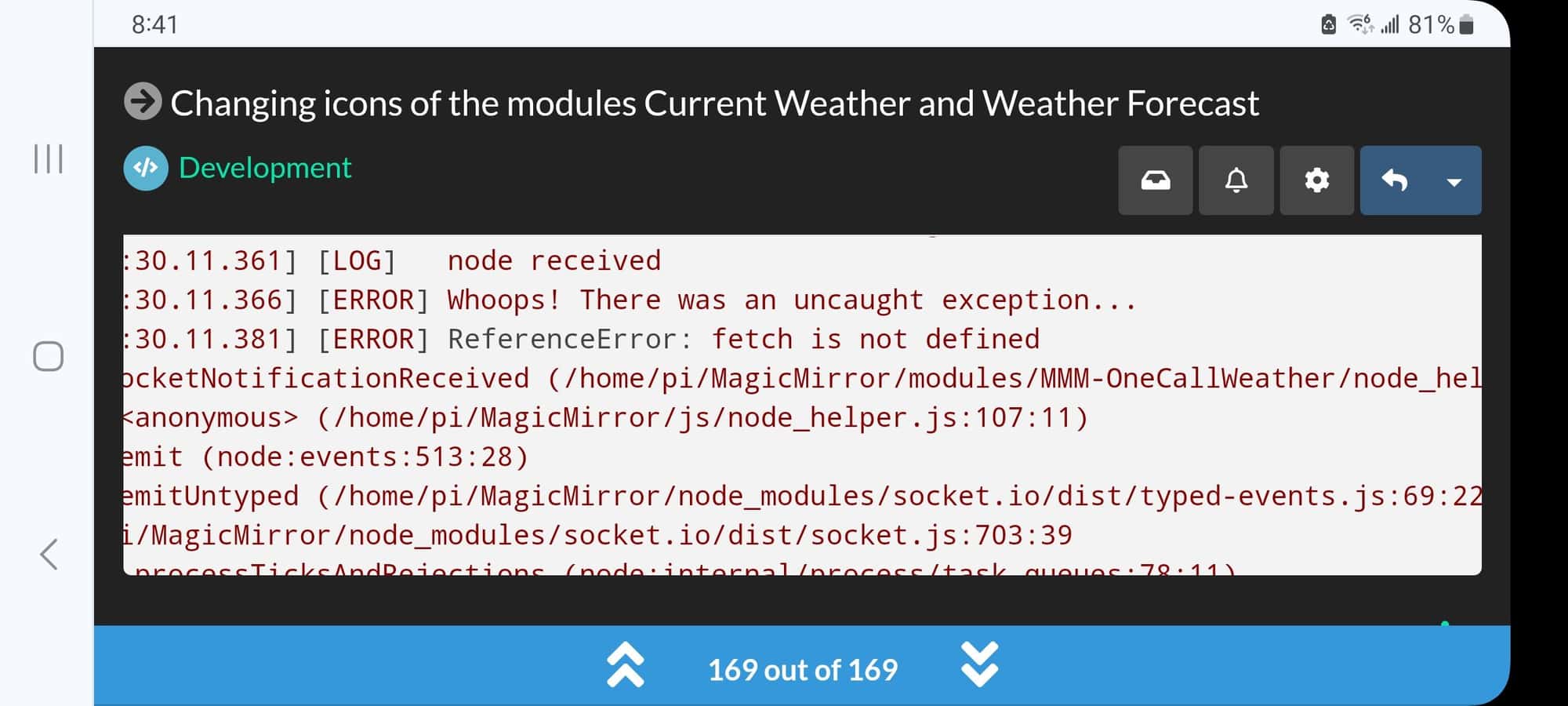
use my upgrade script to get to latest 2.26
-
@sdetweil sorry for not responding to you more quickly, but I had an appointment with the doctor, is it the weather module that doesn’t have the right version? you ask me to use your script but I don’t know what it is, sorry for my ignorance
-
@Manu85 no problem… I don’t expect any timeline in responses… life goes on
i provide scripts to handle the install and upgrade of the MM base
https://github.com/sdetweil/MagicMirror_scripts
(these are listed in the MM install doc, alternative approaches)upgrade is a 2 part process, cause I don’t want to destroy you MagicMirror installation
so the first pass is a test… no changes are made… it will tell you anything about the install that might be of concern… (people change files, and do things I don’t know, so check and report… )
then you run again, with a parameter to DO the upgrade…
both are logged, so we can tell what happened.
and I also provide scripts to take and restore backups of the MM installation
which can also be versioned(with git) and saved/restored from github
https://github.com/sdetweil/MagicMirror-backup-restore -
@Manu85 said in Changing icons of the modules Current Weather and Weather Forecast:
s it the weather module that doesn’t have the right version?
modules can check the version of MM and fail if its not at least this minimum
https://docs.magicmirror.builders/development/core-module-file.html#available-module-instance-properties(from another module on my system currently)
requiresVersion: "2.1.0",so this one should have had
requiresVersion: "2.26.0", -
@sdetweil ok, I’ll try to see with the link you sent me “https://github.com/sdetweil/MagicMirror_scripts” I hope I won’t break everything
-
@Manu85 said in Changing icons of the modules Current Weather and Weather Forecast:
I hope I won’t break everything
thats why the test mode
-
@sdetweil ok, I’ll see if I can do it…
-
@Manu85 and its not fatal… there is some command work to go back to a prior release in place, but possible…
-
@sdetweil ok so I’m going to pass the command line:
bash -c "$(curl -sL https://raw.githubusercontent.com/sdetweil/MagicMirror_scripts/master/raspberry.sh)" -
@Manu85 that is install from nothing , not upgrade to newer release
please translate the page if english is not your primary language
-
@sdetweil fortunately I haven’t taken it yet, I’m starting well…and yes I will translate, thank you
Hello! It looks like you're interested in this conversation, but you don't have an account yet.
Getting fed up of having to scroll through the same posts each visit? When you register for an account, you'll always come back to exactly where you were before, and choose to be notified of new replies (either via email, or push notification). You'll also be able to save bookmarks and upvote posts to show your appreciation to other community members.
With your input, this post could be even better 💗
Register Login