Read the statement by Michael Teeuw here.
Changing icons of the modules Current Weather and Weather Forecast
-
@Manu85 it’s ok, none of us knew much when we started. so take your time.
to use a code block in these messages
-
paste in your text (like from config.js)
-
then select all that text
-
and then push the button above the editor that looks like </>
I copied your pasted text into my custom.css
and the double quote marks became curved.
this is a special word processing quote mark, which is different that text mode quote mark
css needs the text type, straight up and down
(this is because of the lack of the code block wrapper)this prevented the css from being processed correctly
-
-
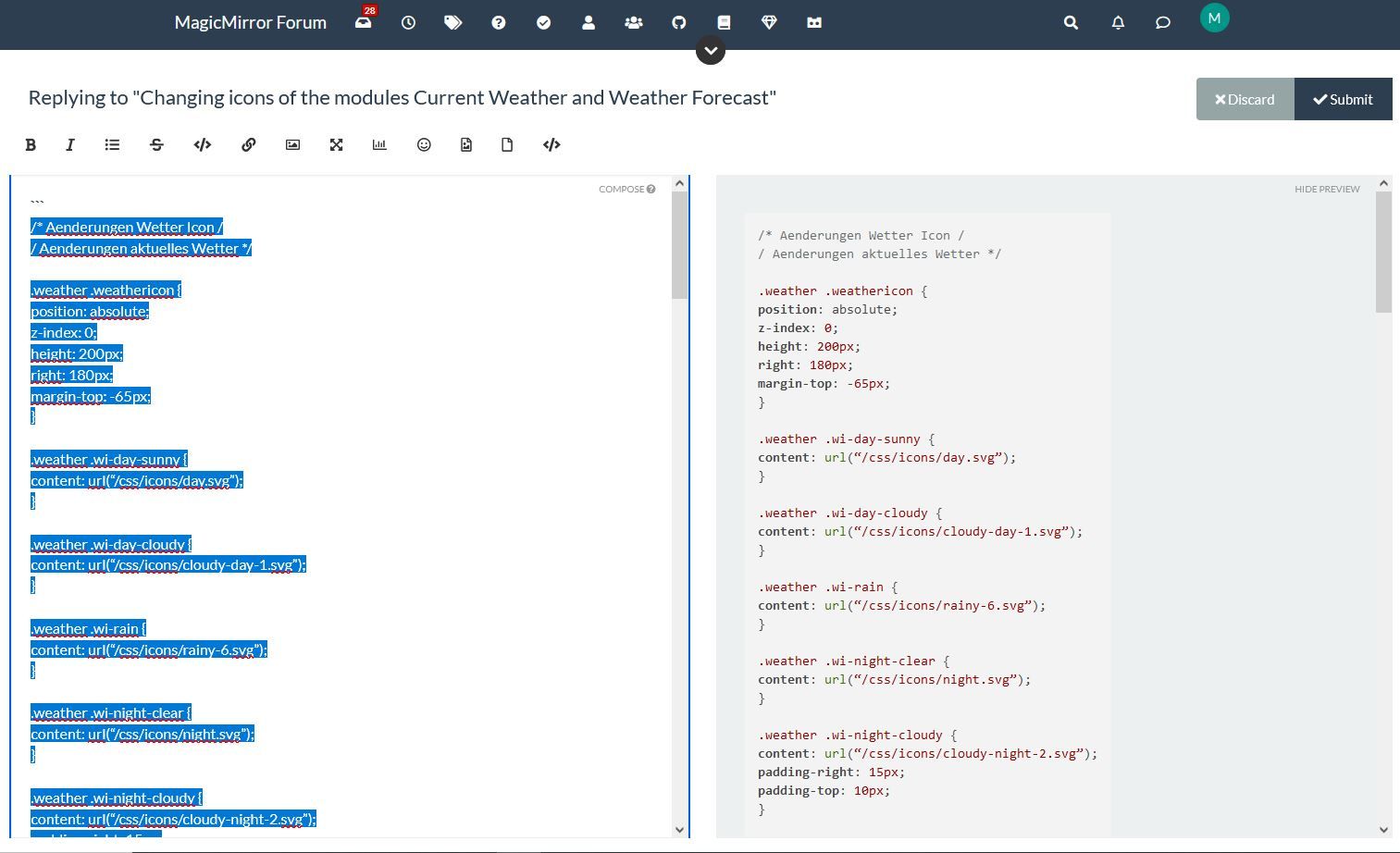
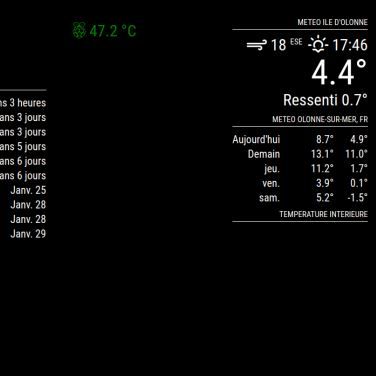
@sdetweil thank you for your patience and for your help, I copied all the lines for the custom css and I pasted it into the “site text editor” sorry for the terms but they are probably not good, then I selected the text, I pressed the </> button and on the other window I had the modified text (see screen copy) then I copied this new text and I copied it into the custom css and the original weather icons have disappeared but I don’t have any new icons, see the other screenshot, I will get there thanks to you :-)
-
@Manu85 the code block wrapper only matters here in the forums.
don’t use it anywhere else
I just wanted to tell you if you copied the css info from another place, to examine the shape of the double quotes. if they are curved
“
and not straight"then this will cause problems in the css file, it did for me.
-
@sdetweil I did the manipulation on this forum and the text that I copied into my custom css has this form:
.weather .wi-day-sunny {
content: url(“/css/icons/day.svg”);
} -
@Manu85 ok. if you zoom in on the double quotes in your last post, you will see they are curved
-
@sdetweil exactly right, but I no longer have weather icons :beaming_face_with_smiling_eyes:
-
@Manu85 show me a couple entries from you custom.css now
remember to use the code block
and the icons ARE in the css/icons folder, correct?
mine are in css/icons/static , as I unzipped the zip file from your link into the css/icons folder.weather .wi-day-sunny { content: url("/css/icons/static/day.svg"); } .weather .wi-day-cloudy { content: url("/css/icons/static/cloudy-day-1.svg"); } -
@sdetweil dans mon custom css j’ai fait ces entrées par exemple (je ne sais pas si c’est ce que vous voulez…):
/* * SONDE DHT 22 temperature interieur */ #dht_temp { font-size: 40px; /* * TEMPERATURE CPU */ } #pi_temp { font-size: 30px; } /* * CALENDRIER ICONES AGENDA */ .fa.fa-male { color: #2B60DE; /* Dodger Blue */ } .fa.fa-birthday-cake { color: #ff0000; /* Red */ } .fa.fa-trash-o { color: #00FF00; /* Green */ } .fa.fa-calendar { color: #F660AB; /* Hot Pink */ -
@Manu85 well, I meant the css info for the icons for weather
-
@sdetweil ah ok here are the entries in my custom css file for the weather, is this what you want?
.weather .wi-day-sunny { content: url(“/css/icons/day.svg”); } .weather .wi-day-cloudy { content: url(“/css/icons/cloudy-day-1.svg”); } .weather .wi-rain { content: url(“/css/icons/rainy-6.svg”); } .weather .wi-night-clear { content: url(“/css/icons/night.svg”); } .weather .wi-night-cloudy { content: url(“/css/icons/cloudy-night-2.svg”); padding-right: 15px; padding-top: 10px; } .weather .wi-cloudy { content: url(“/css/icons/cloudy.svg”); } .weather .wi-showers { content: url(“/css/icons/rainy-7.svg”); } .weather .wi-thunderstorm { content: url(“/css/icons/thunder.svg”); } .weather .wi-snow { content: url(“/css/icons/snowy-6.svg”); } .weather .wi-cloudy-windy { content: url(“/css/icons/cloudy-day-3.svg”); } .weather .wi-night-rain { content: url(“/css/icons/rainy-6.svg”); } .weather .wi-night-snow { content: url(“/css/icons/snowy-6.svg”); } .weather .wi-night-thunderstorm { content: url(“/css/icons/thunder.svg”); } .weather .wi-night-showers { content: url(“/css/icons/rainy-7.svg”); } .weather .wi-fog { content: url(“/css/icons/cloudy.svg”); } .weather .wi-night-alt-cloudy-windy { content: url(“/css/icons/cloudy-night-1.svg”); } /* Aenderungen Wettervorhersage */ .weather .weathericon { position: absolute; left: 35px; z-index: 1; margin-top: -30px; height: 60px; } .weather .wi-day-sunny { content: url(“/css/icons/day.svg”); padding-left: 6px; padding-top: 5px; height: 50px; } .weather .wi-day-cloudy { content: url(“/css/icons/cloudy-day-1.svg”); } .weather .wi-rain { content: url(“/css/icons/rainy-6.svg”); padding-left: 8px; padding-top: 5px; height: 45px; } .weather .wi-night-clear { content: url(“/css/icons/night.svg”); } .weather .wi-night-cloudy { content: url(“/css/icons/cloudy-night-2.svg”); height: 50px; padding-left: 5px; padding-top: 7px; } .weather .wi-cloudy { content: url(“/css/icons/cloudy.svg”); } .weather .wi-showers { content: url(“/css/icons/rainy-7.svg”); } .weather .wi-thunderstorm { content: url(“/css/icons/thunder.svg”); } .weather .wi-snow { content: url(“/css/icons/snowy-6.svg”); } .weather .wi-cloudy-windy { content: url(“/css/icons/cloudy-day-3.svg”); height: 45px; padding-left: 8px; padding-top: 7px; } .weather .wi-night-rain { content: url(“/css/icons/rainy-6.svg”); padding-left: 8px; padding-top: 5px; height: 45px; } .weather .wi-night-snow { content: url(“/css/icons/snowy-6.svg”); } .weather .wi-night-thunderstorm { content: url(“/css/icons/thunder.svg”); } .weather .wi-night-showers { content: url(“/css/icons/rainy-7.svg”); } .weather .wi-fog { content: url(“/css/icons/cloudy.svg”); } .weather .wi-night-alt-cloudy-windy { content: url(“/css/icons/cloudy-night-1.svg”); height: 50px; padding-left: 5px; padding-top: 7px; } -
@Manu85 said in Changing icons of the modules Current Weather and Weather Forecast:
> content: url(“/css/icons/rainy-6.svg”);note that the quotes are leaning, not straight up and down
change like this
content: url("/css/icons/rainy-6.svg"); -
@sdetweil do they have to be like that? because that’s how they were before I modified them with </>
}.currentweather .wi-day-sunny {
content: url(“/css/icons/day.svg”);
}.currentweather .wi-day-cloudy {
content: url(“/css/icons/cloudy-day-1.svg”);
}.currentweather .wi-rain {
content: url(“/css/icons/rainy-6.svg”); -
@Manu85 they ALL must be straight up and down…
I was warning you that the copy you did originally had the wrong quote marks
they ALL MUST BE ONLY
" -
@sdetweil like that ?
.currentweather .wi-night-clear { content: url("/css/icons/night.svg"); } -
@Manu85 yes
-
@sdetweil excuse me, I’ll do it right away
-
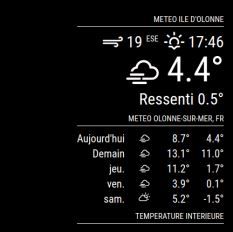
@sdetweil by putting them straight up and down my weather has the original icons
-
@sdetweil sorry for my mistakes
-
Your precious help allowed me to succeed in having the icons on the mirror :-), I added a few lines in the custom to position each icon, for example:
.weather .wi-day-sunny {
content: url(“/css/icons/day.svg”);
padding-left: 60px;
padding-top: 7px;
height: 50px;
}
the last thing to do is how to manage the current day icon (position and size) because on the original file there was a part:.currentweather .weathericon { and another part:.weatherforecast .weathericon {
Following your help I named everything: .weather .weathericon { so that it works and I think that now it no longer makes a difference between current and forecast and I cannot manage the icon of the current day. Do you have any ideas on how to handle this?
Thank you for your valuable help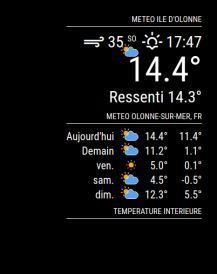
-
@Manu85 yes the current/forecast are not unique modules now…but mm provides a way to differentiate between two of the same module
you can add arbitrary names that are used in the class of the module in the html tree, and then use that class in your custom.css
I wish I had thought of the sooner
in the config.js for one of the weather modules, showing forecast for instance, after the module name line add
    module:"weather",
    classes:"forecast",
...
...
then in the custom.css, for the icons used in forecast change the primary selector
from.weatherto
.forecastif I had thought of this first, we would have just added the two classes lines in config.js
one for currentweather and one for weatherforecast, each on the appropriate weather module instance
Hello! It looks like you're interested in this conversation, but you don't have an account yet.
Getting fed up of having to scroll through the same posts each visit? When you register for an account, you'll always come back to exactly where you were before, and choose to be notified of new replies (either via email, or push notification). You'll also be able to save bookmarks and upvote posts to show your appreciation to other community members.
With your input, this post could be even better 💗
Register Login