Read the statement by Michael Teeuw here.
MMM-GooglePhotos
-
@kykzzang said in MMM-GooglePhotos:
https://lh3.googleusercontent.com/lr/AFBm1_ZoyynSCyzTQfmQ1jO2Ol2jJqYLgBvOMGJ07YcZ
That’s because if you copy one of those links…those images do not exist.
-
sometimes, image loading is successful.
but after index failing, it does not run again.[2020-05-07 09:53:21.010] [LOG] [GPHOTOS] Image loading fails. Check your network.: https://lh3.googleusercontent.com/lr/AFBm1_ak9_lafawfAhSbhANtZXBdVH [2020-05-07 09:55:21.137] [LOG] [GPHOTOS] Image loading fails. Check your network.: https://lh3.googleusercontent.com/lr/AFBm1_ahNqW5H91XaNth2sJoX9QE7s [2020-05-07 09:57:21.130] [LOG] [GPHOTOS] Image loading fails. Check your network.: https://lh3.googleusercontent.com/lr/AFBm1_ZaAjKoODb_OPlUzISo9jy1u4 [2020-05-07 09:59:21.153] [LOG] [GPHOTOS] Image loading fails. Check your network.: https://lh3.googleusercontent.com/lr/AFBm1_bvB6ykWhOyPUcRLEAns7oT3K [2020-05-07 10:01:21.139] [LOG] [GPHOTOS] Image loading fails. Check your network.: https://lh3.googleusercontent.com/lr/AFBm1_Zs_BgUJgTgurcCBrDgV8SMQP [2020-05-07 10:03:21.237] [LOG] [GPHOTOS] Image loading fails. Check your network.: https://lh3.googleusercontent.com/lr/AFBm1_YmrDraY6gfuXVS7lDA6-op7K [2020-05-07 10:05:21.153] [LOG] [GPHOTOS] Image loading fails. Check your network.: https://lh3.googleusercontent.com/lr/AFBm1_YiUySpsiSfYCRte96P2xYIzZ [2020-05-07 10:07:20.918] [LOG] [GPHOTOS] Image loaded: https://lh3.googleusercontent.com/lr/AFBm1_aC6voVTY4cjTOGEGner4cuOGtUC41vpPTElactvgQiPCRufJIt-C [2020-05-07 10:09:21.142] [LOG] [GPHOTOS] Image loading fails. Check your network.: https://lh3.googleusercontent.com/lr/AFBm1_ZWO0WENWR6IqtlvCWqWAZVSF [2020-05-07 10:11:21.023] [LOG] [GPHOTOS] Image loading fails. Check your network.: https://lh3.googleusercontent.com/lr/AFBm1_Zk6JM9zPQ72ll8EYULsuoCBM [2020-05-07 10:13:21.154] [LOG] [GPHOTOS] Image loading fails. Check your network.: https://lh3.googleusercontent.com/lr/AFBm1_b_oSZict47mORzvT6uwd6tCm [2020-05-07 10:15:21.147] [LOG] [GPHOTOS] Image loading fails. Check your network.: https://lh3.googleusercontent.com/lr/AFBm1_bIkwJb-V0P5Gwy5K3bQ8EANA [2020-05-07 10:17:21.158] [LOG] [GPHOTOS] Image loading fails. Check your network.: https://lh3.googleusercontent.com/lr/AFBm1_avm5xrDSN-xwthqb5zg9MxC8 [2020-05-07 10:19:21.160] [LOG] [GPHOTOS] Image loading fails. Check your network.: https://lh3.googleusercontent.com/lr/AFBm1_YC1P-nHfYfVb5AEm6qJfpuvp [2020-05-07 10:21:21.159] [LOG] [GPHOTOS] Image loading fails. Check your network.: https://lh3.googleusercontent.com/lr/AFBm1_buVXMwyR52HwdEOb_Vtz22OL [2020-05-07 10:23:21.154] [LOG] [GPHOTOS] Image loading fails. Check your network.: https://lh3.googleusercontent.com/lr/AFBm1_aJ7QVByAhmj-5G29sTowiQH6 [2020-05-07 10:25:21.157] [LOG] [GPHOTOS] Image loading fails. Check your network.: https://lh3.googleusercontent.com/lr/AFBm1_Z3Ucrm8Tf08CoidOImN531tQ [2020-05-07 10:27:21.206] [LOG] [GPHOTOS] Image loading fails. Check your network.: https://lh3.googleusercontent.com/lr/AFBm1_b_CM8oP6af_yfbt_z1avXwYt [2020-05-07 10:29:20.983] [LOG] [GPHOTOS] Image loaded: https://lh3.googleusercontent.com/lr/AFBm1_YXQKGn4L3DOuTxaqK_khpcrSZDvJggiDLMoQEn8YHfkDm4ZmY4Hi [2020-05-07 10:31:21.147] [LOG] [GPHOTOS] Image loading fails. Check your network.: https://lh3.googleusercontent.com/lr/AFBm1_bipyHtNScWr3gl4cQVoewCyI [2020-05-07 10:33:21.158] [LOG] [GPHOTOS] Image loading fails. Check your network.: https://lh3.googleusercontent.com/lr/AFBm1_azVty06EiBsdLlD5CggnEQcb [2020-05-07 10:35:21.023] [LOG] [GPHOTOS] Image loading fails. Check your network.: https://lh3.googleusercontent.com/lr/AFBm1_a1uFaqkL2Oloi6jGCObhQKcp -
@cowboysdude The URLs only last for an hour. That’s why it re-indexes and updates after 50 min. The issue @kykzzang and I are having is that sometimes during indexing there’s a network issue and the indexing doesn’t complete. When that happens the URLs don’t get updated and the module tries using the old URLs resulting in the the failed image loading.
-
He added logging and in there it should tell you why it’s failing…
-
@cowboysdude said in MMM-GooglePhotos:
He added logging and in there it should tell you why it’s failing…
Yes. This is the error and I appreciate all @Sean has done. However, whatever is causing the error below isn’t something I can identify/control/fix. There are no network issues anywhere else on my network except this single module. At least once a day I need to manually intervene to get it started again.
Error: Client network socket disconnected before secure TLS connection was established (/home/pi/MagicMirror/modules/MMM-GooglePhotos/GPhotos.js:124 GPhotos.log) -
@gonzonia said in MMM-GooglePhotos:
@cowboysdude said in MMM-GooglePhotos:
He added logging and in there it should tell you why it’s failing…
Yes. This is the error and I appreciate all @Sean has done. However, whatever is causing the error below isn’t something I can identify/control/fix. There are no network issues anywhere else on my network except this single module. At least once a day I need to manually intervene to get it started again.
Error: Client network socket disconnected before secure TLS connection was established (/home/pi/MagicMirror/modules/MMM-GooglePhotos/GPhotos.js:124 GPhotos.log)It’s disconnecting before the proper connection can be made… so it sounds like a Google issue.
-
Hello,
I’m a newbie on Magic Mirror, so please, be indulgent :)I’ve setup magic mirror as a server only on my NUC (via Docker) and I’ve installed npm module MMM-GooglePhotos on it.
I can access MM, and see all basic modules, browsing to the server and port configured in docker. So no problems there.I’m blocked though, on the installation (authorization part) of MMM-GooglePhotos module.
I’ve created all credentials on google, however, being a server only installation of magic mirror, I cannot complete the OAUTH token generation as advised in the docs, as via console there is no way to open a “browser” and access google consent screen.Is there any other way, maybe using a generic google API in the config, to authorize without going through consent screen?
Maybe doing the consent somewhere else (accessing an URL?) and then copy (and/or craft) the token somehow?Thank you for your time and help!
P.S.
Apologies if this is not the best place to post this message, so please advise if that’s the case. -
As I’ve said in another post, I couldn’t maintain this module anymore.
However, yesterday night, suddenly I got an idea of what happened. (Not tested, and… sorry, I couldn’t test)
Most of MM modules and MM itself are using the same port to communicate internally and externally. I suspect some modules(and even inside logics in a module) were racing to use the port. They had opened and closed the port by their own schedule, which could make this symptom. Connection with Google Server often needs some long time probably.
The solution might be to use a different port not to race. and make the connections not to happen asynchronously. For the performance, I usually used asynchronous attempting to communicate with Google Server, It might make worse that issue.
Well, some modification of source might be needed, but as I’ve said (again), I couldn’t.Anyway, this guess is not confirmed by the test, just an idea.
If someone could get an inspiration, I hope this guess could be a help. -
@Sean makes perfect sense!! I guessed that was Google … I could only offer that much help as I don’t have time to really look at it either.
Thank you for the response and someone with more time could take a peek at it.
-
@Sean thank you. As always I appreciate the efforts you’ve put in. Much of my posting has been throwing out ideas to see what might stick too. I’m not adept enough at js to tackle this myself but may try at some point. I’ve got it logging at almost a line by line level to see if there’s one call that has the problem. I actually got a whole new error today which was weird. I’ll keep posting as I discover anything but please don’t think I’m trying to get you to do something, it’s more for documentation of the problem in hopes that someone can fix it!
-
New error now that I’ve increased logging. Not sure it’s related but it does seem more specific.
Error: getaddrinfo EAI_AGAIN photoslibrary.googleapis.com
Which could be this. https://github.com/googleapis/google-api-nodejs-client/issues/761Popping up at this line (I have a log entry directly before that shows up, and one after that doesn’t)
var response = await this.request(token, 'mediaItems:search', 'post', null, data) -
@gonzonia said in MMM-GooglePhotos:
getaddrinfo EAI_AGAIN
that means your network failed… are u using a pihole for connection security?
seen lots of failures thru pihole…
-
@sdetweil I do but I thought I’d switched the DNS on there to not use it. Apparently not. This new error was likely the result of the update to pihole v5 (need to figure that out separately). Thanks for pointing me in the right direction!
-
@sdetweil It’s interesting. I’m seeing this error now instead of the socket disconnected error. I’ve changed the DNS on the MM to not use the pihole (it’s using Google DNS).
I don’t know why I’m seeing this vs. the other error all of a sudden. I still think it’s hard to blame the network exclusively. I have other modules too that all run fine at the exact same time.
I’ve tried to figure out how to catch the error but I don’t think I can. From what I can tell it’s making the async call and then while waiting for a response it loses the connection for some reason. I’m not skilled enough to re-write try the async queue method referenced in the github post I linked to previously. I’m just hopeful someone who has the same problem might have the skills to fix it or at least catch it better so that the module doesn’t fail completely. (Meanwhile I’ll keep trying to identify what the problem is).
-
@gonzonia i don’t think the referenced issue is the problem, but there is a bunch of work needed to improve error recovery. I don’t KNOW for sure what the problem IS, but looking at the code there is no recovery from it.
-
anybody have any issues with the photos stop changing after a while? i cant figure it out my post
-
I noticed this module is using huge data. Almost downloading more than 3gb/day. My refresh rate is 1.5min per photo. Anyone else noticed this? How can we reduce the data usage? Probably show photos from the cached data instead of downloading every time?
-
@soubhik-khan I went over the code last month for some not refreshing problem. and it does build and use a local cache.
how big are the pictures? and how many are there?
at 1 mb each for 960 pics, it could be 1gb in a day
-
@sdetweil yes you are right, I think I found the issue. Its not this module. There is something else on the pi hijacking my bandwidth! its insane ~ 24GB is last 24 hours!
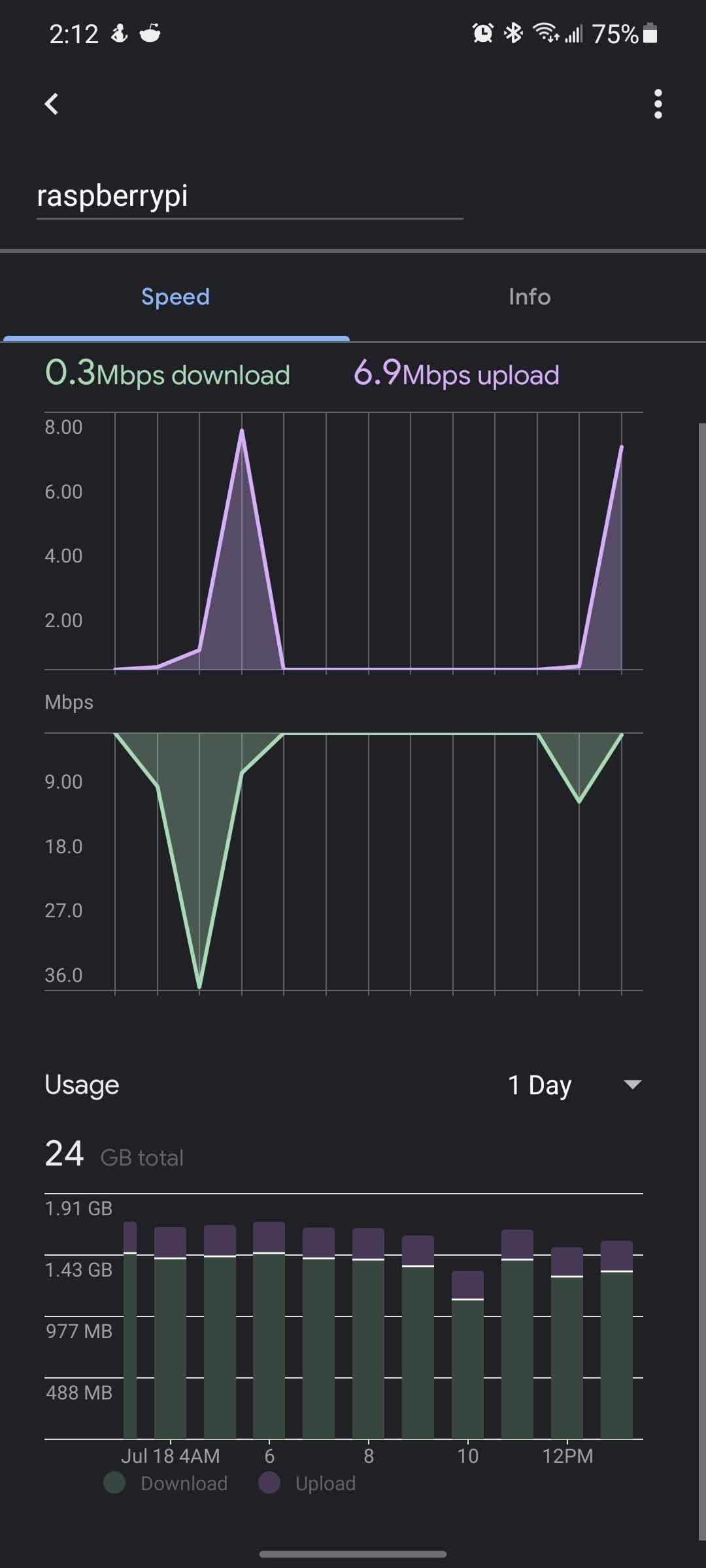
I was about the do a clean install but then I thought I will just remove the unused folders first! I guess its from pocketshhinx or sphinxbase, I had installed some of those voice assistant modules! I removed those two folders and looks like now the data usage is back to normal. Will monitor for a day, if this doesnt help, will need to do a clean install
-
I am currently using this module to display one album that has 5 photos in it. I have it set to change the photo every 15 seconds. For some reason once it gets to the 5th photo, it only displays for barely 1 second and then starts from the beginning again. Any suggestions on how to fix this so that the last photo will display as long as the others?


Hello! It looks like you're interested in this conversation, but you don't have an account yet.
Getting fed up of having to scroll through the same posts each visit? When you register for an account, you'll always come back to exactly where you were before, and choose to be notified of new replies (either via email, or push notification). You'll also be able to save bookmarks and upvote posts to show your appreciation to other community members.
With your input, this post could be even better 💗
Register Login