Read the statement by Michael Teeuw here.
MMM-MirrorMirrorOnTheWall installation issue
-
@oceank No news…anything on your part ??? I tried to use another voice module for MM control but that ruins my Alexa installation and it does not work itself after that either so that was no-go.
I think we should start reading again that long thread where people said they had gotten it to work and see what else we may find. I think it is only the return part form the Lampda to the mirror that is not working it cant be that complicated probably something simple but what do i know.
D -
@OceanK Yesterday i tried all afternoon to play with this again … i tried to change the keys path on the MirorMirrorOnTheWallSKILL before uploading it to Lambda and nothing changed. Well it gave errors that it was not working so i reverted back to the old working zip file that i had where “everything” was last seem to be fine and another error surfaced but the skill works fine.
The error is this2018-11-05T04:11:36.100Z e2223a43-e0b0-11e8-a28e-557bbecf4c24 The applicationIds don't match: amzn1.ask.skill.[unique-value-here] and amzn1.ask.skill.eXXXXX-dXXX-48bd-9b1c-3d309a950fcf 2018-11-05T04:11:36.122Z e2223a43-e0b0-11e8-a28e-557bbecf4c24 { "errorMessage": "Invalid ApplicationId: amzn1.ask.skill.eXXXXXXX-XXX-48bd-9b1c-3d309a950fcf", "errorType": "Error", "stackTrace": [ "AlexaRequestEmitter.ValidateRequest (/var/task/node_modules/alexa-sdk/lib/alexa.js:157:27)", "HandleLambdaEvent.i18n.use.init (/var/task/node_modules/alexa-sdk/lib/alexa.js:123:29)", "/var/task/node_modules/i18next/dist/commonjs/i18next.js:190:9", "done (/var/task/node_modules/i18next/dist/commonjs/i18next.js:281:21)", "/var/task/node_modules/i18next/dist/commonjs/i18next.js:302:7", "I18n.loadResources (/var/task/node_modules/i18next/dist/commonjs/i18next.js:238:7)", "I18n.changeLanguage (/var/task/node_modules/i18next/dist/commonjs/i18next.js:301:10)", "load (/var/task/node_modules/i18next/dist/commonjs/i18next.js:186:14)", "I18n.init (/var/task/node_modules/i18next/dist/commonjs/i18next.js:195:7)", "AlexaRequestEmitter.HandleLambdaEvent (/var/task/node_modules/alexa-sdk/lib/alexa.js:114:32)" ] }the xxx are my changes to hide my id.
I went and checked my appid and it has not changed and like i said the skill works when you go on the Alexa console and it responds with “Hello my queen…” however i do not see any video or photo requests coming though n the logs on the youtube api etc.Another thing that has changed and i do no know why is the IoT endpoint on IoT Core at the bottom under settings.
Can you check yours ne more time please run an error test on lambda and see if you see any changes and check your IoT Core endpoint that we copy paste on index.js file
Denis
-
@richland007 Hey!
I will try later tonite! Im going to do this from scratch again. I will report back. I have been on vaccation for coupple of weeks in dubai. But now Im back!
So lets try this again!
-
hey!
its not possible to build the alexa module with the intentmodel.json
The intentmodel.json is depricated, and I cannot build the model =(
what to do now?
-
So im back again!
I started it all from scratch!
still getting this:
{
“errorMessage”: “In state: . No handler function was defined for event SessionEndedRequest and no ‘Unhandled’ function was defined.”,
“errorType”: “Error”,
“stackTrace”: [
“AlexaRequestEmitter.EmitEvent (/var/task/node_modules/alexa-sdk/lib/alexa.js:212:15)”,
“AlexaRequestEmitter.ValidateRequest (/var/task/node_modules/alexa-sdk/lib/alexa.js:181:23)”,
“HandleLambdaEvent.i18n.use.init (/var/task/node_modules/alexa-sdk/lib/alexa.js:123:29)”,
“/var/task/node_modules/i18next/dist/commonjs/i18next.js:190:9”,
“done (/var/task/node_modules/i18next/dist/commonjs/i18next.js:281:21)”,
“/var/task/node_modules/i18next/dist/commonjs/i18next.js:302:7”,
“I18n.loadResources (/var/task/node_modules/i18next/dist/commonjs/i18next.js:238:7)”,
“I18n.changeLanguage (/var/task/node_modules/i18next/dist/commonjs/i18next.js:301:10)”,
“load (/var/task/node_modules/i18next/dist/commonjs/i18next.js:186:14)”,
“I18n.init (/var/task/node_modules/i18next/dist/commonjs/i18next.js:195:7)”
]
} -
Something is not right with the lamda function.
-
Nothing from your side @richland007 ?
-
nothing at all my friend
-
@oceank this looks very interesting to control themirror with alexa installed already likemy case is https://forum.magicmirror.builders/topic/9211/mmm-alexaonoff-simple-mirror-control-from-external-home-assistant-alexa-google-home-hass-io
D
-
Hey!@richland007
thats i pretty cool! well I already can by voice show and hide every module individually actually and I do that offline. So I dont need any online module like an echo and so on to do this.
-
@oceank how do you hide and show all modules what do you use to do that via voice?? ??/ thats why i wanted mirror mirror for ?? doy you yse MMM-voices?? i can not use that cause it messes my Alexa Pi up
-
Hey @richland007 !
I use this module: Helo Lucy: https://github.com/mykle1/Hello-Lucy
So im running aintel nuc with ubuntu to run the magicmirror with lucy. So I have one hidden microphone behind the mirror for that.
Then I have a raspberry pi with hidden microphone and speakers, running both Alexa and google assistant =)
https://github.com/shivasiddharth/Assistants-Pi
So now its running like I want it =)
-
Just a heads up –
I was running into the same issues as you both. After hours of research I eventually discovered that the AWS IoT security policy for your certificates must be properly configured…otherwise you’ll be hit with authorization issues when clients attempt to connect to the IoT thing for subscribing, publishing, connections, etc. Once i corrected this, I had no further issues with the installation.
The change I made to my policy in ‘AWS IoT>Secure>Policies’ is below:
{
  "Version": "2012-10-17",
  "Statement": [
    {
      "Effect": "Allow",
      "Action": [
        "iot:Publish",
        "iot:Receive"
      ],
      "Resource": [
        "arn:aws:iot:us-east-1:543211234567:topic/sdk/test/java",
        "arn:aws:iot:us-east-1:543211234567:topic/sdk/test/Python",
        "arn:aws:iot:us-east-1:543211234567:topic/topic_1",
        "arn:aws:iot:us-east-1:543211234567:topic/topic_2",
        "arn:aws:iot:us-east-1:543211234567:topic/MagicMirror:new-text",
        "arn:aws:iot:us-east-1:543211234567:topic/MagicMirror:new-images",
        "arn:aws:iot:us-east-1:543211234567:topic/MagicMirror:change-module",
        "arn:aws:iot:us-east-1:543211234567:topic/MagicMirror:new-video"
      ]
    },
    {
      "Effect": "Allow",
      "Action": [
        "iot:Subscribe"
      ],
      "Resource": [
        "arn:aws:iot:us-east-1:543211234567:topicfilter/sdk/test/java",
        "arn:aws:iot:us-east-1:543211234567:topicfilter/sdk/test/Python",
        "arn:aws:iot:us-east-1:543211234567:topicfilter/topic_1",
        "arn:aws:iot:us-east-1:543211234567:topicfilter/topic_2",
        "arn:aws:iot:us-east-1:543211234567:topicfilter/MagicMirror:new-text",
        "arn:aws:iot:us-east-1:543211234567:topicfilter/MagicMirror:new-images",
        "arn:aws:iot:us-east-1:543211234567:topicfilter/MagicMirror:change-module",
        "arn:aws:iot:us-east-1:543211234567:topicfilter/MagicMirror:new-video"
      ]
    },
    {
      "Effect": "Allow",
      "Action": [
        "iot:Connect"
      ],
      "Resource": [
        "arn:aws:iot:us-east-1:543211234567:client/sdk-java",
        "arn:aws:iot:us-east-1:543211234567:client/basicPubSub",
        "arn:aws:iot:us-east-1:543211234567:client/sdk-nodejs-*",
        "arn:aws:iot:us-east-1:543211234567:client/MagicMirror*"
      ]
    }
  ]
}
Make sure your client id defined in MirrorMirror.js matches the wildcard (“MagicMirror” in this case) that was added to iot:Connect action of the policy. This needs to be modified locally in the module and also in the uploaded lambda function!
// Setup our AWS IoT device and receive messages
app.setup = function() {
  app.device = awsIot.device({
    keyPath: __dirname + "/certs/MagicMirror.private.key",
    certPath: __dirname + "/certs/MagicMirror.cert.pem",
    caPath: __dirname + "/certs/root-CA.crt",
    clientId: "MagicMirror" + (new Date().getTime()),
    region: "us-east-1",
    host: "YOURID.iot.us-east-1.amazonaws.com",
  });
Best of luck and happy new year!
-
@blackpanda Hey thank you for reviving the topic and happy new year.
Quick question were do i find the ‘AWS IoT>Secure>Policies’
so i can make the necessary changes at??Is it over on the MirrorMirrorOnTheWallSkill i have a aws-iot-device-sdk folder under src/node_modules but there is no Secure sub folder in it!!!
D
-
@richland007 said in MMM-MirrorMirrorOnTheWall installation issue:
Quick question were do i find the ‘AWS IoT>Secure>Policies’
Policies are modified via the Amazon Web Services (AWS) management console.
You can update the policy by submitting JSON through the API. Or you can use the management console and just duplicate the settings posted above.
-
@blackpanda thanx bro! I will try this later today, I will report back. @richland007 did it work for you?
-
@blackpanda SO you got this to work? I still have problem =( When building the model could you paste your interactionmodel? the one that goes into the json editor…
-
@oceank I haven’t gotten the chance to give it another try but i will soon :)
Did you do the changes that @blackpanda suggested ?? whats it telling you now??@blackpanda It took me a while to realize that it says MagicMirror but on our MirrorMirror.js file the ClienId is MirrorMirror so i changed that and i uploaded on Lambda and i made the appropriate policy changes on the IoT to reflect my arn:aws and my number nut just copy paste yours
but when i test Lambda now i get this error: The applicationIds don’t match: amzn1.ask.skill.[unique-value-here] and amzn1.ask.skill.e0223a06-d061-48bd-9b1c-3XXXXa950fcfAnd the app ID has not changed?? And also when i go to test the skill now on the Alexa developer side now i dont even get"Hello My queen…" i used to get it just goes straight to there was a problem with the requested skills response.
What else do i need to change cause i doubt there is anything major …has the syntax changed again appID or aplicationId etc???
Thank you any help is greatly appreciated
D -
@richland007 so you changed the clientId in the lambda function and uploaded it. Did you change the client id in the module as well? Can you post your security policy? You should also define your queues (modules) there.
The app id is defined in index.js of the skill. APP_ID is defined in a variable near the top of the file.
Looks like this currently:
alexa.appId = APP_IDAlso, you can verify what your skill id is by checking in the amazon developer console then selecting ‘endpoint’ (it’s an option on the left pane under interaction model and interfaces).
-
pro-tip:
A way to check and see if you’re actually subscribing to the topics that are publishing search results:
if you run the following command from a remote putty session…
cd ~/MagicMirror
Display=:0 npm start
you should eventually see that you’re subscribing to the topics!
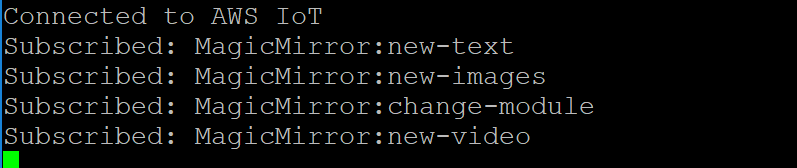
Initially, the misconfigured security policy was preventing this from happening and authorization errors were being thrown in the background (had to dig into cloudwatch logs for this). In putty, the command would simply hang at “Attempt to connect to AWS”
Basically your youtube api search results will be published to the “new-video” queue…and if your aren’t subscribed to that queue then you wont see anything change on your monitor. Same for your google image searches and “new-images”. and so on.

Hello! It looks like you're interested in this conversation, but you don't have an account yet.
Getting fed up of having to scroll through the same posts each visit? When you register for an account, you'll always come back to exactly where you were before, and choose to be notified of new replies (either via email, or push notification). You'll also be able to save bookmarks and upvote posts to show your appreciation to other community members.
With your input, this post could be even better 💗
Register Login