Read the statement by Michael Teeuw here.
MMM-Hue-Lights - new module for your Philips Hue lights!
-
Hi there,
Just released another new MM module - this one is
mmm-hue-lightsand shows the current status of your Philips hue lights and light groups on your magic mirror. It’s a nice way to check whether you forgot to turn the lights on or off :)Just like my Nest modules, you have multiple view options and designs, so hopefully you can find a version that looks good on your particular mirror.
Check it out here:
[card:michael5r/mmm-hue-lights]The
read mehas examples of what it looks like in all the states & modes, but here’s a couple of representative screenshots: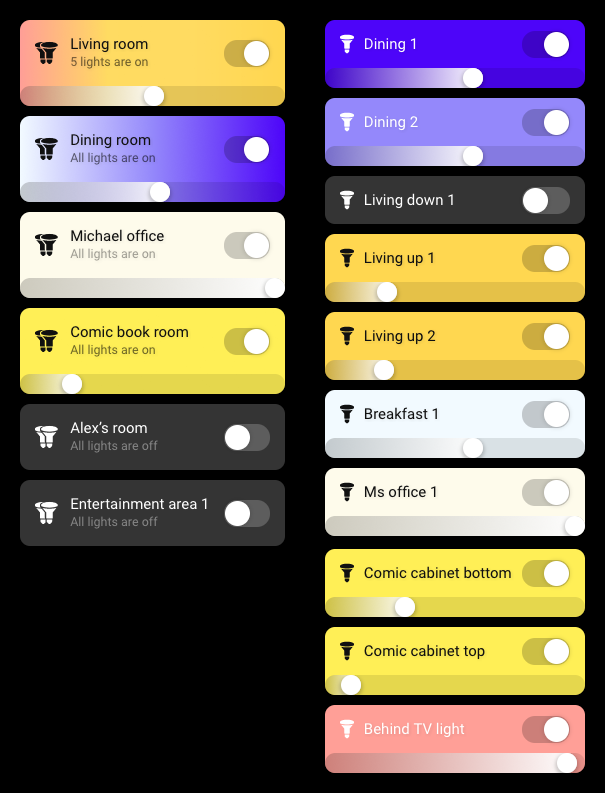


Enjoy!
UPDATES
12-18-2018: Version 1.1.0
This adds ahideFilteroption which allows you to filter out lights and light groups you don’t want displayed. It’s the opposite of thedisplayFilteroption.12-19-2018: Version 1.2.0
When viewinggroups, this now only shows groups with a type ofroom.12-27-2018: Version 1.3.0
AddsmotionSleepandmotionSleepSecondsoptions which allow you to suspend this module when no movement has been detected for X number of seconds.12-28-2018: Version 1.3.1
ChangesmotionSleepto tie into the regularsuspendandresumefunctions exposed by MM -
@michael5r ohhhhhh! ***** now your showing off, your making me get all your modules lol, that looks good that will compliment your nest muddle perfectly! Thank you Sir!!!
-
@dazza120 said in MMM-Hue-Lights - new module for your Philips Hue lights!:
@michael5r ohhhhhh! ***** now your showing off, your making me get all your modules lol, that looks good that will compliment your nest muddle perfectly! Thank you Sir!!!
You’re very welcome - I’m basically just building stuff that I need for my own mirrors :)
-
@michael5r Awesome looking module! Extremely professional looking.
When I get time I’m definitely going look at integrating with my MMM-ISY module to render on top of the Floorplan (my ultimate goal is to use a MagicMirror instance as a web-based home control interface-slash-ISY/Hass.io/Hue front-end on my mirrors, tablets, etc).
-
@michael5r Thanks for sharing :)
-
Hi is it possible to do a hide light or group that you don’t want to be seen rather than adding all the ones you have? As my hue stuff is in its infancy and it’s always having more bulbs added I would rather that it populated new bulbs rather than input the name in the model, I don’t even know if this is possible with your module? But it’s staying on my mirror thanks again for a beautiful module 👌🏾
-
@dazza120 said in MMM-Hue-Lights - new module for your Philips Hue lights!:
Hi is it possible to do a hide light or group that you don’t want to be seen rather than adding all the ones you have? As my hue stuff is in its infancy and it’s always having more bulbs added I would rather that it populated new bulbs rather than input the name in the model, I don’t even know if this is possible with your module? But it’s staying on my mirror thanks again for a beautiful module 👌🏾
There wasn’t the option to do so previously, but there is now.
If you pull the latest version of the module, you’ll find a new setting called
hideFilter. It works exactly the same way as thedisplayFiltersetting, but in reverse - any names you add tohideFilterwill be hidden on your mirror.Like this:
hideFilter: ['living room'],Any lights or light groups named
living roomwill now be hidden.Check it out and see if it works for you.
-
@michael5r said in MMM-Hue-Lights - new module for your Philips Hue lights!:
@dazza120 said in MMM-Hue-Lights - new module for your Philips Hue lights!:
Hi is it possible to do a hide light or group that you don’t want to be seen rather than adding all the ones you have? As my hue stuff is in its infancy and it’s always having more bulbs added I would rather that it populated new bulbs rather than input the name in the model, I don’t even know if this is possible with your module? But it’s staying on my mirror thanks again for a beautiful module 👌🏾
There wasn’t the option to do so previously, but there is now.
If you pull the latest version of the module, you’ll find a new setting called
hideFilter. It works exactly the same way as thedisplayFiltersetting, but in reverse - any names you add tohideFilterwill be hidden on your mirror.Like this:
hideFilter: ['living room'],Any lights or light groups named
living roomwill now be hidden.Check it out and see if it works for you.
Works brilliantly i missed the brackets [ ] as i thought it didn’t need it, but put them in and boom works like a dream now home-away mode won’t bug me lol. Thanks again
-
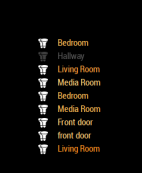
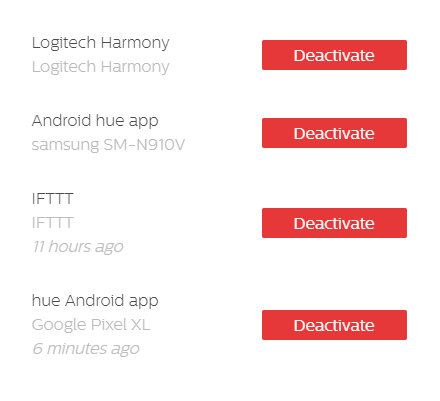
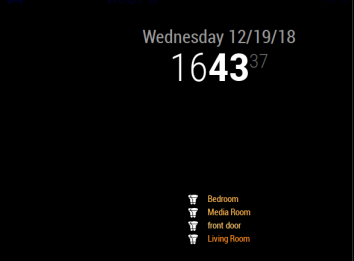
Would you have any idea as to why I am showing multiple identical groups? I thought it was coming from one of my other connected apps to Hue, however I went in and disabled all the other apps and it still shows up. I cant seem to find a way to use hide or show since they have identical names.
-
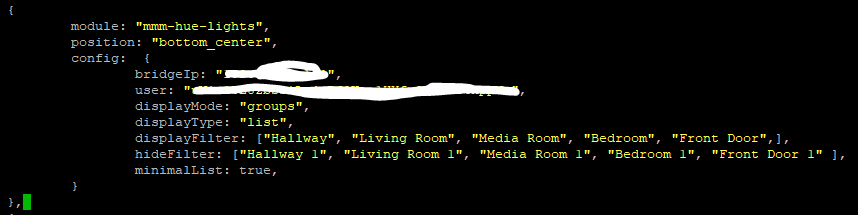
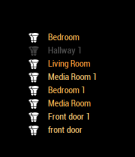
As a work around to this, I went into my Hue app and renamed all my rooms with a 1 on the end, and hid all the ones with that 1. I am not sure where it is pulling the groups from if not the Hue App.
-
@phideltdexter This is most likely due to you having
Entertainment Areasset up on your Hue system as well.Open up the Hue app, click
Settings, thenEntertainment Areasand see what’s in there.If that’s not it, let me know and I’ll do some more debugging on my end.
-
I also thought about that. I had 2 entertainment areas setup already. One in living room and another generic one. I removed them just to make sure, it removed one duplicate of Living Room, but not the others.
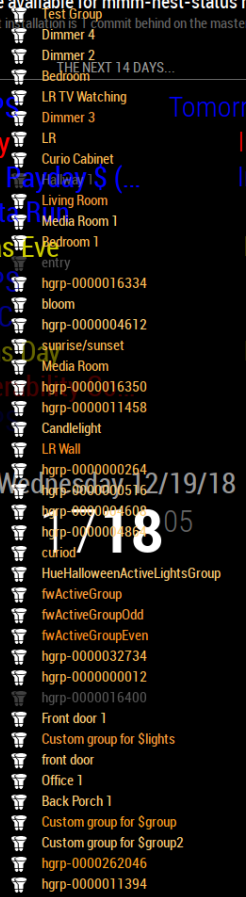
In addition when I disable all the filters I have a list of groups that takes up almost my entire screen. The majority of which are not in the Hue App, which is why initially I thought it had to be pulling from somewhere else besides the Hue App.
-
I also only have 2 formulas installed in Hue Labs. 1 of them is candlelight, so that is where that one comes from. The others, I am still not sure. I also went in and changed the names of all my rooms in my SmartThings environment which didn’t change anything either.
-
@phideltdexter said in MMM-Hue-Lights - new module for your Philips Hue lights!:
I also thought about that. I had 2 entertainment areas setup already. One in living room and another generic one. I removed them just to make sure, it removed one duplicate of Living Room, but not the others.
In addition when I disable all the filters I have a list of groups that takes up almost my entire screen. The majority of which are not in the Hue App, which is why initially I thought it had to be pulling from somewhere else besides the Hue App.
Ahhh … I think I know what this is - I think these are multisource groups and lightsources. Give me a minute to come up with a fix that ignores them from the group list.
-
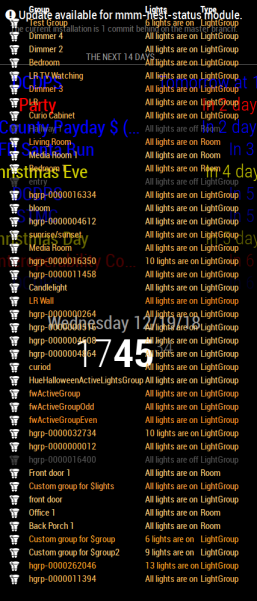
Here is what it shows for Type. I didn’t even think to check. But perhaps if you are filtering out group types, you could add a category for Rooms in the future? Otherwise it shows them as a LightGroup.
-
@phideltdexter said in MMM-Hue-Lights - new module for your Philips Hue lights!:
Here is what it shows for Type. I didn’t even think to check. But perhaps if you are filtering out group types, you could add a category for Rooms in the future? Otherwise it shows them as a LightGroup.
Yeah, that confirms my assumption.
My intention with the
groupswas just to showrooms, though - I just don’t have any of these multisource groups myself, so I never realized they were also being shown.I pushed an update to the module that filters out anything that doesn’t have a type of
room- if you pull it, your list should shrink to a more manageable size :)If you’d like to have the ability to filter these groups - just in case you do want to show ones marked
LightGroup- just post it as an issue on GitHub and I’ll build a real filtering functionality. -
Just wanted to announce that there’s a new version of this module out!
I added functionality to support Paviro’s MMM-PIR-Sensor module meaning that this module can now be suspended & resumed based on movement detected through a PIR sensor (or whatever else you’re using for motion detection).
Check out the release notes here:
https://github.com/michael5r/mmm-hue-lights/releases/tag/1.3.0 -
@michael5r I’m having a issue with the hue lights and MMM-Remote-Control, when viewing it from that app the hue module comes up with an error, it says
Hue API Error: Error: read ECONNRESET
it still changes when you turn on a bulb but would go back to the Error shortly after. When I use VNC to view it as long as I haven’t used mmm remotre control to view it, it works perfectly any ideas? -
@dazza120 That seems odd - let me check it out & see if I can replicate.
-
Hi,
I installed the module today with my Deconz gateway (not Hue).
Everything works fine but I´m not able to use my defined groups.
Lights are working great but the Hue bridge uses rooms and not groups, I think thats my problem.
The Deconz gateway uses only lights and groups.The module MMM-Hue works great with the Deconz gateway but it´s basic. The new module looks much better.
Is there a way to fix this problem?Regards,
Christian

Hello! It looks like you're interested in this conversation, but you don't have an account yet.
Getting fed up of having to scroll through the same posts each visit? When you register for an account, you'll always come back to exactly where you were before, and choose to be notified of new replies (either via email, or push notification). You'll also be able to save bookmarks and upvote posts to show your appreciation to other community members.
With your input, this post could be even better 💗
Register Login