Read the statement by Michael Teeuw here.
[MMM-Remote-Control](v2-dev) Extensible REST API, Dynamic Menus, and Socket Communications, plus other updates
-
@Cr4z33
Please check the output of echo pow when your screen is on and off.
The original setting related to screen status into the node.js was NOK for me. (indeed, it is something like “ON” / “OFF” / “HDMI” etc…) but my TV was answering with “power status: on” and “power status: standby”.
So I had to modify line 610 and 620 with my own.BTW, @shbatm , would be better if those parameters could be configurable also.
Regards
-
@Cr4z33 said in [MMM-Remote-Control](v2-dev) Extensible REST API, Dynamic Menus, and Socket Communications, plus other updates:
@mohace I can.
Double check if you edited anything or try deleting and reinstalling the module?
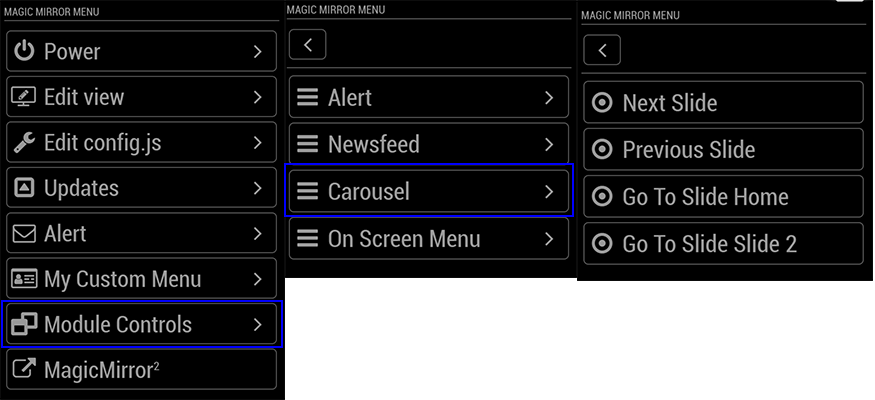
I meant not in that menu but in
-
@bolish OK, but you have to tell me how to do it. :smiling_face_with_open_mouth_cold_sweat:
By the way I have problems turning on and off my TV too.
Even if I edited files to enter the needed CEC commands somehow it doesn’t work (same commands in terminal work fine).@mohace huh?
I don’t have those menu’s entries at all.
Are you using a custom version of the module or? :confused_face: -
@Cr4z33
Make trials with your terminal :- Turn screen on by pasting that in your terminal : echo on 0 | cec-client -s -d 1
- Check the feedback status sent by the TV by putting that in terminal : echo pow 0 | cec-client -s -d 1
- Remind the result
Do exactly the same with turn off :
- Turn screen on by pasting that in your terminal : echo standby 0 | cec-client -s -d 1
- Check the feedback status sent by the TV by putting that in terminal : echo pow 0 | cec-client -s -d 1
- Remind the result
The 2 results you will get should be updated in node.js line 610 / 620.
-
@bolish as I wrote before that’s EXACTLY what I already did. ;)
Terminal commands work straight away while the same commands in MMM-Remote-Control have no effect when used by tapping the buttons in the menu.
-
@Cr4z33
So, the ouput you got in the terminal by sending the “pow 0” command is in line with what is written into node helper.js line 610 / 620? -
-
@Cr4z33
Strange, it worked for me… FMI, what output do you get in the terminal with “echo pow 0 | cec-client -s -d 1”.
When the screen is ON? When the screen is “OFF”? -
@bolish depending wheter the TV is on or off it says
power status: onorpower status: standby. -
@Cr4z33 same as me…let’s try to cross check our node helper .js to see if they are written the same on line 610 and 620.
-
@bolish wait cannot remember if I am using perhaps the developer version, but line numbers are different.
Mine are 601 (on), 604 (off) and 607 (status).
-
This is what I did on my side :
            if (["MONITORTOGGLE", "MONITORSTATUS", "MONITORON"].indexOf(action) !== -1) {
                screenStatus = exec(monitorStatusCommand, opts, (error, stdout, stderr) => {
                    if (stdout.indexOf("TV is off") !== -1 || stdout.indexOf("false") !== -1) { // REPLACE "TV is off" or "false" by "power status: standby"
                        // Screen is OFF, turn it ON
                        status = "off";
                        if (action === "MONITORTOGGLE" || action === "MONITORON") {
                            exec(monitorOnCommand, opts, (error, stdout, stderr) => {
                                this.checkForExecError(error, stdout, stderr, res, { monitor: "on" });
                            });
                            this.sendSocketNotification("USER_PRESENCE", true);
                            return;
                        }
                    } else if (stdout.indexOf("HDMI") !== -1 || stdout.indexOf("true") !== -1) { // REPLACE "HDMI" OR "true" by "power status: on"
                        // Screen is ON, turn it OFF
                        status = "on";
                        if (action === "MONITORTOGGLE") {
                            this.monitorControl("MONITOROFF", opts, res);
                            return;
At least this is what worked for me.
-
@bolish what about the previous lines?
I thought that was the part to edit by replacing monitor commands with HDMI CEC ones like mines?
monitorControl: function(action, opts, res) { let status = "unknown"; let monitorOnCommand = (this.initialized && "monitorOnCommand" in this.thisConfig.customCommand) ? this.thisConfig.customCommand.monitorOnCommand : "echo on 0 | cec-client -s -d 1"; let monitorOffCommand = (this.initialized && "monitorOffCommand" in this.thisConfig.customCommand) ? this.thisConfig.customCommand.monitorOffCommand : "echo standby 0 | cec-client -s -d 1"; let monitorStatusCommand = (this.initialized && "monitorStatusCommand" in this.thisConfig.customCommand) ? this.thisConfig.customCommand.monitorStatusCommand : "echo pow 0 | cec-client -s -d 1"; -
No. From my understanding, you only need to modify the customcommands into your config file not in the node.js.
The one you mention into your post (extract of node.js) are the default ones, don’t modify them.
What you need to modify into node.js are the ouput conditions as I posted above because the way the node.js is written (and how it’s explained on git) those commands will only work if your ouput are :
customCommand: {
        monitorOnCommand: 'shell command to turn on your monitor',
        monitorOffCommand: 'shell command to turn off your monitor',
        monitorStatusCommand: 'shell command to return status of monitor, must return either "HDMI" or "true" if screen is on; or "TV is Off" or "false" if it is off to be recognized'
    }
That’s why we need to replace those conditions into the node.js by the one we get with our TV’s (which are different than the “true” / “flase” “TV is on” etc… but are “power status : stand by” and “power status: on”).
Clear now??
-
@bolish sorry, but it is quite hard to get the difference for me lol. :smiling_face_with_open_mouth_cold_sweat:
Do you mind doing please a pastebin of your edited node_helper.js so that I can try it out?
-
Just replace related lines by the following ones (it’s approx. around line 610) into your node.js :
if (["MONITORTOGGLE", "MONITORSTATUS", "MONITORON"].indexOf(action) !== -1) { screenStatus = exec(monitorStatusCommand, opts, (error, stdout, stderr) => { if (stdout.indexOf("power status: standby") !== -1 || stdout.indexOf("false") !== -1) { // MODIF DONE HERE // Screen is OFF, turn it ON status = "off"; if (action === "MONITORTOGGLE" || action === "MONITORON") { exec(monitorOnCommand, opts, (error, stdout, stderr) => { this.checkForExecError(error, stdout, stderr, res, { monitor: "on" }); }); this.sendSocketNotification("USER_PRESENCE", true); return; } } else if (stdout.indexOf("power status: on") !== -1 || stdout.indexOf("true") !== -1) { // MODIF DONE HERE // Screen is ON, turn it OFF status = "on"; if (action === "MONITORTOGGLE") { this.monitorControl("MONITOROFF", opts, res); return; -
@bolish OK thanks now the TV can be turned off succesfully, but still can’t be turned on ( although I keep getting the
Done!confirmation message ) . :thinking_face: -
@bolish OK something weird happened.
After let’s say 1 minute the TV turned ON by itself (can’t say really…) and there’s now no signal on the (proper) HDMI port.
I have the feeling the module is still sending monitor commands and NOT cec-utils package ones! :thinking_face:
-
@Cr4z33 indeed, strange, I will check my code this evening (I did it by “memory” since this morning…).
-
@bolish in addition to what I wrote in my last post I forgot that I actually have entered the custom commands in the module config section so it is twice weird as it should execute those commands.

Hello! It looks like you're interested in this conversation, but you don't have an account yet.
Getting fed up of having to scroll through the same posts each visit? When you register for an account, you'll always come back to exactly where you were before, and choose to be notified of new replies (either via email, or push notification). You'll also be able to save bookmarks and upvote posts to show your appreciation to other community members.
With your input, this post could be even better 💗
Register Login