MagicMirror Forum
    • Recent
    • Tags
    • Unsolved
    • Solved
    • MagicMirror² Repository
    • Documentation
    • 3rd-Party-Modules
    • Donate
    • Discord
    • Register
    • Login
    A New Chapter for MagicMirror: The Community Takes the Lead
    Read the statement by Michael Teeuw here.

    [MMM-Remote-Control](v2-dev) Extensible REST API, Dynamic Menus, and Socket Communications, plus other updates

    Scheduled Pinned Locked Moved Development
    76 Posts 13 Posters 68.3k Views 13 Watching
    Loading More Posts
    • Oldest to Newest
    • Newest to Oldest
    • Most Votes
    Reply
    • Reply as topic
    Log in to reply
    This topic has been deleted. Only users with topic management privileges can see it.
    • B Offline
      bolish
      last edited by

      @Cr4z33
      So, the ouput you got in the terminal by sending the “pow 0” command is in line with what is written into node helper.js line 610 / 620?

      Cr4z33C 1 Reply Last reply Reply Quote 0
      • Cr4z33C Offline
        Cr4z33 @bolish
        last edited by

        @bolish yep 100% that’s why I tried reporting that to @shbatm , but he didn’t reply about that yet. :grimacing_face:

        1 Reply Last reply Reply Quote 0
        • B Offline
          bolish
          last edited by

          @Cr4z33
          Strange, it worked for me… FMI, what output do you get in the terminal with “echo pow 0 | cec-client -s -d 1”.
          When the screen is ON? When the screen is “OFF”?

          Cr4z33C 1 Reply Last reply Reply Quote 0
          • Cr4z33C Offline
            Cr4z33 @bolish
            last edited by

            @bolish depending wheter the TV is on or off it says power status: on or power status: standby.

            1 Reply Last reply Reply Quote 0
            • B Offline
              bolish
              last edited by

              @Cr4z33 same as me…let’s try to cross check our node helper .js to see if they are written the same on line 610 and 620.

              Cr4z33C 1 Reply Last reply Reply Quote 0
              • Cr4z33C Offline
                Cr4z33 @bolish
                last edited by

                @bolish wait cannot remember if I am using perhaps the developer version, but line numbers are different.

                Mine are 601 (on), 604 (off) and 607 (status).

                1 Reply Last reply Reply Quote 0
                • B Offline
                  bolish
                  last edited by bolish

                  This is what I did on my side :

                              if (["MONITORTOGGLE", "MONITORSTATUS", "MONITORON"].indexOf(action) !== -1) {
                                  screenStatus = exec(monitorStatusCommand, opts, (error, stdout, stderr) => {
                                      if (stdout.indexOf("TV is off") !== -1 || stdout.indexOf("false") !== -1) { // REPLACE "TV is off" or "false" by "power status: standby"
                                          // Screen is OFF, turn it ON
                                          status = "off";
                                          if (action === "MONITORTOGGLE" || action === "MONITORON") {
                                              exec(monitorOnCommand, opts, (error, stdout, stderr) => {
                                                  this.checkForExecError(error, stdout, stderr, res, { monitor: "on" });
                                              });
                                              this.sendSocketNotification("USER_PRESENCE", true);
                                              return;
                                          }
                                      } else if (stdout.indexOf("HDMI") !== -1 || stdout.indexOf("true") !== -1) { // REPLACE "HDMI" OR "true" by "power status: on"
                                          // Screen is ON, turn it OFF
                                          status = "on";
                                          if (action === "MONITORTOGGLE") {
                                              this.monitorControl("MONITOROFF", opts, res);
                                              return;
                  

                  At least this is what worked for me.

                  Cr4z33C 1 Reply Last reply Reply Quote 0
                  • Cr4z33C Offline
                    Cr4z33 @bolish
                    last edited by

                    @bolish what about the previous lines?

                    I thought that was the part to edit by replacing monitor commands with HDMI CEC ones like mines?

                            monitorControl: function(action, opts, res) {
                                let status = "unknown";
                                let monitorOnCommand = (this.initialized && "monitorOnCommand" in this.thisConfig.customCommand) ?
                                    this.thisConfig.customCommand.monitorOnCommand :
                                    "echo on 0 | cec-client -s -d 1";
                                let monitorOffCommand = (this.initialized && "monitorOffCommand" in this.thisConfig.customCommand) ?
                                    this.thisConfig.customCommand.monitorOffCommand :
                                    "echo standby 0 | cec-client -s -d 1";
                                let monitorStatusCommand = (this.initialized && "monitorStatusCommand" in this.thisConfig.customCommand) ?
                                    this.thisConfig.customCommand.monitorStatusCommand :
                                    "echo pow 0 | cec-client -s -d 1";
                    
                    1 Reply Last reply Reply Quote 0
                    • B Offline
                      bolish
                      last edited by

                      No. From my understanding, you only need to modify the customcommands into your config file not in the node.js.

                      The one you mention into your post (extract of node.js) are the default ones, don’t modify them.

                      What you need to modify into node.js are the ouput conditions as I posted above because the way the node.js is written (and how it’s explained on git) those commands will only work if your ouput are :

                      customCommand: {
                              monitorOnCommand: 'shell command to turn on your monitor',
                              monitorOffCommand: 'shell command to turn off your monitor',
                              monitorStatusCommand: 'shell command to return status of monitor, must return either "HDMI" or "true" if screen is on; or "TV is Off" or "false" if it is off to be recognized'
                          }
                      

                      That’s why we need to replace those conditions into the node.js by the one we get with our TV’s (which are different than the “true” / “flase” “TV is on” etc… but are “power status : stand by” and “power status: on”).

                      Clear now??

                      Cr4z33C 1 Reply Last reply Reply Quote 0
                      • Cr4z33C Offline
                        Cr4z33 @bolish
                        last edited by Cr4z33

                        @bolish sorry, but it is quite hard to get the difference for me lol. :smiling_face_with_open_mouth_cold_sweat:

                        Do you mind doing please a pastebin of your edited node_helper.js so that I can try it out?

                        1 Reply Last reply Reply Quote 0
                        • B Offline
                          bolish
                          last edited by bolish

                          Just replace related lines by the following ones (it’s approx. around line 610) into your node.js :

                                      if (["MONITORTOGGLE", "MONITORSTATUS", "MONITORON"].indexOf(action) !== -1) {
                                          screenStatus = exec(monitorStatusCommand, opts, (error, stdout, stderr) => {
                                              if (stdout.indexOf("power status: standby") !== -1 || stdout.indexOf("false") !== -1) { // MODIF DONE HERE
                                                  // Screen is OFF, turn it ON
                                                  status = "off";
                                                  if (action === "MONITORTOGGLE" || action === "MONITORON") {
                                                      exec(monitorOnCommand, opts, (error, stdout, stderr) => {
                                                          this.checkForExecError(error, stdout, stderr, res, { monitor: "on" });
                                                      });
                                                      this.sendSocketNotification("USER_PRESENCE", true);
                                                      return;
                                                  }
                                              } else if (stdout.indexOf("power status: on") !== -1 || stdout.indexOf("true") !== -1) { // MODIF DONE HERE
                                                  // Screen is ON, turn it OFF
                                                  status = "on";
                                                  if (action === "MONITORTOGGLE") {
                                                      this.monitorControl("MONITOROFF", opts, res);
                                                      return;
                          
                          Cr4z33C 2 Replies Last reply Reply Quote 0
                          • Cr4z33C Offline
                            Cr4z33 @bolish
                            last edited by

                            @bolish OK thanks now the TV can be turned off succesfully, but still can’t be turned on ( although I keep getting the Done! confirmation message ) . :thinking_face:

                            1 Reply Last reply Reply Quote 0
                            • Cr4z33C Offline
                              Cr4z33 @bolish
                              last edited by

                              @bolish OK something weird happened.

                              After let’s say 1 minute the TV turned ON by itself (can’t say really…) and there’s now no signal on the (proper) HDMI port.

                              I have the feeling the module is still sending monitor commands and NOT cec-utils package ones! :thinking_face:

                              Cr4z33C 1 Reply Last reply Reply Quote 0
                              • B Offline
                                bolish
                                last edited by

                                @Cr4z33 indeed, strange, I will check my code this evening (I did it by “memory” since this morning…).

                                1 Reply Last reply Reply Quote 0
                                • Cr4z33C Offline
                                  Cr4z33 @Cr4z33
                                  last edited by

                                  @bolish in addition to what I wrote in my last post I forgot that I actually have entered the custom commands in the module config section so it is twice weird as it should execute those commands.

                                  1 Reply Last reply Reply Quote 0
                                  • M Offline
                                    mohace @Cr4z33
                                    last edited by mohace

                                    @Cr4z33 said in [MMM-Remote-Control](v2-dev) Extensible REST API, Dynamic Menus, and Socket Communications, plus other updates:

                                    @mohace huh?
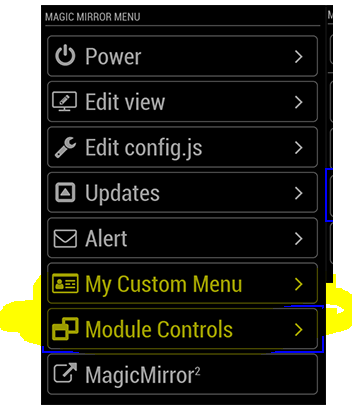
                                    I don’t have those menu’s entries at all.
                                    Are you using a custom version of the module or? :confused_face:

                                    Not at all. You can see same pic in shbatm second post, after the first one you replyed.

                                    @shbatm said in [MMM-Remote-Control](v2-dev) Extensible REST API, Dynamic Menus, and Socket Communications, plus other updates:

                                    Additional Features Added:

                                    • Dynamic Module Control menu – uses the new API to create a Module Control menu on the remote page to control other modules via notifications.
                                    • Custom Menu – ability to specify your own custom menu items from a file (for advanced users)
                                    • Use PM2 API to control restarts/stops of MM. Can also support starting/stopping other PM2 scripts by passing processName: “scriptToUse” in the query payload.

                                    Example Dynamic Menu for MMM-Carousel w/ Navigation
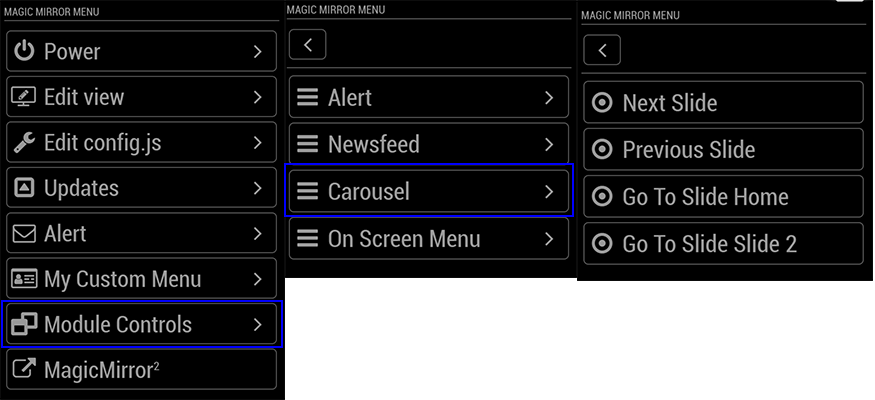
                                    0_1546390145459_ModuleMenuExample.png

                                    It seems that you need activate some features in modules to show them in this menu. But I don’t know what needs Newsfeed, for to have active his entry.

                                    Cr4z33C 1 Reply Last reply Reply Quote 0
                                    • Cr4z33C Offline
                                      Cr4z33 @mohace
                                      last edited by

                                      @mohace Oh yes you are correct I forgot that we can have custom entries indeed.

                                      Well in my case Newsfeed is showing up by default without having to enable manually something. :man_shrugging_light_skin_tone:

                                      1 Reply Last reply Reply Quote 0
                                      • L Offline
                                        Lowis
                                        last edited by Lowis

                                        I don’t have these entries
                                        0_1554502270121_ea6c5d60-a038-4613-848e-24ad1fc604fa-image.png

                                        reinstalled twice the module without luck.

                                        when i first installed this module the entries was there .

                                        my config.js

                                        {
                                              module: 'MMM-Remote-Control',
                                              position: 'bottom_left',
                                              config: {
                                                customCommand: {},
                                                customMenu: 'custom_menu.json',
                                                showModuleApiMenu: true,
                                                apiKey: ''
                                              }
                                            },
                                        
                                        1 Reply Last reply Reply Quote 0
                                        • swvalentiS Offline
                                          swvalenti Project Sponsor
                                          last edited by

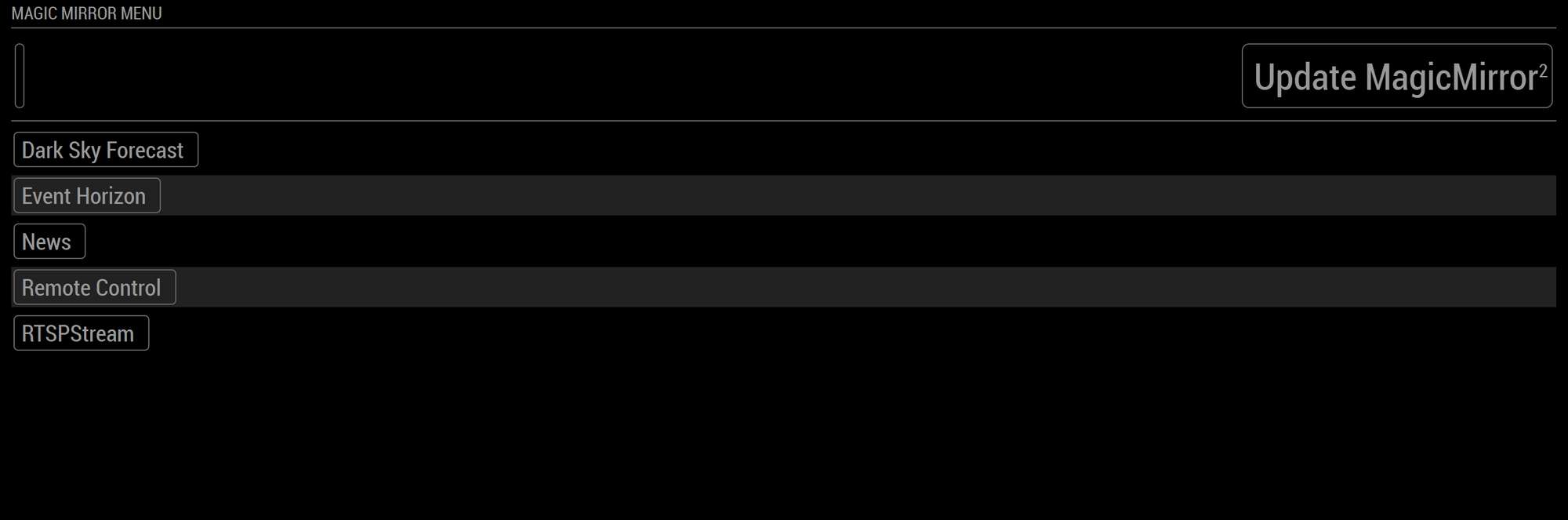
                                          Any idea why my remote control looks like this? It’s lacking the right buttons etc…0_1557623899958_MM.PNG

                                          1 Reply Last reply Reply Quote 0
                                          • Cr4z33C Offline
                                            Cr4z33
                                            last edited by Cr4z33

                                            I need to add some custom commands to control MMM-RTSPStream streams like if they were tv channel buttons, but I am not skilled enough to understand the interested readme section. :smiling_face_with_open_mouth_cold_sweat:

                                            @shbatm could you please help me adding one stream button (as example for all the others to add)?

                                            All I need is to run a combo of ‘RTSP-STOP all’ first (I am using OMXplayer therefore I prefer to kill any running stream first) and ‘RTSP-PLAY streamX’ immediately after.

                                            Cr4z33C 2 Replies Last reply Reply Quote 0

                                            Hello! It looks like you're interested in this conversation, but you don't have an account yet.

                                            Getting fed up of having to scroll through the same posts each visit? When you register for an account, you'll always come back to exactly where you were before, and choose to be notified of new replies (either via email, or push notification). You'll also be able to save bookmarks and upvote posts to show your appreciation to other community members.

                                            With your input, this post could be even better 💗

                                            Register Login

                                            • 1
                                            • 2
                                            • 3
                                            • 4
                                            • 4 / 4
                                            • First post
                                              Last post
                                            Enjoying MagicMirror? Please consider a donation!
                                            MagicMirror created by Michael Teeuw.
                                            Forum managed by Sam, technical setup by Karsten.
                                            This forum is using NodeBB as its core | Contributors
                                            Contact | Privacy Policy