MagicMirror Forum
    • Recent
    • Tags
    • Unsolved
    • Solved
    • MagicMirror² Repository
    • Documentation
    • 3rd-Party-Modules
    • Donate
    • Discord
    • Register
    • Login
    A New Chapter for MagicMirror: The Community Takes the Lead
    Read the statement by Michael Teeuw here.

    MMM-MealViewer

    Scheduled Pinned Locked Moved Development
    48 Posts 6 Posters 30.5k Views 6 Watching
    Loading More Posts
    • Oldest to Newest
    • Newest to Oldest
    • Most Votes
    Reply
    • Reply as topic
    Log in to reply
    This topic has been deleted. Only users with topic management privileges can see it.
    • cowboysdudeC Offline
      cowboysdude Module Developer
      last edited by cowboysdude

      Or you could do this:

      scheduleUpdate: function() {
             setInterval(() => {
                 this.getMenuData();
             }, this.config.updateInterval); 
         },
          getMenuData: function() {
             this.sendSocketNotification('GET-MENU-DATA');
         }
      

      At the top of the main js you set the interval:

      updateInterval: 15 * 60 * 1000,
      

      Then in the start section you call it:

      // Define start sequence.
         start: function() {
             Log.info("Starting module: " + this.name); 
             this.scheduleUpdate();
         },
      

      Either the way Sam showed you or the above will work :)

      G 1 Reply Last reply Reply Quote 0
      • G Offline
        gonzonia @cowboysdude
        last edited by gonzonia

        @cowboysdude Thanks! I might switch to that. I’ve had to rework it a little because the URL wasn’t getting set except at the first call. I just moved setup for that into the getMenuData and I think it’s all working now. I’ll give it a day to run and see what happens tomorrow before I try messing with it again and update the file on github.

        -updated to fix grammar

        1 Reply Last reply Reply Quote 1
        • cowboysdudeC Offline
          cowboysdude Module Developer
          last edited by cowboysdude

          Sam is a REALLY smart guy so he gives you the smart guy answer…
          I’m not as smart so I give you my dumb guy answer LOL

          It will work either way … so now you def have an answer that works :)

          S 1 Reply Last reply Reply Quote 1
          • S Offline
            sdetweil @cowboysdude
            last edited by

            @cowboysdude said in MMM-MealViewer:

            Sam is a REALLY smart guy so he gives you the smart guy answer

            nah, Sam is the LAZY guy… change as LITTLE as possible. especially for folks just starting out

            Sam

            How to add modules

            learning how to use browser developers window for css changes

            1 Reply Last reply Reply Quote 1
            • G Offline
              gonzonia
              last edited by

              Well, thanks to both of you! I can confirm it is finally working.

              Now to update github. Someday I should write some documentation too.

              1 Reply Last reply Reply Quote 0
              • htilburgsH Offline
                htilburgs
                last edited by

                @cowboysdude, I’m looking for the part where you “change” the XML data to JSON data. I’m trying to write a new MMM, but the data is presented in XML. I like the have it in JSON, so I can use it.

                Maybe I read over it, but I cannot figure out where you do this.

                (still trying to learn JS, but not afraid to ask and AI is my best friend) ☺

                S 1 Reply Last reply Reply Quote 0
                • S Offline
                  sdetweil @htilburgs
                  last edited by sdetweil

                  @htilburgs there are a few xml to json modules

                  https://www.npmjs.com/package/xml2js

                  google search
                  ‘nodejs xmltojson’

                  here is one with a just code, no extra libs

                  https://davidwalsh.name/convert-xml-json

                  Sam

                  How to add modules

                  learning how to use browser developers window for css changes

                  1 Reply Last reply Reply Quote 0
                  • htilburgsH Offline
                    htilburgs
                    last edited by

                    @sdetweil , I’ve found them, but I don’t know how to use it in combination with the URL that creates the XML.

                    Indeed the last one with no extra libs looks promising. I tried to simply add this in the node_helper.js but getting stuck at how to use it.
                    I’ve looked into all the MMM Modules but cannot seem to find an example.

                    (still trying to learn JS, but not afraid to ask and AI is my best friend) ☺

                    S 1 Reply Last reply Reply Quote 0
                    • S Offline
                      sdetweil @htilburgs
                      last edited by sdetweil

                      @htilburgs the url bring back the data with request

                      request(url, function(err, res, body) {
                          // if no error and server was happy
                          if(err == null && res.statusCode ==200){
                          console.log(body);
                          var json_data=this.xmlToJson(body)
                          console.log("Speed[0] text is "+json_data.SD[0].SPEED.@attributes.TEXT)
                      }
                      });
                      

                      when the server responds, the function is called and passed the data, body)
                      and then u would convert it from xml to json . using the last code

                      var json_data=this.xmlToJson(body)

                      then the json is accessed with the normal structure notation
                      (using the sample with the code in the last link)

                      json_data.SD[0].SPEED.@attributes.TEXT will be ‘1421’

                      SD is an array (multiple of same xml tags)

                      a little ugly in the data layour, could get rid of the @attributes thing with a small code change

                      Sam

                      How to add modules

                      learning how to use browser developers window for css changes

                      1 Reply Last reply Reply Quote 0
                      • htilburgsH Offline
                        htilburgs
                        last edited by

                        So in my case the URL produces:

                        0_1576260496007_7fa5a24c-528a-4697-9557-2a9058df2860-image.png image url)

                        json_data.SD[0].SPEED@attributes.TEXT will be:

                        json.data.film[0].titel    --> 'Bellicher: Cel'
                        

                        Correct?

                        (still trying to learn JS, but not afraid to ask and AI is my best friend) ☺

                        S 1 Reply Last reply Reply Quote 0
                        • S Offline
                          sdetweil @htilburgs
                          last edited by

                          @htilburgs correct (json_data is the name of the output variable, note underscore, not dot, using dot means ‘go into’) … if you use one of the module add ons… not the code shown…

                          Sam

                          How to add modules

                          learning how to use browser developers window for css changes

                          S 1 Reply Last reply Reply Quote 0
                          • S Offline
                            sdetweil @sdetweil
                            last edited by

                            @htilburgs and the number of films in the array would be

                            json_data.film.length

                            using the developers window you can put a code stop on the line after the xml2json
                            and then u can explore the conversion…

                            you can also use console.log(JSON.stringify(some_object)) and it will dump the structure in json format

                            Sam

                            How to add modules

                            learning how to use browser developers window for css changes

                            1 Reply Last reply Reply Quote 0
                            • htilburgsH Offline
                              htilburgs
                              last edited by

                              Mmmm… not working yet…
                              My current node_helper.js:

                              const NodeHelper = require('node_helper');
                              const request = require('request');
                              
                              module.exports = NodeHelper.create({
                              
                                  start: function() {
                                      console.log("Starting node_helper for: " + this.name);
                                  },
                              	
                              	// Changes XML to JSON
                              	xmlToJson: function(xml) {
                              		
                              		// Create the return object
                              		var obj = {};
                              
                              		if (xml.nodeType == 1) { // element
                              			// do attributes
                              			if (xml.attributes.length > 0) {
                              			obj["@attributes"] = {};
                              				for (var j = 0; j < xml.attributes.length; j++) {
                              					var attribute = xml.attributes.item(j);
                              					obj["@attributes"][attribute.nodeName] = attribute.nodeValue;
                              				}
                              			}
                              		} else if (xml.nodeType == 3) { // text
                              			obj = xml.nodeValue;
                              		}
                              
                              		// do children
                              		if (xml.hasChildNodes()) {
                              			for(var i = 0; i < xml.childNodes.length; i++) {
                              				var item = xml.childNodes.item(i);
                              				var nodeName = item.nodeName;
                              				if (typeof(obj[nodeName]) == "undefined") {
                              					obj[nodeName] = xmlToJson(item);
                              				} else {
                              					if (typeof(obj[nodeName].push) == "undefined") {
                              						var old = obj[nodeName];
                              						obj[nodeName] = [];
                              						obj[nodeName].push(old);
                              					}
                              					obj[nodeName].push(xmlToJson(item));
                              				}
                              			}
                              		}
                              		return obj;
                              	},
                              		
                              	
                              	getMTVM: function(url) {
                              		request(url, function(err, res, body) {
                              		// if no error and server was happy
                              			if(err == null && res.statusCode ==200){
                              			console.log(body);
                              			var json_data = this.xmlToJson(body)
                              			console.log("Text is " + json_data.film[0].titel)
                              			}
                              		});
                              	},
                              
                              
                                  socketNotificationReceived: function(notification, payload) {
                                      if (notification === 'GET_MTVM') {
                                          this.getMTVM(payload);
                                      }
                                  }
                              });


                              In the dev console I get an error:

                              Whoops! There was an uncaught exception...
                              TypeError: this.xmlToJson is not a function
                              

                              (still trying to learn JS, but not afraid to ask and AI is my best friend) ☺

                              S 1 Reply Last reply Reply Quote 0
                              • S Offline
                                sdetweil @htilburgs
                                last edited by

                                @htilburgs ah the fun of ‘this’…

                                	getMTVM: function(url) {
                                               let self=this
                                		request(url, function(err, res, body) {
                                		        // if no error and server was happy
                                			if(err == null && res.statusCode ==200){
                                			   console.log(body);
                                			   var json_data = self.xmlToJson(body)
                                			   console.log("Text is " + json_data.film[0].titel)
                                			}
                                		});
                                	},
                                

                                Sam

                                How to add modules

                                learning how to use browser developers window for css changes

                                htilburgsH 1 Reply Last reply Reply Quote 0
                                • htilburgsH Offline
                                  htilburgs @sdetweil
                                  last edited by

                                  @sdetweil Yeah! That part is working. Now I’ve an other error which has something to do with the xmlToJson function:

                                  Whoops! There was an uncaught exception...
                                  TypeError: xml.hasChildNodes is not a function
                                  

                                  Any idea?

                                  (still trying to learn JS, but not afraid to ask and AI is my best friend) ☺

                                  S 1 Reply Last reply Reply Quote 0
                                  • S Offline
                                    sdetweil @htilburgs
                                    last edited by sdetweil

                                    @htilburgs yeh, tricky crap… they had a special runtime that supported that… sorry…
                                    have to use one of the libs…

                                    in your module folder do

                                    npm install xml2js
                                    

                                    then in your code

                                    const xml2js = require('xml2js');
                                    

                                    then

                                    getMTVM: function(url) {
                                                   let self=this
                                    		request(url, function(err, res, body) {
                                    		        // if no error and server was happy
                                    			if(err == null && res.statusCode ==200){
                                    			   console.log(body);
                                    			   xml2js.parseString(body,function (err,result) {
                                    			       let json_data = result // not needed but may make more clear
                                    			       console.log("Text is " + json_data.film[0].titel)			   
                                    			   });		   
                                    			}
                                    		});
                                    	},
                                    

                                    Sam

                                    How to add modules

                                    learning how to use browser developers window for css changes

                                    htilburgsH 1 Reply Last reply Reply Quote 0
                                    • htilburgsH Offline
                                      htilburgs @sdetweil
                                      last edited by htilburgs

                                      @sdetweil Almost there I think ;-)

                                      Whoops! There was an uncaught exception...
                                      TypeError: Cannot read property '0' of undefined
                                          at /home/pi/MagicMirror/modules/MMM-MyTVMovies/node_helper.js:28:47
                                          at Parser.<anonymous> (/home/pi/MagicMirror/modules/MMM-MyTVMovies/node_modules/xml2js/lib/parser.js:306:18)
                                          at Parser.emit (events.js:182:13)
                                          at SAXParser.onclosetag (/home/pi/MagicMirror/modules/MMM-MyTVMovies/node_modules/xml2js/lib/parser.js:264:26)
                                          at emit (/home/pi/MagicMirror/modules/MMM-MyTVMovies/node_modules/sax/lib/sax.js:624:35)
                                          at emitNode (/home/pi/MagicMirror/modules/MMM-MyTVMovies/node_modules/sax/lib/sax.js:629:5)
                                          at closeTag (/home/pi/MagicMirror/modules/MMM-MyTVMovies/node_modules/sax/lib/sax.js:889:7)
                                          at SAXParser.write (/home/pi/MagicMirror/modules/MMM-MyTVMovies/node_modules/sax/lib/sax.js:1436:13)
                                          at Parser.exports.Parser.Parser.parseString (/home/pi/MagicMirror/modules/MMM-MyTVMovies/node_modules/xml2js/lib/parser.js:325:31)
                                          at Parser.parseString (/home/pi/MagicMirror/modules/MMM-MyTVMovies/node_modules/xml2js/lib/parser.js:5:59)
                                      

                                      Has this something to do with the json_data.film[0].titel ??
                                      Or is it something else?

                                      When I remove .film[0].titel I got:

                                      Text is [object Object]
                                      200[object Object]
                                      

                                      (still trying to learn JS, but not afraid to ask and AI is my best friend) ☺

                                      S 1 Reply Last reply Reply Quote 0
                                      • S Offline
                                        sdetweil @htilburgs
                                        last edited by

                                        @htilburgs u should look at the data format

                                        getMTVM: function(url) {
                                                       let self=this
                                        		request(url, function(err, res, body) {
                                        		        // if no error and server was happy
                                        			if(err == null && res.statusCode ==200){
                                        			   console.log(body);
                                        			   xml2js.parseString(body,function (err,result) {
                                        			       let json_data = result // not needed but may make more clear
                                        			       console.log(JSON.stringify(json_data))			   
                                        			   });		   
                                        			}
                                        		});
                                        	},
                                        

                                        Sam

                                        How to add modules

                                        learning how to use browser developers window for css changes

                                        htilburgsH 1 Reply Last reply Reply Quote 0
                                        • htilburgsH Offline
                                          htilburgs @sdetweil
                                          last edited by

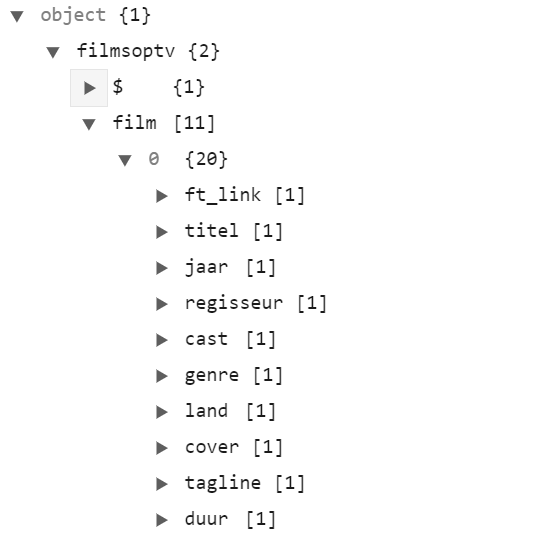
                                          @sdetweil JSON is perfect:

                                          0_1576264519518_ff13b851-b585-43c2-a741-02e28faa83e9-image.png

                                          Thanks for the help so far!! Now I have my data I can play around with it.

                                          (still trying to learn JS, but not afraid to ask and AI is my best friend) ☺

                                          1 Reply Last reply Reply Quote 0

                                          Hello! It looks like you're interested in this conversation, but you don't have an account yet.

                                          Getting fed up of having to scroll through the same posts each visit? When you register for an account, you'll always come back to exactly where you were before, and choose to be notified of new replies (either via email, or push notification). You'll also be able to save bookmarks and upvote posts to show your appreciation to other community members.

                                          With your input, this post could be even better 💗

                                          Register Login

                                          • 1
                                          • 2
                                          • 3
                                          • 3 / 3
                                          • First post
                                            Last post
                                          Enjoying MagicMirror? Please consider a donation!
                                          MagicMirror created by Michael Teeuw.
                                          Forum managed by Sam, technical setup by Karsten.
                                          This forum is using NodeBB as its core | Contributors
                                          Contact | Privacy Policy