Is there a way to deal with the jitteriness of MMM-Jast on monitors and TV’s?
Sometimes seems worse than others.
 A
Offline
A
Offline
A New Chapter for MagicMirror: The Community Takes the Lead
Read the statement by Michael Teeuw here.
Read the statement by Michael Teeuw here.
Posts
-
MMM-Jast jittery
-
RE: Multiple tables formatted, not just MMM-Gas
@sdetweil So should be either
.MMM-Gas.table { }or.MMM-Gas table { }? What is the preferred way? -
RE: Multiple tables formatted, not just MMM-Gas
@cowboysdude I already have that in place.
-
RE: Applying CSS to individual cells in a table
@sdetweil Have it read MM/DD/YY, even on the day of event.
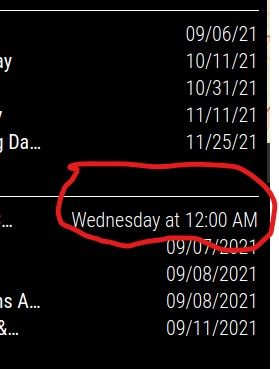
Either 6 or 7 days out from calendar event, the date swaps fromMM/DD/YYtoMonday at 12:00 AM. (For US Labor Day holiday, in this case)
hideTimegets me to it just showingMonday.I thought
getRelative: 0,was used to do what I want it to do, You have option of from between 0 - 48 hours with default being 6 hours it goes to relative time. It is swapping at about 6 - 7 DAYS in reality. Maybe just a coincidence but it seems like the defaultgetRelative: 6;is 6 days, not hours, and setting it to zero has no effect. -
Multiple tables formatted, not just MMM-Gas
I applied some CSS to the MMM-Gas table and all was looking good until I looked at all the other tables on my MM and they all took the same formatting as MMM-Gas even though I directly named the module as shown in this code snippet. I thought that by addressing each item as shown in first CSS would prevent that. Shouldn’t the other tables have used whatever was configured in to their module code and CSS?
.MMM-Gas {
something something
}
would have prevented that.
I turned off the CSS for MMM-Gas and the other tables reverted to their expected format, Below is CSS for couple of items. How do I format JUST the MMM-Gas table?/* ###MMM-Gas Formatting###
.MMM-Gas .table {
position: relative;
left: 20px;
width: 95%;
}.MMM-Gas th {
position: relative;
padding: 0;
text-align: left;
font-size: 20px;
} -
RE: Applying CSS to individual cells in a table
@sdetweil What is “jumpy”? Is it similar to say moment.js or other similar libraries? I know I read a bunch of stuff relating to moment.js battling with the calendar module to see if I could figure out how to make the calendar module just show a date which I failed to succeed in doing.
-
Applying CSS to individual cells in a table
How do you go about changing individual cells in a table? I have been messing with MMM-Gas and out of the box it was really small in comparison to other modules. This on on a standard computer monitor and not on big TV I have been poking at, off and on.
I got the cells/font below Price and Station enlarged no problem and at first I was anticipating them to scale up but when I dug around in MMM-Gas.js they are doing something that I have not seen before.
ajumpy.innerHTML = "Price";&xjumpy.innerHTML = "Station";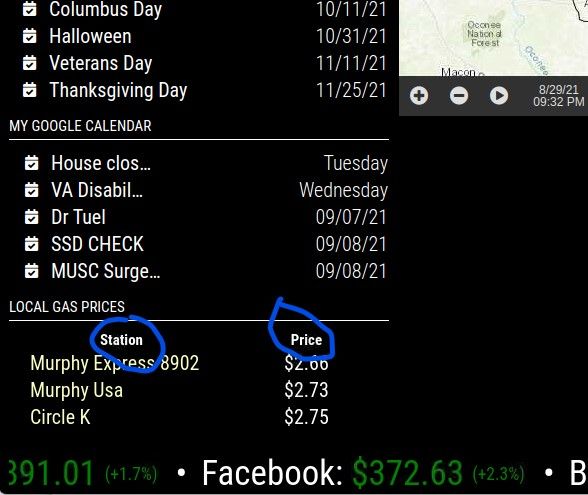
-
Generic CSS question when target is several layers down
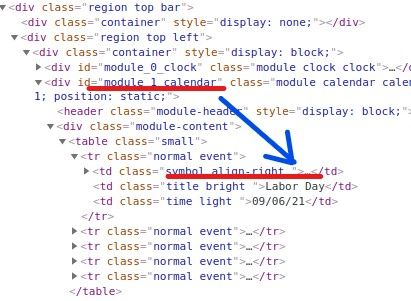
How does one address what appears to be an attribute amenable to custom CSS tweaking when the item is several layers down as shown in attached picture? I figure it has to do with the crude example I sketched out below but not sure what is driver for when you insert spaces, or don’t.
I see CSS that is
.X.Y.Z {
padding-left: 20px;
}
While other times it may be.X.Y .Z {
padding-left: 20px;
}
-
dateFormat and getRelative
I have two of the default calendar modules, one above the other both visually and in
config.js.module_1_calendarandmodule_2_calendar. I have both modules withdateFormatset toMM/DD/YY.
I also havegetRelative: 0,which in the configure options description says will force the calendar event to stay absolute vs at a configured time (0 - 48) with default being 6. My understanding could be way off the mark but I translate that as saying right up to and including the day of the event it will stay in'MM/DD/YY'rather than what is shown in attached picture of myconfig.jsfile. The default 6 hours isn’t really the issue either as the circled Wednesday at 12:AM is way out beyond 6 hours.
In the end I do not want either calendar to show anything but'MM/DD/YY'and I thought the combination of the date format and forcing thegetRelativewould accomplish that.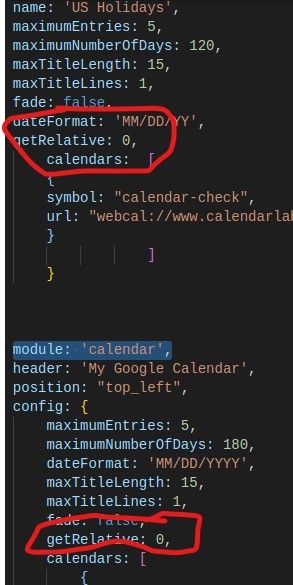
-
RE: Duplicate Modules w Different CSS
@sdetweil You want me to start as new topic since it relates to config?
-
RE: Duplicate Modules w Different CSS
@sdetweil Are you saying to use that identifier in the config file too. I did that and it made the second module disappear.
I replacedmodule: 'calendar',withmodule: 'module_2_calendar',This is the line in Developer Tools
<div id="module_2_calendar" class="module calendar calendar" -
RE: Duplicate Modules w Different CSS
@sdetweil This about duplicate modules and how to address them in
config.jsfile. On my two calendar modules, how do I distinguish between the first and second modules in the config when module name is the same. The CSS name as you described above didn’t fly. The first modulegetRelative: 0,works as described but it is using the defaultgetRelative: 6,in the second module -
RE: Trouble getting Background Image to Show
@sdetweil I have a ton of pictures from rocket launches to elk in Rockies. I somehow or another had found Dak Board and piddled with it but it was a subscription based system that MagicMirror puts to shame.
-
RE: Trouble getting Background Image to Show
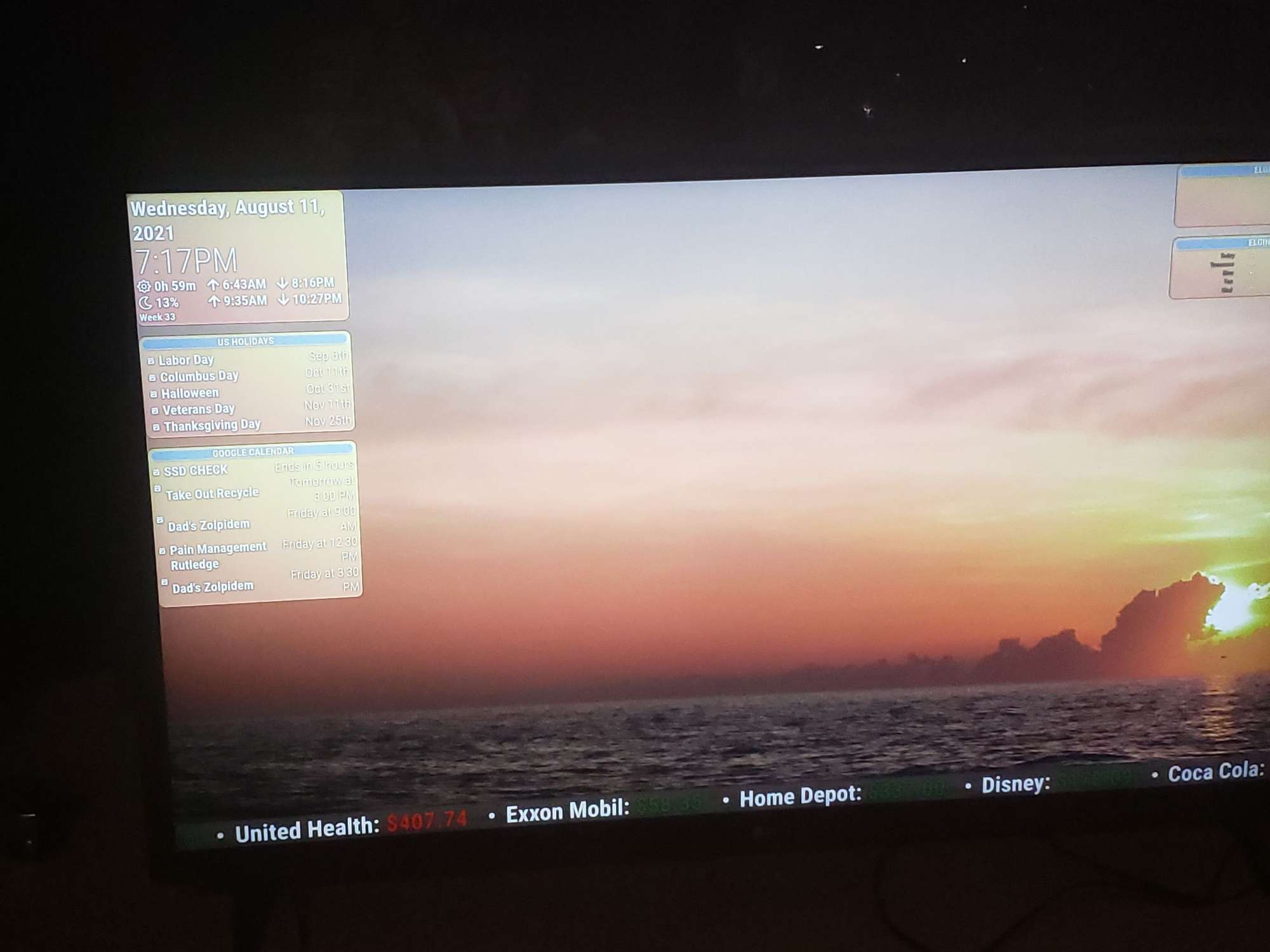
@sdetweil Wasn’t in vain. Thanks for the help. Image pretty washed out in photo but have some opacity and gradient and looks better in person.
-
RE: Trouble getting Background Image to Show
@sdetweil So I need to put laptop IP in whitelist what I think I understand you to be saying
-
RE: Trouble getting Background Image to Show
@sdetweil See my wordy edit above
-
RE: Trouble getting Background Image to Show
@sdetweil I am getting a
Not allowed to load local resource
I thought the image might have not been quite right so copied it fresh and did renaming in terminal but really sure what is going on.I’m a dummy. I do think the image file was messed up as I was getting file not found errors before I reloaded & renamed file in terminal vs in the Pi version of file manager. Windows habits die hard.
After I did that I started getting the local resource message. I had been doing this through VNC on my laptop but pulled big screen tv over where I could read it, deleted the localhost address from file that I did in VNC and redid the exact same address via Pi directly and its all good now.
Shame on me but is there some rule of thumb about what you can and can’t do remotely. I have built 5 of these things with no issues using VNC until this background sreen issue. Even on this one, I’ve loaded multiple modules, jumbo sized fonts etc. -
RE: Trouble getting Background Image to Show
@sdetweil localhost is what shows in developer window? You show 8090 vs my 8080
-
RE: Trouble getting Background Image to Show
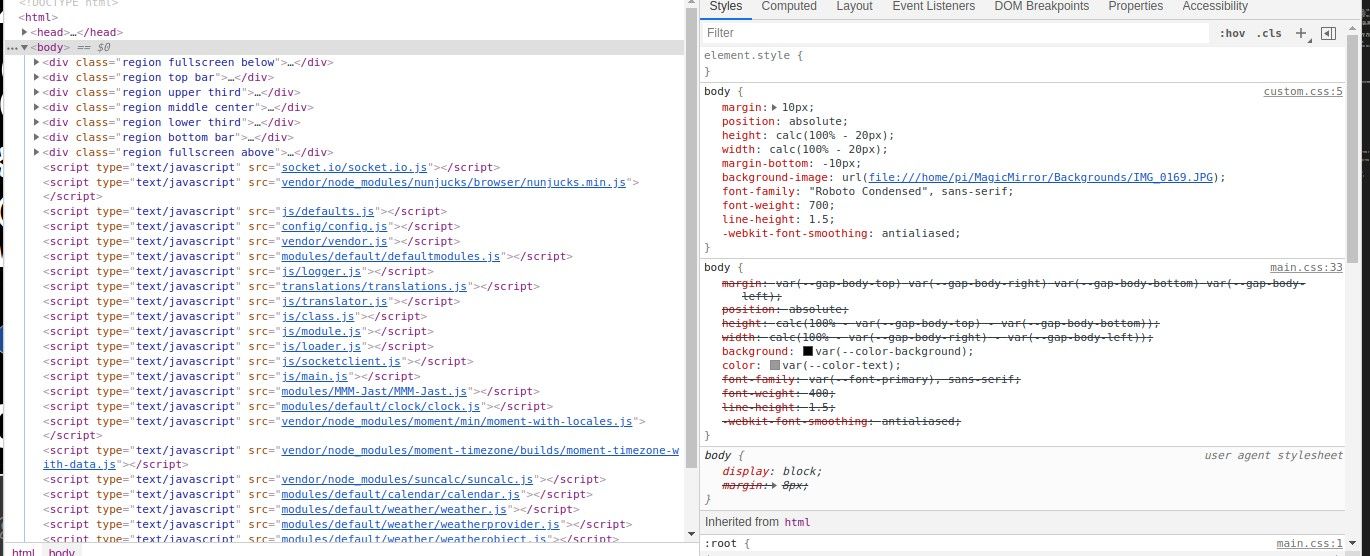
@sdetweil I’ve wrestled with this all morning and exhausted every combination I could imagine, I decided to try sticking a color in as shown below. Not sure if anything can be inferred if it will accept a background color but not a background image. I am ignorant of the vagaries of js but is it possible that
background: var(--color-background);in is locking me i n to only color options since the default is set in:root { --background-color #000 }body { background: red; }