MagicMirror Forum
    • Recent
    • Tags
    • Unsolved
    • Solved
    • MagicMirror² Repository
    • Documentation
    • 3rd-Party-Modules
    • Donate
    • Discord
    • Register
    • Login
    1. Home
    2. AxLed
    3. Posts
    A New Chapter for MagicMirror: The Community Takes the Lead
    Read the statement by Michael Teeuw here.
    A
    Offline
    • Profile
    • Following 0
    • Followers 2
    • Topics 16
    • Posts 235
    • Groups 1

    Posts

    Recent Best Controversial
    • RE: Navigation inside MagicMirror with Buttons / Rotary Encoder on GPIO

      Hi to all,

      i made some progress, i solved following topics:

      • i got addEventListener working (it now listens to Keyboard inputs so far, Future: GPIO PINs)
      • i dont have a need for jQuery anymore (reduces complexity)
      • i improved the navigation-actions from http-Links (to MMM-Remote-control) to direct using sendnotifications (reduces complexity and dependencies)

      and i still have some problems (challenges):

      • how can i set the focus on a div on my module afer MM finished loading? I need this so my keyboard keypresses are recognised. (Setting the focus manual by mouse let my module work).

      Maybe someone can help me or give me some tips.

      Regards AxLED

      posted in Development
      A
      AxLed
    • RE: Navigation inside MagicMirror with Buttons / Rotary Encoder on GPIO

      i made some progress to the following problem:
      30. Failure: script source in html site: http://code.jquery.com/jquery-1.7.2.min.js

      Problem 1: I tried getScripts to load it

      getScripts: function() {
      		return [
      			'http://code.jquery.com/jquery-1.7.2.min.js', //js laden
      		]
      	},
      

      but i dont know if loading worked an how i can test it.
      Solution: F12 Debugger (Firefox) shows “Load script: http://code.jquery.com/jquery-1.7.2.min.js in loader.js:182:4”.

      So i know (guess) it works.

      Now i moved to the next problem, i tried to use

      addEventListener
      

      in my .js code to react on mouseover, to color hyperlinks red (just an example to test how and if it works). One of my 4 links turn red (always the last one), could this be because i create my links in a “for loop” and addEventListener just grabs the last one?

      Looking forward hearing from you.

      Greets AxLED

      posted in Development
      A
      AxLed
    • RE: Navigation inside MagicMirror with Buttons / Rotary Encoder on GPIO

      thank you yawns

      posted in Development
      A
      AxLed
    • RE: Navigation inside MagicMirror with Buttons / Rotary Encoder on GPIO

      Hi,

      because of suggestion of some users, i try to write my own module and need some help.

      I have a working html file with following components:

        1. css
        1. html
        1. script source in html site: http://code.jquery.com/jquery-1.7.2.min.js
        1. javascript in html site, to react on some interaction

      navigation.html in action:
      0_1524774325444_MM-navigation.gif

      I tried to reconstruct the html file as a MMM-Module, with some succuss and some failure.
      Success:
      10. css
      20. html

      0_1524774373586_MM4.JPG

      Failure:
      30. script source in html site: http://code.jquery.com/jquery-1.7.2.min.js

      Problem 1: I tried getScripts to load it

      getScripts: function() {
      		return [
      			'http://code.jquery.com/jquery-1.7.2.min.js', //js laden
      		]
      	},
      

      but i dont know if loading worked an how i can test it.

      1. javascript in html site, to react on some interaction

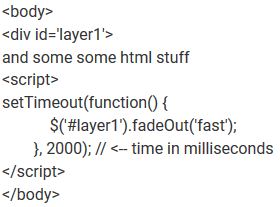
      Problem 2: I have javascript code in my html file, but i dont know where and how to place it in my module.js file

      0_1524774669736_code.JPG

      Maybe somebody can help me or give me some hints.

      Regards

      AxLED
      @moderator: maybe this topic can be moved to ‘modules -> development’

      posted in Development
      A
      AxLed
    • RE: default newsfeed and iframe

      @ Oneil25
      Config looks ok, have you tried a second rss source (feed), maybe something with nytimes feed.
      AxLED

      posted in Troubleshooting
      A
      AxLed
    • RE: default newsfeed and iframe

      One Tip, you have to press the button twice to Open the full article (website). Details see Readme at Newsfeeds Module.
      AxLED

      posted in Troubleshooting
      A
      AxLed
    • RE: Navigation inside MagicMirror with Buttons / Rotary Encoder on GPIO

      Hi to the builders,

      i made some progress.

      • i connected 3 buttons to my RPI1 (my TestPi, as my pixel VM doesnt have GPIO)
        • arrow up
        • arrow down
        • enter
      • installed pikeyd (to map GPIO Buttons to keyboard press, as my navigation.html works with javascript which interacts with keyboard press)
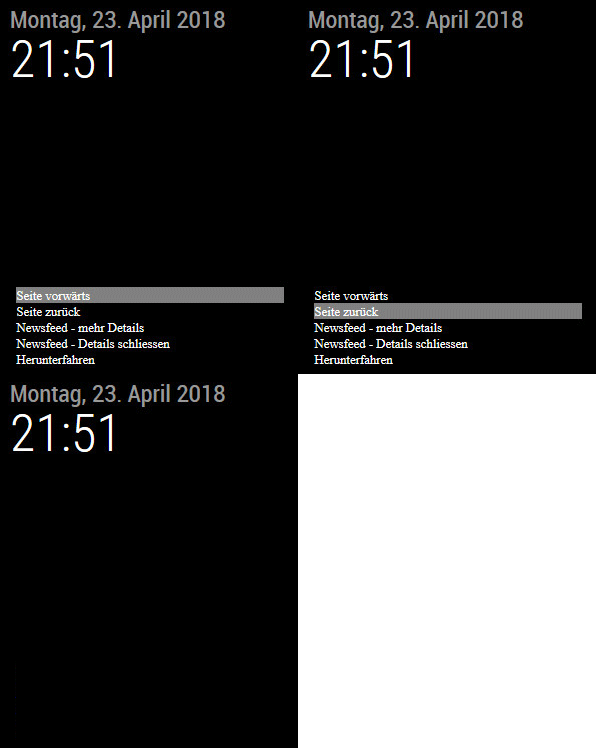
      • modified css and javascript on navigation.html, so i grab focus on loading and hide after x milliseconds (navigation shows back on button press)

      Requirements (so far):

      • MMM-Remote-Control (as i use hyperlinks to navigate)
      • MMM-IFrame (to show my navigation.html)
      • pikeyd (https://github.com/mmoller2k/pikeyd)

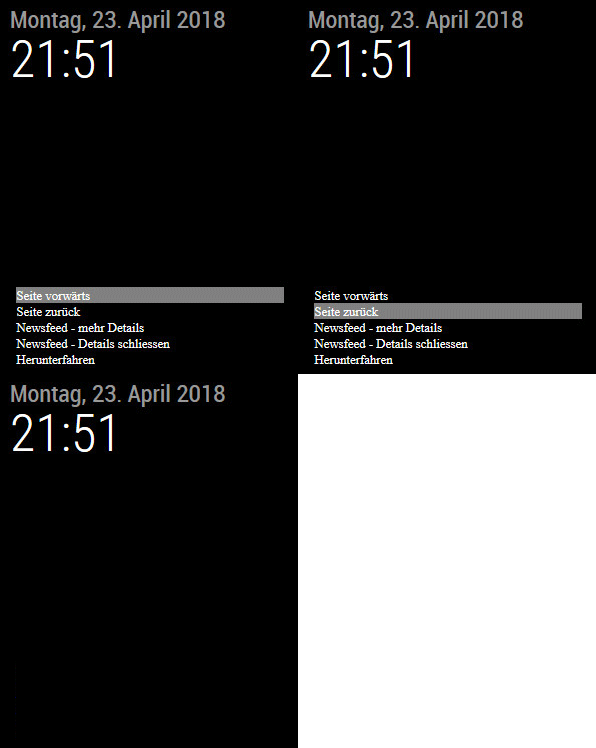
      Here are some screenshots:
      0_1524515723542_MM-navigation.gif

      I still have some problems:

      • loosing focus on navigation.html, after “Button Enter” at Chromium on RPI1 via VNC (Webbrowser of Win PC works with keyboard press an keeps focus after pressing enter), maybe this works on RPI3 (my productive environment)

      Is there someone who can help me to put this in a module?
      I like the idea, to navigate through my MM using only 3 buttons (planed: Rotary Encoder)

      Regards

      AxLED

      posted in Development
      A
      AxLed
    • RE: Problem to update

      Hi greda,

      if you dont need the changes anymore:
      change in the directory (modules/default/compliments in your case)

      git reset --hard
      
      git pull origin master
      

      After this, try to update again, you should get further with your update.

      Regards AxLED

      posted in Troubleshooting
      A
      AxLed
    • RE: Navigation inside MagicMirror with Buttons / Rotary Encoder on GPIO

      Hello,

      i started creating a html file with javascript, which responses on keyboard action.

      So far i check for 3 Keys: Arrow Up, Arrow Down and Enter.

      For testing:

      • i showmy html site (navigation.html) in module MMM-iFrame.
      • i call MM via Webbrowser from a PC
      • i have to set the focus in the MMM-iFrame Window first
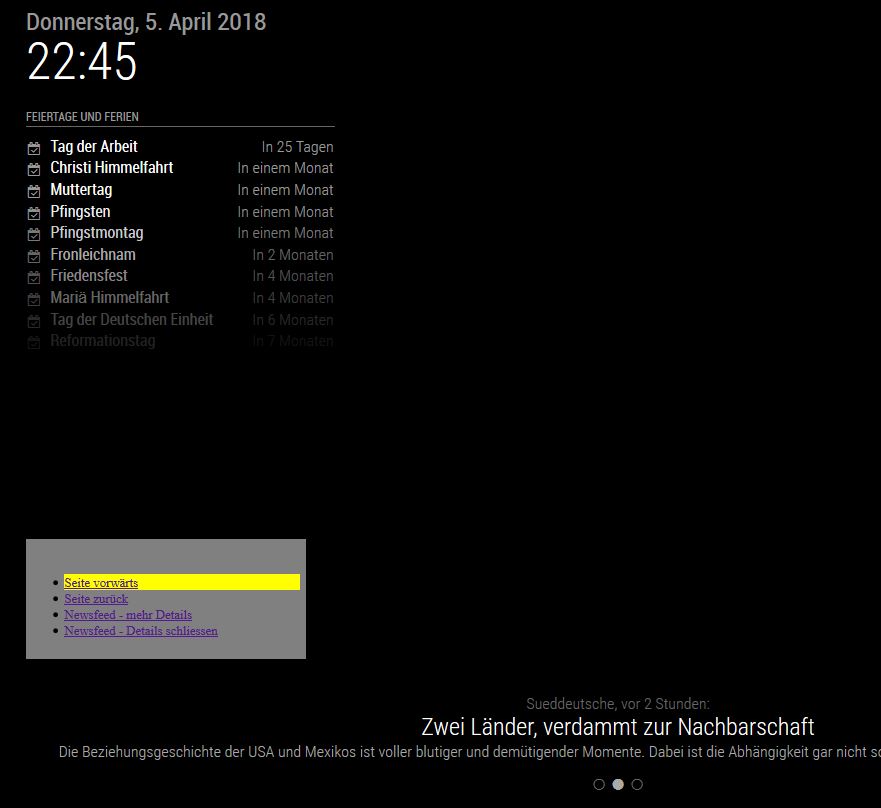
      • now i can “scroll to my pages” and “show details on Newsfeed” (realized via Hyperlinks of MMM-Remote-Control)

      Screenshot:
      0_1522961338522_navi1.JPG

      Code of navigation.html:
      (@moderator: i dont have the permission to upload that 13KB HTML File, can you help me?)

      So the first steps are made, i hope that “Website javascript” can somehow be translated to javascript code which can be handled by MM needs it.

      AxLED

      posted in Development
      A
      AxLed
    • Navigation inside MagicMirror with Buttons / Rotary Encoder on GPIO

      Hi,

      i am searching for a navigation for my mirror, finally i would like to use an rotary encoder.
      I will start with 3 Push Buttons (Left, Right, Enter), as i think this is easier to start.
      I got my inspiration from MMM-Buttons which works OK on my mirror but is limited (choosing Pages - MMM-Pages).
      I would like to have an individual (extendable) navigation where i can choose from different options.

      Example:
      Navigation is hidden and shows only up, if used/needed for some seconds.

      • Enter (first time): Navigation shows up
      • Left/Right: Move inside the navigation
      • Enter: choose the selected navigation entry and execute (or enter another navigation level)
      • after x seconds, Navigation disappears

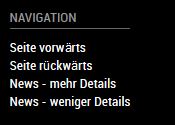
      Something like this, but not on separate display rather on MM:
      0_1522429140816_Navigation_Request.JPG

      Ideas:

      • Choose Pages (MMM-Pages, Command to Execute: PAGE_INCREMENT/PAGE_DECREMENT)
      • Show Newsfeed Details (News Feed, Command to Execute: ARTICLE_MORE_DETAILS/ARTICLE_LESS_DETAILS)
        • Scroll in Newsfeed (ARTICLE_MORE_DETAILS shows Website where scrolling is needed)
      • Show/Hide Modules
      • Volume Up/Down
      • etc.

      Maybe someone has an idea, how to realise that or are there already modules with some matching code to do that?
      I have seen some navigation modules, but they interact with mouse or touchscreen but not with Button on GPIO.

      I am looking forward hearing from you.

      Best regards

      AxLED

      posted in Development
      A
      AxLed
    • RE: Reverse Lookup MMM-FRITZ-Box-Callmonitor - help needed

      Hi pinsdorf,

      thanks for your reply, here are some answers to your questions:

      • putting the lookup in a own module.
        => Feel free, you just have to tell me, how i can grant write permissions to you (maybe via PN)
      • i closed my own pull request, as i didnt find any other option

      Maybe you can also help in fixing this issue: https://github.com/paviro/MMM-FRITZ-Box-Callmonitor/issues/30

      Regards

      AxLED

      posted in Development
      A
      AxLed
    • RE: Reverse Lookup MMM-FRITZ-Box-Callmonitor - help needed

      @pinsdorf
      i created a fork, i am not sure if i did everything right (i checked some readme before and keeped on that), details see: https://github.com/Ax-LED/MMM-FRITZ-Box-Callmonitor/pull/1/files

      There is also a working beta of the reverse lookup feature.

      I know the code is still quick n dirty.

      AxLED

      posted in Development
      A
      AxLed
    • RE: Reverse Lookup MMM-FRITZ-Box-Callmonitor - help needed

      I almost made it, for debugging i went this way (as i dont know any better so far):

      • Clientside: Browser with debugging feature
      • Serverside (like node_helper.js): console.log on every important location in the code

      My workaround (so far):
      I cloned the function getName to getName2 and use Reverselookup of phonenumbers only in getName2.
      I changed the call of getName to getName2 in following places:
      Line 80-98:

      //Incoming call
      		monitor.on("inbound", function(call) {
      			//If caller is not empty
      			if (call.caller != "") {
      				self.sendSocketNotification("call", self.getName2(call.caller));
      			};
      		});
      
      		//Call accepted
      		monitor.on("connected", function(call) {
      			self.sendSocketNotification("connected", self.getName2(call.caller));
      		});
      
      		//Caller disconnected
      		monitor.on("disconnected", function(call) {
      			//send clear command to interface
      			self.sendSocketNotification("disconnected", {"caller": self.getName2(call.caller), "duration": call.duration});
      		});
      console.log(this.name + " is waiting for incoming calls.");
      

      Reasons why i did this workaround: loadCallList
      This function is called initialy, when you start MM and everytime you get a call. I dont understand, why loadCallList goes through all calls from the fritzbox journal in the past (infinitely), no matter what configuration options of the module you choosed. This gives me an "Socket hang up" error on reverse lookup after 100 requests. Now you know why i did this workaround.

      Regards

      AxLED

      posted in Development
      A
      AxLed
    • RE: Reverse Lookup MMM-FRITZ-Box-Callmonitor - help needed

      Hi pinsdorf,
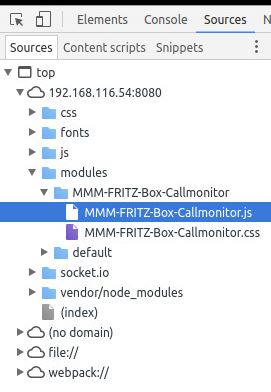
      all mentioned files are in the folder MMM-FRITZ-Box-Callmonitor but on debugging, i only can choose from the ones above (see my screenshot).

      I will follow your suggestion with git, if my code adaptation has passed the beta phase, as i still have some problems.

      posted in Development
      A
      AxLed
    • RE: Reverse Lookup MMM-FRITZ-Box-Callmonitor - help needed

      @pirnsdorf

      Thanks for the information, so i started one of my MM-Dev-Environments (Ubuntu 16.04) and run MM with npm start dev, unfortunatelly i can not mark node_helper.js, as i only see the MODULNAME.js and the MODULNAME.css.

      The part of code i want to debug is in node_helper.js, how can i do this?
      Screenshot:
      0_1519752147187_dev1.JPG

      AxLED

      posted in Development
      A
      AxLed
    • RE: Reverse Lookup MMM-FRITZ-Box-Callmonitor - help needed

      Hi,

      i tried to implement Reverse lookup, so i extended the package.json file about the needed depencies and did a npm install afterwards, which worked fine.

      Now i am struggeling in implementing aditional code in node_helper.js, as i dont know how to debug it. Some bugs are show in the console, as i start MM, but some not.

      Is there a way to test node_helper.js by itself?
      Or, how do you test new modules / module modifications?

      I am looking forward to get some tipps.

      Regards AxLED

      posted in Development
      A
      AxLed
    • RE: Reverse Lookup MMM-FRITZ-Box-Callmonitor - help needed

      @pinsdorf
      I am moving forward and getting closer to my target.
      With your tips i got rid of the Express framework (calling http://localhost/scrape to start web scraping). I also found a way two show the results in the console and addition writing a file (for my personal debugging).

      Right now i have to files:
      package.json

      {
        "name"         : "MMM-Alex2",
        "version"      : "0.0.1",
        "description"  : "Reverse Lookup Phonenumber.",
        "main"         : "server.js",
        "author"       : "Alex",
        "repository"   : {
          "type" : "git",
          "url"  : "https://github.com/"
        },
        "dependencies" : {
          "request"    : "latest",
          "cheerio"    : "latest"
        }
      }
      

      server.js

      var request = require('request');
      var cheerio = require('cheerio');
      var moment = require('moment');
      var fs      = require('fs');
      
      var callnr = '0049xxxx';
      var url = 'http://www.dasoertliche.de/?form_name=search_inv&ph=' + callnr;
      
      title = '';
      adresse = '';
      anrufer = 'kein Treffer auf Örtliche.de für '+ callnr;
      
      request(url, function (error, response, html) {
        if (!error) {
      	var $ = cheerio.load(html);
      	
      	$('.left').filter(function(){
              var data = $(this);
              
      		title = data.text().trim();
      		//adresse = data.children().children().text().trim();
      		adresse = data.children().eq(2).text().trim();
      		})
      		
      	$('.name ').filter(function(){
              var data = $(this);
              anrufer = data.text().trim();
      		})
      
          console.log('Anrufer: ' + anrufer);
      	console.log('Adresse: ' + adresse);
          //console.log('Title: ' + title);
      	console.log('Gesamt: ' + anrufer + ', ' + adresse + ' - '+ moment().format("DD.MM.YYYY HH:mm"));
          
      	//Daten fortschreiben
      	fs.appendFile('anrufe.txt', moment().format("DD.MM.YYYY HH:mm") + ' Gesamt: ' + anrufer + ', ' + adresse +'\n', function(err){
            console.log('File successfully written!');
          })
      	
        }
        else {
          console.log("We’ve encountered an error: " + error);
        }
      });


      If i put them in a folder (under MagicMirror/modules) an do a npm install in that folder, it will install the depencies.

      If in now run node server.js in MagicMirror/modules/FOLDERNAME i will get the result of a static phonenumber in the console and in a textfile in FOLDERNAME.

      My next step will be the implementation in MMM-Fritz-Box-Callmonitor, as you suggested.

      AxLED
      posted in Development
      A
      AxLed
    • Reverse Lookup MMM-FRITZ-Box-Callmonitor - help needed

      Hi,
      i am interested in extending MMM-FRITZ-Box-Callmonitor with a reverse lookup feature.

      I check following tutorial:
      https://scotch.io/tutorials/scraping-the-web-with-node-js
      The git can be found at: https://github.com/scotch-io/node-web-scraper

      I clone and installed it,
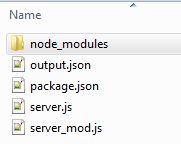
      0_1519333116204_fritz.JPG

      after this i modified it, so i can write parsed datas of http://www.dasoertliche.de/?form_name=search_inv&ph=[Phonenumber] in a output.json file.

      This is what my server_mod.js looks like:

      {
          "title": "1\n\nAutovermietung SIXT \n\n\t\t\t\t\n\t\t\t\t\tStreetsomething 1, 12345 City",
          "adresse": "Streetsomething 1, 12345 City",
          "anrufer": "Autovermietung SIXT"
      }
      

      Now i need some help, how to implement it into MMM-FRITZ-Box-Callmonitor, i have following problems:

      1. I still have a static phonenumber for reverse lookup in server_mod.js
      url = 'http://www.dasoertliche.de/?form_name=search_inv&ph=[phonennumber]';
      
      1. To create a output.json file i have to start node server_mod.js (in Module directory) and have to call http://localhost:8081/scrape in my browser.

      I think the first steps are made, maybe somebody can give me a hint how to move forward.

      AxLED

      posted in Development
      A
      AxLed
    • RE: Splash Screens/No Signal

      i had a similar issue, connecting RPI with HDMI vs. VGA had different behavior.
      To get my PIR working the way i want it, i had to use a HDMI->VGA Adapter and connected the display by VGA. Dont worry, VGA also supports FullHD Resolution.
      See alse: https://forum.magicmirror.builders/topic/6410/which-monitor-supports-standby-sleep-poweroff-wakeup-via-vga-hdmi-commands

      posted in Hardware
      A
      AxLed
    • RE: [MMM-Buttons] Connect multiple buttons to send configurable notifications

      @cruunnerr
      Thanks for the tips, you made my day, it works now.
      What i did: Changed the wiring from negativ (GND) to 3.3V (with resistor) as shown on picture of cruunnerr wiring diagram.

      No i try to get a rotary switch and got it working, as i need some WAF (Woman acceptance faktor) for my mirror.

      Regards

      AxLED

      posted in System
      A
      AxLed
    • 1 / 1