MagicMirror Forum
    • Recent
    • Tags
    • Unsolved
    • Solved
    • MagicMirror² Repository
    • Documentation
    • 3rd-Party-Modules
    • Donate
    • Discord
    • Register
    • Login
    1. Home
    2. AxLed
    3. Best
    A New Chapter for MagicMirror: The Community Takes the Lead
    Read the statement by Michael Teeuw here.
    A
    Offline
    • Profile
    • Following 0
    • Followers 2
    • Topics 16
    • Posts 235
    • Groups 1

    Posts

    Recent Best Controversial
    • [MMM-Dreambox] to connect a Dreambox or a Enigma2 Receiver (like VU or VU+) to MagicMirror and stream stations via omxplayer

      Here is my second module.

      Description
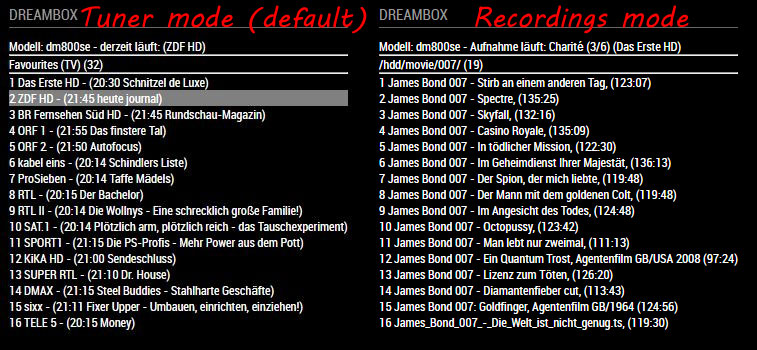
      A module to connect a Dreambox or a Enigma2 Receiver (like VU or VU+) to MagicMirror. You can select services of your dreambox and stream them via omxplayer. The module shows some further informations like:

      • model of your dreambox
      • which service is tuned right now / are there active timer
      • epg for the services with its starting time

      Magic-Mirror Module MMM-Dreambox screenshot1

      Download
      [card:Ax-LED/MMM-Dreambox]

      Please let me know what you think.

      AxLED

      posted in Entertainment
      A
      AxLed
    • RE: Using Unicode Character and symbols in module

      Hi to all,

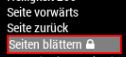
      i found a solution.
      0_1536262932769_lock.JPG

      I use font awesome (which comes with mm anyway) an the following css:

      .fa-lock1:after {
                  content: "\f023";
                }
      

      AxLED

      posted in Development
      A
      AxLed
    • RE: "HIDE" and/or "SHOW" modules automatically...

      @justjim1220
      The modules you can use are:
      MMM-Remote-Control (to show/hide modules)
      MMM-ModuleSchedulert (to define when you would like to do this

      But there are some more modules in the MM Cosmos.

      AxLED

      posted in General Discussion
      A
      AxLed
    • RE: Fifa World Cup overview

      Hi to all,

      i found a different solution: https://github.com/LukeSkywalker92/MMM-SoccerLiveScore with some modifications.

      node_helper.js:
      change the hyperlinks (or only the …/ta/… part of the links in node_helper.js to …/em4/…)
      Example, Line 52:
      Change

      url: 'https://www.ta4-data.de/ta/data/competitions',
      

      to

      url: 'https://www.ta4-data.de/em4/data/competitions',
      

      Do the replacements on the 5 hyperlinks in node_helper, and here you go.

      config.js
      The league id for WM ist 4000

      {
      			module: "MMM-SoccerLiveScore",
      			position: "top_left",
      			header: "Live-Scores",
      			config: {
      				leagues: [4000],
              			showNames: true,
              			showLogos: true,
              			displayTime: 60 * 1000,
              			showTables: true
      				}
      		},
      

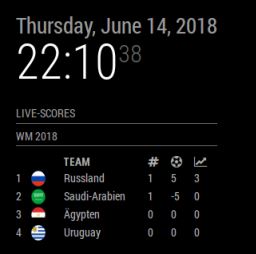
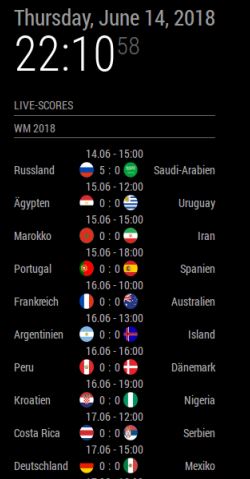
      Pictures:
      0_1529014299763_wm2018_1.JPG
      0_1529014318658_wm2018_2.JPG

      AxLED

      posted in Requests
      A
      AxLed
    • RE: How can i pass query / parameters from URL to module

      @sdetweil
      @Sean
      Thanks for your quick response, you are faster than my programming timeslots in my “mancave” are. Today i had some time and got it working.

      I will test my module changes (for MMM-Navigate) on my mirror for some days, maybe i find some errors and can fix them before i upload it to quick to github in a poor “quality”.

      My intension was to get rid of MMM-Remote-Control in my installation, as i found errors (while a new install of my MM) and as it seems that MMM-Remote-Control is not maintainanced anymore.

      I added following features to MMM-Navigate:

      • Raspberry operations: any Shellcommands, i use it for
        • restart of MM (pm2 restart mm)
        • restart of Raspberry (sudo shutdown -h now)
        • reboot of Raspberry (sudo reboot)
      • controlling MM by URL Calls (if you dont have a rotary encoder connected or while programming)

      stay healthy

      Regards

      AxLED

      posted in Development
      A
      AxLed
    • RE: MMM-ModuleScheduler (how to use MMM-RemoteControl to HIDE/SHOW modules)?

      @blup said in MMM-ModuleScheduler (how to use MMM-RemoteControl to HIDE/SHOW modules)?:

      {notification: ‘REMOTE_ACTION’, schedule: ‘0 6 * * MON-FRI’, payload: {action: “SHOW&module=module_15_MMM-Traffic”}},

      Hi Peter,

      1st Tip:
      I think your syntax in config.js is wrong.
      You use:

      {notification: 'REMOTE_ACTION', schedule: '0 6 * * MON-FRI', payload: {action: "SHOW&module=module_15_MMM-Traffic"}},
      

      and i think (didnt test it) it should be

      {notification: 'REMOTE_ACTION', schedule: '0 6 * * MON-FRI', payload: {action: "SHOW", module: "module_15_MMM-Traffic"}},
      

      2nd Tip:
      Have you checked the config options of MMM-Traffic, see this entries:

      showWeekend, startHr, endHr, hideOffHours
      

      AxLED

      posted in Troubleshooting
      A
      AxLed
    • RE: Problem with MMM-Button

      Here you go:
      https://github.com/ptrbld/MMM-Button
      and
      https://github.com/Jopyth/MMM-Buttons

      AxLED

      posted in Troubleshooting
      A
      AxLed
    • RE: [MMM-Buttons] Connect multiple buttons to send configurable notifications

      @cruunnerr
      Thanks for the tips, you made my day, it works now.
      What i did: Changed the wiring from negativ (GND) to 3.3V (with resistor) as shown on picture of cruunnerr wiring diagram.

      No i try to get a rotary switch and got it working, as i need some WAF (Woman acceptance faktor) for my mirror.

      Regards

      AxLED

      posted in System
      A
      AxLed
    • RE: Timetable with (almost) static data

      So, now i installed apache2 and php on my test system (ubuntu vm). I got a first solution with a .php site (running on same machine) and MMM-iFrame pointing to local php site.

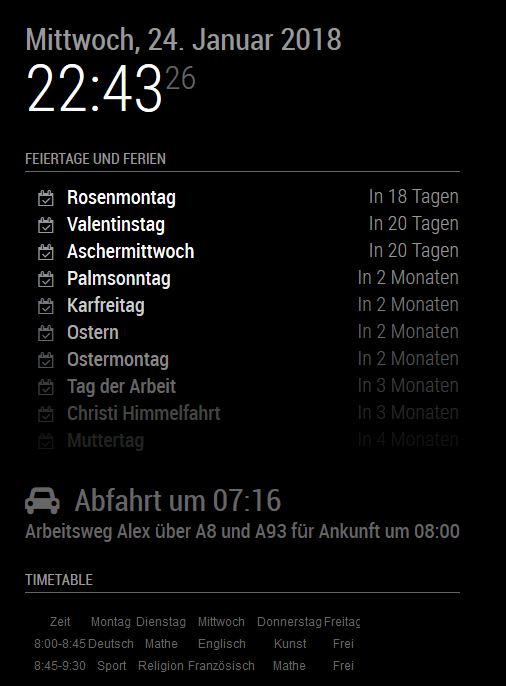
      Here is a first screenshot:
      0_1516830260556_timetable.JPG

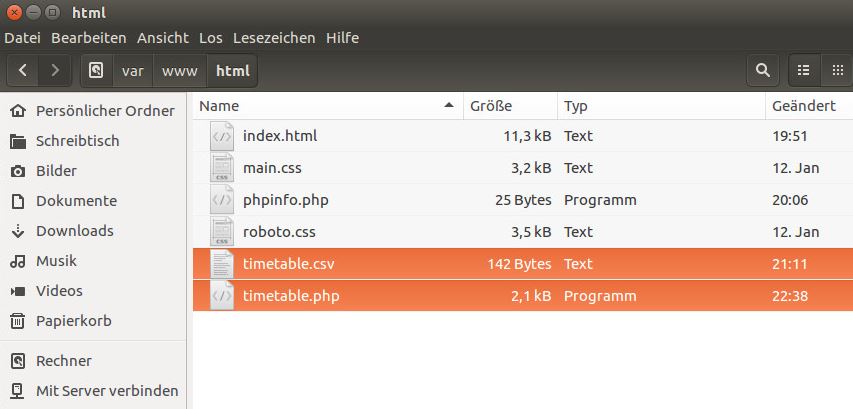
      My Webfolder looks like this:
      0_1516830359419_www-folder.JPG

      • index.html (comes from apache2)
      • phpinfo.php (was a testfile to check if php works)
      • timetable.php (is my php site, which reads the datas of timetable.csv, so it is easier to change datas once a year)

      Right now i am fighting with css and formatting, but the first steps are made.

      I am not sure what the performance on RPI will be with apache2 and php running next to MM2.

      Axled

      posted in Requests
      A
      AxLed
    • RE: MMM-MyWeather doesn't show up

      @SoleLo
      try to remove the quotes around the values true and false inside your Module MMM-MyWeather config.
      For example:

      coloricon: true,
      

      instead of

      coloricon: "true",
      

      AxLED

      posted in Troubleshooting
      A
      AxLed
    • RE: Syntax Error.

      @Nico-Biester
      There are some mistakes in your module config:

      • wrong quotes, you use “ instead of " (are you using mac to edit config.js?)
      • missing commas (in lessons, after 11:50)
      • missing brackets and/or bracket on the wrong position
      • wrong translations, you cant translate mon:to Mo:, as the module is looking for the array name of mon:
      • general advice: always use brackets in pair (every bracket which opens, has to close somewhere)

      This code shoud work:

      {
                  module: "MMM-WeeklySchedule",
                  position: "top_center",
                  header: "Stundenplan",
                  config: {
                      schedule: {
                          timeslots: [ "8:00", "8:30", "10:00", "11:40", "11:50" ,"13:00", "14:00", "14:45", "16:00"],
                          lessons: {
                              mon: [ "GA", "LZ - ", "Pause (30)", "1 FS", "2 FS", "Pause (60)", "LB", "3 FS", "Feierabend"],
                              tue: [ "GA", "LZ - ", "Pause (30)", "1 FS", "2 FS", "Pause (60)", "LB", "3 FS", "Feierabend"],
                              wed: [ "GA", "LZ - ", "Pause (30)", "1 FS", "2 FS", "Pause (60)", "LB", "3 FS", "Feierabend"],
                              thu: [ "GA", "LZ - ", "Pause (30)", "1 FS", "2 FS", "Pause (60)", "LB", "3 FS", "Feierabend"],
                              fri: [ "GA", "LZ - ", "Pause (30)", "1 FS", "2 FS", "Pause (60)", "LB", "3 FS", "Feierabend"],
                                  },
                              updateInterval: 1 * 60 * 60 * 1000, // every hour
                              showNextDayAfter: "22:00"
                          },
                  },
              },
      

      AxLED
      posted in Troubleshooting
      A
      AxLed
    • RE: Method to use button to advance month view, toggle to day agenda

      @bmfinn
      i had the same need, but didnt have the time to move further, see https://forum.magicmirror.builders/topic/7500/calendar-module-interaction-scrollable-different-start-dates

      AxLED

      posted in Requests
      A
      AxLed
    • RE: Problem update

      @greda
      If you dont need your changes in your compliment module, you can try following commands (in the folder you are trying to update via git pull)

      git reset --hard
      git pull origin master
      

      Do some post installations (if required).

      AxLED

      posted in Troubleshooting
      A
      AxLed
    • RE: Run MM on Ubuntu 16 VM

      @justjim1220
      did you try to start the “Server only” mode an open a browser on Ubuntu with IP of your MM?
      To start Server only do node serveronly in your MagicMirror directory.

      Maybe this helps to find the problem.

      AxLED

      posted in General Discussion
      A
      AxLed
    • RE: Is there a holiday API module.

      @cheng-cli
      Maybe not a direct answer to your question, but you can also use calendar .ics files for displaying holidays (with the default calendar module of mm), see links:
      https://github.com/MichMich/MagicMirror/tree/master/modules/default/calendar
      https://www.calendarlabs.com/online-calendar/2019-calendar/
      AxLED

      posted in Requests
      A
      AxLed
    • RE: MagicMirror will not start after update 2.5.0

      @Blackmirror
      Can you please post the output when you try to start the mirror by

      npm start
      

      in the magicmirror folder?
      Your post only shows the warnings after installing/updating your magicmirror.

      AxLED

      posted in Troubleshooting
      A
      AxLed
    • RE: Hello-Lucy

      @Damian
      I have some (maybe helpful) informations about the use of microphones on RPI.
      I tested this on RPI3.

      I checked the difference beetween the following microphones (i had at home anyway):

      1. USB Mic from Wii (Logitech)
      2. USB Mic from Playstation 2 (orignal Singstar with that USB adapter inbetween)
      3. USB Soundcard (USB-Audio C-Media) with 2x 3.5mm jack for microphone and speaker

      Then i tried recording and playing that record to find out about the quality.
      I used commands like this:
      Record:

      arecord /home/pi/Desktop/test_wii_mic.wav -D sysdefault:CARD=1
      

      Play:

      omxplayer -p -o hdmi /home/pi/Desktop/test_wii_mic.wav
      

      No. 1 and 2 were terrible (it was even for a human hard to understand what words i recorded), No. 3 was very good. So my thought were to use No. 3 for different MMM-voice projects.

      I hope this helps.

      AxLED

      posted in Fun & Games
      A
      AxLed
    • MMM-Dreambox, Version 2.0 released

      Hi to all MagicMirror users,

      i just released Version 2 of my MMM-Dreambox module.

      Download
      [card:Ax-LED/MMM-Dreambox]

      2.0 Changelog:

      • optimized configuration options, to reduce complexity (see also minimum configuration in readme of module)
      • added recordings mode (to stream recordings of your tuner to magic mirror)
      • extended notification system to select recordings and tuner mode

      Update:
      Do a git pull in the MMM-Dreambox directory.

      Thanks to @evroom for testing on different enigma2 receivers.

      AxLED

      posted in Entertainment
      A
      AxLed
    • RE: module updateDom() call limitations

      @sdetweil
      Maybe not a direct answer to your question, but i found out, that updateDom() is not always needed if you “only” want to update some content.

      As example i have a (inital) div like:

      var Receiverinfo = document.createElement("div");
      Receiverinfo.setAttribute('id','model');
      Receiverinfo.innerHTML = '';
      

      you can change the value/content by

      document.getElementById('model').innerHTML = 'what ever value you want';
      

      AxLED

      posted in Troubleshooting
      A
      AxLed
    • RE: RPie reboots when switching roomlights on/off

      @Frühstück
      I had a similar problem with a button connected to the GPIO Pins. In my case the button/pi/gpio reacted if i switched on a roomlight (which has nothing to do with my pi), even nothing was pressed at the pi.
      I think the cause of your problem could be the “main power switch” of your pi case. Is this connected to the gpio pins and was there a script which was delivered with the case?
      A helpful search string for google could be “interference raspberry pi gpio”.

      In my case some capacitors at the gpio wiring was the solution.

      AxLED

      posted in Troubleshooting
      A
      AxLed
    • 1 / 1