MagicMirror Forum
    • Recent
    • Tags
    • Unsolved
    • Solved
    • MagicMirror² Repository
    • Documentation
    • 3rd-Party-Modules
    • Donate
    • Discord
    • Register
    • Login
    1. Home
    2. BKeyport
    3. Best
    A New Chapter for MagicMirror: The Community Takes the Lead
    Read the statement by Michael Teeuw here.
    Offline
    • Profile
    • Following 0
    • Followers 2
    • Topics 67
    • Posts 1,319
    • Groups 1

    Posts

    Recent Best Controversial
    • RE: Newbie - Build Smart Mirror

      This is the fun part of the process. Figuring out what’s best to do for YOU.

      I Would:

      • Get a fan “hat” for your Pi.
      • Use heat sinks
      • If you use the HDMI outputs, use the one closest to the power plug.
      • Know your power supply is proper for the unit. (Bad power = bad experience).
      • Install using @sdetweil scripts. (See: https://docs.magicmirror.builders/getting-started/installation.html#alternative-installation-methods)

      I Wouldn’t:

      • Follow any old guides regarding magic mirror or follow guides not on the magicmirror.builders website - They may have bad information.
      • forget to specify your OS version when searching for help (major system breaking changes happen between releases, so always search for things like this “Static IP address using buster”)
      • ask questions before searching for an answer (We’ve been through it all).
      • be afraid to ask questions here - no question is stupid, just some are already answered.

      – Good luck, may your project be successful.

      posted in General Discussion
      BKeyportB
      BKeyport
    • RE: MMM-Multimonth

      @sdetweil Thanks, Sam - I tend to think multiple platform so I leave the main directories off when I write…

      posted in Utilities
      BKeyportB
      BKeyport
    • RE: new Raspi OS release

      I still take my mirror displays and put them back into X11 mode. It’s what I understand, it’s what allows me to do what I want to do.

      posted in General Discussion
      BKeyportB
      BKeyport
    • RE: MMM-Multimonth

      MAJOR Update -
      29 Oct 2022 - Start Implementing streamlined CSS, add feature to move weekend around, documentation improvements.

      This update will not break old CSS or code. I’ve made sure any changed CSS includes reference to old CSS for compatibility. Some CSS names are changing to make more sense. Un-needed duplicates are being eliminated.

      New:
      If all you’re doing is changing the appearance, the README.md file has new instructions on how to do this… You can actually delete your old long changes and simply have changes in one css element.

      Now you can move the weekend. See the config table in README.

      Now you can turn on or off the previous/next month display in the month grid regardless of number of months!

      Let me know if you have any bugs or oddities.

      Thanks!

      posted in Utilities
      BKeyportB
      BKeyport
    • RE: Add fade to transparent background on module.

      @mykle1 … when you pray to the CSS gods, you’re praying to @cowboysdude 🤣🤣🤣

      posted in Custom CSS
      BKeyportB
      BKeyport
    • RE: Stop mm from a touch button

      @harney because of the problems within the MM world, I ended up controlling my buttons with external python scripts. More flexable, more configurable, and able to do exactly what I want.

      posted in Tutorials
      BKeyportB
      BKeyport
    • New regions suggestion

      I’d like to see the current region set expanded and adjusted:

      Currently we have:
      top_bar, bottom_bar
      top_left, bottom_left, top_center, bottom_center, top_right, bottom_right
      upper_third, lower_third
      middle_center
      fullscreen_below, fullscreen above.

      I’d like to see the grid a bit differently:
      Vertically: Top, Middle, Bottom.
      Horizontally: Left, Center, Right.
      3x3 grid, in essence.

      Also, I’d like to see the ability to span two spots, say Top_center_right

      This would make it much better for portrait mode screens.

      posted in Feature Requests
      BKeyportB
      BKeyport
    • RE: Any ideas for mounting RPi onto the back of the monitor?

      If you’re keeping the monitor “whole” - you could use something like this:

      http://www.mindsensors.com/rpi/132-raspberry-pi-b-case-with-vesa-mount

      Alternatively, just velcro… whatever works.

      posted in General Discussion
      BKeyportB
      BKeyport
    • RE: MMM-NewsFeedTicker

      yes, as a matter of fact. Fixes the centering too if you have that problem:

      custom.css in css subdirectory:

      .MMM-NewsFeedTicker .image {
      position: absolute;
      display: inline-block;
      vertical-align: middle;
      margin-left: 0;
      height: 40px; /* set to your image size */
      z-index: 1;
      background-color: #FFF;
      bottom: 0;
      left: 0px;

      }

      posted in Utilities
      BKeyportB
      BKeyport
    • RE: Remove space between two modules. Custom CSS code and pictures.

      Try messing with this:

      .module {
              padding: 10px;
       }
      

      In main.css there’s also a “margin-bottom: 30px” in that css piece.

      Look through main.css for other settings you can monkey to get it to go. It may be that you can adjust it for that region only with the right css pieces.

      posted in Custom CSS
      BKeyportB
      BKeyport
    • RE: Any plan to replace "request" and "moment"?

      God, the alternatives to moment are head spinning. I don’t understand 'em, and can’t even get basic functions to work right within jsfiddle.net (Example: Date1 <= Date2 crashes jsfiddle)

      For now, I’ve added package.json to both modules, and if needed, will update my install instructions.

      posted in Feature Requests
      BKeyportB
      BKeyport
    • RE: What’s the smallest display I could reasonably use?

      @joshajh I used the official screen for a long time for a desktop viewer.

      posted in General Discussion
      BKeyportB
      BKeyport
    • RE: [MMM-RTSPStream] - Video Streaming from Live Feeds & Security Cameras

      @goprojojo

      Cron.

      #      m       h        dom    mon     dow     command
             15      2        *      *       *       sudo reboot
      

      Why 2:15 you might ask? 2 AM daily my camera reboots and usually corrupts the display - takes about 10 minutes for it to restart where it don’t, and 5 more minutes to make sure it’s clear of it’s reboot and upgrade routines.

      I recommend https://crontab.guru/ to help you build cron tasks.

      posted in Utilities
      BKeyportB
      BKeyport
    • RE: Remove space between two modules. Custom CSS code and pictures.

      @jamaces One other thing you can try - you can see if it’s dead space or something the module is hiding by adding a background shade to all modules.

      .module {
                background: rgba(0, 0, 0, 0.5);
      } 
      
      posted in Custom CSS
      BKeyportB
      BKeyport
    • RE: Any plan to replace "request" and "moment"?

      @0m4r When I’m testing something, I’ll load it up on my local machine, which is a Mac, and yes, I use Safari. :)

      posted in Feature Requests
      BKeyportB
      BKeyport
    • RE: What’s the smallest display I could reasonably use?

      @joshajh No. I rotated between single modules and ran it portrait mode even.

      posted in General Discussion
      BKeyportB
      BKeyport
    • RE: MMM-CalendarExtMinimonth

      For those who run across this and want to do it yourself:

      @Sean said in MMM-CalendarExtMinimonth:

      @mrdenmark
      I think multi-instances are possible, but all the instances will display same result unless you modify the source of each instance.

      This is correct. I’ve got it completely solved. Instructions are written for Raspberry Pi.

      1. Install the module once using original directions.
      2. Change to the modules home directory:
      cd ~/MagicMirror/modules
      
      1. Copy the module from it’s install directory to a new directory, so you have multiple copies (I used MMM-CalendarExtMinimonth2):
      cp -r MMM-CalendarExtMinimonth MMM-CalendarExtMinimonth2
      
      1. Change to new directory:
      cd MMM-CalendarExtMinimonth2
      
      1. Rename files MMM-CalendarExtMinimonth.css and MMM-CalendarExtMinimonth.js to new directory name.
      mv MMM-CalendarExtMinimonth.css MMM-CalendarExtMinimonth2.css
      mv MMM-CalendarExtMinimonth.js MMM-CalendarExtMinimonth2.js
      
      5.  Modify the following lines - // and everything after it is my note: 
      
      ```js
      dom.id = "CXMM" // Change "CXMM" to another id, I used CXMM2
      colors.id = "CXMM_COLOR_TRICK" // Change CXMM to same as dom.id  
      var trick = document.getElementById("CXMM_COLOR_TRICK") // Change CXMM again
      Module.register("MMM-CalendarExtMinimonth", { // Change MMM-CalendarExtMinimonth to name of directory
      return ["MMM-CalendarExtMinimonth.css"] // change to name of CSS file. 
      
      1. Change every instance of ‘moment()’ to ‘moment().add(1, “month”)’ in the file except for the two “Today” calls:

      Example:

      // Change
      
      var startCalDate = moment().locale(locale).startOf('month').startOf('week')
      var endCalDate = moment().locale(locale).endOf('month').endOf('week')
      
      // To: 
      
      var startCalDate = moment().add(1, "month").locale(locale).startOf('month').startOf('week')
      var endCalDate = moment().add(1, "month").locale(locale).endOf('month').endOf('week')
      ```js 
      // DO NOT CHANGE THESE
      // var startToday (If today is the 15th, it'll mark the 15th of next month as today if it's changed)
      // var endToday (If today is the 15th, it'll mark the 15th of next month as today if it's changed)
      // moment. (No "()") - Other function, not using moment library
      //  moment(anything) - special function
      
      1. In the renamed CSS file change all instances of CXMM to new dom.id name - If you don’t do this, you’ll get a string of numbers up the side.

      2. In your config.js file - call it as a separate module:

      {
      module: "MMM-CalendarExtMinimonth2",
      position: "bottom_right",
      refreshInterval: 60*2.5*1000,
      }, 
      {
      module: "MMM-CalendarExtMinimonth",
      position: "bottom_right",
      refreshInterval: 60*2.5*1000,
      }, 
      

      Make other changes to CSS as for default instructions.

      Enjoy!
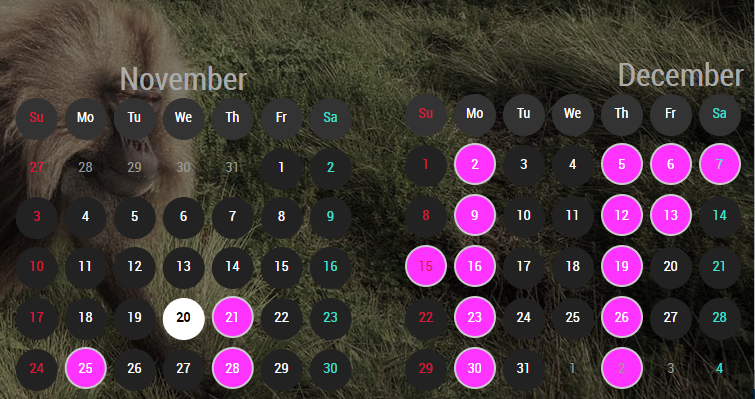
      0_1574317441674_Capture.PNG

      posted in Utilities
      BKeyportB
      BKeyport
    • RE: Mirror not displaying on the entire screen

      @jbeechey32 I used this to get the entire screen.

      body {
      	margin: 0px;
      	height: 100vh;
      	width: 100vw;
       }
      
      posted in Custom CSS
      BKeyportB
      BKeyport
    • RE: Feature suggestion: Dual or triple screen

      @MarkV It’s documented how to do it. I (re)wrote that documentation personally. Feel free to read https://docs.magicmirror.builders/configuration/introduction.html#advanced-configuration-and-frequently-asked-how-to-configure-examples and ask here if you have any questions, I’ll be more than happy to help.

      posted in Feature Requests
      BKeyportB
      BKeyport
    • RE: Ideas Needed

      How I do URL calls in python is through urllib.request - import that library then:

      urllib.request.urlopen("http://pi.hole:60001/remote?action=MONITORTOGGLE")
      

      Depends on how far outside you wanna go outside the MM ecosystem.

      edit: reminds me, I gotta re-write that for the new config, pi-hole and the mirror being two different units now.

      posted in General Discussion
      BKeyportB
      BKeyport
    • 1 / 1
