@sdetweil Right. Buster. My mind is a version behind. 🤣
 B
Offline
B
Offline
A New Chapter for MagicMirror: The Community Takes the Lead
Read the statement by Michael Teeuw here.
Read the statement by Michael Teeuw here.
Posts
-
RE: Rotating Display again..
-
RE: MMM-CalendarExt3Agenda
hey, @MMRIZE - I can’t figure out how to do something.
One of my remotely generated events has taken to advertising in it’s title.
(Washington Football vs Arizona - blah blah special event, Presented by Idiot Company)I want to get rid of everything after the dash. Not sure how to word the transform to do it - can you explain?
Thanks.
-
RE: MM as rolling picture frame
here’s how I did it.
-
Set up SAMBA on the pi, and include a mapping to your photos drive (I wouldn’t recommend keeping them locally)
-
magic mirror’s config, using MMM-Backgroundslideshow
/* Magic Mirror Config by Brendan Keyport. */
/* Office - Certificate Display */
var config = {
	address: "0.0.0.0",
	port: 8082,  // port is 8082 as I use a server/client style setup.
	ipWhitelist: [],
	language: "en",
	timeFormat: 12,
	units: "imperial",
	//logLevel: ["INFO", "LOG", "WARN", "ERROR", "DEBUG"],
	customCss: "css/custom3.css",
	modules:
	 [
		{
    		module: 'MMM-BackgroundSlideshow',
    		position: 'fullscreen_below',
    		config: {
      			imagePaths: ['<path to shared folder>'],
      			transitionImages: true,
      			randomizeImageOrder: true,
      			showAllImagesBeforeRestart: true,
      			//transitionSpeed: 0,
      			gradient: [0],
      			horizontalGradient: [0],
      			backgroundSize: "contain"
  			 }
  		}
/*************** DO NOT EDIT BELOW ***************/
	]
};

if (typeof module !== "undefined") {
	module.exports = config;
}
Easy as Pi.
-
-
RE: Backing up via GitHub repo
Here’s what I’ve done.
Everything I modify, including instructions for things that can’t be moved is stored in a “MyConfigs” directory on my harddrive, with symlinks in the original folder - so config.js and custom.css is actually symlinks in the magicmirror folders.
Modifications to modules that I do are all forked off the original and stored independently.
It took me literally 5 minutes to get config up again after a SD Card blowout…
Pros: no work to get unmodified modules and MagicMirror up to current.
Cons: remembering the dang symlink command. I’m gonna write a script.
-
RE: PC to Pi app
@kasperinline Termius is better.
Enabling SSH is easy, tho, even pre-first boot of the pi. Just put a file named “ssh” in the boot directory once you build the image. :)
-
RE: MMM-CalendarExt3Agenda
@DDE12 refer back to https://forum.magicmirror.builders/topic/16976/mmm-calendarext3agenda/24?_=1668752794543
The combo of my work and @MMRIZE 's work results in that. Right around there is where I got all of my settings for my install. Feel free to experiment.
-
RE: pm2 Autostart invert issue
One thing - are you using a Pi 4? Or the “Fake KMS” drivers? If so, boot.txt won’t work - nor will anything else, really.
If the Mirror is running - directly on the pi, or through VNC, Alt-Space, then N. This will give you your desktop. then use your OSKey or the menu icon, go to preferences, and see if “Screen configuration” exists. If it does, set your rotation there, and remove it everywhere else.
-
RE: MM keeps freezing
FYI. the bolt is still active, fresh copy of the OS downloaded from their website, on RPI3b+. whipped it together so to test for mirror frame placement.
-
RE: Temperature/humidity on Magic Mirror
@Egnos I’d look to see what’s supported in the 3rd party modules, and work backwards from there… that being said, for outside modules, go with Davis or other commercial products, and use something like an iframe tool, I use MMM-HTMLSnippet - and just grab the panel I want from Davis’ choices.
https://github.com/MichMich/MagicMirror/wiki/3rd-Party-Modules#utility--iot--3rd-party--integration
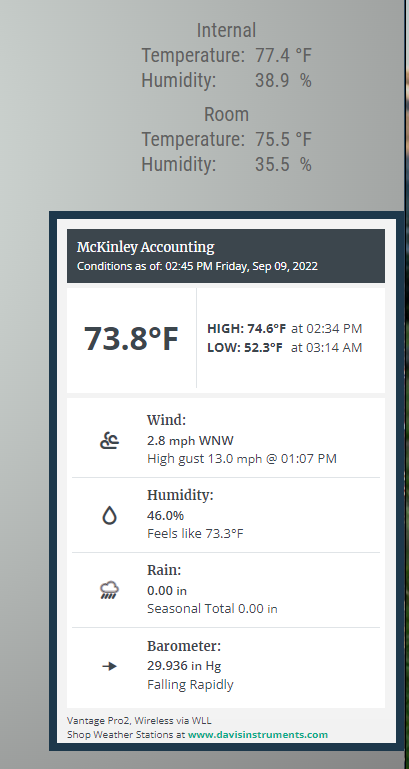
In this picture, the “internal” and “room” temps are provided by MMM-Temperature via i2c/Stemma QT modules (Room being a BME 280 from Adafruit, Internal is a HTU21 also from Adafruit)
The big panel is MMM-HTMLSnippet.
CSS is modified a lot to fit my theming.
-
RE: MMM-Multimonth
Another big update.
Event visualization is now working. Module will underline in a color of your choice (see css in README.md) for any event pulled from MagicMirror’s default calendar module.
Other tweaks have occurred. Please read the readme completely to upgrade.
Thanks!
-
RE: Calender Module: Time Not visible
Yep.
dateFormat: "M/D h:mm a",That’ll fix it.
-
RE: No Wi-Fi connectivity
Module shouldn’t have interfered with wifi - Do you have a Pi 4? There’s a couple of problems with Pi 4’s and Wifi.
if you’re using a QHD resolution, it can jam wifi. second - if you’ve got 5ghz enabled, it can jam wifi.
-
RE: update the raspberry os needed?
@bdream No need, I’ve been running on old OSes for a while now - mostly because I want to keep using OMXPlayer.
-
RE: MMM-CalendarExt3 - use hidden calendar and remote weather locale?
@eqpaisley here’s what I would do. Install MMM-CalendarExt3Agenda and use it instead of the default calendar module to display events. You’ll still use calendar, just not use it with the position indicator. CE3A gives you a ton more control over the calendars displayed and used, is prettier, and more functional, IMO.
-
RE: Config error
You have to be in the MM directory, FWIW.
I have a script set up in my root directory:
cd ~/MagicMirror
npm run config:check
cd ~ -
RE: MM cant boot, wont boot!
One other thing you can do is run “npm run config:check” in the magicmirror root directory (~/MagicMirror) - it’ll run through and see if there’s anything that’s slightly out of wack to blank the mirror but not out of wack enough to throw an error. It’s saved me lots of headaches several times.
-
RE: Magic mirror dual screen
Here’s the answer for @1a2a3a (Edited to show below changes)
Here’s how to do it cleanly: (replace
<username>with your pi login name., with width of first monitor)- create two starting scripts:
First,
mm.shis as follows:cd /home/<username>/MagicMirror DISPLAY=:0 npm startSecond,
mm2.shis as follows:cd /home/<username>/MagicMirror export MM_CONFIG_FILE=${pwd}/config/config2.js DISPLAY=:0 npm start- Two config files in magicmirror/config next:
First,
config.js(this is your second monitor):var config = { electronOptions: { x: <width> }, address: "0.0.0.0", port: 8080, ipWhitelist: [], language: "en", timeFormat: 12, units: "imperial", //logLevel: ["INFO", "LOG", "WARN", "ERROR", "DEBUG"], modules: [ ...Second
config2.js(this is your first monitor):var config = { address: "0.0.0.0", port: 8081, ipWhitelist: [], language: "en", timeFormat: 12, units: "imperial", //logLevel: ["INFO", "LOG", "WARN", "ERROR", "DEBUG"], modules: [ ...electronOptions will only work in the file that isn’t redirected to a new config - so use that in the
config.jsonly. -
RE: MMM-CalendarExt3Agenda
@luisestrada said in MMM-CalendarExt3Agenda:
Show the days only which has event on the day.
.CX3A .agenda .cell[data-events-counts=“0”] {
display: none;
}Perfect. Thank you.
-
RE: MMM-CalendarExt2 - show calendar name in event
look into the transform function.
https://github.com/MMM-CalendarExt2/MMM-CalendarExt2/blob/master/docs/Filtering-and-Sorting.md
You’ll have to figure out if there’s an event tag you can grab off of, but, here’s the basic concept (I have my system setting CSS classes based on keywords)
transform: function(event) { if (event.title.search("Recycle") > -1) { event.icon = "mdi:recycle"; event.className = "lemay"; } if (event.title.search("Yard Waste") > -1) { event.icon = "entypo-leaf"; event.className = "lemay"; } if (event.title.search("Trash") > -1) { event.icon = "bi:trash"; event.className = "lemay"; } if (event.title.search("Seahawks") > -1) { event.icon = "fa-solid:football-ball"; event.className = "seahawks"; } if (event.title.search("Sounders") > -1) { event.icon = "noto:soccer-ball"; event.className = "sounders"; } return event; }, -
RE: Mirror not displaying any modules
@Eric_H config:check hasn’t worked as of 2.12.
Gonna have to manually run through for now.