MagicMirror Forum
    • Recent
    • Tags
    • Unsolved
    • Solved
    • MagicMirror² Repository
    • Documentation
    • 3rd-Party-Modules
    • Donate
    • Discord
    • Register
    • Login
    1. Home
    2. BKeyport
    3. Best
    A New Chapter for MagicMirror: The Community Takes the Lead
    Read the statement by Michael Teeuw here.
    Offline
    • Profile
    • Following 0
    • Followers 2
    • Topics 65
    • Posts 1,311
    • Groups 1

    Posts

    Recent Best Controversial
    • MMM-Multimonth

      MagicMirror Module to display a calendar with multiple months

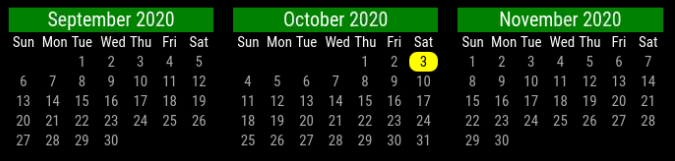
      A mini-calendar with as many months as the user wants, assuming screen space is available.
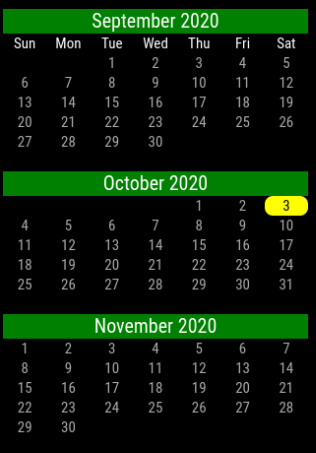
      vert-noweek-norep.png

      horz-noweeknum.png

      Download

      https://www.github.com/BKeyport/MMM-Multimonth
      [card:BKeyport/MMM-Multimonth]

      Installation

      Clone this repository in your ~/MagicMirror/modules/ folder ( $ cd ~MagicMirror/modules/ ):

      git clone https://github.com/BKeyport/MMM-Multimonth.git
      

      Using the module

      To use this module, add it to the modules array in the config/config.js file:

      {
        module: 'MMM-Multimonth',
      	position: 'top_left', // can be any of the postions
      	config: { // Optional - will default to 3 months, with one previous and one next. 
      	  startMonth: -1, // Define when you start from current month (negative is before current, zero is current, positive is in future) 
               monthCount: 3, //  How many months to display 
               highlightWeekend: false // highlightWeekend if desired, set to true. 
      	}
      }
      

      Many thanks to kirash for the inspiration with the monthly_calendar module, sdetweil and lavolp3 for the help in coding and CSS work. Without your help, this would just be a pipe dream.

      This is a basic module, but I felt it was good enough for release to the public.

      Please, if you have any suggestions for improvement, let me know, I’m learning Javascript and CSS as I write this, and I dream of much bigger things.

      ~~Localization is provided by moment.js and controlled by the master language of MagicMirror. Please file any errors with localizations as bugs with the moment.js team - https://github.com/moment/moment/~~

      Please see github for version info and further instructions.
      posted in Utilities calendar magicmirror2 module
      BKeyportB
      BKeyport
    • RE: Is cloning to a new OS possible?

      @tippon To speed reinstall - I have my config.js and custom.css symlinked to a common location outside the MagicMirror tree, and a bash script setup to clone and npm install every module I use, and reinstall the symlinks.

      easy peasy…

      My system backs that up nightly to a private github repository, and bam quick and dirty way to get my system back running when my pi crashes.

      posted in General Discussion
      BKeyportB
      BKeyport
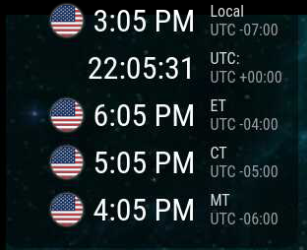
    • MMM-Worldclock

      MagicMirror Module to display clocks from multiple time zones

      After not getting an answer on Sean’s EXCEPTIONAL worldclock module (His first) from the new maintainer, I decided to fork it and start working on it myself. As such, I present to you “MMM-Worldclock”… It’s mostly Sean’s work, with a few fixes here and there right now.

      This will be fully supported, much in the spirit of Sean’s work.

      This module is derived from default MagicMirror module ‘clock’ and modified. Thanks to michaelteeuw.
      This module displays times from around the world.
      Modified fork of worldclock by eouia, renamed and improved.

      Capture.PNG

      Installation

      1. Execute the following commands to install the module:
      cd ~/MagicMirror/modules # navigate to module folder
      git clone https://github.com/BKeyport/MMM-Worldclock # clone this repository
      
      1. Then, add the following into the modules section of your config/config.js file:
      {
        module: 'MMM-Worldclock',
        position: 'top_left', // This can be any of the regions, best results in top_left or top_right regions
        config: {
          // See 'Configuration options' for more information.
      
          timeFormat: 'hh:mm A', //defined in moment.js format()
          style: 'top', //predefined 4 styles; 'top', 'left','right','bottom'
          offsetTimezone: null, // Or you can set `Europe/Berlin` to get timegap difference from this timezone. `null` will be UTC timegap.
          clocks: [
            {
              title: "Home",
            },
            {
              title: "HOLLYWOOD", // Too long title could cause ugly text align.
              timezone: "America/Los_Angeles", //When omitted, Localtime will be displayed. It might be not your purporse, I bet.
              flag: "us",
            },
            {
              timezone: "Asia/Seoul",
            },
          ]
        }
      },
      

      Of course, you should change the configuration values for your purpose.

      for configuration options see github.

      Updates:

      2020-08-06 (BKeyport) Fixed timeFormat per clock to work properly.
      2019-02-24 (Sean) offsetTimezone is added.
      2017-08-25 (sean) supports MMM-TelegramBot (https://github.com/eouia/MMM-TelegramBot) command /worldclock is added
      2017-08-10 (sean) Country flags are supported. HTML/CSS Structures are refined.

      ** Note: telegram bot may not work in this version, I did not modify that code in the slightest, however, if it’s relying on the module name, it’s broken. I’ll fix it if it gets reported to me.

      Thanks to Seongnoh Sean Yi’s (eouia) for his exceptional module and all the wonderful support he’s done over the years. I wouldn’t have the knowledge I have without Sean’s help.

      posted in Utilities
      BKeyportB
      BKeyport
    • RE: Flickering in portrait mode
      sudo Raspi-config 
      

      Advanced Options -> GL Drivers -> Legacy.

      “legacy” and “normal” drivers are the same thing.

      posted in Troubleshooting
      BKeyportB
      BKeyport
    • RE: Room climate module

      The problem with having the mirror and the sensor so close is that the heat from the monitor and the pi itself will mess with the readings of the sensor.

      posted in Hardware
      BKeyportB
      BKeyport
    • RE: Automatic checking of all MagicMirror² modules

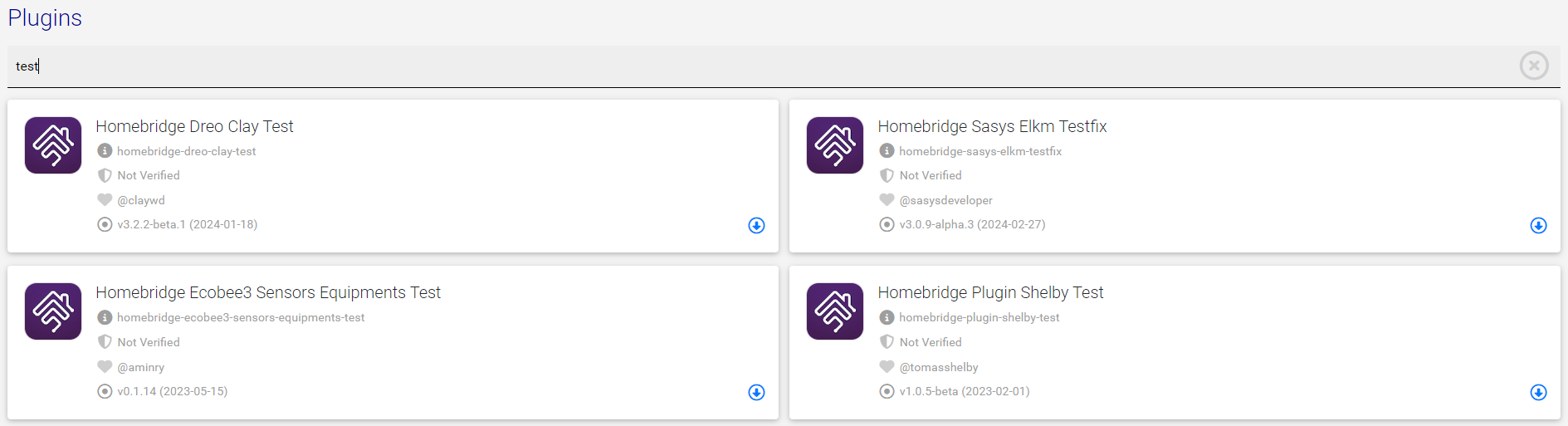
      @MMRIZE I’d love to see a plugin store and/or marketplace of sorts. Some other projects uses NPM with a fancy front end web to do so, much like some modules use(d) a web interface to set up the initial config or adjust configs (Sam’s config module, MMM-RTSP, etc)

      This would be an ideal marketplace (Simple, to the point, shows everything a user needs) :
      2504511b-339e-4a29-91af-aefbed281f37-image.png

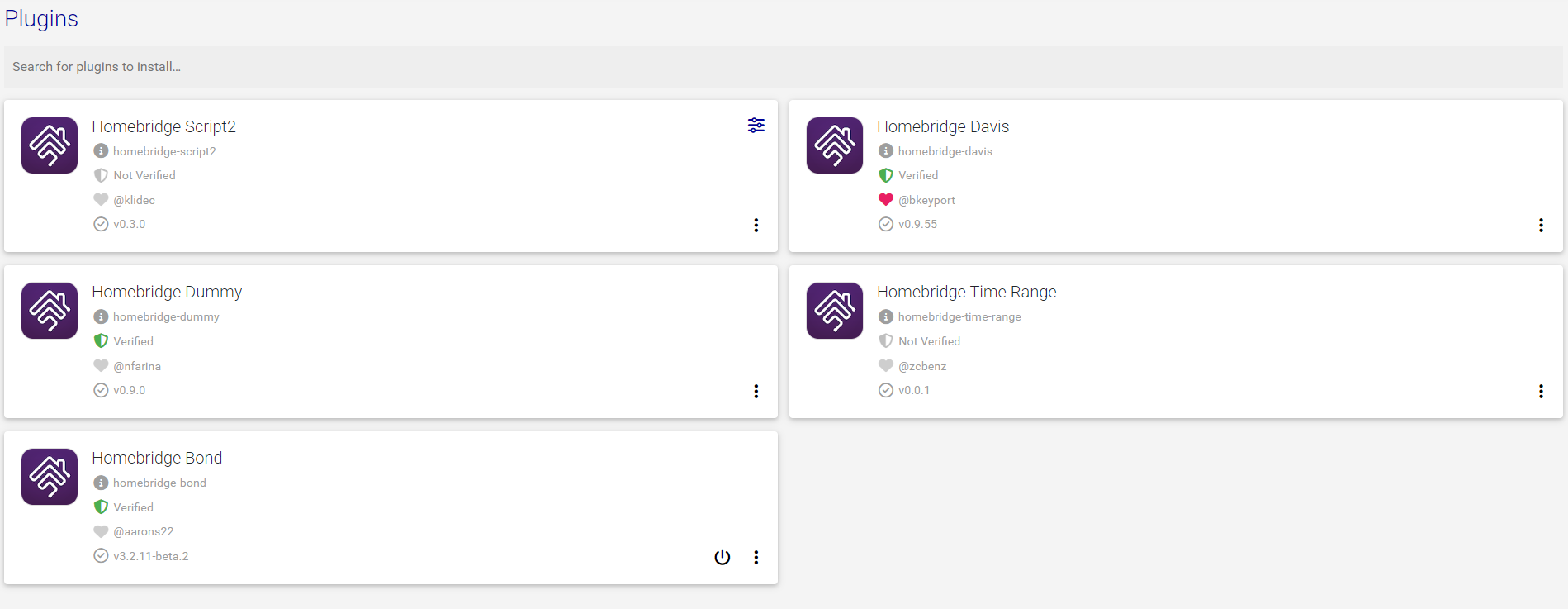
      Then when the user wants to config:
      d0937da4-c231-4935-acb3-6d616b2dfefd-image.png

      Homebridge is one of the better ways of doing things, IMO.

      posted in Development
      BKeyportB
      BKeyport
    • New Youtube Video featuring MagicMirror...

      https://www.youtube.com/watch?v=RFsIWtmc-WA

      Becky Stern walks us through her Magic Mirror design build, including disassembling a monitor, building a frame, etc. It’s a cool setup.

      posted in System
      BKeyportB
      BKeyport
    • RE: I am stuck need help

      One of the best commands to know is

       npm run config:check
      

      Start at the topmost error and work your way down the file - it’s got lots of problems, but is easily fixed. Also, I highly recommend a graphical type editor if possible - Geany is what I use.

      I installed samba on my magic mirror so I can edit with the PC version of Geany and save it right to the Pi. It’s great.

      posted in Troubleshooting
      BKeyportB
      BKeyport
    • RE: Monitor recommendation

      @danybony Monitors without any on/off logos is gonna be a tough one - You’ll want to use HDMI sleep to power up and down the monitor or simply blank it (I’d go for the latter if you’re concerned about a “No Signal” image).

      As for the others - you’ll have to experiment - sadly.

      General advice:

      Get a monitor with a bezel on all sides - why? No lopsided display when you pull it out of frame.

      Get a monitor with the cables pointing out one side or the bottom. Why? Pointing out the back will cause issues in install and make it harder to make it compact.

      Get a monitor with a built in power converter (110v/220v direct into monitor) - why? For compactness reasons - less work to build frame behind it.

      posted in Hardware
      BKeyportB
      BKeyport
    • RE: New Youtube Video featuring MagicMirror...

      @mykle1 Yeah, I was looking for my modules too. :)

      posted in System
      BKeyportB
      BKeyport
    • RE: How to add modules. For absolute beginners.

      @Dask Dependencies are on a case by case basis. In many cases, it’s as simple as installing it into npm, by using npm install

      In some cases, however, there’s additional outside programs or such that’s not covered by the npm install method. I’ve yet to see a module that requires additional software not include an installer script to take care of that for you, generally the readme will tell you if that’s the case.

      Bottom line, follow the instructions in the readme.

      posted in Troubleshooting
      BKeyportB
      BKeyport
    • RE: Request for Suggestion: Daily Calendar View with Details?

      Take a look into https://github.com/MMM-CalendarExt2/MMM-CalendarExt2

      It can make your calendars dance.

      Really.

      posted in Troubleshooting
      BKeyportB
      BKeyport
    • RE: Questions about update

      I have a couple of tricks I use to preserve my modifications, even across a total system rebuild.

      1. config.js & custom.css is symlinked to my backup directory.
      2. my config.js is commented on where I can get my modules, and any forum posts which apply to help get them running (like how to add back required node.js modules that aren’t in MagicMirror core anymore)
      3. any and all non-core modules that have changes that would be overwritten by an update by the author are forked to my own github. if I update a core module, I would symlink the modified file to my backup directory.
      4. I left myself instructions in the backup directory on how to reset things I can’t/shouldn’t backup as of present (crontab, samba, config.txt, how to set up fresh SD card, hostname, etc) (config.txt you’ll see in the backup, but you shouldn’t just copy that back as new installs may be different in that file, use it to compare and add your changes)
      5. My backup directory is thrown to github in a private repository nightly using this (censored) script.
      #!/bin/bash
      d=$(date +%Y-%m-%d)
      cd ~/<directory>
      cp /boot/config.txt config.txt.backup
      cp /etc/samba/smb.conf smb.conf.backup
      rm core
      git add *
      git commit -m "Nightly Backup"+$d --all
      git push https://BKeyport:<token>@github.com/BKeyport/<directory>.git
      

      In my crontab -e:

        0 0 * * * /home/pi/<directory>/backup.sh 
       30 * * * * pm2 restart omx
      

      (Run the backup script at midnight, and restart my camera cutout at 30 minutes past the hour respectively - OMX is a bit of a pain, working on better)

      I would love to see user modules be in their own directory so I could just wholesale symlink that directory to my backup system, but, eh…

      howtos :
      github (cheat sheet: https://education.github.com/git-cheat-sheet-education.pdf)
      symlinks: (https://www.freecodecamp.org/news/symlink-tutorial-in-linux-how-to-create-and-remove-a-symbolic-link/)
      cron: https://ostechnix.com/a-beginners-guide-to-cron-jobs/

      posted in Troubleshooting
      BKeyportB
      BKeyport
    • RE: MMM-MLB only showing header with logo. Should it be loading anything in offseason?

      @jamaces I wouldn’t expect it to show anything, as the data sources are empty at the moment.

      posted in Troubleshooting
      BKeyportB
      BKeyport
    • RE: How to go to the IP address on the mirror and see the module errors in the browser console?

      @Laz As all of my systems are behind a firewall - I’ve opened the Mirror to “public” access by using the config of

      var config = {
      	address: "0.0.0.0",
      	port: 8080,
      	ipWhitelist: [],
      ... 
      

      then, I simply load the mirror in my main computer’s browser with http://mirror:8080 and use the devtools of my browser to view the errors and such.

      posted in Troubleshooting
      BKeyportB
      BKeyport
    • RE: Old modules

      @sdetweil Quite literally, I learned coding from doing that. :)

      posted in Troubleshooting
      BKeyportB
      BKeyport
    • RE: Major problems loading new module page...

      @KristjanESPERANTO Of course, now that I’ve reported it, it’s stopped doing it entirely. I’ll chalk it to an issue on my end. Things are a little crazy over here right now.

      posted in Troubleshooting
      BKeyportB
      BKeyport
    • RE: Why are my posting spam

      What’s sad, is that actual spam is missed frequently. My late night routine is coming on here and marking the 90% of messages that come in as spam. 🙄

      Edit: as I posted this, another spammer posted…

      posted in Troubleshooting
      BKeyportB
      BKeyport
    • RE: MMM Remote Control Error

      FWIW, in the future,

      Open a terminal
      Type cd MagicMirror and press Enter
      Now you’re in the MagicMirror directory
      Type npm run config:check and press Enter
      MagicMirror will now check your config

      posted in General Discussion
      BKeyportB
      BKeyport
    • RE: MMM-Multimonth

      new product released!

      Added:
      Language and calendar modification unlinked. The module now has startWeek variable to set the start of the week

      You now can shorten the day names to the shortest available for your language. (for english, instead of “Sun Mon Tue Wed Thu Fri Sat” it will be “S M T W T F S”

      Removed:
      All references and use of Moment. It’s now native code completely.

      Other:
      There’s a bug - Week numbers are in the system, but it will generate an additional line. I am going to re-do the module more (enough to create a MultiMonth2), so in that process I’ll sure I’ll find the cause.

      As a reminder, internationalization is based on the mirror as a whole, so if you have your mirror set to French, it will have French month and day names.

      Read the Readme for instructions.

      Thanks to MMRize for the inspiration to do this!

      posted in Utilities
      BKeyportB
      BKeyport
    • 1
    • 2
    • 3
    • 4
    • 5
    • 8
    • 9
    • 1 / 9