MagicMirror Forum
    • Recent
    • Tags
    • Unsolved
    • Solved
    • MagicMirror² Repository
    • Documentation
    • 3rd-Party-Modules
    • Donate
    • Discord
    • Register
    • Login
    1. Home
    2. British_Kiwi
    3. Posts
    A New Chapter for MagicMirror: The Community Takes the Lead
    Read the statement by Michael Teeuw here.
    B
    Offline
    • Profile
    • Following 0
    • Followers 0
    • Topics 5
    • Posts 33
    • Groups 0

    Posts

    Recent Best Controversial
    • RE: Unable to change pages using MMM-page-indicator

      Thanks to you both.

      @kristjanesperanto I changed to your main one and it has solved the problem. So thanks for that.

      @sdetweil I have never got the keyboard to work. I can click on things on the screen, but I think the keyboard is hidden behind everything, so I probably will just disable it altogether. By changing the MMM-pages, this solved the problem without making changes to the keyboard. Do you know what setting I would need to make it pop up in front when I need to type things in?

      Very happy to have my MM and HA working again :)

      posted in Troubleshooting
      B
      British_Kiwi
    • RE: Unable to change pages using MMM-page-indicator

      I know I have another response awaiting approval. However, I wanted to confirm that I checked my MMM-pages module and it is https://github.com/sdetweil/MMM-pages branch (hopefully the correct terminology).

      posted in Troubleshooting
      B
      British_Kiwi
    • RE: Unable to change pages using MMM-page-indicator

      @sdetweil Hi Sam
      I haven’t changed anything in my config, and maybe that is the problem. There are certainly some things I should probably remove which I am not using and aren’t showing. But I don’t want to change anything else until this works. I also meant to say that when I updated Magic Mirror, I used your script.

      /* Config Sample
       *
       * For more information on how you can configure this file
       * see https://docs.magicmirror.builders/configuration/introduction.html
       * and https://docs.magicmirror.builders/modules/configuration.html
       *
       * You can use environment variables using a `config.js.template` file instead of `config.js`
       * which will be converted to `config.js` while starting. For more information
       * see https://docs.magicmirror.builders/configuration/introduction.html#enviromnent-variables
       */
      let config = {
      	//address: "localhost",	// Address to listen on, can be:
      							// - "localhost", "127.0.0.1", "::1" to listen on loopback interface
      							// - another specific IPv4/6 to listen on a specific interface
      							// - "0.0.0.0", "::" to listen on any interface
      							// Default, when address config is left out or empty, is "localhost"
      	address: "0.0.0.0",
      	port: 8080,
      	basePath: "/",	// The URL path where MagicMirror² is hosted. If you are using a Reverse proxy
      									// you must set the sub path here. basePath must end with a /
      	//ipWhitelist: ["XXXX", "::ffff:XXX.0.0.1", "::1"],	// 
      	ipWhitelist: [],
      	//Set [] to allow all IP addresses
      									// or add a specific IPv4 of 192.168.1.5 :
      									// ["XXX.0.0.1", "::ffff:XXX.0.0.1", "::1", "::ffff:XXX.XXX1.5"],
      									// or IPv4 range of XXX.XXX.X.X --> XXX.XXX.X.XX use CIDR format :
      									// ["XXX.X.X.X", "::ffff:XXX.0.0.1", "::1", "::ffff:1XXX"],
      
      	useHttps: false,			// Support HTTPS or not, default "false" will use HTTP
      	httpsPrivateKey: "",	// HTTPS private key path, only require when useHttps is true
      	httpsCertificate: "",	// HTTPS Certificate path, only require when useHttps is true
      
      	language: "en",
      	locale: "en-AU",   // this variable is provided as a consistent location
      			   // it is currently only used by 3rd party modules. no MagicMirror code uses this value
      			   // as we have no usage, we  have no constraints on what this field holds
      			   // see https://en.wikipedia.org/wiki/Locale_(computer_software) for the possibilities
      
      	logLevel: ["INFO", "LOG", "WARN", "ERROR"], // Add "DEBUG" for even more logging
      	timeFormat: 24,
      	units: "metric",
      
      	modules: [
      	
      		{
      			module: "MMM-pages",
      			disabled: false, //true to disable the module
      			config: {
      				//rotationTime: 1000 * 20, //roate every 20 seconds
      				rotationTime: 0, //do not rotate, manually change pages
      				modules: [
      					["home"], //class name for page 1 main home page
      					["testing"], //class name for page to add testing MODULES
      					["HA"], //class name for page for Home Assistant
      				],
      				fixed: ["fixed_page"],
      				hiddenPages: {
      					"screenSaver": ["screensaver_page"],
      					"admin": ["admin_page"],
      				}
      			}
      		},
      	
      		{
      			module: "MMM-Keyboard",
      			disabled: false, //true to disable the module
      			position: "fullscreen_above",
      			classes: "home",
      			config: {
      				startWithNumbers: false,
      				startUppercase: true,
      				debug: false
      			}
      		},
      		
      		//TOP BAR MODULES ("top_bar")
      		
      		
      		{
      			module: "alert",
      			disabled: false, //true to disable the module
      			classes: "home",
      		},
      		{
      			module: "updatenotification",
      			disabled: false, //true to disable the module
      			position: "top_bar",
      			classes: "home",
      		},
      		//FULL SCREEN ("fullscreen_below")
      
      		/*
      		{
      			module: 'MMM-SynPhotoSlideshow',
      			position: 'fullscreen_below',
      			classes: "testing",
      			config: {
      				useSynologyPhotos: true,
      				synologyUrl: 'http://XXX.XXX.XX.XX:5000',
      				synologyAccount: 'XX',
      				synologyPassword: 'XX',
      				synologyAlbumName: 'XX', // Optional: specific album
      				synologyMaxPhotos: 1000,
      				imagePaths: [], // Can be empty if only using Synology
      				slideshowSpeed: 60000, // 60 seconds
      				transitionImages: true,
      				randomizeImageOrder: true
      			}
      		},
      		*/
      		//TOP LEFT MODULES ("top_left")
      		{
      			module: "clock",
      			disabled: false, //true to disable the module
      			position: "top_left",
      			timezone: "Australia/X",
      			classes: "home",
      		},
      
      		
      		{
      			module: "calendar",
      			disabled: false, //true to disable the module
      			header: "Australian Holidays",
      			classes: "home",
      			position: "top_left",
      			config: {
      				broadcastPastEvents: true, // <= IMPORTANT to see past events
      				calendars: [
      					{
      						name: "Australian Holidays",
      						fetchInterval: 7 * 24 * 60 * 60 * 1000,
      						symbol: "calendar-check",
      						url: "https://ics.calendarlabs.com/35/33aae31a/Australia_Holidays.ics",
      						color: "yellow", // <= RECOMMENDED to assign color
      					},


      				]
      			}
      		},
      
      		{
      			module: 'MMM-HomeAssistantDisplay',
      			disabled: true, //true to disable the module
      			classes: "testing",
      			position: 'top_left',
      			config: {
      				host: "http://XXX.XXX.XX.XX/",
      				token: XX
      				port: 8123,
      				useTLS: true,				
      				title: "XX",
      				//class: "HAValues",
      				sections: [{
      					XXX
      					},
      				]
      			},
      		},		
      
      
      		//TOP CENTER MODULES ("top_center")


      		//TOP RIGHT MODULES ("top_right")
      		
      		{			
      			module: "weather",
      			disabled: false, //true to disable the module
      			classes: "home",
      			position: "top_right",
      			header: "Weather Forecast",
      			config: {
      				weatherProvider: "openmeteo",
      				type: "forecast",
      				lat: -37.7386,
      				lon: 145.31431,
      			}
      		},		
      
      		{
      			module: "MMM-Daikin",
      			disabled: true, //true to disable the module
      			classes: "testing",
      			header: 'AC Status',
      			position: 'top_right',
      			config: {
      				devices: [
      						{
      							ipAddress: 'XXX.XXX.XX.XX', // IP of AC Unit Lounge
      						},
      						
      					],
      				updateInterval: 1 * 30 * 1000,
      			}
          	},
      
      
      		//UPPER THIRD MODULES ("upper_third")
      		
      		//MIDDLE CENTRE MODULES ("middle_center")
      		{
      			module: "MMM-CalendarExt3",
      			disabled: false, //true to disable the module
      			classes: "home",
      			position: "middle_center",
      			title: "XXXX",
      			config: {
      				mode: "week",
      				weekIndex: -1,
      				weeksInView: 5,
      				instanceId: "mainCalendar-All", //example basicCalendar
      				locale: 'en-AU',
      				maxEventLines: 5,
      				firstDayOfWeek: 1,
      				calendarSet: [], //list all calendar names?
      				//waitfresh: 5000,
      				useWeather: true,
      				
      			}
      		},		
      				
      				
      		//LOWER THIRD MODULES ("lower_third")
      		
      		{
      			module: "compliments",
      			disabled: true, //true to disable the module
      			classes: "home",
      			position: "lower_third"
      		},


      		//BOTTOM LEFT MODULES ("bottom_left")
      
      		{
      			module: "MMM-Worldclock",
      			disabled: false, //true to disable the module
      			classes: "home",
      			position: "bottom_left", // This can be any of the regions, best results in top_left or top_right regions.
      			config: {
      				// See "Configuration options" for more information.
      
      				timeFormat: "hh:mm A", // defined in moment.js format()
      				style: "top", // predefined 4 styles; "top", "left","right","bottom"
      				offsetTimezone: null, // Or you can set `Europe/Berlin` to get timegap difference from this timezone. `null` will be UTC timegap.
      				clocks: [
      				{
      					title: "UK", // Too long title could cause ugly text align.
      					timezone: "Europe/London", // When omitted, Localtime will be displayed. It might be not your purporse, I bet.
      					flag: "gb",
      				},
      				{
      					title: "France", // Too long title could cause ugly text align.
      					timezone: "Europe/Paris", // When omitted, Localtime will be displayed. It might be not your purporse, I bet.
      					flag: "fr",
      				},
      				{
      					title: "VIC/TAS/ACT/NSW",
      					timezone: "Australia/Melbourne",
      					flag: "au",
      				},
      				{
      					title: "QLD", // Too long title could cause ugly text align.
      					timezone: "Australia/Brisbane", // When omitted, Localtime will be displayed. It might be not your purporse, I bet.
      					flag: "au",
      				},
      					
      				{
      					title: "SA", // Too long title could cause ugly text align.
      					timezone: "Australia/Adelaide", // When omitted, Localtime will be displayed. It might be not your purporse, I bet.
      					flag: "au",
      				},
      				{
      					title: "WA", // Too long title could cause ugly text align.
      					timezone: "Australia/Perth", // When omitted, Localtime will be displayed. It might be not your purporse, I bet.
      					flag: "au",
      				},
      				{
      					title: "NT", // Too long title could cause ugly text align.
      					timezone: "Australia/Darwin", // When omitted, Localtime will be displayed. It might be not your purporse, I bet.
      					flag: "au",
      				},
      			  
      			]
      		  }
      		},		
      
      		{
      			module: 'MMM-Remote-Control',
      			disabled: false, //true to disable the module
      			classes: "home testing",
      			// uncomment the following line to show the URL of the remote control on the mirror
      			position: 'bottom_left',
      			// you can hide this module afterwards from the remote control itself
      				config: {
      				apiKey: 'xxxx'
      				}
      		},
      		//BOTTOM CENTRE MODULES ("bottom_center")
      		
      		{
      			module: 'MMM-SmartTouch', 
      			disabled: true, //true to disable the module
      			classes: "home",
      			position: 'bottom_center',    // This can be any of the regions.(bottom-center Recommended)
      			config:{ 
      				// None configuration options defined 
      			}
      		},


      		//BOTTOM RIGHT MODULES ("bottom_right")
      		
      		{
      			module: 'MMM-Todoist2',
      			disabled:false,
      			classes: "home", //This adds the module to the page 'home'
      			position: 'bottom_right',	// This can be any of the regions. Best results in left or right regions.
      			header: 'Todoist', // This is optional
      			config: { // See 'Configuration options' for more information.
      				hideWhenEmpty: false,
      				accessToken: XXXX
      				maximumEntries: 15,
      				updateInterval: 10*60*1000, // Update every 10 minutes
      				fade: false,      
      				// projects and/or labels is mandatory:
      				projects: [ XXXXX], //These are the project IDs from Todoist (copied from URL after [project name]-... 
      				labels: [ "magicmirror", "Important" ], // Tasks for any projects with these labels will be shown.
      				showProject: true,
      				sortOrder: "dueDateDesc",
      				displayTasksWithinDays: 0, // If 0 will show overdue and those due today
      				displayTasksWithoutDue: true, //If true shows tasks without a due date
      				displaySubtasks: false, //If true shows subtasks
      		  }
      		},
      		
      		//BOTTOM BAR modules
      		{
      			module: "newsfeed",
      			disabled: false, //true to disable the module
      			classes: "home",
      			position: "bottom_bar",
      			config: {
      				feeds: [
      					{
      						title: "ABC News Top Stories",
      						url: "https://abcnews.go.com/abcnews/topstories",
      					}
      				],
      				showSourceTitle: true,
      				showPublishDate: true,
      				broadcastNewsFeeds: true,
      				broadcastNewsUpdates: true,
      			}
      		},
      
      		
      		//FULLSCREEN BELOW MODULES ("fullscreen_below")


      		//Second testing page for HA using iFrame
      
      		{
      			module: 'iFrame',
      			disabled: false, //true to disable the module
      			position: "bottom_right" ,	// This can be any of the regions.
      			classes: "HA",
      			header: "Home Assistant",
      			config: {
      				// See 'Configuration options' for more information.
      					url: "http://XXX.XXX.XX.XX:8123/",
      					width: "920px", // Optional. Default: 100%
      					height: "1710px", //Optional. Default: 100px
      					
      				}
      		},


      		{
      			module: "MMM-page-indicator",
      			disabled: false, //true to disable the module
      			classes: "home testing HA",
      			position: "bottom_bar",
      			config: {
      				pages: 3,
      				activeBright: true,
      				inactiveDimed: false,
      				inactiveHollow: true,
      				showPageNumberOnHover: false,
      			}
      		},
      
      	]
      		
          };
      
      /*************** DO NOT EDIT THE LINE BELOW ***************/
      if (typeof module !== "undefined") { module.exports = config; }


      @kristjanesperanto I initially only updated what was flagged on the magic mirror and I don’t think there was MMM-pages. However, i ended up going to each module folder and “git pull” just in case and it said Already updated. Since your message, I checked what version I have and although it keeps saying Already updated, the version says 1.0.1 so not the version you have said. I tried again to update and it keeps saying Already Updated. I will see if I can update to that version, but will have to work this out.
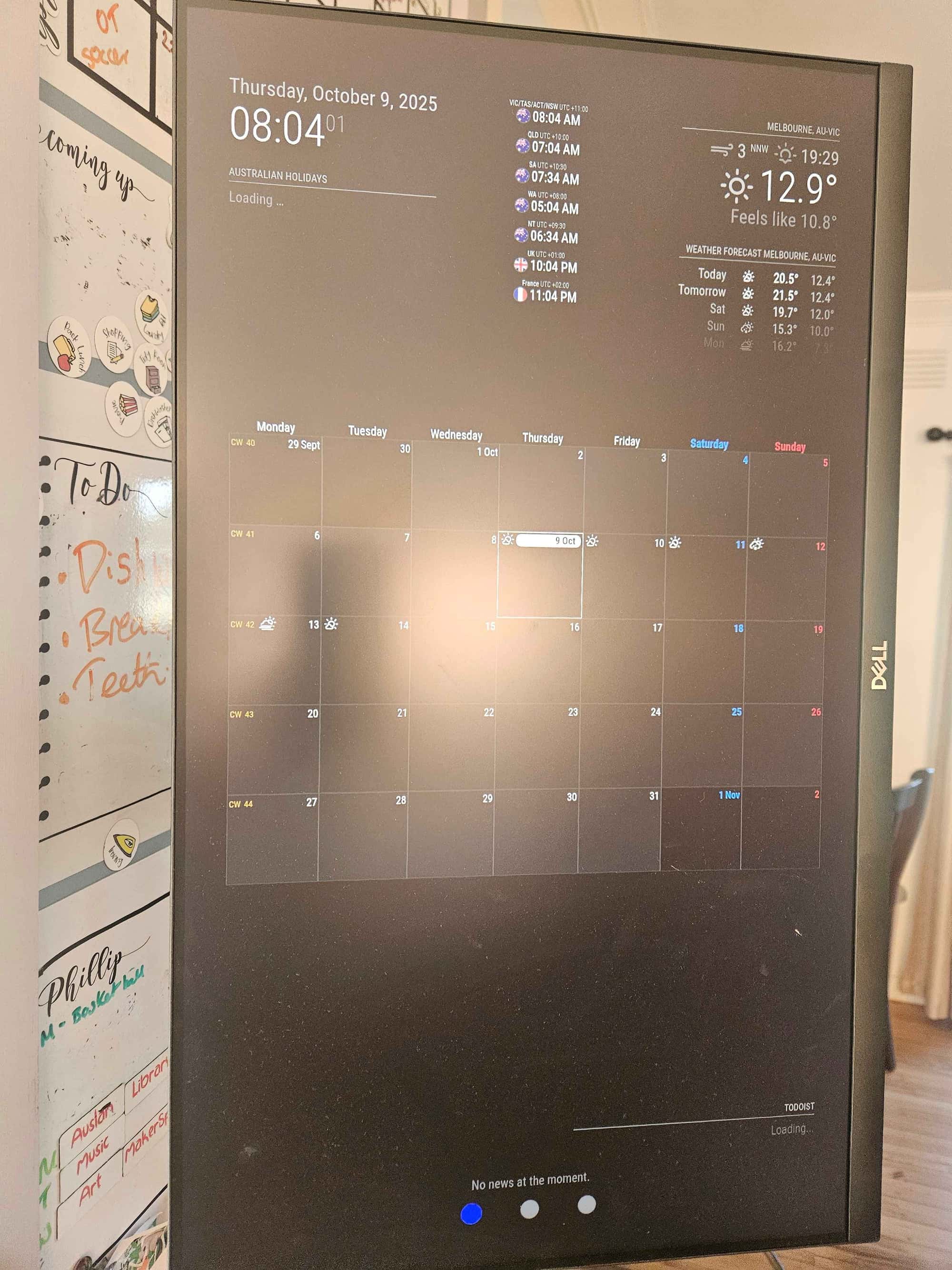
      posted in Troubleshooting
      B
      British_Kiwi
    • Unable to change pages using MMM-page-indicator

      Good morning
      My mirror has been pretty stable since my last post which is great. I have three pages, one is my main with calendar, weather etc and the last one has iFrame with my Home Assistant on it.
      Yesterday I decided to do some updates, I finally updated Magic Mirror itself, MMM-CalendarExt3, MMM-page-indicator and MMM-Remote-Control. The latter was a pain and took a bit of time as had some messages about different branches, but it is now showing as up to date.

      My problem is that although the page indicator looks the same, the “Home” button is pulsing to show it is the focus page, however, I cannot switch pages. I’ve checked documentation to see if I needed to make any changes to the config file, but it looks like no changes to that are needed.

      I have set it up using classes.
      I’m about to head to work, but was hoping someone might either know a quick fix or what to check in logs etc that might point me in the right direction. I have a touch screen and that is still working as if I click on an event on the google calendar, the event pops up. Unfortunately this means I cannot access Home Assistant through my MM which is really frustrating!

      posted in Troubleshooting
      B
      British_Kiwi
    • RE: Is adding Home Assistant the right way to go?

      @sdetweil that’s a much cleaner way to disable a module. I will use that. Thanks again for your help.

      posted in General Discussion
      B
      British_Kiwi
    • RE: Is adding Home Assistant the right way to go?

      @sdetweil not sure if I am doing this right. I thought I had made notes about how to check logs etc, but after some googling I have this (which I don’t think you were after):

      admin@raspberrypihome:~/MagicMirror $ npm run config:check
      
      > magicmirror@2.33.0 config:check
      > node js/check_config.js
      
      [2025-10-10 07:21:14.145] [INFO]  Checking config file /home/admin/MagicMirror/config/config.js ...
      [2025-10-10 07:21:14.197] [INFO]  Your configuration file doesn't contain syntax errors :)
      [2025-10-10 07:21:14.198] [INFO]  Checking modules structure configuration ...
      [2025-10-10 07:21:14.258] [ERROR] This module configuration contains errors:
      undefinedmust be object
      

      Not too sure which module this is referring too.

      Here are the pm2 logs. I’ve removed yesterdays stuff. All I have done this morning is pm2 restart 0 --updated-env (as it keeps saying something about environment variables which I haven’t seen prior to a few days ago.

      admin@raspberrypihome:~/MagicMirror $ pm2 logs
      [TAILING] Tailing last 15 lines for [all] processes (change the value with --lines option)
      /home/admin/.pm2/pm2.log last 15 lines:
      PM2        | 2025-10-10T07:15:02: PM2 log: Stopping app:MagicMirror id:0
      PM2        | 2025-10-10T07:15:03: PM2 log: App [MagicMirror:0] exited with code [0] via signal [SIGINT]
      PM2        | 2025-10-10T07:15:03: PM2 log: pid=617000 msg=process killed
      PM2        | 2025-10-10T07:15:03: PM2 log: App [MagicMirror:0] starting in -fork mode-
      PM2        | 2025-10-10T07:15:03: PM2 log: App [MagicMirror:0] online
      
      /home/admin/.pm2/logs/MagicMirror-error.log last 15 lines:
      0|MagicMir | [2025-10-10 07:15:04.251] [ERROR] This module configuration contains errors:
      0|MagicMir | undefinedmust be object
      0|MagicMir | [2025-10-10 07:15:04.252] [ERROR] WARNING! Could not load config file. Starting with default configuration. Error found: TypeError: Cannot read properties of undefined (reading 'module')
      
      /home/admin/.pm2/logs/MagicMirror-out.log last 15 lines:
      0|MagicMir | - VERSIONS: electron: 38.1.2; used node: 22.19.0; installed node: 22.18.0; npm: 10.9.3; pm2: 6.0.13
      0|MagicMir | - ENV:      XDG_SESSION_TYPE: tty; MM_CONFIG_FILE: undefined
      0|MagicMir |             WAYLAND_DISPLAY:  wayland-0; DISPLAY: :0; ELECTRON_ENABLE_GPU: undefined
      0|MagicMir | - RAM:      total: 8059.20 MB; free: 6557.28 MB; used: 1501.92 MB
      

      It does it look like there is an issue with a module, but I can’t work out which module. Any ideas on how to work it out?

      At the moment I have commented out calendarext3, home assistant display, but I do have iframe showing on one of the pages.

      posted in General Discussion
      B
      British_Kiwi
    • RE: Is adding Home Assistant the right way to go?

      @sdetweil the default calendar isn’t working either! I have commented out ext3, I have reduced the calendar entries on the default calendar to just Australian holidays in case Google is having a fit! It just says loading. I had not touched any of this code in the config at all. I have seen there have been cases of calendar’s not loading last January and few again now. Is it worth me raising it on the github discussion or issue list?

      https://github.com/MMRIZE/MMM-CalendarExt3/issues ?

      posted in General Discussion
      B
      British_Kiwi
    • RE: Is adding Home Assistant the right way to go?

      @sdetweil and @Hilt

      Sam, I usually use your script (not quite sure why I didn’t, blaming lack of sleep). I have run it and all running correctly. keep getting a message about environment variables, but have been running the following code which seems to sort it till the next time.

      pm2 restart 0 --update -env
      

      Thanks for giving more details about fullscreen below and above. I don’t have anything else on that page, so I am surprised why this didn’t fill up the screen.

      @Hilt I ended up using your code about using bottom_right and after a bit of tweaking and I can now see it. just need to log in.

      My main problem now (there is always one) , is that I still can’t get the calendar to populate or todoist. Of course, my last back up was not just before this stopped working and I think it was around the time I updated the module. However, I didn’t update the Todoist module so a bit baffled. I’ll have to check my code and see if I have inadvertently done something. I am using VSCode and doesn’t look like I have, but will go through it carefully after work. Here is what it looks like now:
      MM.jpg

      I do have to tweak my sizing of the modules on my home page as there is a little overlap when everything is populated, but apart from that this page was working well.
      Anyway , have a great day :)

      posted in General Discussion
      B
      British_Kiwi
    • RE: Is adding Home Assistant the right way to go?

      @sdetweil . I’ll try that tomorrow. Just about to head to bed.

      I think I might know why I lost my google calendar in the meantime. I had seen there were updates which I had been ignoring, but in the end i updated the calendar, pages and page indicator. I have since seen that the new MM update has impacts on the calendar and looks like my nodjs was an old version. I followed your instructions from here https://forum.magicmirror.builders/topic/19770/nodejs-version-update-issue/2?_=1759892047767 and have updated nodejs to v 22.18, but I still don’t have any calendars showing.

      A problem for another night!

      posted in General Discussion
      B
      British_Kiwi
    • RE: Is adding Home Assistant the right way to go?

      @sdetweil and @Hilt

      I have made progress (sort of). Before when I was testing the various versions of iFrames I hadn’t even tried linking to HA and was using basic websites and just couldn’t see it.

      I commented out the HA Display one for now in case it was all throwing a wobbly and I tested that I could access the HA login screen from the monitor using the browser.

      I have used this to add an iFrame with the URL for the HA:

                 {
      			module: 'iFrame',
      			position: "fullscreen_above" ,	// This can be any of the regions.
      			classes: "testing",
      			config: {
      				// See 'Configuration options' for more information.
      					url: "http://xxx.xxx.xx.xx:8123/",
      					width: "100%", // Optional. Default: 100%
      					height: "100vh", //Optional. Default: 100px
      					border: "1px",
      				},
      		},
      

      I can now see it, but I cannot get it to fill the page. It is a very thin window at the top. I have tried changing height to 100%, but found something on the forum about vh. I have tried fullscreen, fullscreen_below and other sections and nothing seems to make it particularly big.

      The other thing I have noticed is that on my first page “home” my google calendar is missing, or at least the data has gone. I am using MMM-CalendarExt3 and my Todoist (MMM-Todoist2) list has all gone too. the title is there, but no tasks. I had noticed that the calendar and page indicators etc needed updating so I tried that afterwards, but no luck. Is it because I have multiple places using URLs? The calendar has 5 google calendar’s, though the Todoist is using an API.

      Apart from that, it is going well 😂

      posted in General Discussion
      B
      British_Kiwi
    • RE: Is adding Home Assistant the right way to go?

      Hey Sam

      Hope you are having a good week! I’m back! I have had a fun week playing with MM and HA and with a few issues with permissions which I finally fixed I am certainly getting there. So have a couple of questions for you (or anyone else reading along)

      So my set-up is RPi5 with Bookwork. MM is on there and I have used MMM-pages - first page is things like my calendars, weather etc. Second page is currently my testing page, and am going to put the HA on there.

      I have used Docker and Portainer on the RPi for HA. I have created a Dashboard for our solar and batteries etc. I followed the “Home Assistant - Recreate Synergy ‘Home’ Card #184” on here https://github.com/TypQxQ/Sigenergy-Local-Modbus/discussions/184.

      I tried to add iFrame which is now read only so tried MMM-iFrame-Ping. As a basic test I tried to display our (Australia) ABC news site and it couldn’t be displayed. I even just tried google in case it couldn’t go in an iFrame and that didn’t pop up either.

      I then tried MMM-HomeAssistantDisplay and have managed to get the title Home Assistant up but of course the templates on my code don’t exist, but I wanted to clarify something. For this module, can I display a dashboard, or do I have to build the page with templates. Does each template act like a “card”? I haven’t tried to do anything with templates as yet.

      Any pointers? I like the idea of doing both ways, but the first doesn’t work and the second I think I might need to know about templates more.

      posted in General Discussion
      B
      British_Kiwi
    • RE: Is adding Home Assistant the right way to go?

      @Hilt @sdetweil sorry for the delay in response. School holidays, plus investigating options for heat pumps and keep getting distracted. I did manage to install Docker and Portainer (hadn’t seen your response yet) to my Pi and so am going to have a play with HA today. However, also going to check all your suggestions to see what can be useful :)

      posted in General Discussion
      B
      British_Kiwi
    • RE: Is adding Home Assistant the right way to go?

      @sdetweil thanks Sam as always!! So if I install docker and then follow the HA install instructions for the container, then should be fine. I think i eventually found the correct instructions.
      I do have a Synology NAS which I could possibly put it on, would need to check where to put it and what permissions.
      Could I add docker directly onto the Pi?

      posted in General Discussion
      B
      British_Kiwi
    • Is adding Home Assistant the right way to go?

      HI
      I am really not sure whether this is the right section to post, so please move if need be.

      I have my MM set up on RP5, have the usual google calendar, weather etc, planning on adding some other bits and pieces as I go on.

      This year, we have got a new EV (XPeng) and now have Sigenstor battery and have updated our panesl. We are also going to add WIFI to our Daikin splits. I have already set up MMM-Pages and would like to have a page to cover our Sigenergy information with solar and battery info, have info about our car battery and eventually to have the Daikin stuff on there. I have found the module for Daikin, but not for the other things. Home Assistant does seem to already have these things and I am trying to work out whether it is best to try and develop MM modules to access these information (or put a request in), or to add Home Assistant modules via iFrame or something like that. If the latter, then I am a little stuck on how to proceed. I don’t have anything set up for Home Assistant, and I’m reluctant to wipe the RaspberryPi and start again with the HAOS. I have seen something about dockers, do I create a docker on the Pi to setup HA there? and can that be on there whilst MM is installed on the RPi? I seem to be going in circles. I will possibly ask about creating HA in a docker container in their forum, but was wondering if anyone here, knows which is the best approach for those with a lot of MM set-up already.
      Thanks in advance.

      posted in General Discussion
      B
      British_Kiwi
    • RE: Can I use Dell P2424HT as a touchscreen with MM & RPi5?

      @sdetweil
      Touch screen is now working.
      Currently have a micro-hdmi adapter into the RPi. A powered hdmi to usb-c connecting from adapter to the monitor.
      The powered bit is plugged into the usb a port on the Pi. Hope this helps in the future 😀

      posted in Hardware
      B
      British_Kiwi
    • RE: Accessing config.js and file explorer on laptop

      @sdetweil great, I will leave it as is for now otherwise I will go crazy (or more so). I think I might do the same, most of our photos are on a synology nais so would prefer that anyway, so will try that instead 😀

      Thank you so much for all your help and patience!!!

      posted in Troubleshooting
      B
      British_Kiwi
    • RE: further errors

      @sdetweil err yeah I forgot about that! Tried it and comes up with a lot of these:

      [22794:0803/092318.972480:ERROR:ui/gfx/linux/gbm_wrapper.cc:79] Failed to get fd for plane.: No such file or directory (2)
      [22794:0803/092318.973024:ERROR:ui/gfx/linux/gbm_wrapper.cc:261] Failed to export buffer to dma_buf: No such file or directory (2)
      

      so then ran

      npm run start:wayland
      

      and I get:

      [22972:0803/092452.875681:ERROR:ui/ozone/platform/wayland/host/wayland_connection.cc:191] Failed to connect to Wayland display: No such file or directory (2)
      [22972:0803/092452.875799:ERROR:ui/ozone/platform/wayland/ozone_platform_wayland.cc:278] Failed to initialize Wayland platform
      [22972:0803/092452.875834:ERROR:ui/aura/env.cc:257] The platform failed to initialize.  Exiting.
      /home/admin/MagicMirror/node_modules/electron/dist/electron exited with signal SIGSEGV
      

      I then did:

      pm2 stop 0
      pm2 start 0  //I let it fully load
      pm2 stop 0
      pm2 logs --err
      

      and I got the following:

      0|MagicMir | [2025-08-03 09:26:50.192] [WARN]  You're using a full whitelist configuration to allow for all IPs
      0|MagicMir | /home/admin/MagicMirror/node_modules/electron/dist/electron exited with signal SIGINT


      Is this just okay to leave as is? If I hadn’t been checking for other errors, I wouldn’t have known this was popping up as my screen is displaying as expected.

      posted in Troubleshooting
      B
      British_Kiwi
    • RE: Accessing config.js and file explorer on laptop

      @sdetweil I did a search for it and it and followed instructions, but the GPU memory was not in the raspi-config. Turns out newer RPi5 does not have it.
      Found another page on how to change it on the config.txt but I cannot see it listed. File was not in the folder google suggested, so opened the file that the command prompt said it moved.
      I am not really set on having ISS-Live, it does work, but whilst I try and work out how to get google photos or other photos, thought it would be nice to see what it could do.
      The modules I want seem to be showing okay, but will keep an eye on it.

      posted in Troubleshooting
      B
      British_Kiwi
    • RE: further errors

      @sdetweil
      I tried to find the config file to see and it was in boot/firmware/config.txt but couldn’t see any reference to GPU. however, I ran what you suggested and got the following:

      admin@raspberrypihome:~ $ export ELECTRON_ENABLE_GPU=1
      admin@raspberrypihome:~ $ npm start
      npm error code ENOENT
      npm error syscall open
      npm error path /home/admin/package.json
      npm error errno -2
      npm error enoent Could not read package.json: Error: ENOENT: no such file or director
      admin/package.json'
      npm error enoent This is related to npm not being able to find a file.
      npm error enoent
      npm error A complete log of this run can be found in: /home/admin/.npm/_logs/2025-08-
      Z-debug-0.log
      

      Hope this makes sense.

      I’m pre-empting you asking about that log, here is the last one:

      0 verbose cli /usr/local/bin/node /usr/local/bin/npm
      1 info using npm@10.9.2
      2 info using node@v22.17.1
      3 silly config load:file:/usr/local/lib/node_modules/npm/npmrc
      4 silly config load:file:/home/admin/.npmrc
      5 silly config load:file:/usr/local/etc/npmrc
      6 verbose title npm start
      7 verbose argv "start"
      8 verbose logfile logs-max:10 dir:/home/admin/.npm/_logs/2025-08-02T07_50_53_293Z-
      9 verbose logfile /home/admin/.npm/_logs/2025-08-02T07_50_53_293Z-debug-0.log
      10 silly logfile start cleaning logs, removing 1 files
      11 silly logfile done cleaning log files
      12 verbose stack Error: Could not read package.json: Error: ENOENT: no such file or directory, open '/home/admin/package.json'
      12 verbose stack     at async open (node:internal/fs/promises:639:25)
      12 verbose stack     at async readFile (node:internal/fs/promises:1243:14)
      12 verbose stack     at async read (/usr/local/lib/node_modules/npm/node_modules/@npmcli/package-json/lib/read-package.js:9:18)
      12 verbose stack     at async PackageJson.load (/usr/local/lib/node_modules/npm/node_modules/@npmcli/package-json/lib/index.js:131:31)
      12 verbose stack     at async PackageJson.normalize (/usr/local/lib/node_modules/npm/node_modules/@npmcli/package-json/lib/index.js:117:5)
      12 verbose stack     at async #run (/usr/local/lib/node_modules/npm/lib/commands/run-script.js:86:13)
      12 verbose stack     at async RunScript.exec (/usr/local/lib/node_modules/npm/lib/commands/run-script.js:40:7)
      12 verbose stack     at async Npm.exec (/usr/local/lib/node_modules/npm/lib/npm.js:207:9)
      12 verbose stack     at async module.exports (/usr/local/lib/node_modules/npm/lib/cli/entry.js:74:5)
      13 error code ENOENT
      14 error syscall open
      15 error path /home/admin/package.json
      16 error errno -2
      17 error enoent Could not read package.json: Error: ENOENT: no such file or directory, open '/home/admin/package.json'
      18 error enoent This is related to npm not being able to find a file.
      18 error enoent
      19 verbose cwd /home/admin
      20 verbose os Linux 6.12.34+rpt-rpi-2712
      21 verbose node v22.17.1
      22 verbose npm  v10.9.2
      23 verbose exit -2
      24 verbose code -2
      25 error A complete log of this run can be found in: /home/admin/.npm/_logs/2025-08-02T07_50_53_293Z-debug-0.log
      

      But at least my screen is populating fine :)

      posted in Troubleshooting
      B
      British_Kiwi
    • RE: Accessing config.js and file explorer on laptop

      @sdetweil

      Hi, sorry running around after kids!

      This is the end of the upgrade.log (not sure how my other reply separated!)

      Upgrade started - Sat Aug  2 10:11:26 AEST 2025
      system is Linux raspberrypihome 6.12.34+rpt-rpi-2712 #1 SMP PREEMPT Debian 1:6.12.34-1+rpt1~bookworm (2025-06-26) aarch64 GNU/Linux
      user requested to apply changes
      doing test run = false
      the os is PRETTY_NAME="Debian GNU/Linux 12 (bookworm)" NAME="Debian GNU/Linux" VERSION_ID="12" VERSION="12 (bookworm)" VERSION_CODENAME=bookworm ID=debian HOME_URL="https://www.debian.org/" SUPPORT_URL="https://www.debian.org/support" BUG_REPORT_URL="https://bugs.debian.org/"
      architecture from dpkg is 
      Node currently installed. Checking version number.
      Minimum Node version: v22.14.0
      Installed Node version: v22.17.1
      Check current Node installation ...
      Node currently installed. Checking version number.
      Minimum Node version: v22.14.0
      Installed Node version: v22.17.1
      No Node.js upgrade necessary.
      Check current NPM installation ...
      NPM currently installed. Checking version number.
      Minimum npm version: V10.9.2
      Installed npm version: V10.9.2
      No npm upgrade necessary.
      
      increasing swap space
      saving custom.css
      remote name = origin
      local version 2.32.0 already same as master 2.32.0
      restoring custom.css
      removing git alias
      Upgrade ended - Sat Aug  2 10:11:26 AEST 2025
      
      
      posted in Troubleshooting
      B
      British_Kiwi
    • 1 / 1