@sdetweil what do you mean with nom install in their folder?
A New Chapter for MagicMirror: The Community Takes the Lead
Read the statement by Michael Teeuw here.
Read the statement by Michael Teeuw here.
C
Offline
Posts
-
RE: Noob need support for MM2 Update to 2.2.2
-
RE: Noob need support for MM2 Update to 2.2.2
during npm install I got the following info: npm WARN ajv-keywords@2.1.1 requires a peer of ajv@^5.0.0 but none was installed.
How can I check which version is installed?
-
RE: Wheather/ Wunderground not loading
Thanks - then I have to try another module and update MM2…
Hope it works out…
-
Noob need support for MM2 Update to 2.2.2
Hi guys,
based on my issue with the Wunderground API which is still expired I would like to install the DarkSkyForecast weather module which requires version MM 2.2.2 as a minimum. How can I update the system? The target is only the update without reinstalling or configuring my modules?
Thanks Chris -
RE: Wheather/ Wunderground not loading
WU does not supply new API keys for free - I am looking for an opportunity only to change tie PAKi key in teh confis - an leaf the rest as it is. I was happy to have my mirrior confugured as it is… ;-)
-
RE: Wheather/ Wunderground not loading
Thanks for the info - how can I implement another key in the module? Do I have to install a new weather module or is Wunderground working with another API key?
-
Wheather/ Wunderground not loading
Hi guys,
after a while of operation (https://forum.magicmirror.builders/topic/6101/my-1st-mm-project-as-a-noob-1-2m-x-0-6m-with-22-display?page=1) my wheather is not loading anymore on my mirror.
Sometimes I had to rebbot the mirror several times to get it started - now the wheater module is not loading anymore? Any hints for a noob to check?
Config:
{module: ‘MMM-WunderGround’,
position: ‘top_right’,
config: {
apikey: ‘xxxxxxxxxxxx’,
pws: ‘xxxxxxxxxxxxx’,hourly: ‘1’,
fctext: ‘1’,
fcdaycount: “4”,
fcdaystart: “0”,
hourlyinterval: “3”,
hourlycount: “2”,
alerttime: 10000,
alerttruncatestring: “english:”,
roundTmpDecs: 1,
coloricon: true,
daily:1,
iconset: “colourful”,
UseCardinals: 0,
layout: “horizontal”,
debug: 1,
sysstat: 0
}
With the command npm start dev I see following error:
{
“response”: {
“version”:“0.1”,
“termsofService”:“http://www.wunderground.com/weather/api/d/terms.html”,
“features”: {
}
,
“error”: {
“type”: “invalidkey”
,“description”: “this key is not valid due to exceeding rate plan”
}
}
}MMM-WunderGround.js:821 Uncaught TypeError: Cannot read property ‘estimated’ of undefined
at Class.processWeather (MMM-WunderGround.js:821)
at Class.socketNotificationReceived (MMM-WunderGround.js:1249)
at module.js:183
at r. (socketclient.js:25)
at r.emit (index.js:133)
at r.onevent (socket.js:270)
at r.MMSocket.self.socket.onevent (socketclient.js:19)
at r.onpacket (socket.js:228)
at r. (index.js:21)
at r.emit (index.js:133)Any ideas?
Thanks, Chris -
RE: My 1st MM Project as a noob.... 1,2m x 0,6m with 22" display
The mentioned temperature was to high. I changed the PWS now and everything is fine…
-
RE: My 1st MM Project as a noob.... 1,2m x 0,6m with 22" display
I ordered the controller via ebay. Only type your display information (in my case LTM220MT05) and you will find a lot of offers (e.g. https://www.ebay.com/sch/i.html?_from=R40&_trksid=p4712.m570.l1313.TR0.TRC0.H0.XLTM220MT05.TRS0&_nkw=LTM220MT05&_sacat=0 )
… I think you can also order via alibaba.com. -
RE: My 1st MM Project as a noob.... 1,2m x 0,6m with 22" display
Here is my config for the wunderground weather:
{
    module: 'MMM-WunderGround',
    position: 'top_right',
    config: {
        apikey: 'xxxxxxxxxxxxxxxxxxxxx',
        pws: 'pws:xxxxxxxxxxx18',
        hourly: '1',
        fctext: '1',
        fcdaycount: "4",
        fcdaystart: "0",
        hourlyinterval: "3",
        hourlycount: "2",
        alerttime: 10000,
        alerttruncatestring: "english:",
	roundTmpDecs: 1,
	coloricon: true,
	daily:1,
	iconset: "colourful",
	UseCardinals: 0,
	layout: "horizontal",
	debug: 1,
	sysstat: 0
    }
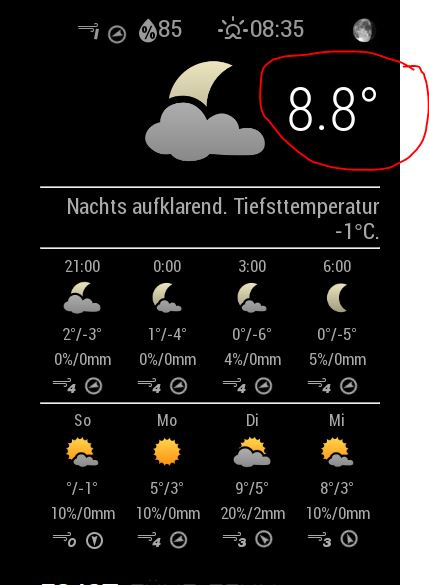
But maybe you know what temperature is shown in the top (see pic) or how can I delete this - seems to be a wrong number…
-
RE: My 1st MM Project as a noob.... 1,2m x 0,6m with 22" display
another advantage is the new power supply for the monitor - you do not need a 220V input anymore. I can use now a 12V power adapter with a slim cable to the controller board…
-
RE: My 1st MM Project as a noob.... 1,2m x 0,6m with 22" display
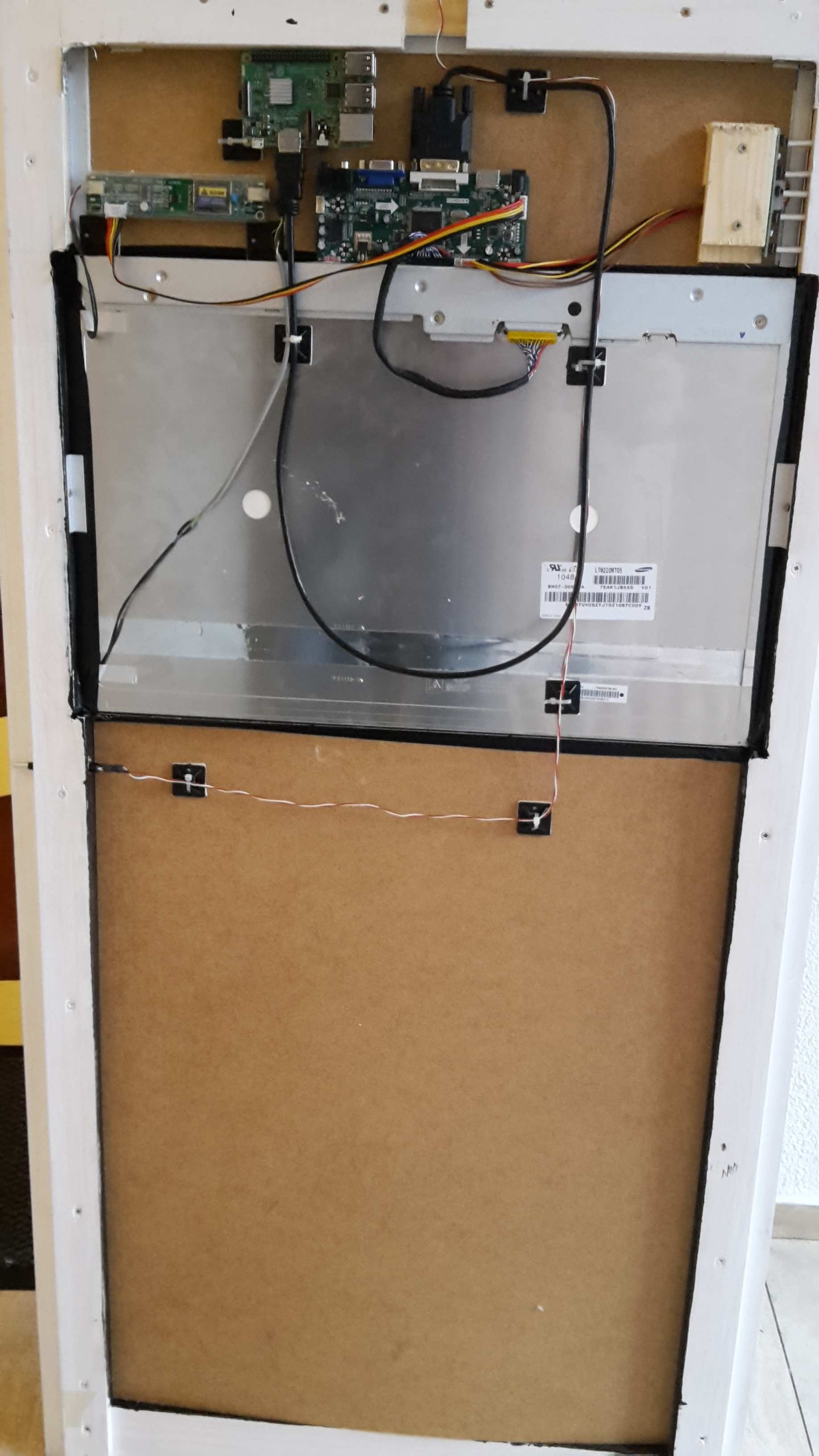
Yes - it was a 22" fujitsu monitor and I found a Samsung display in there… I ordered a “HDMI+DVI+VGA LED LCD 2 CCFL Controller Board Kit for LTM220MT05” for 22€ from china and everything went well with the display. I scrapped all the other controller boards and plastic stuff from the monitor because they were not slim enough…
The mirror was ordered online via https://www.myspiegel.de/spionspiegel-pg-2102.html (easy for me in germany ;-) ) . I have good experiences with the company and have also a spy mirror from these guys in my sleeping room to hide the TV… -
My 1st MM Project as a noob.... 1,2m x 0,6m with 22" display
HI guys,
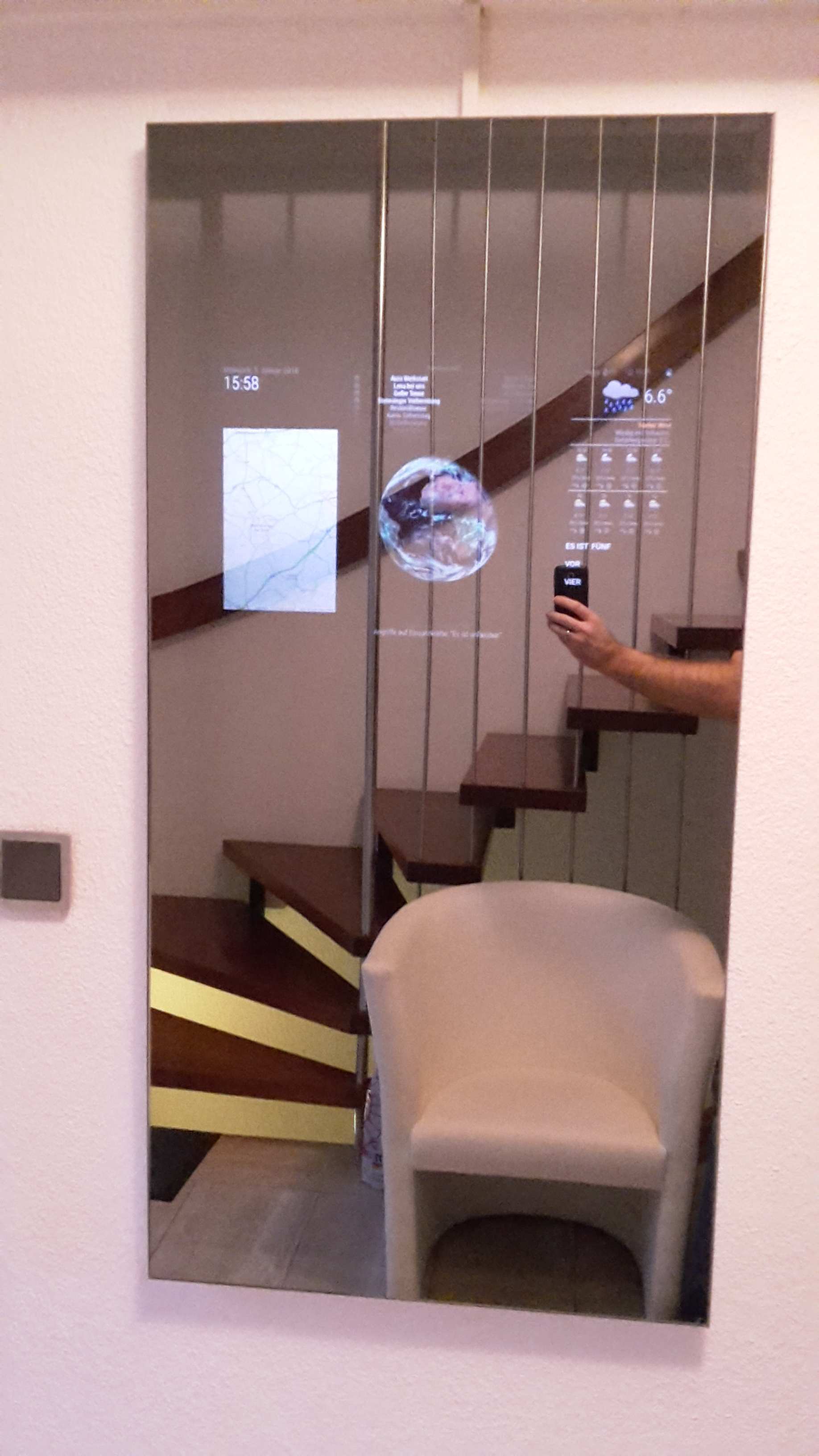
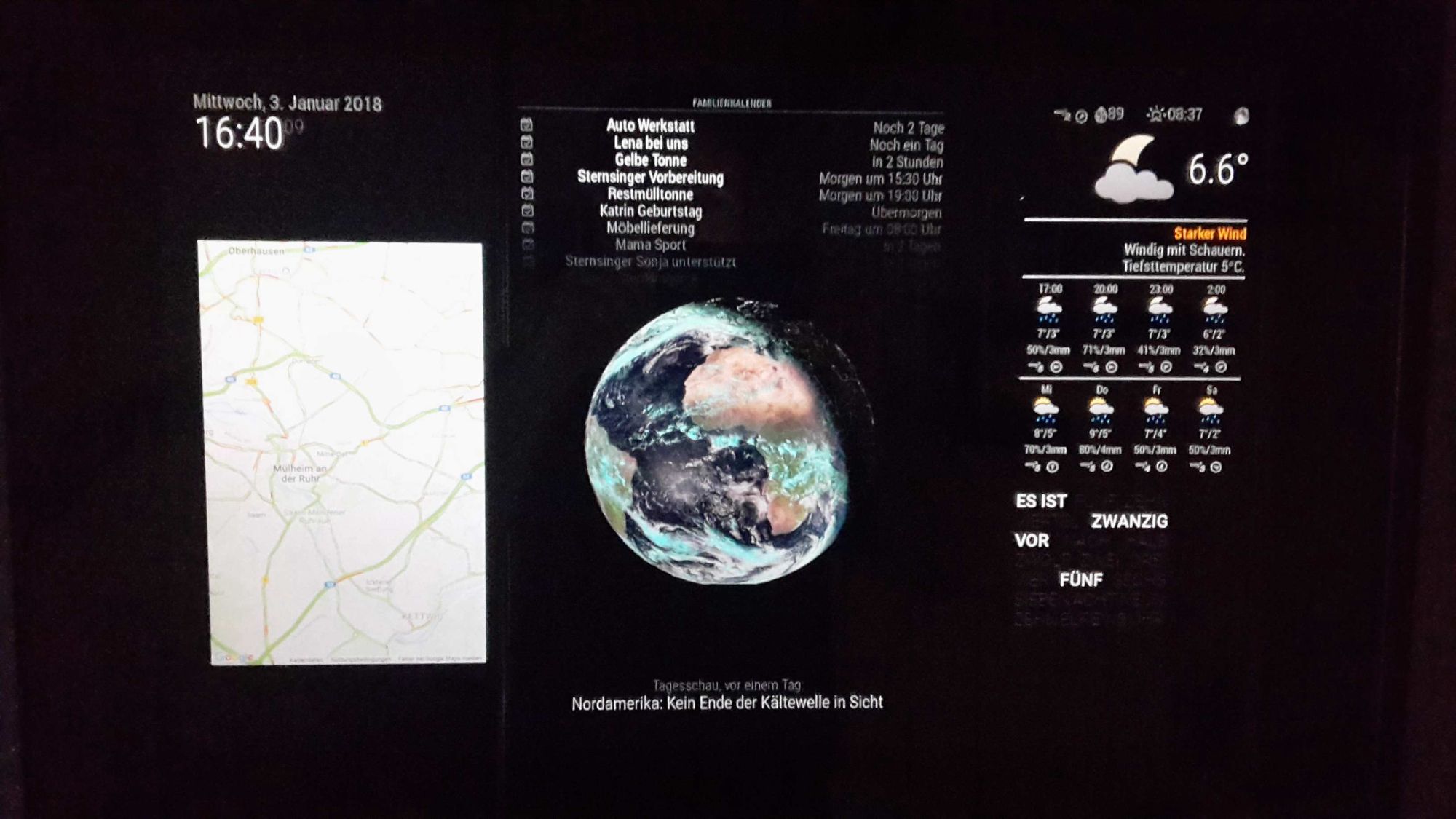
I still finished my 1st MM Project. I used a 22" display with a new chinese controller. The system is powered by a WLAN socket wich can be also powerdes via a buttor an the frame (I modified the socket to get the ability).
Content of the mirror:- Clock
- Google calendar
- Globe
- Newsfeed
- Wunderground weather
- Word Clock
My target was to have a very slim framework - I realised it with a wooden frame and alumnium profiles which cover the side of the mirror. the complete depth is now 24mm for the frame and 8mm for the mirror.
Really happy to have it done and get a new highlight in the entree… ;-)
-
RE: Blank screen - noob needs support
I have powered the PI and monitor via a wlan socket which can be switched on/off - could this cause the problem?
Regards, Chris -
RE: Blank screen - noob needs support
Problem solved - I installed an other SD Card with the backup of MM and everything is working fine again… but I do not know what happened before. So I will have a backup in the desk if something will appear in near future ;-)
Regards, Chris
-
RE: 5 extra points for the WAF :)
Hi,
can you explain a noob a little bit more in detail how to implement the Dakboard calandar into the MM?I really like your setup,
Regards, Chris
-
Blank screen - noob needs support
Hi, I just finished my MM project and it works fine for 5 days. This morning I got a blank screen with following notification:
Starting MagicMirror: v2.1.3
Loading config ...
Loading module helpers ...
No helper found for module: alert.
Initializing new module helper ...
Module helper loaded: updatenotification
No helper found for module: clock.
No helper found for module: MMM-TextClock.
Initializing new module helper ...
Module helper loaded: newsfeed
No helper found for module: MMM-Globe.
No helper found for module: MMM-GoogleMapsTraffic.
All module helpers loaded.
Starting server on port 8080 ...
Server started ...
Connecting socket for: updatenotification
Connecting socket for: newsfeed
Starting module: newsfeed
Sockets connected & modules started ...
Whoops! There was an uncaught exception...
{ Error: listen EADDRINUSE 127.0.0.1:8080
    at Object.exports._errnoException (util.js:1050:11)
    at exports._exceptionWithHostPort (util.js:1073:20)
    at Server.setupListenHandle [as _listen2] (net.js:1263:14)
    at listenInCluster (net.js:1304:12)
    at doListen (net.js:1428:7)
    at GetAddrInfoReqWrap.asyncCallback [as callback] (dns.js:62:16)
    at GetAddrInfoReqWrap.onlookup [as oncomplete] (dns.js:78:10)
  code: 'EADDRINUSE',
  errno: 'EADDRINUSE',
  syscall: 'listen',
  address: '127.0.0.1',
  port: 8080 }
Any ideas?
Thx and Regards, Chris