MagicMirror Forum
    • Recent
    • Tags
    • Unsolved
    • Solved
    • MagicMirror² Repository
    • Documentation
    • 3rd-Party-Modules
    • Donate
    • Discord
    • Register
    • Login
    1. Home
    2. cruunnerr
    3. Best
    A New Chapter for MagicMirror: The Community Takes the Lead
    Read the statement by Michael Teeuw here.
    Offline
    • Profile
    • Following 3
    • Followers 7
    • Topics 14
    • Posts 279
    • Groups 0

    Posts

    Recent Best Controversial
    • RE: MMM-PIR-SENSOR not working

      @mab6435 said in MMM-PIR-SENSOR not working:

      My modification to the modules config file looks like this.
      {
      module: “MMM-PIR-Sensor”,
      }

      Bur that is not like it is described in the readme of the module.

      try:

      {
      			module: 'MMM-PIR-Sensor',
      			config: {
      			sensorPIN: 22,
      			powerSavingDelay: 120 // in seconds
      			}
      		},
      

      Also u need to use a powersaving delay. Cause the default is 0 !

      And i am not sure, but i think u used “ instead of "

      posted in Troubleshooting
      cruunnerrC
      cruunnerr
    • RE: {HowTo} turn on/off your monitor (Time based, PIR/Button, App)

      Not much time, so here comes just a short think…

      1. You have two cogs on the pir. Move the time delay completely left or right (so it will just give a very short impulse).

      2. Set the Shutoff-delay in the script to 5 seconds (just to try)

      3. Try another GPIO…

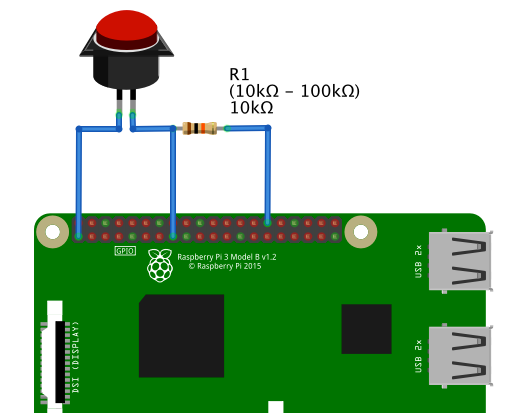
      4. try a pull-up or pull-down resistor like used at thy button-method

      Bild Text

      posted in Tutorials
      cruunnerrC
      cruunnerr
    • RE: first attempt .. gone wrong :)

      To be sure everything will work fine i would use the desktop version. Best option here is Jesse i think :)

      Otherwise u can try this guide, cause with the lite versions of raspbian there are dependancies missing for the MagicMirror.
      The guide works fine for me using raspbian stretch lite

      posted in Troubleshooting
      cruunnerrC
      cruunnerr
    • RE: {HowTo} turn on/off your monitor (Time based, PIR/Button, App)

      Read the last few posts ;)

      For example u want to use the pir from Sunday 22pm over the whole week until next Sunday 6am.
      So on every Sunday from 6am to 22pm the monitor should stay on.

      So you just need two cronjobs. On Sunday, 6am u need to kill the pir.py and on Sunday, 22pm you need to start it again :)

      Try it like this:

      1. nano killpir.sh

      2. Write this into file and save with CTRL+X and Yes

      #!/bin/bash
      sudo pkill $(ps aux | grep python pir.py | awk '{ print $2 }')
      vcgencmd display_power 1
      
      1. chmod +x killpir.sh

      2. sudo nano /etc/crontab

      3. Write this into file and save with CTRL+X and Yes:

      0 22 * * 7 /usr/bin/sh /home/pi/killpir.sh
      0 6 * * 7 /usr/bin/python /home/pi/pir.py
      

      So for example your crontab looks like this:

      # /etc/crontab: system-wide crontab
      # Unlike any other crontab you don't have to run the `crontab'
      # command to install the new version when you edit this file
      # and files in /etc/cron.d. These files also have username fields,
      # that none of the other crontabs do.
      
      SHELL=/bin/sh
      PATH=/usr/local/sbin:/usr/local/bin:/sbin:/bin:/usr/sbin:/usr/bin
      
      # m h dom mon dow user  command
      17 *    * * *   root    cd / && run-parts --report /etc/cron.hourly
      25 6    * * *   root    test -x /usr/sbin/anacron || ( cd / && run-parts --report /etc/cron.daily )
      47 6    * * 7   root    test -x /usr/sbin/anacron || ( cd / && run-parts --report /etc/cron.weekly )
      52 6    1 * *   root    test -x /usr/sbin/anacron || ( cd / && run-parts --report /etc/cron.monthly )
      0 22    * * 7   root    /usr/bin/sh /home/pi/killpir.sh
      0 6     * * 7   root    /usr/bin/python /home/pi/pir.py
      #
      
      posted in Tutorials
      cruunnerrC
      cruunnerr
    • RE: MMM-GoogleMapsTraffic "breaks" mirror?

      @seattlecajun said in MMM-GoogleMapsTraffic “breaks” mirror?:

        position: "upper-third",
      

      please try it with:

      position: "upper_third",
      
      posted in Troubleshooting
      cruunnerrC
      cruunnerr
    • RE: Simple welcome script

      hey,

      nice to welcome u ;)

      I don’t use it, but as far as i know the default compliments module does that :)

      https://github.com/MichMich/MagicMirror/tree/master/modules/default/compliments

      So u don’t have to install an extra module. Just edit your compliments module in your config.js

      {
          module: "compliments",
              position: "lower_third",    // This can be any of the regions.
                  // Best results in one of the middle regions like: lower_third
              config: {
                  compliments: {
                      anytime: [
                      "Hey Tony"
                      ],
                      morning: [
                      "Good morning",
                      ],
                      afternoon: [
                      "Good afternoon",
                      ],
                      evening: [
                      "Good evening",
                      ]
                  }
          }
      },
      

      You can also use more variables. Take a look here:

      https://github.com/MichMich/MagicMirror/tree/master/modules/default/compliments

      posted in Development
      cruunnerrC
      cruunnerr
    • RE: Something is wrong ....

      @Peter

      Lets write here, so the other thread would not be filled up with this problem ;)

      so u don’t know how it starts. That sound like u used the automatic installer and clicked “YES” when it asked u to start automatically.

      Please type in console:

      pm2 status
      U will see a process name (probably “MagicMirror”)

      now u can use
      pm2 start MagicMirror to start MM
      pm2 stop MagicMirror to stop MM
      pm2 restart MagicMirror to restart MM

      or even
      pm2 logs MagicMirror to see logs and errors. Please try if i am right and then post the error log here

      posted in Troubleshooting
      cruunnerrC
      cruunnerr
    • RE: Where are you from?

      small village with a population of 1000 people near “Mönchengladbach, Germany”

      Here is nothing then a Gas station. :D

      posted in General Discussion
      cruunnerrC
      cruunnerr
    • RE: how to start an image slide show with a press of a button?

      hmm…

      To start it hidden just open your remoteControl with http://YOUR.RASPBERRY.IP.ADDRESS:8080/remote.html
      Go to “Edit view” and hide the module. Then press “SAVE”
      Note: Every time you change your config u need to do this again ;)

      so now to your button problem…

      please try this:

      open a browser on your pc and type:

      http://YOUR.RASPBERRY.IP.ADDRESS:8080/remote?action=HIDE&module=module_0_ImageSlideshow

      http://YOUR.RASPBERRY.IP.ADDRESS:8080/remote?action=SHOW&module=module_0_ImageSlideshow

      This should hide and show the module as these are the comments which the remote control is using.

      If this works its probably a configuration problem with the PIN.

      note that:

      +-----+-----+---------+------+---+---Pi 3---+---+------+---------+-----+-----+
       | BCM | wPi |   Name  | Mode | V | Physical | V | Mode | Name    | wPi | BCM |
       +-----+-----+---------+------+---+----++----+---+------+---------+-----+-----+
       |     |     |    3.3v |      |   |  1 || 2  |   |      | 5v      |     |     |
       |   2 |   8 |   SDA.1 |   IN | 1 |  3 || 4  |   |      | 5v      |     |     |
       |   3 |   9 |   SCL.1 |   IN | 1 |  5 || 6  |   |      | 0v      |     |     |
       |   4 |   7 | GPIO. 7 |   IN | 1 |  7 || 8  | 0 | IN   | TxD     | 15  | 14  |
       |     |     |      0v |      |   |  9 || 10 | 1 | IN   | RxD     | 16  | 15  |
       |  17 |   0 | GPIO. 0 |  OUT | 0 | 11 || 12 | 0 | IN   | GPIO. 1 | 1   | 18  |
       |  27 |   2 | GPIO. 2 |   IN | 0 | 13 || 14 |   |      | 0v      |     |     |
       |  22 |   3 | GPIO. 3 |  OUT | 0 | 15 || 16 | 0 | IN   | GPIO. 4 | 4   | 23  |
       |     |     |    3.3v |      |   | 17 || 18 | 0 | OUT  | GPIO. 5 | 5   | 24  |
       |  10 |  12 |    MOSI |   IN | 0 | 19 || 20 |   |      | 0v      |     |     |
       |   9 |  13 |    MISO |   IN | 0 | 21 || 22 | 0 | IN   | GPIO. 6 | 6   | 25  |
       |  11 |  14 |    SCLK |   IN | 0 | 23 || 24 | 1 | IN   | CE0     | 10  | 8   |
       |     |     |      0v |      |   | 25 || 26 | 1 | IN   | CE1     | 11  | 7   |
       |   0 |  30 |   SDA.0 |   IN | 1 | 27 || 28 | 1 | IN   | SCL.0   | 31  | 1   |
       |   5 |  21 | GPIO.21 |   IN | 1 | 29 || 30 |   |      | 0v      |     |     |
       |   6 |  22 | GPIO.22 |   IN | 1 | 31 || 32 | 0 | IN   | GPIO.26 | 26  | 12  |
       |  13 |  23 | GPIO.23 |   IN | 0 | 33 || 34 |   |      | 0v      |     |     |
       |  19 |  24 | GPIO.24 |   IN | 0 | 35 || 36 | 1 | OUT  | GPIO.27 | 27  | 16  |
       |  26 |  25 | GPIO.25 |   IN | 0 | 37 || 38 | 0 | IN   | GPIO.28 | 28  | 20  |
       |     |     |      0v |      |   | 39 || 40 | 0 | IN   | GPIO.29 | 29  | 21  |
       +-----+-----+---------+------+---+----++----+---+------+---------+-----+-----+
       | BCM | wPi |   Name  | Mode | V | Physical | V | Mode | Name    | wPi | BCM |
       +-----+-----+---------+------+---+---Pi 3---+---+------+---------+-----+-----+
      

      Don’t know what type u are using (BCM, w-pi, physical ??)

      In your config you wrote Pin: 18, but in your first post u said 15…

      Maybe try another one. For example u could use GPIO 29, which is physically Pin 40, which is BCM Pin 21…

      So in your config u must write, that u are using Pin 21!

      posted in Troubleshooting
      cruunnerrC
      cruunnerr
    • RE: how to start an image slide show with a press of a button?

      @xela

      Ah sorry… the MMM was missing. should be this:

      http://your.raspberry.ip.address:8080/remote?action=HIDE&module=module_0_MMM-ImageSlideshow

      And

      http://your.raspberry.ip.address:8080/remote?action=SHOW&module=module_0_MMM-ImageSlideshow

      posted in Troubleshooting
      cruunnerrC
      cruunnerr
    • 1
    • 2
    • 3
    • 4
    • 5
    • 6
    • 7
    • 8
    • 2 / 8