MagicMirror Forum
    • Recent
    • Tags
    • Unsolved
    • Solved
    • MagicMirror² Repository
    • Documentation
    • 3rd-Party-Modules
    • Donate
    • Discord
    • Register
    • Login
    1. Home
    2. cruunnerr
    3. Posts
    A New Chapter for MagicMirror: The Community Takes the Lead
    Read the statement by Michael Teeuw here.
    Offline
    • Profile
    • Following 3
    • Followers 7
    • Topics 14
    • Posts 279
    • Groups 0

    Posts

    Recent Best Controversial
    • RE: MMM-GoogleMapsTraffic

      Hey,

      cool module but got some issues when trying to select a dark mode style.
      I wanted to look the map like in this example: https://developers.google.com/maps/documentation/javascript/styling

      well, i have tried to use your code and modify the colors. also i have tried to use the code from here: https://mapstyle.withgoogle.com

      the module always starts, but i just got the standard view on it.

      maybe you could explain a little bit more detailed how to do it. that would be great. thx

      posted in Transport
      cruunnerrC
      cruunnerr
    • RE: npm ERR! cb() never called! _ when trying to install MMM-RTSPStream

      @shbatm said in npm ERR! cb() never called! _ when trying to install MMM-RTSPStream:

      npm install -g npm

      as i typed in this, it started to install and shows this:

      npm ERR! Linux 4.9.59-v7+
      npm ERR! argv "/usr/bin/node" "/usr/bin/npm" "install" "-g" "npm"
      npm ERR! node v6.12.2
      npm ERR! npm  v3.10.10
      npm ERR! path /usr/lib/node_modules/npm/node_modules/abbrev
      npm ERR! code EACCES
      npm ERR! errno -13
      npm ERR! syscall access
      
      npm ERR! Error: EACCES: permission denied, access '/usr/lib/node_modules/npm/node_modules/abbrev'
      npm ERR!     at Error (native)
      npm ERR!  { Error: EACCES: permission denied, access '/usr/lib/node_modules/npm/node_modules/abbrev'
      npm ERR!     at Error (native)
      npm ERR!   errno: -13,
      npm ERR!   code: 'EACCES',
      npm ERR!   syscall: 'access',
      npm ERR!   path: '/usr/lib/node_modules/npm/node_modules/abbrev' }
      npm ERR! 
      npm ERR! Please try running this command again as root/Administrator.
      
      npm ERR! Please include the following file with any support request:
      npm ERR!     /home/pi/npm-debug.log
      

      so i did it as root and rebooted my pi.

      now i installed your module and got some warnings AND some errors:

      pi@MagicMirror:~/MagicMirror/modules/MMM-RTSPStream $ npm install
      npm WARN registry Unexpected warning for https://registry.npmjs.org/: Miscellaneous Warning EINTEGRITY: sha1-QFUCsAfzGcP0cXXER0UnMA8qta0= integrity checksum failed when using sha1: wanted sha1-QFUCsAfzGcP0cXXER0UnMA8qta0= but got sha512-zr6QQnzLt3Ja0t0XI8gws2kn7zV2p0l/D3kreNvS6hFZhVU5g+uY/30l42jbgt0XGcNBEmBDGJR71J692V92tA==. (260 bytes)
      npm WARN registry Using stale package data from https://registry.npmjs.org/ due to a request error during revalidation.
      
      > MMM-RTSPStream@1.2.1 postinstall /home/pi/MagicMirror/modules/MMM-RTSPStream
      > ./install_sd_patch.sh && sudo npm i -g http-server
      
      Applying Graceful Shutdown patch to MagicMirror.
      error: Anwendung des Patches fehlgeschlagen: js/electron.js:96
      error: js/electron.js: Patch konnte nicht angewendet werden
      npm ERR! code ELIFECYCLE
      npm ERR! errno 1
      npm ERR! MMM-RTSPStream@1.2.1 postinstall: `./install_sd_patch.sh && sudo npm i -g http-server`
      npm ERR! Exit status 1
      npm ERR! 
      npm ERR! Failed at the MMM-RTSPStream@1.2.1 postinstall script.
      npm ERR! This is probably not a problem with npm. There is likely additional logging output above.
      
      npm ERR! A complete log of this run can be found in:
      npm ERR!     /home/pi/.npm/_logs/2017-12-22T17_39_55_666Z-debug.log
      pi@MagicMirror:~/MagicMirror/modules/MMM-RTSPStream $ 
      

      edit:

      i took a look in the debug_log file after the reboot of the pi (2017-12-22T17_36_34_105Z-debug.log) :

      0 info it worked if it ends with ok
      1 verbose cli [ '/usr/local/bin/node', '/usr/local/bin/npm', 'start' ]
      2 info using npm@5.6.0
      3 info using node@v9.2.1
      4 verbose run-script [ 'prestart', 'start', 'poststart' ]
      5 info lifecycle magicmirror@2.1.0~prestart: magicmirror@2.1.0
      6 info lifecycle magicmirror@2.1.0~start: magicmirror@2.1.0
      7 verbose lifecycle magicmirror@2.1.0~start: unsafe-perm in lifecycle true
      8 verbose lifecycle magicmirror@2.1.0~start: PATH: /usr/local/lib/node_modules/npm/node_modules/npm-lifecycle/node-gyp-bin:/home/pi/MagicMirro$
      9 verbose lifecycle magicmirror@2.1.0~start: CWD: /home/pi/MagicMirror
      10 silly lifecycle magicmirror@2.1.0~start: Args: [ '-c', 'electron js/electron.js' ]
      11 silly lifecycle magicmirror@2.1.0~start: Returned: code: 1  signal: null
      12 info lifecycle magicmirror@2.1.0~start: Failed to exec start script
      13 verbose stack Error: magicmirror@2.1.0 start: `electron js/electron.js`
      13 verbose stack Exit status 1
      13 verbose stack     at EventEmitter.<anonymous> (/usr/local/lib/node_modules/npm/node_modules/npm-lifecycle/index.js:285:16)
      13 verbose stack     at EventEmitter.emit (events.js:159:13)
      13 verbose stack     at ChildProcess.<anonymous> (/usr/local/lib/node_modules/npm/node_modules/npm-lifecycle/lib/spawn.js:55:14)
      13 verbose stack     at ChildProcess.emit (events.js:159:13)
      13 verbose stack     at maybeClose (internal/child_process.js:943:16)
      13 verbose stack     at Process.ChildProcess._handle.onexit (internal/child_process.js:220:5)
      14 verbose pkgid magicmirror@2.1.0
      15 verbose cwd /home/pi/MagicMirror
      16 verbose Linux 4.9.59-v7+
      17 verbose argv "/usr/local/bin/node" "/usr/local/bin/npm" "start"
      18 verbose node v9.2.1
      19 verbose npm  v5.6.0
      20 error code ELIFECYCLE
      21 error errno 1
      22 error magicmirror@2.1.0 start: `electron js/electron.js`
      22 error Exit status 1
      23 error Failed at the magicmirror@2.1.0 start script.
      23 error This is probably not a problem with npm. There is likely additional logging output above.
      24 verbose exit [ 1, true ]
      

      could it be, that my downgrade to 2.1.0 is to blame?

      posted in Troubleshooting
      cruunnerrC
      cruunnerr
    • RE: npm ERR! cb() never called! _ when trying to install MMM-RTSPStream

      hi,

      yes, its on a raspberry pi 3.

      pi@MagicMirror:~ $ node -v
      v6.12.2
      pi@MagicMirror:~ $ npm -v
      3.10.10
      

      edit:

      well, first it started to install something. i did it via ssh, so i changed to my browser to surf in the web while the raspberry is installing. When i looked back i just saw this message shown above.

      posted in Troubleshooting
      cruunnerrC
      cruunnerr
    • RE: MMM-MyCommute

      ok. i send it to you, but the code looks scary with the chat.

      i uploaded it to my ftp-server and send you the link

      thanks for helping me

      edit:

      Got it!
      you have too write it like this:

      alternatives: true, //does work
      

      not like this:

      alternatives: 'true', //doesn't work
      

      Thank you anyway :)

      posted in Transport
      cruunnerrC
      cruunnerr
    • RE: MMM-MyCommute

      For sure this is no problem. Take as much time as u need for your family. thats much more important!

      didn’t find a private message option, just a chat^^ sorry for that. I post my config right here.

      just for info: I didn’t touch the MMM-MyCommute.js, so its just this one i need: https://github.com/jclarke0000/MMM-MyCommute/blob/master/MMM-MyCommute.js

      So here is my full config:

      /* Magic Mirror Config Sample
       *
       * By Michael Teeuw http://michaelteeuw.nl
       * MIT Licensed.
       *
       * For more information how you can configurate this file
       * See https://github.com/MichMich/MagicMirror#configuration
       *
       */
      
      var config = {
      	address: "0.0.0.0", // Address to listen on, can be:
      	                      // - "localhost", "127.0.0.1", "::1" to listen on loopback interface
      	                      // - another specific IPv4/6 to listen on a specific interface
      	                      // - "", "0.0.0.0", "::" to listen on any interface
      	                      // Default, when address config is left out, is "localhost"
      	port: 8080,
      	ipWhitelist: ["192.0.0.0/3", "::fff:0.0.0.0/1", "::fff:128.0.0.0/2", "::fff:192.0.0.0/3", "::fff:224.0.0.0/4", "127.0.0.1", "::ffff:127.0.0.1", "::1"], // Set [] to allow all IP addresses
      	                                                       // or add a specific IPv4 of 192.168.1.5 :
      	                                                       // ["127.0.0.1", "::ffff:127.0.0.1", "::1", "::ffff:192.168.1.5"],
      	                                                       // or IPv4 range of 192.168.3.0 --> 192.168.3.15 use CIDR format :
      	                                                       // ["127.0.0.1", "::ffff:127.0.0.1", "::1", "::ffff:192.168.3.0/28"],
      
      	language: "de",
      	timeFormat: 24,
      	units: "metric",
      
      	modules: [
      		{
      			module: "alert",
      		},
      		{
              		module: 'MMM-Remote-Control'
              		// uncomment the following line to show the URL of the remote control on the mirror
              		// , position: 'bottom_left'
              		// you can hide this module afterwards from the remote control itself
          		},
      		{
      		module: 'MMM-SystemStats',
      		position: 'top_center', // This can be any of the regions.
      		classes: 'small dimmed', // Add your own styling. Optional.
      		config: {
      			updateInterval: 5000,
      			animationSpeed: 0,
      			align: 'right', // align labels
      			//header: 'System Stats', // This is optional
      			},
      		},
      		{
      			module: "updatenotification",
      			position: "top_bar"
      		},
      		{
      			module: "clock",
      			position: "top_left"
      		},
      		{
      			module: 'calendar',
      			header: 'Chris Kalender',
      			position: 'top_left',
      			config: {
      				calendars: [
      					{
      						symbol: 'calendar-check-o ',
      						url: '*private*'
      					},
      					{
                                                      symbol: 'calendar-check-o ',
                                                      url: 'http://i.cal.to/ical/61/nrw/feiertage/71e91ccb.83fad41c-d19fda68.ics'
                                              },
      
      				]
      
      			}
      		},
      		{
      			module: 'MMM-MyCommute',
      			position: 'top_left',
      			header: 'Verkehrslage',
      			classes: 'default everyone',
      			showSummary: 'true', 
      			config: {
      				apikey: '*private*',
          				origin: '*private*',  
      				destinations: [
            				{
              				destination: '*private*',
              				label: 'Arbeit',
              				mode: 'driving',
      					alternatives: 'true',
      					time: null
            				},
            				{
              				destination: '*private*',
              				label: '*private*',
              				mode: 'driving',
              				time: null
            				},
          				]
         			}
        		},
      //		{
      //			module: "compliments",
      //			position: "lower_third"
      //		},
      //		{
      //			module: "currentweather",
      //			position: "top_right",
      //			config: {
      //				location: "New York",
      //				locationID: "",  //ID from http://www.openweathermap.org/help/city_list.txt
      //				appid: "YOUR_OPENWEATHER_API_KEY"
      //			}
      //		},
      //		{
      //			module: "weatherforecast",
      //			position: "top_right",
      //			header: "Weather Forecast",
      //			config: {
      //				location: "New York",
      //				locationID: "5128581",  //ID from http://www.openweathermap.org/help/city_list.txt
      //				appid: "YOUR_OPENWEATHER_API_KEY"
      //			}
      //		},
      		{
      			disabled: false,
      			module: 'MMM-NOAA',
      			position: 'top_right',
      			config: {
      
      				apiKey: "*private*",    // https://www.wunderground.com/weather/api  select the middle plan... 
      				useAir: false,             // set to false if you do not want to use Air Quality Index
      				airKey: "*private*",    // IF you want Air Quality Index
      				pws: "*private*",         // go here to find your pws: https://www.wunderground.com/wundermap
      				showClock: false,           // Hides or shows clock
      				dformat: false,             // for M/D/YYYY format, false for D/M/YYYY
      				format: "24",              // 12 or 24 hour format.. will default to 12 hour if none selected.
      				ampm: false,                // to show AM and PM on Sunrise/Sunset time
      				showGreet: false,          // deafult is false - to show greeting under clock and above date
      				name: "",                  // Your name
      				showWind: false,
      				showDate: false,
      				showForecast: true,         //show bottom 3 day forecast
      				flash: true,                 //Today in forecast flashes halo
      				showUV: true,               //show UV index
      	      			showBar: true,             // show Barometer
      	    			showHum: true,              //show Humidity level
      				position: 'top_right',       //whatever you have in above position must also be here
      	      			alert: true                //show weather alerts default is true
      				}
      		},
      		{
      			module: 'MMM-Globe',
      			position: 'top_right',
      			config: {
      					style: 'natColor',
      					imageSize: 200,
      					ownImagePath:'',
      					updateInterval: 10*60*1000
      				}
      		},
      		{
      			module: "newsfeed",
      			position: "bottom_bar",
      			config: {
      				feeds: [
      					{
      						title: "Tagesschau Themen",
      						url: "http://www.tagesschau.de/xml/rss2"
      					}
      				],
      				showSourceTitle: true,
      				showPublishDate: true,
      				showDescription: true,
      				updateInterval: 25000,
      			}
      		},
      	]
      
      };
      
      /*************** DO NOT EDIT THE LINE BELOW ***************/
      if (typeof module !== "undefined") {module.exports = config;}
      

      Thank u very much for helping :)

      posted in Transport
      cruunnerrC
      cruunnerr
    • RE: MMM-MyCommute

      its correct.

      intentionally i typed in a wrong apikey, what effects an error message when module loads up.

      its this format and its correct:

      apikey: 'ABCDabcd1234abcd5679',
      

      edit:

      i used the “standard api key” from google. there was also a “premium api key”, but this one i don’t need, right?

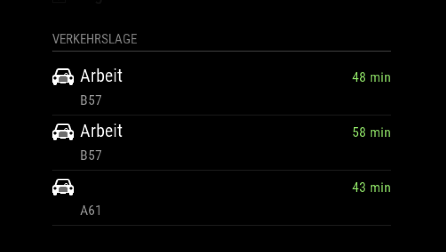
      to make sure that I express myself correctly… i want it to looks like this:

      alt text

      posted in Transport
      cruunnerrC
      cruunnerr
    • RE: MMM-MyCommute

      i thought it is set to “true” by default.

      i tried it like this, but still not working:

      {
              destination: 'xxx_hide_xxx',
              label: 'Arbeit',
              mode: 'driving',
              showSummary: 'true',
              alternatives: 'true',
              time: null
            },
      

      edit:
      still checked the “MMM-MyCommute.js”

      showSummary is true

      posted in Transport
      cruunnerrC
      cruunnerr
    • RE: MMM-MyCommute

      Hey,

      this is a great module. love it. but i got some issues by using the alternative routes.
      the “avoid” feature works, but it would be nice if i could see all available routes in one destination. With “available routes” i mean the alternative routes that google maps shows you normally.

      i tried like this:

      {
                              module: 'MMM-MyCommute',
                              position: 'top_left',
                              header: 'Verkehrslage',
                              classes: 'default everyone', 
                              config: {
                                      apikey: 'xxx_hide_xxx',
                                      origin: 'xxx_hide_xxx',  
                                     
                                     destinations: [
            {
              destination: 'xxx_hide_xxx',
              label: 'Arbeit',
              mode: 'driving',
              alternatives: 'true', // < thats what i mean!!!
              time: null
            },
            {
              destination: 'xxx_hide_xxx',
              label: 'Arbeit',
              mode: 'driving',
              avoid: 'highways',
              time: null
            },
            {
              destination: 'xxx_hide_xxx',
              label: 'xxx_hide_xxx',
              mode: 'driving',
              time: null
            },
          ]
         }
        },
      

      but it looks just like this:

      0_1513888105763_Bildschirmfoto 2017-12-21 um 21.25.27.png

      any idea?

      posted in Transport
      cruunnerrC
      cruunnerr
    • npm ERR! cb() never called! _ when trying to install MMM-RTSPStream

      Hey guys,

      i actually downgraded my MM to 2.1.0 and electron 1.4.15 cause of the “CPU Usage Problem”…
      However the MM runs very well and all Modules are fluety.

      Now i was trying to install the MMM-RTSPStream Module but get an error message. All other modules, where i needed to use npm install were good.

      i just clone the module into my MagicMirror/modules folder and cd in the new folder. when i type in “nom install” i get the message below:

      pi@MagicMirror:~ $ cd ~/MagicMirror/modules
      pi@MagicMirror:~/MagicMirror/modules $ git clone https://github.com/shbatm/MMM-RTSPStream.git
      Klone nach 'MMM-RTSPStream' ...
      remote: Counting objects: 162, done.
      remote: Total 162 (delta 0), reused 0 (delta 0), pack-reused 162
      Empfange Objekte: 100% (162/162), 1.02 MiB | 804.00 KiB/s, Fertig.
      Löse Unterschiede auf: 100% (102/102), Fertig.
      pi@MagicMirror:~/MagicMirror/modules $ cd MMM-RTSPStream
      pi@MagicMirror:~/MagicMirror/modules/MMM-RTSPStream $ npm install
      npm ERR! cb() never called!
      pi@MagicMirror:~/MagicMirror/modules/MMM-RTSPStream $
      

      Well, i am not a brilliant programmer, so i hope to get some help of you guys.

      Thank you very much :)

      posted in Troubleshooting
      cruunnerrC
      cruunnerr
    • RE: Electron CPU usage

      Well,

      i had MM 2.1.2 installed, so i needed to use the 2.1.0 way…

      but i actually got it running with “DISPLAY=:0 npm start”

      then i just copied the installed modules folders to the new directory and copied my “old” config.js but that didn’t work.

      i actually install the 3rd party modules manual. hopefully my old config.js will work then.

      But thank you anyway

      edit:

      so,

      i got MM2.1.0 running with electron 1.4.15

      have had a few problems, but now all works great.

      posted in Troubleshooting
      cruunnerrC
      cruunnerr
    • 1
    • 2
    • 24
    • 25
    • 26
    • 27
    • 28
    • 26 / 28