Hello guys.
Is there a modul, with i can load pictures (local path) from my raspbbery to the mirror?
If not, can someone help me pleas? :)
Thanks
D
Offline
A New Chapter for MagicMirror: The Community Takes the Lead
Read the statement by Michael Teeuw here.
Read the statement by Michael Teeuw here.
Posts
-
local pictures, displayed on the mirror.
-
RE: assign a symbol to a module
@Plati i have tried it. But than there will no data displayed.
@strawberry-3.141 Tahnks for your help, you are great. -
RE: assign a symbol to a module
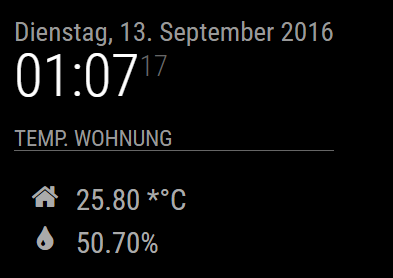
Hi ianperrin, thank you :)
Do you knwo, how can i erase the “*” befor the “°C” ?
-
RE: assign a symbol to a module
@yawns Hi, Thanks it works.
I have an other question.how can I get the values , that they will displayed in two lines?
-
RE: assign a symbol to a module
@yawns said in assign a symbol to a module:
getDom: function() {
var wrapper = document.createElement(“div”);var symbol = document.createElement(“span”);
symbol.className = “fa fa-home”;
wrapper.appendChild(symbol);return wrapper;
}Thanks. When i add the code, i have the “house” but i have a getdom function with the following code…
getDom: function(){

		var wrapper = document.createElement("div");
		if(this.dataFile){
                        var humidityRegExp = /Humidity = (.*?) %/ig;
                        var humidity = humidityRegExp.exec(this.dataFile)[1];

                        var temperatureRegExp = /Temperature = (.*?) *C/ig;
                        var temperature = temperatureRegExp.exec(this.dataFile)[1];
			wrapper.innerHTML = "r.F.: " + humidity + "%, Temp.: " + temperature + "°C";
		} else {
			wrapper.innerHTML = "No data";
		}
		return wrapper;
	},
…how do I implement the code in this?
-
RE: assign a symbol to a module
@strawberry-3.141 said in assign a symbol to a module:
getStyles: function () {
return [“font-awesome.css”];
},I add:
 var header = document.createElement("header");   // in the getdom function and

getStyles: function () {
        return ["font-awesome.css"];
},
in the .js file. And now I have to do ?
how do i musst edit the config file ?
Note from admin: Please use Markdown on code snippets for easier reading!
-
assign a symbol to a module
Hello everyone :)
How can I assign a symbol to a module?
I have a modul which displayed some info´s for me.
Now i want to add a Symbol to this modul,
similar to the calender modul symbol. ( The modul has no .css file only .js files.)
But I don´t know how I get it.
Can someone help me?sorry for my bad endglisch and Greetings from Germany
-
RE: .txt file include
@strawberry-3.141 HI Thanks. Sorry but, where do I insert the code?
I´m new in this… -
RE: .txt file include
@strawberry-3.141
Raspberry Pi wiringPi DHT22 reader www.lolware.net Data not good, skip Data not good, skip Data not good, skip Humidity = 47.10 % Temperature = 24.50 *C .This is the contetn of the .txt file. And its all in one line.
-
RE: .txt file include
@yawns Danke für deinen Tipp. Aber es läuft nun.
Habe aber nun ein anderes Problem ;)
gibt es eine Möglichkeit, die asugabe der txt Datei zu beregenzen, so dass mir nur bestimmte Werte angezeigt werden.
In der Datei stehen Werte von einem dht22 sensor und ich möchte nur diese werte ausgeben ohne die den anderen INhalt. -
RE: .txt file include
@strawberry-3.141 in the file are values from a dht22 temp.sensor.
but i only need the values for Humidity = xx and Temperature =xx.is there any why to get only this values ?
-
RE: .txt file include
@strawberry-3.141 Hi :) it works :)
i don´t know why, but it works. I have reseted the system and after taht ist works.
Thank you very mutch.i want to display not all the text out of the .txt file.
Do you know what i must change in the node_helper.js? -
RE: .txt file include
@strawberry-3.141
Sorry i hade no time the last days.I put the Test-temp.txt in ~/MagicMirror and for tests ind~/MagicMirror/modules/sensor.
But nothing happens.I get only an error about the weatherforecast bu nothing els…
-
RE: .txt file include
@strawberry-3.141 1_1472575446381_sensor.js 0_1472575446381_node_helper.js 0_1472575579268_config.js
Here are my code files. Maybe this can help?
-
RE: .txt file include
@strawberry-3.141
Mh… than i don´t know…
i have copy your code but it doesen´t work…
I need to change anything els?And thank you for your patience :)
-
RE: .txt file include
@strawberry-3.141 said in .txt file include:
fs.readFile(‘Test-temp.txt’, ‘utf8’, (err, data) => {
Hi, sorry.
It didn´t work :/Here is the
node_helper.jscodeconst NodeHelper = require("node_helper"); const fs= require("fs"); module.exports = NodeHelper.create({ //here comes the part of the nodehelper after the 3 dots as posted above socketNotificationReceived: function(notification, payload) { if(notification === 'START'){ this.config = payload; this.readData(); setInterval(() => { this.readData(); }, this.config.updateInterval); } }, readData: function(){ //to read a file to do the following fs.readFile('Test-temp.txt', 'utf8', (err, data) => { if (err) throw err; this.sendSocketNotification('DATA', data); }); } }); and here is the sensor.js code: Module.register("sensor",{ defaults: { updateInterval: 30*60*1000 //reads the file every 30 mins }, start: function(){ this.sendSocketNotification('START', this.config); }, socketNotificationReceived: function(notification, payload) { if(notification === 'DATA'){ this.dataFile = payload; this.updateDom(); } }, getDom: function(){ var wrapper = document.createElement('div'); if(this.dataFile){ wrapper.innerHTML = this.dataFile; } else { wrapper.innerHTML = 'No data'; } return wrapper; } });Waht did i wrong? :D
I hope you can help me.
Note from admin: Please use Markdown on code snippets for easier reading!
-
RE: .txt file include
@strawberry-3.141
hi, now i get " [object ArryBuffer]"
what did i worng?