@Mykle1 Ah Thanks :D, now i have the console, but there is no error.
D
Offline
A New Chapter for MagicMirror: The Community Takes the Lead
Read the statement by Michael Teeuw here.
Read the statement by Michael Teeuw here.
Posts
-
RE: Add symboly/icon in a modul
-
RE: Add symboly/icon in a modul
@j.e.f.f said in Add symboly/icon in a modul:
with npm start dv i get this info, i dont get es divided screen in to halves.
pi@raspberrypi:~ $ npm start dev
npm ERR! Linux 4.9.41-v7+
npm ERR! argv “/usr/bin/node” “/usr/bin/npm” “start” “dev”
npm ERR! node v6.11.3
npm ERR! npm v3.10.10
npm ERR! path /home/pi/package.json
npm ERR! code ENOENT
npm ERR! errno -2
npm ERR! syscall opennpm ERR! enoent ENOENT: no such file or directory, open ‘/home/pi/package.json’
npm ERR! enoent ENOENT: no such file or directory, open ‘/home/pi/package.json’
npm ERR! enoent This is most likely not a problem with npm itself
npm ERR! enoent and is related to npm not being able to find a file.
npm ERR! enoentnpm ERR! Please include the following file with any support request:
npm ERR! /home/pi/npm-debug.logand with pm2 logs mm this one
pi@raspberrypi:~ $ pm2 logs mm
[TAILING] Tailing last 15 lines for [mm] process (change the value with --lines option)ach with the other code
mqttDiv.innerHTML = "< span class='fa fa-calendar'>< /span>" + this.mqttVal.toString().concat(this.config.postText);i get a symbol, only with the var version, it does not work.
-
RE: Add symboly/icon in a modul
Now with this code ( is the original code with added css file and with your part) i only get the text “loading MQTT DATA” before it has still worked with your code. Maybe it is to late or i don´t see the error…but if you can be so nice, can you add tell me wehre my error is and can you add the varribale code ? And thank you very much for your help. :)
'use strict'; /* global Module */ /* Magic Mirror * Module: MMM-mqtt * * By Javier Ayala http://www.javierayala.com/ * MIT Licensed. */ Module.register('MMM-mqtt', { defaults: { mqttServer: 'mqtt://test.mosquitto.org', loadingText: 'Loading MQTT Data...', topic: '', showTitle: false, title: 'MQTT Data', interval: 300000, postText: '' }, start: function() { Log.info('Starting module: ' + this.name); this.loaded = false; this.mqttVal = ''; this.updateMqtt(this); }, getStyles: function() { return ["MMM-DHT-Sensor.css", "font-awesome.css"]; }, updateMqtt: function(self) { self.sendSocketNotification('MQTT_SERVER', { mqttServer: self.config.mqttServer, topic: self.config.topic }); setTimeout(self.updateMqtt, self.config.interval, self); }, getDom: function() { var wrapper = document.createElement('div'); if (!this.loaded) { wrapper.innerHTML = this.config.loadingText; return wrapper; } if (this.config.showTitle) { var titleDiv = document.createElement('div'); titleDiv.innerHTML = this.config.title; wrapper.appendChild(titleDiv); } var mqttDiv = document.createElement('div'); var symbolEl = document.createElement("span"); symbol.className = "fa fa-calendar"; //font awesome calendar icon var textEl = document.createElement("span"); textEl.innerHTML = this.mqttVal.toString().concat(this.config.postText); mqttDiv.appendChild(symbol) mqttDiv.appendChild(textEl); wrapper.appendChild(mqttDiv); return wrapper; }, socketNotificationReceived: function(notification, payload) { if (notification === 'MQTT_DATA' && payload.topic === this.config.topic) { this.mqttVal = payload.data.toString(); this.loaded = true; this.updateDom(); } if (notification === 'ERROR') { this.sendNotification('SHOW_ALERT', payload); } } }); -
RE: Add symboly/icon in a modul
It works!! Ehm is it possible to make it varriable, so i can choose the symbol with an entrie in the defaults ?
Module.register('MMM-mqtt', { defaults: { mqttServer: 'mqtt://test.mosquitto.org', loadingText: 'Loading MQTT Data...', topic: '', showTitle: false, title: 'MQTT Data', interval: 300000, postText: '' }, -
RE: Add symboly/icon in a modul
@j.e.f.f thank you. But one question, who can i call the Symbol, so that is Displayed before
var mqttDiv = document.createElement('div'); mqttDiv.innerHTML = this.mqttVal.toString().concat(this.config.postText); wrapper.appendChild(mqttDiv); // here add the symbol -
RE: Add symboly/icon in a modul
@j.e.f.f i try to ad a sysmbol as a font . But if you have an other idea, then it is ok.
-
Add symboly/icon in a modul
Hi i want to add symboly/icon in a modul. But I can not do it. The symbol is said to be the result or it can be set over the config…can any one help me pleas ?
This is the module code.
'use strict'; /* global Module */ /* Magic Mirror * Module: MMM-mqtt * * By Javier Ayala http://www.javierayala.com/ * MIT Licensed. */ Module.register('MMM-mqtt', { defaults: { mqttServer: 'mqtt://test.mosquitto.org', loadingText: 'Loading MQTT Data...', topic: '', showTitle: false, title: 'MQTT Data', interval: 300000, postText: '' }, start: function() { Log.info('Starting module: ' + this.name); this.loaded = false; this.mqttVal = ''; this.updateMqtt(this); }, updateMqtt: function(self) { self.sendSocketNotification('MQTT_SERVER', { mqttServer: self.config.mqttServer, topic: self.config.topic }); setTimeout(self.updateMqtt, self.config.interval, self); }, getDom: function() { var wrapper = document.createElement('div'); if (!this.loaded) { wrapper.innerHTML = this.config.loadingText; return wrapper; } if (this.config.showTitle) { var titleDiv = document.createElement('div'); titleDiv.innerHTML = this.config.title; wrapper.appendChild(titleDiv); } var mqttDiv = document.createElement('div'); mqttDiv.innerHTML = this.mqttVal.toString().concat(this.config.postText); wrapper.appendChild(mqttDiv); // here add the symbol return wrapper; }, socketNotificationReceived: function(notification, payload) { if (notification === 'MQTT_DATA' && payload.topic === this.config.topic) { this.mqttVal = payload.data.toString(); this.loaded = true; this.updateDom(); } if (notification === 'ERROR') { this.sendNotification('SHOW_ALERT', payload); } } }); -
RE: MMM-FHEM shows values from FHEM devices ...
@BenRoe thanks for the answer. I have removed the squared brackets but it is still the same. The modul will not displayed. Do you have an other idea ?
-
RE: MMM-FHEM no Fhem statusdisplay
@Woody Thank you, yes i think my originlproblem is not the authorization.
Do you have any idea., what it could be ? -
RE: MMM-FHEM no Fhem statusdisplay
@Woody
So i now there is this entrie in the config.cfg “define allowed_WEB allowed
#attr allowed_WEB basicAuth xxxxxxxxxxxxxxx
#attr allowed_WEB validFor WEB”and my config.js looks like this
{
    module: 'MMM-FHEM',
    position: 'top_right',
    config: {
      host: 'localhost',
      port: '8083',
      https: false,
	        devices: [
                  { deviceName: 'ESPEasy_ESP_Test_DHT',
                    deviceReadings: [
                                      { name: 'Temperatur', icon: 'wi wi-thermometer', suffix: '°' },
                                      { name: 'Humidity', icon: 'wi wi-humidity', suffix: '%' },
                                    ],
                  },
                  { deviceName: '',
                    deviceReadings: [
                                      { name: 'Temperatur', icon: 'wi wi-thermometer', suffix: '°' },
                                      { name: 'Humidity', icon: 'fa fa-battery-half', suffix: '' },
                                    ],
                  },
                ],
    },
  },
And this is in FHEM…
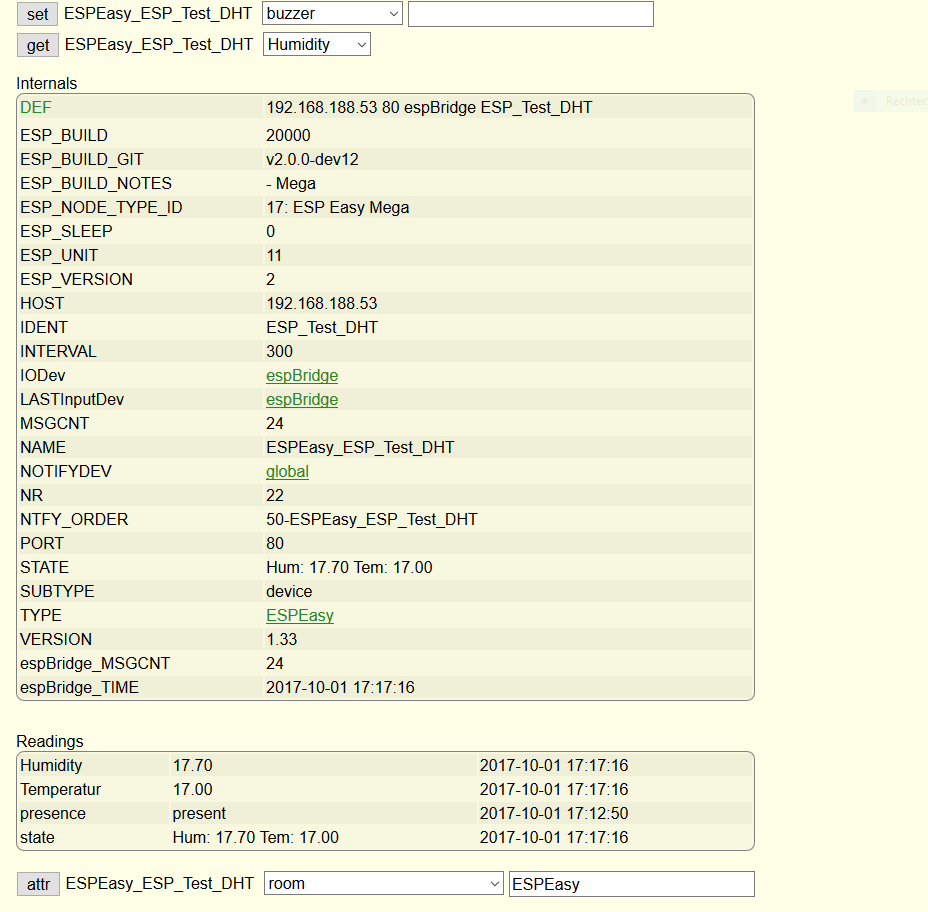
where is the mistake?
-
RE: MMM-FHEM no Fhem statusdisplay
@Woody said in MMM-FHEM no Fhem statusdisplay:
attr allowed_WEB basicAuth shjedIOhbn6BHFJjGH
Hi Woody, thanky you for your answer. Can you explain it?
I have defined WEB and than ? Sorry i am very new in FHEM what means " shjedIOhbn6BHFJjGH"? -
RE: MMM-FHEM shows values from FHEM devices ...
Hi everyone
I’ve tried to install and activate the MMM-FHEM module but with not to much success. There was actually no problem neither with the installation nor the configuration but I can’t get it running.FHEM is running on the Rpi.
Here is my config.js.//FHEM { module: 'MMM-FHEM', position: 'bottom_bar', config: { host: ['localhost'], port: '8083', https: false, devices: [ { deviceName: 'ESPEasy_ESP_Test_DHT', deviceReadings: [ { name: 'Temperatur', icon: 'wi wi-thermometer', suffix: '°' }, { name: 'sate', icon: 'wi wi-humidity', suffix: 'test%' }, ], }, ], }, }, ]i hope you can help me.
greetings from Germany -
RE: MMM-FHEM no Fhem statusdisplay
@Woody said in MMM-FHEM no Fhem statusdisplay:
Thanks Folks,
it seem I was completely stumped. Sometimes I overlook the simplest things.
The password was the problem but, at least I think this is not a good solution to access Fhem without authorization. Anyway, problem solved - thanks a lot.Rgs. Woody
Hi Woody,
how can i deactivate the passwort? I think my problem is the same. -
Add icon to a module/mqtt module
Hi everyone,
i thave the MQTT module i call temperature values from a DHT22.
Now i want to have a Temperaturesymbol befor the value… like the DHT module for the Raspberry.
Can anyone help me?
I don´t know waht i have to do :DThanks :)
-
RE: 2nd Page
@ianperrin thank you but i think it´s not that what i want. I Want to change the page to dipslay some informations on the 2nd.
-
2nd Page
Hi guys, is it possible to creat an 2nd page, so i can switch between the 1st and 2nd page.?
-
RE: local pictures, displayed on the mirror.
@GHLasse Thank you. I will test it later.
-
RE: Mirror, mirror on the wall. Who has the biggest of them all?
@strawberry-3.141 ok, thanks. Is there a public version, the globe modul is very nice. Because my knowledge of js and programming ist not so god, so i can´t creat the modul.
-
RE: Mirror, mirror on the wall. Who has the biggest of them all?
Very nice :)
is there a modul, for the rotating globus?