MagicMirror Forum
    • Recent
    • Tags
    • Unsolved
    • Solved
    • MagicMirror² Repository
    • Documentation
    • 3rd-Party-Modules
    • Donate
    • Discord
    • Register
    • Login
    1. Home
    2. doubleT
    3. Posts
    A New Chapter for MagicMirror: The Community Takes the Lead
    Read the statement by Michael Teeuw here.
    D Offline
    • Profile
    • Following 0
    • Followers 4
    • Topics 4
    • Posts 176
    • Groups 1

    Posts

    Recent Best Controversial
    • RE: Small screen makes modules overlap

      The modules usually have fixed pixel widths and heights, so when two modules in one row both have 300 px width and the screen is 800 px wide, there’s 200 px space in between or left and right but when the screen is only 500 px wide, you’ll have at least 100 px overlap (if there’s no space left and right).

      A bigger screen might not help if it has the same resolution (compare 1024 px 15" and 1024 px 19").

      What you’ll probably need to do is (manually) scale down all modules’ sizes in your custom.css. In theory, if all settings were done in rem, you could just change the default font size and be done, but … that’d be too easy. ;)

      posted in Troubleshooting
      D
      doubleT
    • RE: Hamburg transportation-HVV

      What do you mean, they won’t let you use the API?
      Did you apply for access to the Geofox-API and they denied? What did they say? https://www.hvv.de/fahrplaene/abruf-fahrplaninfos/datenabruf/

      The only other module I know of is this one:
      https://forum.magicmirror.builders/topic/369/hamburg-hvv-public-transportation-module-using-realtime-data/8
      (where we both already posted. ;) )

      posted in Requests
      D
      doubleT
    • RE: Is it possible to change font color based on text payload?

      Hi,

      I just saw that you already opened an issue on GitHub and answered there so that the developer get’s a notification, too.

      Meanwhile, you can edit the module yourself like this:

      Change line 103 in MMM-MQTT.js from
      valueWrapper.className = "align-right bright medium";
      to
      valueWrapper.className = "align-right bright medium " + sub.value.toLowerCase();

      provided the value is just one word, not more, the cell with the value now has a class name added that’s the same as the value, in your case ‘closed’ and you can add the following to the CSS file or your custom.css:
      .MMM-MQTT .closed { color: green; } .MMM-MQTT .open{ color: red; }

      Regards,
      Torben

      posted in Custom CSS
      D
      doubleT
    • RE: MMM-Nixie – Nixie Tube Clock for your MagicMirror

      I’ll look into that. What position do you use the Nixie clock on? Have you checked what happens if you move it?

      posted in Fun & Games
      D
      doubleT
    • RE: Ich selbst habe das Problem das ich nicht weiß was oder wie ich mit der open software anfangen soll

      Ein bisschen Eigeninitiative wäre schön und ist eigentlich auch Grundvoraussetzung für Programmierer allgemein.

      Open Source bedeutet, dass der Quellcode für jeden frei zugänglich ist. Jeder kann ihn einsehen, kopieren, verändern und Vorschläge zur Verbesserung machen.

      Bisschen googlen und recherchieren - führt auch meist schneller zu Ergebnissen. Und bitte beim Thema bleiben, idealerweise auf Englisch.

      Es gibt hier mehrere Threads dazu, wie man anfängt. Das hängt auch ein bisschen von der Hardware ab und was du vorhast.

      https://forum.magicmirror.builders/category/28/tutorials

      posted in General Discussion
      D
      doubleT
    • RE: Why are people doing this: var self = this?

      @E3V3A said in Why are people doing this: var self = this?:

      var self = this

      this can change. When it’s called first, it’s one thing and when you think you need the same thing again, this might be something else already. So you temporarily store the first this in the var self. That way it’s the same thing when you need it later again.

      posted in Development
      D
      doubleT
    • RE: Border

      Looks like it’s divided in two parts with 50% 50% each but a set max-height for the image. So when the container is widened by the headline, the two areas get wider aswell.
      You can check the width in the developer tools and set it as max-width or width in custom.css

      posted in Troubleshooting
      D
      doubleT
    • RE: Modifying Stylesheet (Weathermap, News feed & Temperature)

      My advice is to check both files in MagicMirror/css/: main.css and custom.css.
      In main.css you can see all default css, don’t change anything but you can learn a lot. When you identify what you want to change, copy it in main.css, paste it into custom.css and make the changes.

      For css, it’s relevant when something is loaded. If an identifier with a style is mentioned two times in a file, the second one overwrites the first one. And custom.css is loaded after main.css, so styles there override main.css.

      Here’s how to get started with css: https://www.w3schools.com/css/

      Also, you might want to check out the browsers developer tools. Start the mirror with npm start dev and you can select the elements, learn about their identifiers, classes, IDs and you can test changes directly in these developer tools (non permanent).

      posted in Custom CSS
      D
      doubleT
    • RE: How to pass a value between functions in a Module?

      getDom: function() is called initially to set up the content. Usually you have something like div.innerHTML = variable; but at the beginning, varibable might be empty. To make the variable usable globally (in the scope of your module), you set it up and call it as this.variable.

      When your function that fills this variable updates that variable content, you call updateDom();
      That makes the dom reload and this time, this.variable has content to show.

      There’s other ways to fill the element with the content of a variable without totally rebuilding the DOM:
      In the function that handles the variable, you could say document.getElementbyId(elementId).innerHTML = variable;

      Edit: To complete this. If you want to pass a value from one function to another (but this is not working for the Dom, because that has to be set up initially):

      firstFunction: function () {
          var greeting: "Hello";
          secondFunction(greeting);
      }
      secondFunction: function (word) {
          var greeting: word;
          Log.info(greeting); // "Hello"
      }
      posted in Development
      D
      doubleT
    • RE: Changing compliments

      @AliAS
      Compliments are included via document.createTextNode(complimentText); which doesn’t allow HTML inside.

      But you can change the line within getDom: function() {} that includes the compliment from
      wrapper.appendChild(compliment);
      to
      wrapper.innerHTML = complimentText;

      and then just add a <br /> to the compliment.

      posted in Troubleshooting
      D
      doubleT
    • RE: MMM-OlympicGames

      There doesn’t seem to be an official API. Without one, a website with an up-to-date medal table would have to be called and parsed regularly. There’s at least one API that can be found by reverse engineering, but solutions like these are not really legal (often it’s against the terms of use) and thus can’t/shouldn’t be shared/adviced on a public forum. Even if you get an API, the code that parses the JSON would have to be rewritten - more or less from zero, depending on the differences.

      posted in Sport
      D
      doubleT
    • MMM-Nixie – Nixie Tube Clock for your MagicMirror

      Who doesn’t like Nixie tubes?

      Description:

      This module adds a Nixie tube clock to your MagicMirror. It cannot do much more than show the time, but it’s looking cool doing it. I’m considering a switch to hide all other modules during night time so at night only the soothing glow of the ticking Nixie tube clock fills the dark room.

      It’s working like the real thing with 10 layers/digits in each “tube”. You can turn of the fake glass tubes, the wires and also the inactive digits.

      Note:

      If some of the digits seem brighter than others, that’s because the higher the digit, the further back it sits in the tube and so the inactive digits sit in front of it, blocking some of its brightness (not much). You can set inactive to dimm to reduce this or turn it off completely (but then it’s not a real Nixie tube anymore …).

      Screenshot:

      Nixie tube clock

      Download:

      [card:TTigges/MMM-Nixie]

      Version: 1.00

      Planned features:

      • Configurable sizes and colors.
      • Nightswitch (turn off everything else between time A and time B).

      Have fun, let me know if you have any questions, ideas, comments. Thank you.

      posted in Fun & Games
      D
      doubleT
    • RE: show integer logs from python script as diagram in MM ?

      You are welcome. You’re also welcome to play with the code and adapt it to your needs and if you have suggestions on what to change, let me know.

      The module is ment to sit at the bottom and fill the whole width. Where would you like to place it alternatively? Some of that positioning is adjusted in the css right now, so depending on the position it would need different css settings.

      The prediction on when the tank will be empty is on my to do list (check the Code). Shouldn’t be too hard. But it’d involve read Ingo the dates and that’s something I kept out for now (internationally different time formats and all that).

      posted in Requests
      D
      doubleT
    • RE: Changing wether API?

      @navyvette87
      If you’re talking about the default weather modules, they only work with keys for http://www.openweathermap.org
      But you can remove those from your config and add MMM-Wunderground instead following its instructions: https://github.com/RedNax67/MMM-WunderGround

      posted in General Discussion
      D
      doubleT
    • RE: show integer logs from python script as diagram in MM ?

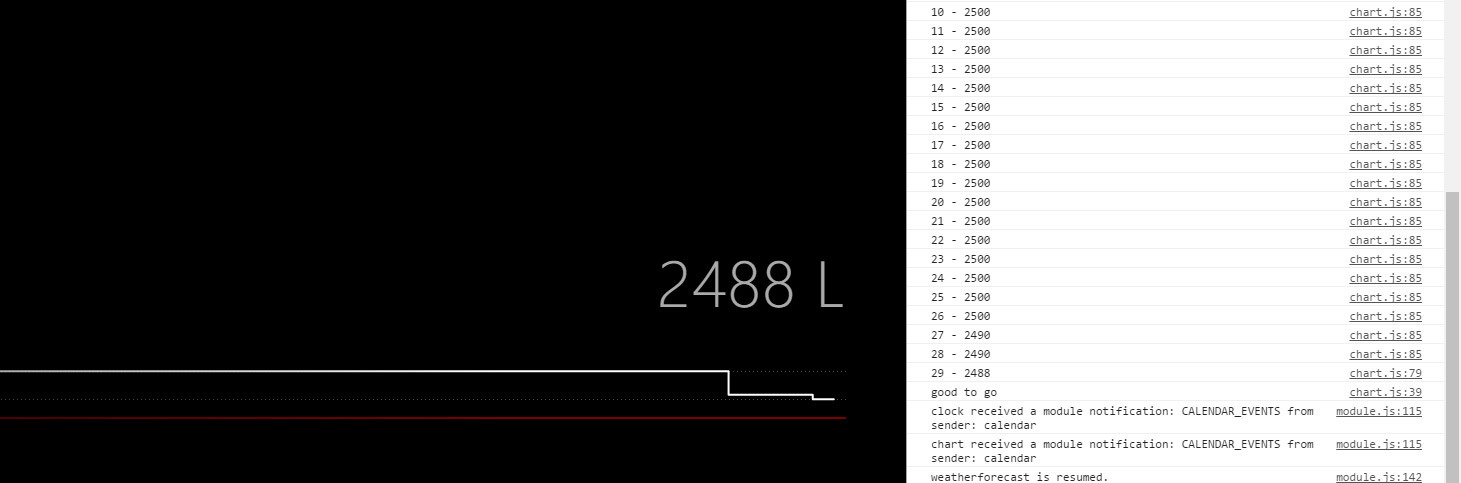
      As promised, I changed a few things to my module and now it should work with your JSON (the one with the format you told me in PM:)

      [{"Datum":"2018-02-04","Volumen":2500},{"Datum":"2018-02-04","Volumen":2500}]
      

      In the future, I’d like to make this more independent with the key being set in the config (not everyone wants “Volumen” as key). There are some other to-do’s as well, but I had it running.

      Check it out and let me know: https://github.com/TTigges/MMM-Oiltank

      One note: It should work if you address your file with file: "http://192.168.0.123/yourfile.json" or whatever the ip of your NAS is. Check the readme for more info.

      It’s not yet ready to be presented as a full running module, so I’ll keep it low key in here for now.
      alt text

      posted in Requests
      D
      doubleT
    • RE: MMM-OlympicGames

      @dnks23 http://www.medalbot.com/api/v1/medals, it’s in the node_helper.js

      posted in Sport
      D
      doubleT
    • RE: show integer logs from python script as diagram in MM ?

      @cruunnerr said in show integer logs from python script as diagram in MM ?:

      as u can read in my edit, i can create a JSON with the script i posted. but i don’t know where to put the script to execute it automatically every 24 hours or something like that.
      because i think using cronjob would be the wrong way, right? :D

      That’s exactly what a cronjob is for. ;)

      But yeah, that’s on the serving side. You have to make sure the file is updated (read, altered, saved) or overwritten entirely.

      I checked MMM-Chart and have the same issue, not even his own example is working. Tried some debugging but didn’t get very far. I don’t know what’s wrong.

      Let’s take a step back because I think there are some things that are not necessarry.
      You read the volume with a RasPi and it’s logged to a file on your NAS. Regular updates to that file work already?
      It’s also saved to a MySQL database?
      You have a Script that makes a JSON from the database? But it’s not yet regularly updated? Does this Script run on the measuring RasPi or the Mirror?

      I’d make the measuirng Pi save a JSON to the NAS. Make sure it’s working and the format is clean. MySQL database and another script are not necessarry that way. Then I’d make the Mirror read the JSON.

      Shoot me a PM (in German), I think I have an idea.

      posted in Requests
      D
      doubleT
    • RE: show integer logs from python script as diagram in MM ?

      Sorry, I didn’t want to confuse you. I’d suggest Highcharts if you want to build your own module (which I thought you were going for in the beginning). It’s a library that you load (you load the scripts) and use. You address it, tell it the id of the element where the chart should sit and the data it should show along with some parameters on how to show it.

      But maybe in your case you really want to use MMM-Chart. On first look it seems like the JSON you have there should be totally enough! No CSV needed, as far as I can see from the readme.

      What he has is similar to your JSON:

      [["2017-04-21 15:58:00",8.3,95.5],["2017-04-21 14:55:00",9.3,90.5],["2017-04-21 12:56:00",10.7,87.7],["2017-04-21 11:53:00",10.5,87.7],["2017-04-21 11:01:00",10.6,88.8]]
      

      It’s just that he has arrays in an array and you have objects with keys and values in an array.
      I didn’t check, but maybe MMM-Chart works with your style, too. Else, you could try to get your JSON to write as arrays in an array:

      [["2018-02-03T23:00:00.000Z",2488],["2018-02-03T23:00:00.000Z",2488]]
      

      From then on, MMM-Chart should print your chart.

      BTW. please check if you can edit your process/function that writes your JSON so there is no comma after the last object (or array, if you change it).

      posted in Requests
      D
      doubleT
    • RE: Trim the fat in a JSON file?

      Ok, I checked the code of that module, values: ["price"] IS the correct setting for the config but getValue: function(data, value) {... has an error.

      getValue: function(data, value) {
          if (data && value) {
            var split = value.split(".");
            var current = data;
            while (split.length > 0) {
      //        current = current[split.shift()]; // WRONG!
                current = current[0][split.shift()];
            }
            return current;
          }
          return null;
      },
      

      I’d have written that totally different, but yeah, at the moment, the problem is, that the object it should be looking for is nested within a wrapping object. Add the [0]and you should be getting your results.
      Edit: Could also be a problem with the received json format.

      posted in Troubleshooting
      D
      doubleT
    • RE: show integer logs from python script as diagram in MM ?

      Yes, that’d be the easiest option. Could be running tonigt. ;)
      Personally, I’d go with the json, though. I did it like this with Highcharts.js, which seems familiar to MMM-Charts:

      node-helper.js:

      const fs = require("fs");
      //...
          socketNotificationReceived: function(notification, payload) {
              if (notification === "UpdateChart") {
              	this.getChart();
              }
          },
          getChart: function() {
      
      		var rawdata = fs.readFileSync('path/to/my.json');
      		var history = JSON.parse(rawdata);
      		var history = history.slice(-84); // 12 per day x 7 = I only want the last 84 data points
      		this.sendSocketNotification("ChartUpdate", history);
      	}
      

      module.js:

          getScripts: function() {
              return [
                  this.file("highcharts/highcharts.js"),
                  this.file("highcharts/series-label.js"),
                  this.file("highcharts/exporting.js")
              ]
          },
          socketNotificationReceived: function(notification, payload) {
              if (notification === "ChartUpdate") {
              	this.getChart(payload);
              }
          },
          getChart: function(history) {
              var chart = "";
                  for(i = 0; i < history.length; i++) {
                      if (i === 0) {
      	    		chart = history[i].litre;
      	    	}
      	    	else {
      	    		chart = chart + ", " + history[i].price;
      	    	}
      	    }
      	    var maxi = Math.max.apply(Math, JSON.parse("[" + chart + "]"));
      	    var highest = maxi.toString() + " L";
      	    var mini = Math.min.apply(Math, JSON.parse("[" + chart + "]"));
      	    var lowest  = mini.toString() + " L";
      
      	    Highcharts.chart('module-chart', { // the id of the div to contain the chart!
      	    	chart: {
      		    	height: 175, 
      		    	margin: 0,
      		    	left: 0
      	    	},
      	        plotOptions: {
      	            series: {
      	                marker: {
      	                    enabled: false
      	                }
      	            }
      	        },
      	        tooltip: {
      	            pointFormat: "Value: {point.y:.2f}"
      	        },
      	        yAxis: {
      	            min: mini-0.05,
      	            max: maxi+0.05,
      	            tickInterval: 0.05,
      	            plotLines: [{
      	            	value: this.price,
      	            	dashStyle: 'solid',
      	            	width: 1,
      	            	color: {
      		                linearGradient: [0, 0, 900, 0],
      		                stops: [
      		                    [0, 'rgba(255, 255, 255, 0.1)'],
      		                    [1, 'rgba(255, 255, 255, 0.2)']
      		                ]
      		            }
      	            }, {
      	            	value: Math.max.apply(Math, JSON.parse("[" + pricelist + "]")),
      	            	dashStyle: 'dot',
      	            	width: 1,
      	            	color: {
                                  linearGradient: [0, 0, 900, 0],
                                  stops: [
                                      [0, 'rgba(255, 255, 255, 0.2)'],
                                      [1, 'rgba(255, 255, 255, 0.3)']
                                  ]
                              },
                              label: {
                                  text: highest,
                                  x: -2,
                                  y: -7
                              }
      	            }, 
                          {
                          value: Math.min.apply(Math, JSON.parse("[" + pricelist + "]")),
                          dashStyle: 'dot',
                          width: 1,
                          color: {
                              linearGradient: [0, 0, 900, 0],
                              stops: [
                                  [0, 'rgba(255, 255, 255, 0.2)'],
                                  [1, 'rgba(255, 255, 255, 0.3)']
                              ]
                          },
                          label: {
                              text: lowest,
                              x: -2,
                              y: 13
                          }
                      }]
                  },
                  series: [{
                      data: JSON.parse("[" + pricelist + "]"), // here's the action
                      step: 'center',
                      lineWidth: 2,
                      color: {
      	            linearGradient: [0, 0, 900, 0],
      	            stops: [
      	                [0, 'rgba(255, 255, 255, 0.4)'],
      	                [1, 'rgba(255, 255, 255, 1)']
                          ]
                      }
                  }]
              });
          }
      posted in Requests
      D
      doubleT
    • 1 / 1