MagicMirror Forum
    • Recent
    • Tags
    • Unsolved
    • Solved
    • MagicMirror² Repository
    • Documentation
    • 3rd-Party-Modules
    • Donate
    • Discord
    • Register
    • Login
    • Profile
    • Following 0
    • Followers 1
    • Topics 13
    • Posts 78
    • Groups 0
    D Offline
    1. Home
    2. dwburger
    3. Best
    A New Chapter for MagicMirror: The Community Takes the Lead
    Read the statement by Michael Teeuw here.

    Posts

    Recent Best Controversial
    • [MMM-TempestWeather] WeatherFlow Tempest weather station and forecast

      Description

      MMM-TempestWeather is a MagicMirror² weather module for owners of a WeatherFlow Tempest personal weather station.

      It combines real-time observations from your Tempest with current conditions and a five-day forecast.

      The display includes:

      • Current temperature and conditions
      • Wind speed and direction
      • Relative humidity
      • Barometric pressure and pressure trend
      • Precipitation probability and daily accumulation
      • Five-day forecast with weather icons
      • Automatic WebSocket reconnection and connection monitoring

      Real-time observations are received through the WeatherFlow WebSocket service. Forecast and current-condition information comes from the WeatherFlow Better Forecast service.

      The module uses the standard MagicMirror frontend/node_helper architecture and requires no additional npm packages on supported Node.js versions.

      A WeatherFlow Tempest station, personal access token, device ID, and station ID are required.

      Screenshots
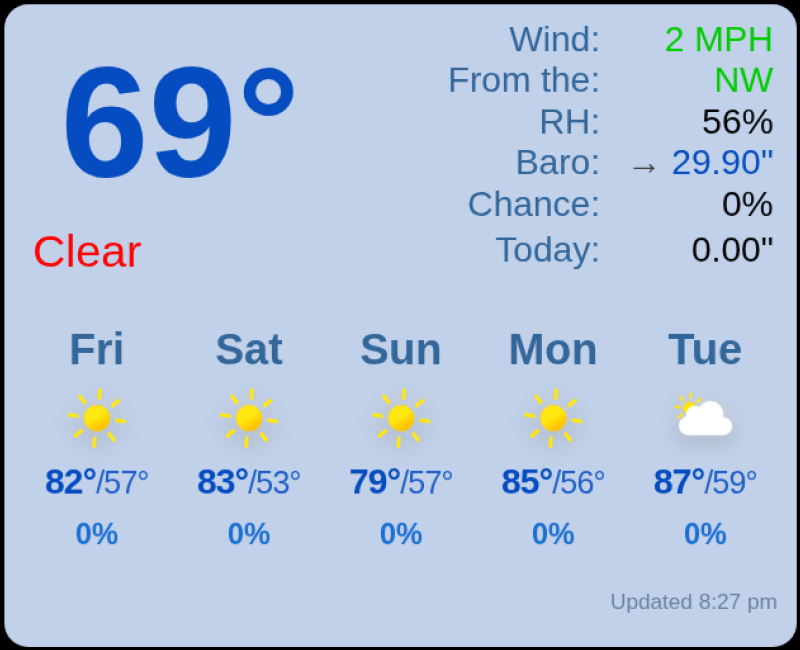
      MMM-TempestWeather

      Download

      https://github.com/dwburger/MMM-TempestWeather

      Installation and configuration instructions are provided in the README.


      Version 1.2

      • Added configurable imperial and metric unit support
      • Added the units configuration option (imperial or metric)
      • Imperial displays °F, MPH, inHg, and inches
      • Metric displays °C, km/h, hPa, and mm
      • Imperial remains the default for backward compatibility
      • Better Forecast requests now use the selected unit system

      Version 1.1

      • Moved WeatherFlow WebSocket communication to node_helper.js
      • Moved Better Forecast REST requests to node_helper.js
      • Added WebSocket reconnection and connection watchdog
      • Added forecast request timeout and overlap protection
      • No additional npm packages required

      Version 1.0

      • Initial standalone release
      posted in Showcase weather tempest weatherflow
      D
      dwburger
    • RE: Complete Walkthrough - Install MagicMirror on a PC - Windows 7/10

      @Mykle1 May I butt in here. I was the one who started the question. I had to change the “start:” string in the package.json file to:

      “start”:“node_modules/.bin/electron js/electron.js”

      As Sam instructed. Once I did that, the “npm start” command got my MM2 running.

      Thanks, BTW, for creating the walkthrough. I’m thrilled to have MM2 running on my old Acer laptop!

      posted in Troubleshooting
      D
      dwburger
    • RE: Rude Module Developers

      I stumbled onto MM2.5 10 days ago with little background in JS. I’ve had a blast getting my mirror set-up and am in awe of its capabilities and the developers contributing time and energy to this FREE project. Complaining about anything just seems misplaced to me. Instead, dig in a little and “learn the ropes”. Don’t know if I’ll dig in myself, but it sure looks like fun!

      posted in General Discussion
      D
      dwburger
    • RE: MM on Ubuntu

      I may have given you the wrong impression…I really don’t know my way around Linux/Ubuntu. However, I was able to run your fixuppm2 script and I now see what you mean about not having to do anything else. I’m getting the behavior I want. When I reboot my machine MM2 starts right up. I’m getting ready to make another MM2 on a mini PC running Ubuntu. This time, I’m going to use your install script!

      posted in Troubleshooting
      D
      dwburger
    • RE: MM2.5 slow to PM2 start after changing pi password

      Looks like I should have looked closer to home than all over the web! I watched more closely at the boot-up procedure of my RPi and noticed a FAILED step involving dhcpcd. I looked that up on the web and found that newer distros don’t want you to edit the file /etc/network/interfaces. See this link for more information:

      https://www.raspberrypi.org/forums/viewtopic.php?t=203530

      I followed the directions there and then went back Raspberrypi.org to follow the directions for properly (and easily) setting up my wifi. Once I did all that the dhcpcd error was gone and my MM2.5 reboot issues were resolved.

      Case closed.

      posted in Troubleshooting
      D
      dwburger
    • MMM-RTSPStream success

      I’ve finally gotten a video stream that’s stable on my MM2 using MMM-RTSPStream. I thought I’d share the set-up to give back to this community that has been so helpful to me!
      Webcam - Reolink E1 Pro (https://www.amazon.com/gp/product/B07THQDSBD/ref=ppx_yo_dt_b_asin_title_o06_s00?ie=UTF8&psc=1)
      Raspberry Pi 4 Model B
      OS - Raspberry Pi OS 32-bit
      Magic MIrror 2.13.0 (installed using sdetweil scripts at https://github.com/sdetweil/MagicMirror_scripts
      Followed instructions for camera set-up
      Installed MMM_RTSPStream following instructions and config.html link to start
      Could not use vlc, used omxplayer instead
      Install omxplayer if necessary (using Snapcraft at https://snapcraft.io/install/omxplayer-pi/debian)
      Final, working configuration:

      {
          module: "MMM-RTSPStream",
          position: "bottom_right",
          config: {
              autoStart: true,
              rotateStreams: false,
              rotateStreamTimeout: 10,
              moduleWidth: 308,
              moduleHeight: 231,
              localPlayer: 'omxplayer',
              remotePlayer: 'vlc',
              showSnapWhenPaused: false,
              remoteSnaps: false,
              shutdownDelay: 12,
                  stream1: {
                  name: 'Your Own Label',
                  url: 'rtsp://admin:[Your Password]@[Your IP address]:554/h264Preview_01_sub',
                  frameRate: '7',
                  hdUrl: 'rtsp://admin:[Your Password]@[Your IP address]:554/h264Preview_01_sub',
                  snapshotType: 'url',
                  snapshotRefresh: 10,
                  width: 400,
                  height: 350,
      			absPosition:{
      				top: 700,
      				right: 1910,
      				bottom: 1050,
      				left: 1310,
      				
      			},
                  },
              }
      },
      

      The “moduleWidth” and moduleHeight" are irrelevant. What sets the size and position of the video window are the “width” and “height” values along with the “absPosition” values for “stream1”. The values that worked for me may not work for you so some trial error will be involved. Unless, of course, you completely understand the screen geometry for your MM2. I don’t so I had to go through a trial and error process to get the position just right. Part of my challenge was a body “zoom” value in my custom.css that added a level of complexity I never quite figured out. No matter, my step-by-step process resulted in a video stream the size I wanted and in the place I wanted. I also set the border width to 0 in MMM-RTSPStream.css file as follows:

      .MMM-RTSPStream .innerWrapper {
        position: relative;
        width: 352px; /* Video width + 2*border + 2*padding */
        height: 242px;
        border: 0px solid white;
      

      The bottom-line is a stable video feed from my Reolink webcam in the lower-right corner of my MM2. Hope this helps!

      posted in General Discussion
      D
      dwburger
    • MMM-RTSPStream snapshots

      I’d like to use MMM-RTSPStream to display a snapshot of my Wyze camera’s RTSP stream every 5 minutes. I can manually generate a .jpg snapshot using the following console command:

      ffmpeg -y -i rtsp://#myUsername#:#myPassword#@192.168.1.117:554/live -vframes 1 /home/pi/image.jpg

      However, I can’t get this file created or displayed on my MM2 screen using MMM-RTSPStream. All I see on my MM2 screen is a dark-gray area surrounded by a white frame in the bottom-right corner of the screen. Based on my reading of the module’s instructions, I should be able to do this. Below is the MMM-RTSPStream section of my MM2 config.js file. Maybe someone can spot my error(s) that’s keeping this from working properly??? Thanks for any help provided.

      {
          module: "MMM-RTSPStream",
          position: "bottom_right",
          config: {
              autoStart: true,
              rotateStreams: false,
              rotateStreamTimeout: 10,
              moduleWidth: 354,
              moduleHeight: 250,
              localPlayer: 'ffmpeg',
              remotePlayer: 'ffmpeg',
              showSnapWhenPaused: true,
              remoteSnaps: true,
              shutdownDelay: 12,
              stream1: {
                  name: 'DWBPanCam',
                  url: 'rtsp://#myUsername#:#myPassword#@192.168.1.117/live',
                  frameRate: '15',
                  hdUrl: 'rtsp://#myUsername#:#myPassword#@192.168.1.117/live',
      	    snapshotUrl: '/home/pi',
      	    snapshotType: 'file',
      	    snapshotRefresh: 60,
      	    protocol: 'tcp',
                  width: undefined,
                  height: undefined,
                  ffmpegPort: 554,
                  },
              }
      },
      
      posted in Utilities
      D
      dwburger
    • Daily reboot inconsistency

      My RPi loses wifi connection often so I set up a daily reboot (using crontab). It works most of the time, but often enough Magic Mirror won’t start after the reboot using PM2. Sometimes MM starts, but the fonts are all very small. Sometimes it takes 3-4 manual reboots of the RPi to get MM up and running again. Just wondering whether anyone else has observed this in their own MM and found a fix and/or if anyone has suggestions on how to approach this problem. Thanks in advance for any help!

      posted in Troubleshooting
      D
      dwburger
    • 1 / 1