Hi, I notice some requests and other activities,here and on GitHub.
Due to unforeseen medical issues, I do not have really time, nor the means to respond to everything
Already happy I have some sort of Internet connection here.
But with Sam it is in good hands, just make use of his fork.
Greetings, E.J.
 E
Online
E
Online
A New Chapter for MagicMirror: The Community Takes the Lead
Read the statement by Michael Teeuw here.
Read the statement by Michael Teeuw here.
Posts
-
RE: MMM-pages - how to know which page index my module has?
-
RE: MMM-pages - how to know which page index my module has?
@sdetweil
Short question:There are 2 versions of MMM-pages:
https://github.com/edward-shen/MMM-pages
https://github.com/sdetweil/MMM-pagesThey seem in-sync, but which one would be the preferred one to take?
-
RE: MMM-pages - how to know which page index my module has?
As a workaround, I will make it a requirement to put the MMM-Player on the first page (page index 0).
When I receive 0, then I will start streaming, otherwise I will stop streaming.
That seems to work. -
RE: MMM-pages - how to know which page index my module has?
@sdetweil
Yeah, this module is kind of in my foster care.
I did not come up with the code; only made some tweaks and made it available.
There is not suspend or resume to been seen in the code.But I will study the stuff you mentioned and will try to implement that.
Thx.
-
MMM-pages - how to know which page index my module has?
Hi,
I am currently adopting MMM-MPlayer to interact with MMM-pages.
Reason is that suspending the module does not suspend (stop) the stream, as it is an overlay.
As long as MMM-MPlayer is running, it will always display the stream.From the config I can deduct the page index (3 in this case):
      modules: [
        ["compliments"], // page 1
        ["MMM-YrThen"], // page 2
        ["calendar"], // page 3
        ["MMM-MPlayer"], // page 4
      ],
And I see that reflected in the log:
0|MagicMirror  | [2025-01-18 16:13:55.383] [LOG]   [MMM-MPlayer.js:65:15] Received MMM-pages NEW_PAGE 3
0|MagicMirror  | [2025-01-18 16:13:55.804] [LOG]   [module.js:189:7] compliments is suspended.
0|MagicMirror  | [2025-01-18 16:13:55.835] [LOG]   [module.js:189:7] calendar is suspended.
0|MagicMirror  | [2025-01-18 16:13:55.917] [LOG]   [module.js:189:7] MMM-YrThen is suspended.
0|MagicMirror  | [2025-01-18 16:13:56.395] [LOG]   [module.js:196:7] clock is resumed.
0|MagicMirror  | [2025-01-18 16:13:56.439] [LOG]   [module.js:196:7] MMM-MPlayer is resumed.
But I would need to see my module name in the payload (MMM-MPlayer in this case), to act on the correct page index.
Come to think of it, I also would need the keyword
suspendedorresumedin the payload, in order to know what to do.Any thoughts on this ?
Best regards,
E.J.
-
RE: module unable to play mp3 file using omxplayer
@plainbroke
Yes, that makes sense.
Keyword: overlay.
I will reply in the MPlayer issue you opened for this, to not hijack this topic. -
RE: MMM-PublicTransportHafas direction parameter not working anymore
I tested this and indeed it does not seem to work (anymore).
FordirectionI used the station Id for the station adjacent to my station.
I will raise an issue for this. -
RE: MMM-PublicTransportHafas: Service Temporarily Unavailable
@KristjanESPERANTO said in MMM-PublicTransportHafas: Service Temporarily Unavailable:
I just released version 3.0.1 to fix this 😀
At this moment I see an entry in the past with +0.5.
Also saw +0.6.
When turning on debug, I only seedelayvalues of 0, 60 and null, so I wonder where the current 0.5 comes from.
The values forwhenandplannedWhenall have a difference of 0 or 1 minute.It seems that it only affects the first entry in the list, which in my case is the first unreachable in the past.
And it does not really bother me, but it still is odd. -
RE: MMM-PublicTransportHafas direction parameter not working anymore
I personally do not use this, but are you sure about
direction: “682669”
?
Seems a bit off. -
RE: MMM-PublicTransportHafas: Service Temporarily Unavailable
I did the update and it is looking much better now.
I reverted back to db (npm run query dbis working again).
Only one thing I noticed: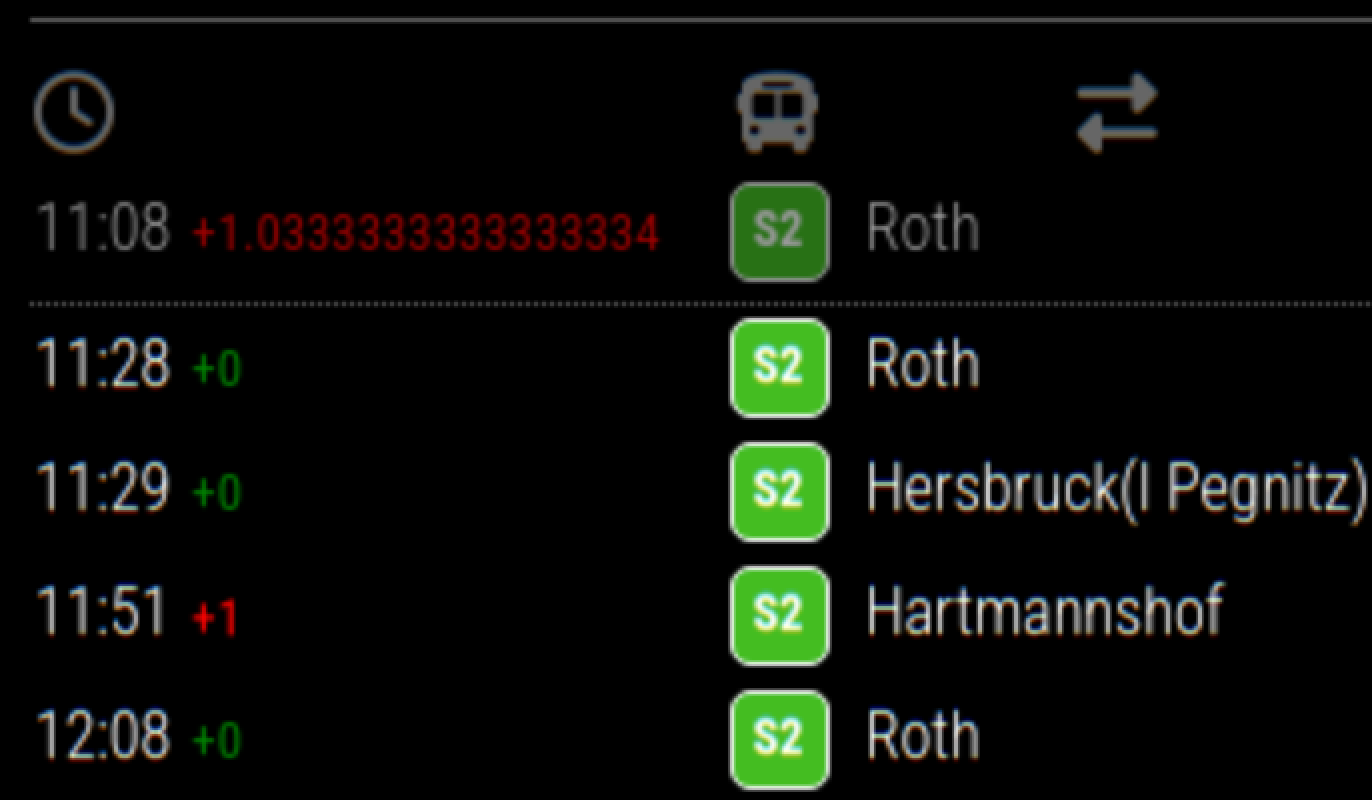
On display (last update 11:15)
11:08 +1.0333333333333334
11:28 +0The 11:08 entry is in the past (
maxUnreachableDepartures: 2,).
The+1.0333333333333334is a bit too much :-) -
RE: MMM-PublicTransportHafas: Service Temporarily Unavailable
$ cd ~/MagicMirror/modules/MMM-PublicTransportHafas -
RE: MMM-PublicTransportHafas: Service Temporarily Unavailable
@p1lspeda said in MMM-PublicTransportHafas: Service Temporarily Unavailable:
Höfchen/Listmann
For you, try this:
$ npm run query rmv

Using hafas-client profile: rmv

Enter an address or station name: Höfchen/Listmann

Stops found for 'Höfchen/Listmann':

 > Stop: MZ Höfchen/Listmann
   ID: 3029051
   Transport product(s): Bus
Config:
hafasProfile: "rmv", stationID: "3029051", stationName: "Höfchen/Listmann", -
RE: MMM-PublicTransportHafas: Service Temporarily Unavailable
@othomys said in MMM-PublicTransportHafas: Service Temporarily Unavailable:
Georg-Schwarz-Str./Merseburger-Str.
For you I found this one:
$ npm run query insa

Enter an address or station name: Georg-Schwarz

Stops found for 'Georg-Schwarz':

 > Stop: Leipzig, Georg-Schwarz-/Merseburger Str.
   ID: 12555
   Transport product(s): Tram, Bus
So your config will be:
hafasProfile: "insa", stationID: "12555", stationName: "Georg-Schwarz-Str./Merseburger-Str.", -
RE: MMM-PublicTransportHafas: Service Temporarily Unavailable
Possible work-around.
Needs travelling via Austria :-)To check if your station is available:
$ cd ~/MagicMirror/modules/MMM-PublicTransportHafas
$ npm run query oebb

> mmm-publictransporthafas@2.1.13 query
> node ./convenience/query_stations.mjs oebb

Using hafas-client profile: oebb

Enter an address or station name:
This will give you a station Id.
Update config.js:
$ vi ~/MagicMirror/config/config.js
:
:
      hafasProfile: "oebb",
      stationID: "<ID>",
      stationName: "<Stop>",
:
:
For me the list appears again, although I do not see the real-time times, meaning it shows the ⚠ symbol (as set in
noRealtimeDelayString: "⚠",).One can try different hafas-client profiles, listed in:
https://github.com/public-transport/hafas-client/blob/main/p/readme.md
When you are lucky there is a good alternative to db.
-
RE: MMM-PublicTransportHafas: Service Temporarily Unavailable
Seems that DB made the service, as used by Hafas, unavailable.
https://reiseauskunft.bahn.de
503 Service Temporarily UnavailableAlso other programs using it have this problem.
Can only hope that there is or there will be an alternative source.
It is the one of the 3 most used MagicMirror modules in our household. -
RE: MMM-MPlayer
@plainbroke said in MMM-MPlayer:
@evroom
Crap on a Cracker,Thank you again for this great moduel.
I like this expression!
I also waited a long time for this module.
Only made it available on Github and tweaked it a little.
When in January the new MM version comes out, I am finally going to reinstall my old setup.
Good to know that you got it solved. -
RE: MMM-MPlayer
@myfingersarecold said in MMM-MPlayer:
regarding #2 on my pi i didnt have to rotate the mplayer orientation, but i adjusted the output of my pi to portrait and everything behaved but ymmv depending on how it’s setup.
Could you please tell me how you do the general rotation to portrait ?
I use the custom.css to get it rotated clockwise.
As MPlayer is an overlay, like OMXPlayer, it is not affected by this.body { : : transform: rotate(-90deg); transform-origin: top left; width: 100vh; height: 100vw; : : }But of course there are more, potential better, ways of getting it rotated.
-
RE: MMM-MPlayer
Hi @plainbroke,
Let’s see what we can do about it.
First be sure that the URL can be opened and shows your stream:
VLC Media Player
      File
            Open Network
               URL: rtsp://192.168.1.32:554/live
               Open
Then get some data from the logs:
$ pm2 flush
$ pm2 restart MagicMirror
$ sleep 15  (or simply count to 15)
$ grep 'MMM-MPlayer' ~/.pm2/logs/MagicMirror-*.log
Also adding DEBUG will give some more information and since you only use one module, all output will be related to this module:
logLevel: ["INFO", "LOG", "WARN", "ERROR", "DEBUG"],Tailing the current log:
$ pm2 logs MagicMirror --lines 100Also try if a single stream will work:
(note, please adjust the indents when and where needed)$ vi ~/MagicMirror/config/config.js { module: 'MMM-MPlayer', disabled: false, position: 'middle_center', header: 'MPlayer', config: { useTwoWindows: false, layout: 'row', monitorAspect: 0, rotate: -1, windowSize: { width: 640, height: 360 }, windowPosition: { x: 5, y: 225 }, streamInterval: 30000, streams: { window1: [ 'rtsp://192.168.1.32:554/live', ] } } },I am using an 8 GB RAM Raspberry Pi 4b, perhaps there are memory constrains we are not aware of.
But when you say the mp4s are working …
To see the memory usage:
$ free -h -t -
RE: MMM-MPlayer
@myfingersarecold said in MMM-MPlayer:
I don’t feel like actually uploading it to github, but here is the source code, and an example config.
I took the liberty to take the provided code, make changes to it and make it available as a public repository:
https://github.com/evroom/MMM-MPlayer
My own main purpose for using it, is to setup a new Raspberry Pi (Raspberry Pi 4 Model B), with Debian 12 (bookworm) and the latest MM version (2.30.0).
Replacing a Pi 3b 32-bit Debian 10 buster setup where OMXPlayer is still working.
I will be using a single window with a single RTSP stream (for an Axis Network Camera).
Nothing fancy.Best regards,
E.J.