MagicMirror Forum
    • Recent
    • Tags
    • Unsolved
    • Solved
    • MagicMirror² Repository
    • Documentation
    • 3rd-Party-Modules
    • Donate
    • Discord
    • Register
    • Login
    1. Home
    2. ganget
    3. Posts
    A New Chapter for MagicMirror: The Community Takes the Lead
    Read the statement by Michael Teeuw here.
    G
    Offline
    • Profile
    • Following 0
    • Followers 0
    • Topics 5
    • Posts 43
    • Groups 0

    Posts

    Recent Best Controversial
    • Animated rainbow color gradient for the default clock module

      I wanted to introduce some more color to my MagicMirror so i made a animated rainbow color gradient which i used to spice up my default clock module. Here is a gif with the result:
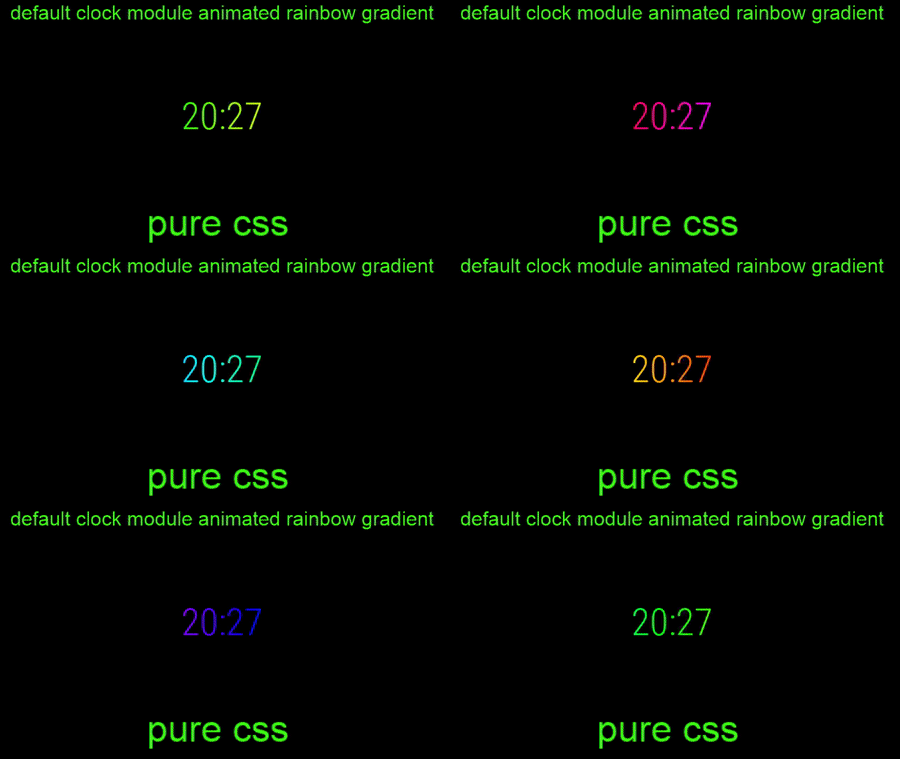
      0_1549222544023_Animated rainbow color gradient.gif
      The code

      .clock-time-only-color {
      	background-image: linear-gradient(to left, #ff0000,#ff4000,#ff8000,#ffbf00,#ffff00,#bfff00,#80ff00,#40ff00,#00ff00,#00ff40,#00ff80,#00ffbf,#00ffff,#00bfff,#0080ff,#0040ff,#0000ff,#4000ff,#8000ff,#bf00ff,#ff00ff,#ff00bf,#ff0080,#ff0040,#ff0000);
      	-webkit-background-clip:  text;
      	-webkit-animation: animate 60s linear infinite;
      	background-size: 1000%;
      	color: transparent;
      	
      }
      @-webkit-keyframes animate{
      	0%	{background-position: 0% 500%;}
      	100%	{background-position: 500% 1000%;}
      

      If somebody has any idea of improving the image quality for the animation i’m really interested!
      posted in Showcase
      G
      ganget
    • RE: -=]!Show Your Module Setup![=-

      @mykle1 Looks very cool man! Now the flat earth believers can’t argue any more the earth is round! haha:face_with_stuck-out_tongue_closed_eyes:

      posted in Show your Mirror
      G
      ganget
    • RE: My first Mirror

      @fischi87 Damn your mirror looks really sharp. which monitor and mirror did you use? and btw what is that white thing top left on top of the frame? I like the small wooden frame you used in this build! l’m Pretty curious which modules you are planning to add!

      Congratulations on making your own MagicMirror!

      posted in Show your Mirror
      G
      ganget
    • RE: -=]!Show Your Module Setup![=-

      @robiv8 If you mean the graph it’s MMM-rain-forecast It only works in the Netherlands atm. But i guess you could change the module a little so it will use a different API.

      As for showing the analog clock above the other modules maybe adding a z-index to it in your custom.css file will help you to make it work.

      posted in Show your Mirror
      G
      ganget
    • RE: Considering taking donations to support the MagicMirror project. Interested in your thoughts!

      @michmich I’n my opinion you’re doing this the right way! You are actively initiating a discussion about this topic and keeping it transparant.

      Keeping donating voluntarily and optional will likely assure that people can enjoy working on there Magic Mirror as a hobby. The positive effect of accepting donations in my opinion is that it can boost the project in a good way by getting more resources available for it. Which enables more growth for the project and people involved.

      The idea of companies supporting is very nice, The only potential loss for these future relationships is that it would be a nightmare if they get the ability to hijack and/or steal the project or influence it too much.

      Looking forward to the reactions on this topic.:slightly_smiling_face:

      posted in MagicMirror
      G
      ganget
    • RE: -=]!Show Your Module Setup![=-

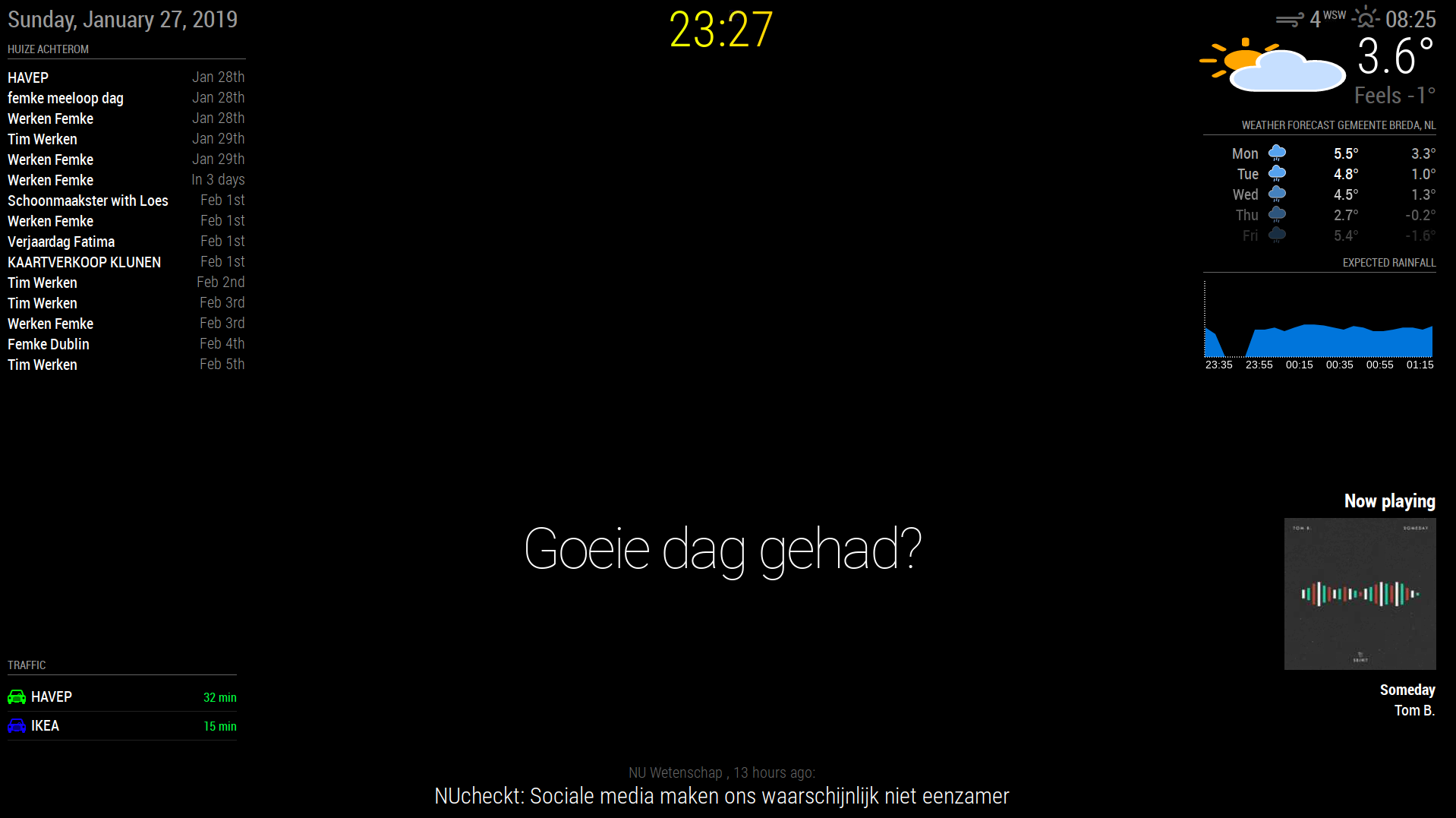
      Because I like the idea of people showing there Module Setup here is mine. :winking_face:

      0_1548885659117_Magic mirror 2.png
      The Modules used in the setup. (list is left to right and top to bottom)
      left: clock date only, default calendar and MMM-MyCommute
      center: clock time only, compliments and newsfeed
      right: currentweather, weatherforecast, MMM-rain-forecast and MMM-Scrobbler

      I added a custom animated css color gradient to my clock to get some beautiful changing color.
      Also changed the icons for currentweather and weatherforecast to add color.
      Hope you guys like it! and if you have any recommendations for cool modules let me know!:smiling_face_with_open_mouth_smiling_eyes:

      Will likely replace the calendar module pretty soon with something different

      posted in Show your Mirror
      G
      ganget
    • MMM-MyCalendar stuck on loading

      Heey I have installed your MMM-MyCalendar module last week and can’t make it work. Even the default config is stuck on loading… The default calendar module works fine. But i like the lay-out of this one allot more. Can you help me with fixing this?

      This is my config: (copied and pasted from MMM-MyCalendar.js)

      		{
      			module: "MMM-MyCalendar",
      			header: "Huize Achterom",
      			position: "top_left",
      			config: {
      				maximumEntries: 10, // Total Maximum Entries
      				maximumNumberOfDays: 365,
      				displaySymbol: true,
      				defaultSymbol: "calendar", // Fontawesome Symbol see http://fontawesome.io/cheatsheet/
      				displayRepeatingCountTitle: false,
      				defaultRepeatingCountTitle: "",
      				maxTitleLength: 25,
      				fetchInterval: 5 * 60 * 1000, // Update every 5 minutes.
      				animationSpeed: 2000,
      				fade: true,
      				urgency: 7,
      				useRelativeDates: false,
      				dayOfWeekFormat: "dddd",
      				dateFormat: "MMMM D",
      				timeFormat: "h:mm A",
      				joiningWord: "at",
      				getRelative: 6,
      				fadePoint: 0.25, // Start on 1/4th of the list.
      				hidePrivate: false,
      				colored: false,
      				calendars: [
      					{
      					symbol: "calendar",
      					url: "http://www.calendarlabs.com/templates/ical/US-Holidays.ics",
      					},
      				],
      			}
      		},
      
      posted in Troubleshooting
      G
      ganget
    • RE: MMM-GooglePhotos

      @taxandria
      I see that there is a comma missing at line 10 in between the || needs to be a comma.

      sort: "time", //'time', 'reverse', 'random'|,|
      

      I’m also not sure about the difference between ” and " (notice the slight angle) being a problem or not.

      p.s. It’s pretty hard to read the code when only half of it is properly styled.

      posted in Entertainment
      G
      ganget
    • RE: Can someone Make a module to show iTunes playing

      @dazza120 You should check out the last.fm site for that and google ;)

      posted in Requests
      G
      ganget
    • RE: Can someone Make a module to show iTunes playing

      @dazza120 MMM-Scrobbler would do that if you connect your iTunes to last.fm

      posted in Requests
      G
      ganget
    • RE: How to start MM with a module as default hidden

      @thestigh Would you like to have the module running but not showing in your Magic Mirror? I guess you can do this by not assigning a position for the module.

      example for the clock module

      modules: [
      	{
      		module: "clock",
      		position: "",	// leave this blank
      		config: {
      			// The config property is optional.
      			// See 'Configuration options' for more information.
      		}
      	}
      ]
      
      posted in Troubleshooting
      G
      ganget
    • RE: [MMM-Rainbow] Animated text color transition

      @justjim1220. Yeah it shows every color atm before the minute updates and the loop starts again.

      posted in Entertainment
      G
      ganget
    • RE: [MMM-Rainbow] Animated text color transition

      @justjim1220 I changed the update interval to 60 sec and that makes it work allot better. I kept the background size at 500% so the color gradient won’t repeat.

      .clock-time-only-color {
      	background-image: linear-gradient(to left, red,orange,yellow,green,blue,purple);
      	-webkit-background-clip:  text;
      	-webkit-animation: animate 60s linear infinite;
      	background-size: 500%;
      	color: transparent;
      	
      }
      @-webkit-keyframes animate{
      	0%	{background-position: 0% 500%;}
      	100%	{background-position: 500% 0%;}
      

      The result
      0_1548425053414_MagicMirror screen 2.png
      Thanks for your help!

      posted in Entertainment
      G
      ganget
    • RE: [MMM-Rainbow] Animated text color transition

      @justjim1220 Good tip man! I will change the update interval and look at the difference.

      posted in Entertainment
      G
      ganget
    • RE: [MMM-Rainbow] Animated text color transition

      @seann yeah i tried increasing the number to like 20 sec up to 6000. But the problem i get then is that it shows me only the first 2 colors in the gradient. Dunno but will try and work on it tomorrow

      posted in Entertainment
      G
      ganget
    • RE: [MMM-Rainbow] Animated text color transition

      @seann I took a different approach to this, mainly because I only wanted to have it for only one module. I have changed my custom.css and one line in the clock.js, so it grabs a different style.
      My code makes a gradient background which I clip to the text. Then to make it move across the text i use webkit-animation. I’m not totally satisfied with the result of the animation yet but i will keep tweaking that.

      the animation moves way too fast now and when I make the animation duration longer it doesn’t feature all the colors of the gradient.
      the only line i needed to change in the clock.js file

      timeWrapper.className = "time clock-time-only-color large light";
      

      Custom.css (lines i added)

      .clock-time-only-color {
      	background-image: linear-gradient(to right, #ff0000,#ff4000,#ff8000,#ffbf00,#ffff00,#bfff00,#80ff00,#40ff00,#00ff00,#00ff40,#00ff80,#00ffbf,#00ffff,#00bfff,#0080ff,#0040ff,#0000ff,#4000ff,#8000ff,#bf00ff,#ff00ff,#ff00bf,#ff0080,#ff0040,#ff0000);
      	-webkit-background-clip:  text;
      	-webkit-animation: animate 3s linear infinite;
      	background-size: 500%;
      	color: transparent;
      	
      }
      @-webkit-keyframes animate{
      	0%	{background-position: 0% 500%;}
      	50%	{background-position: 100% 0%;}
      	100%    {background-position: 0% 100%;}
      	}


      Do you have any idea on how I can make the animation duration way longer like 10 min and still show all the colors in the gradient?

      Thank you for the initial idea and for inspiring me!

      posted in Entertainment
      G
      ganget
    • RE: [MMM-Rainbow] Animated text color transition

      I really like the idea of this module, I’m searching for the possibility to make only my clock have this effect and maybe a gradient kind of color shift. Can you help me with this idea?

      posted in Entertainment
      G
      ganget
    • MMM-Calendar in * amount of days incorrect

      I have some trouble with the MMM-Calendar issue.
      0_1548198677590_MMM-Calendar.jpg
      As you can see “Werken Femke” is twice in 7 days. But these two events are on two different days. I believe this only happens when its after midnight but i’m not sure. How can i fix this issue and make the in * amount of days logic again.

      Thank you in advance for reading and helping me.

      posted in Troubleshooting
      G
      ganget
    • RE: syntax errors

      @egnos As @sdetweil already stated the comma’s are for showing the code that there is more to run after the line. It is no problem to have a extra comma at the end. But if you don’t put a comma the code doesn’t run further and gives you a syntax error. The {} are for making a object in JS, if you don’t close the object with a } you will also get a syntax error.

      posted in Troubleshooting
      G
      ganget
    • 1
    • 2
    • 3
    • 2 / 3