@HeikoGr
So now I put It in the MagicMirror folder?
 H
Offline
H
Offline
A New Chapter for MagicMirror: The Community Takes the Lead
Read the statement by Michael Teeuw here.
Read the statement by Michael Teeuw here.
Posts
-
RE: obsession with modul checker
-
RE: MMM-MyHomeWizard
Update to v2.0.0
In this updated version, the data is saved daily at 11:59 p.m. This makes it possible to see the current difference during a day.
You can enable and disable this option via the showDeltaXXXX options in config.js.Module page: MMM-MyHomeWizard
-
RE: obsession with modul checker
@HeikoGr
Oké, clear. Thanks for the quick replys -
RE: obsession with modul checker
@HeikoGr
So it is not possible to check all the modules in one run?
I have to do it for each module? -
RE: obsession with modul checker
@HeikoGr said in obsession with modul checker:
node scripts/magicmirror-check.mjs
I tried it, but get an error
❌ Error: Cannot copy a FIFO pipe: cp returned EINVAL (cannot copy a FIFO pipe: /tmp/mm-module-checker-MagicMirror/modules/MagicMirror-----MagicMirrorOrg/.lgd-nfy0) /tmp/mm-module-checker-MagicMirror/modules/MagicMirror-----MagicMirrorOrg/.lgd-nfy0 -
RE: MagicMirror crash core.xxxx
I rebooted my MagicMirror and the “problem” doesn’t appear anymore now. Hope it stays this way, but still wondering what has happened.
-
MagicMirror crash core.xxxx
My MagicMirror currently keeps crashing and generates core.xxxx files in the MagicMirror folder.
When I open the file with gdb, I get this:gdb) core core.279811 warning: Can't open file anon_inode:[io_uring] during file-backed mapping note processing [New LWP 279811] [New LWP 279819] [New LWP 279842] [New LWP 279818] [New LWP 279820] [New LWP 279812] [New LWP 279822] [New LWP 279841] [New LWP 279821] [New LWP 279824] [New LWP 279840] [New LWP 279830] [New LWP 279843] Reading symbols from /home/pi/MagicMirror/node_modules/electron/dist/electron... (No debugging symbols found in /home/pi/MagicMirror/node_modules/electron/dist/electron) [Thread debugging using libthread_db enabled] Using host libthread_db library "/lib/aarch64-linux-gnu/libthread_db.so.1". Core was generated by `/home/pi/MagicMirror/node_modules/electron/dist/electron js/electron.js --ozone-platform=wayland'. Program terminated with signal SIGSEGV, Segmentation fault. #0 0x000000556a30595c in uv.loop_interrupt () [Current thread is 1 (Thread 0x7f94d2b020 (LWP 279811))]What is going on?
-
RE: Swap 2 modules on loading 1 module
@sdetweil I Will give both of them a look and let see what I come up with. Thanks for the reply.
-
RE: MMM-MyTasklist
@Getinthegames
Thank you, that was the reason for me to create this module, simplicity.
I didn’t need all the extras, just a simple list. -
Swap 2 modules on loading 1 module
Currently my mirror is full with the needed apps. I like to swap out one module on load of an other module.
For example:
Left under is Module A. When I start a number on Spotify my module MMM-OnSpotify pops up (as expected) but it goes over Module A that is already in the Left under corner.Question:
Is there a way that let Module A temporary disappear, until MMM-OnSpotify disappears after stopping playing music on Spotify?Default situation:
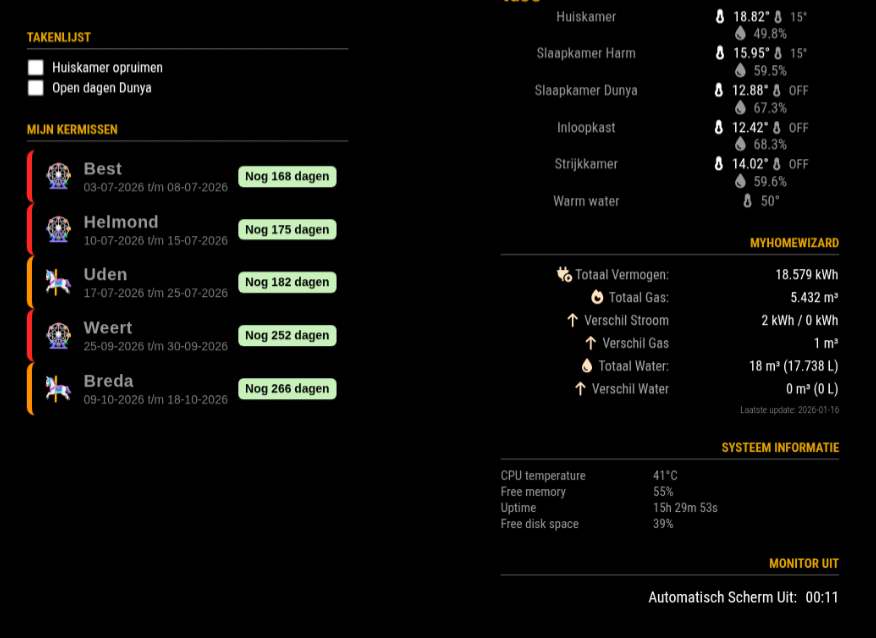
Situation with listening to Spotify:
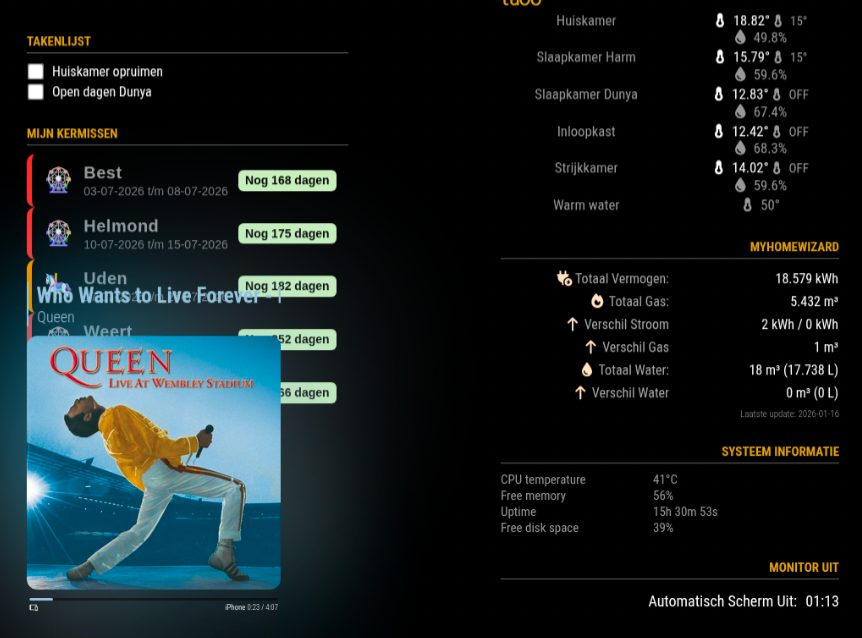
-
MMM-Kermis
MMM-Kermis
This a module for Magic Mirror².
This displays the Carnivals (Kermis), you can add, update and delete through a webinterface.
This module is only available in Dutch.
Installation
Clone this repository in your modules folder, and install dependencies:
cd ~/MagicMirror/modules
git clone https://github.com/htilburgs/MMM-Kermis.git
cd MMM-Kermis
npm install
Update
When you need to update this module:
cd ~/MagicMirror/modules/MMM-Kermis
git pull
npm install
Configuration
Go to the MagicMirror/config directory and edit the config.js file.
Add the module to your modules array in your config.js.{ module: "MMM-Kermis", position: "top_left", header: "Mijn Kermissen", disabled: false, config: { refreshInterval: 60 * 1000 // 1 minuut } },Load Webinterface for updating the Carnivals (Kermissen)
Open a browser and type
http://serverip address:3001
So if for example you’re MagicMirror is on 192.168.0.48 then you go tohttp://192.168.0.48:3001
The Webinterface for MMM-Kermis will be loaded and you will be able to:add Kermis
All the updates are instantly published on your Mirror
Versions
v1.0.0 - Initial release
v1.1.0 - Update for Chromium, install fonts-noto-color-emoji -
RE: MMM-MyTasklist
@meikelrix @chrisfr1976
MMM-MyTasklist is updated to v1.2.1 with correct language support in the Webinterface -
RE: MMM-MyTasklist
@chrisfr1976
That was the reason for me to create this (Simple) module.
Just this and nothing more.On my site, the language is saved in the tasks.json and reloaded when I reload the page. I have to check. I’m Currently in a short holliday, but if you can you can make an issue in github so I don’t forget. I come back to you.
-
RE: MMM-MyTasklist
I Just published v1.2.0
This is an update with EDIT possibility in the Webinterface -
RE: MMM-MyTasklist
@karsten13
I know that is an option. The fast fix now is that I have changed the port to 8448 -
RE: MMM-MyTasklist
@sdetweil
Oké, I didn’t know. Let me see in an hour.
Is there a rule for the Ports? Which I can use or not use? -
MMM-MyTasklist
MMM-MyTasklist
This a module for Magic Mirror².
This displays a simple Tasklist, you can update through a web frontend.
Installation
Clone this repository in your modules folder, and install dependencies:
cd ~/MagicMirror/modules
git clone https://github.com/htilburgs/MMM-MyTasklist.git
cd MMM-MyTasklist
npm install
Update
When you need to update this module:
cd ~/MagicMirror/modules/MMM-MyTasklist
git pull
npm install
Configuration
Go to the MagicMirror/config directory and edit the config.js file.
Add the module to your modules array in your config.js.{ module: "MMM-MyTasklist", position: "top_left", header: "MyTaskList", disabled: false, config: { tasksFile: "modules/MMM-MyTasklist/tasks.json", updateInterval: 300000, showCompleted: true, maxTasks: null } },Load Webinterface for updating the Tasklist
Open a browser and type
http://serverip address:8448
So if for example you’re MagicMirror is on 192.168.0.48 then you go tohttp://192.168.0.48:8448
The Webinterface for MyTasklist will be loaded and you will be able to:- choose language for the Webinterface
- add tasks
- complete tasks
- delete tasks
- edit tasks
- move the order from tasks by drag-and-drop
- filter on all, active or done tasks
All the updates are instantly published on your Mirror
NOTE:
With a touchscreen you’re able to check the checkboxes on the Mirror to complete the task.
All these changes are instantly published to the WebinterfaceVersions
v1.0.0 - Initial release
v1.1.0 - Update Look & Feel
v1.1.1 - Change Webinterface port from 8123 to 8448
v1.2.0 - Add possibility to edit the tasks in the Webinterface
v1.2.1 - Update language selector didn’t work correct in Webinterface (always dutch after reload) -
RE: MMM-Chores - Manage and keep track of your household Chores
@PierreGode
Tested and works. Thanks!