@sdetweil Nothing changed in the settings.
Still “weekly”
 H
Offline
H
Offline
A New Chapter for MagicMirror: The Community Takes the Lead
Read the statement by Michael Teeuw here.
Read the statement by Michael Teeuw here.
Posts
-
RE: Weekly summary
-
Weekly summary
I used to get a weekly summary in the mail every sunday.
Has something changed, because this is sudenly stopped. -
RE: MMM-MySystem
@Megawaldi
Currently it is not possible. The icons are ‘hard-coded’ into the module. -
RE: MMM-MySystem
@OberfragGER
I had somebody with a simular problem on MMM-MyTado. He installed the fonts-noto-color-emoji fontsudo apt update sudo apt install fonts-noto-color-emoji fc-cache -fvRestart your mirror and see what happens.
-
RE: MMM-MyGarbage
Published update to V3.1.1
- list itemFix weeksToDisplay For example: 2 weeks are 14 days so this could end up showing 3 weeks. Now fixed to ISO weeks.
- list itemNormalized all dates to ISO strings
- list itemImprove CSV bin filtering (avoid garbage data)
-
RE: MMM-MyGarbage
Just published an update v3.1.0
- Add support for combined multiple same day pickups into 1 ICS event (thanks to @PlatinumPenguin)
- Clean up code to prevent crashes
-
RE: MMM-MyTado
@MyMirror
The humidity is already shown -> The humidity (💦)
The open window is already shown -> Open Window (🪟)
It will be shown in the status column when it appears in that zone. -
RE: PIR / MQTT - Presence sensor(s) revived
@rkorell
That’s correct!
At the end, because it currently just works with MMM-OnSpotify, it was not so difficult.I Will look into this in the near future to support other Player also.
-
MMM-HideModulesOnSpotify
MMM-HideModulesOnSpotify
This is a small Magic Mirror² module that can hide one ore more modules when MMM-OnSpotify starts.
The problem I had that my MagicMirror was full and the MMM-OnSpotify came over the other modules.
With this module, I have created a way to automatically hide a module when MMM-OnSpotify opens. When MMM-OnSpotify closes again, the original module is reloaded in its place.
This module loads automatically, but is not visible on the MagicMirror.
The only thing you can see is in the logs that the module has been loaded.Installation
Clone this repository in your modules folder, and install dependencies:
cd ~/MagicMirror/modules
git clone https://github.com/htilburgs/MMM-HideModulesOnSpotify.git
cd MMM-HideModulesOnSpotify
npm install
Update
When you need to update this module:
cd ~/MagicMirror/modules/MMM-HideModulesOnSpotify
git pull
npm install
Configuration
Go to the MagicMirror/config directory and edit the config.js file.
Add the module to your modules array in your config.js.{ module: "MMM-HideModulesOnSpotify", config: { modulesToHide: ["clock","calendar"] } },Configuration Options
Option Description modulesToHide Array of module(s) you like to hide. Fill in the exact module Name as in your config.js Versions
v1.0.0 (12-03-2026): Initial version
License
The MIT License (MIT)
Copyright © 2026 Harm Tilburgs
Permission is hereby granted, free of charge, to any person obtaining a copy of this software and associated documentation files (the “Software”), to deal in the Software without restriction, including without limitation the rights to use, copy, modify, merge, publish, distribute, sublicense, and/or sell copies of the Software, and to permit persons to whom the Software is furnished to do so, subject to the following conditions:
The above copyright notice and this permission notice shall be included in all copies or substantial portions of the Software.
The software is provided “as is”, without warranty of any kind, express or implied, including but not limited to the warranties of merchantability, fitness for a particular purpose and noninfringement. In no event shall the authors or copyright holders be liable for any claim, damages or other liability, whether in an action of contract, tort or otherwise, arising from, out of or in connection with the software or the use or other dealings in the software.
-
RE: PIR / MQTT - Presence sensor(s) revived
@rkorell
I see you’re even using one of my Modules (MMM-MyGarbage)My MusicPlayer (Volumio) is on the left side, too but is spreading the region if cover-art is appearing…Did you do something special for this, or is this an option in de Module?
Because when MMM-OnSpotify appears, it just go over everything that is standing there.
So for now I’ve disabled it and looking for a solution. -
RE: MMM-MyGarbage
Just published an update v3.0.0
- Add support for flexible numbers of Bins
- Bin names are automaticly detected
- Match bin colors to bin names for csv and ical
- Error message instead of “Loading…” when the CSV or ICAL is in wrong format
- Better debug information in console and in module
- Clean up code
Enjoy this new version and if you find any issues, please report them here
-
RE: PIR / MQTT - Presence sensor(s) revived
@rkorell
My current mirror
This is why I have it on the right. For me this feels better.
On the left side there comes the Spotify information, when I play music.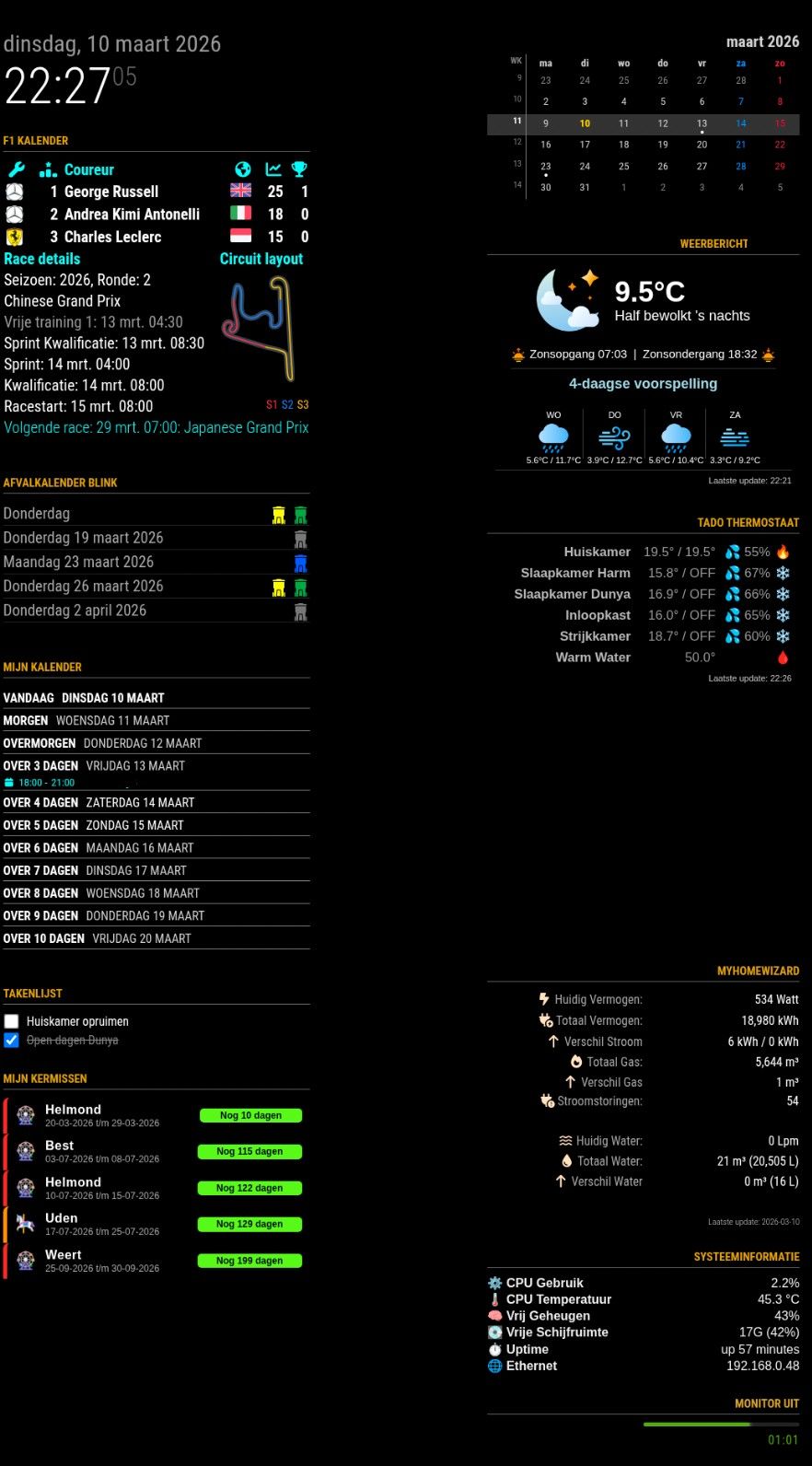
-
MMM-MySystem
MMM-MySystem
This is a Magic Mirror² module for the system information.
I now there are more 😉, but I built a version with a modern look and feel, suited for my needs.Installation
Clone this repository in your modules folder, and install dependencies:
cd ~/MagicMirror/modules
git clone https://github.com/htilburgs/MMM-MySystem.git
cd MMM-MySystem
npm install
Update
When you need to update this module:
cd ~/MagicMirror/modules/MMM-MySystem
git pull
npm install
Configuration
Go to the MagicMirror/config directory and edit the config.js file.
Add the module to your modules array in your config.js.{ module: "MMM-MySystem", position: "top_right", header: "System Information", disabled: false, config: { showHeader: true, showCpuUsage: true, showCpuTemp: true, showMemory: true, showDisk: true, showUptime: true, showIPeth: true, showIPwifi: true, tempUnit: "C" updateInterval: 10000 } }Configuration Options
Option Description showHeaderShow the header with Hostname, Model and OS Version
Options:true/false- Default:trueshowCPUusageShow the CPU Usage (%)
Options:true/false- Default:trueshowCPUtempShow the CPU Temperature
Options:true/false- Default:trueshowMemoryShow the Free Memory (%)
Options:true/false- Default:trueshowDiskShow the Free Diskpace
Options:true/false- Default:trueshowIPethShow the IP Address for the Ethernet
Options:true/false- Default:trueshowIPwifi | Show the IP Address for the Wifi<br/>Options:true/false- Default: <b>true`tempUnitShow the temperature in ˚C or ˚F
Options:C/F- Default:CupdateIntervalUpdate interval module in ms
Default:10000(10 seconds)Versions
v1.0.0 (10-03-2026): Initial version)
-
RE: PIR / MQTT - Presence sensor(s) revived
@rkorell
Hi Ralf, I implemented the new version and parameter.
It works great!I’m now playing with the CSS.
Made the bar smaller (50%) rounded edges and alligned the counter at the left of my screen.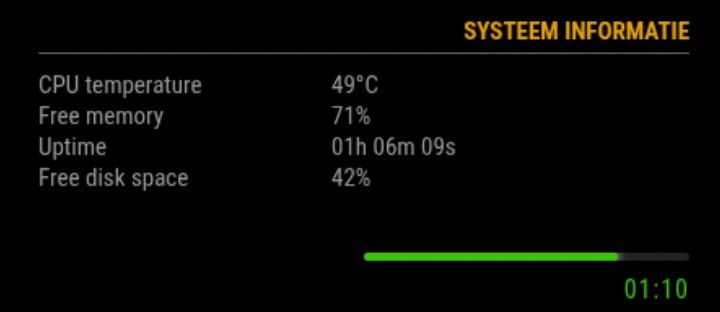
For those who like this setup, just add following in ~/MagicMirror/css/custom.css
/* MMM-PresenceScreenControl */ .psc-linebar { width: 50%; height: 5px; background: #222; border-radius: 4px; margin: 6px 0 6px 0; overflow: hidden; margin-left: auto; margin-right: 0; } .psc-bar { height: 100%; width: 100%; border-radius: 4px; transition: width 0.4s ease, background 0.4s ease; box-shadow: 0 0 6px currentColor; } .psc-timer { font-size: 16px; margin-top: 4px; margin-bottom: 2px; letter-spacing: 1px; text-align: right !important; } -
RE: PIR / MQTT - Presence sensor(s) revived
@rkorell
Oke, done some testing:
With the ‘new’ strings, I get:onCommand: "WAYLAND_DISPLAY=wayland-0 wlr-randr --output HDMI-A-1 --on --mode 1920x1080 --transform 270", offCommand: "WAYLAND_DISPLAY=wayland-0 wlr-randr --output HDMI-A-1 --off",[ERROR] [MMM-PresenceScreenControl] [updateScreen] ERROR: Error: Command failed: WAYLAND_DISPLAY=wayland-0 wlr-randr --output HDMI-A-1 --on --mode 1920x1080 --transform 270 unknown output HDMI-A-1Why this message, I don’t know.
After a reboot this message didn’t show again.Then I stopped MagicMirror and did the same command from the commandline
WAYLAND_DISPLAY=wayland-0 wlr-randr --output HDMI-A-1 --offAfter 6 seconds my display comes on again.
So it isn’t coming from MagicMirror, but from my system.
I created a simple Python3 script to turn off and on my monitor. Same problem.Next step:
I took a new SD Card and installed a fresh copy of Trixie.
Didn’t do anything else, no updates or something else and tried again withWAYLAND_DISPLAY=wayland-0 wlr-randr --output HDMI-A-1 --offfrom the command prompt.
Display goes off and after 6 seconds back on again.
So I excluded MagicMirror. What else can it be?Next step:
I took an other RPI4b with the new SD Card from previous step. Repeated the test, but still same result. Monitor goes on after 6 seconds. So it is not MagicMirror, not the RPI. But why it works with MMM-PIR and not with MMM-PresenceScreenControl. It is still a riddle for me.Next step:
Original RPI with original SD Card and installed MMM-Universal-Pir. Same result, after 6 seconds screen on.
So I excluded MagicMirror, SD Card, Trixie installation and RPI. It must have something to do with my monitor?!?
Did something happen? Not that I know.After doing a search on the big WWW, I found an interesting article that described exact the same issue I was having.
https://forums.raspberrypi.com/viewtopic.php?t=363966So I searched for my RemoteControl and search for a setting
that automatically scan its input sources (not easy if your MagicMirror screen is rotated 270° ;-)
And I found this setting and indeed it was standing on auto scan. I put it on HDMI as only source and tried it again:YES, IT IS WORKING!!!
And even better than before, now my monitor turns completly off after 15 min. of no signal. So instead of using 75W when on, 26W in standby, it now uses 0W after 15 minutes (it’s a setting on the monitor).
Activating the PIR, it turns back on!So with this I hope that if somebody else has this problem, they can solve it to.
Ralf, thanks for all the help and trying to solve it with me.
I’m looking forward for the startupGracePeriod parameter and think this is going to make the module fully as I like it.
Thank you for your great work with this module and a grownup replacement for MMM-Pir!!! -
RE: PIR / MQTT - Presence sensor(s) revived
@rkorell
I live in the Netherlands.I’m Currently at the office, but I Will test it this evening and give you the results.
-
RE: PIR / MQTT - Presence sensor(s) revived
@rkorell
I did a git pull so I’m sure I’ve the latest version:- Screen stays on until I trigger the sensor, so that is not changed.
- Screen goes off after 30 sec (my setting for testing) and after 6 seconds it comes on again, saying 00:00
I had set debug:“complex” and this is what it gave
[2026-03-09 06:53:11.320] [LOG]   [MMM-PresenceScreenControl] [PresenceScreenControl] [PIR] gpiomon output: 30488.576057914     rising  gpiochip0 17 "GPIO17"
[2026-03-09 06:53:12.466] [LOG]   [MMM-PresenceScreenControl] [PresenceScreenControl] [PIR] gpiomon output: 30489.724051868     falling gpiochip0 17 "GPIO17"
[2026-03-09 06:53:14.974] [LOG]   [MMM-PresenceScreenControl] [PresenceScreenControl] [PIR] gpiomon output: 30492.232041526     rising  gpiochip0 17 "GPIO17"
[2026-03-09 06:53:16.122] [LOG]   [MMM-PresenceScreenControl] [PresenceScreenControl] [PIR] gpiomon output: 30493.380045941     falling gpiochip0 17 "GPIO17"
[2026-03-09 06:55:15.350] [LOG]   [MMM-PresenceScreenControl] [PresenceScreenControl] [PIR] gpiomon output: 30612.608045172     rising  gpiochip0 17 "GPIO17"
[2026-03-09 06:55:16.498] [LOG]   [MMM-PresenceScreenControl] [PresenceScreenControl] [PIR] gpiomon output: 30613.756051231     falling gpiochip0 17 "GPIO17"
I only have a message when I trigger the PIR, but further no messages. For being complete, my config:
{ module: "MMM-PresenceScreenControl", position: "bottom_right", disabled: false, config: { mode: "PIR", pirGPIO: 17, onCommand: "DISPLAY=:0 wlr-randr --output HDMI-A-1 --on --mode 1920x1080 --transform 270", offCommand: "DISPLAY=:0 wlr-randr --output HDMI-A-1 --off", counterTimeout: 30, autoDimmer: false, autoDimmerTimeout: 60, style: 2, colorFrom: "red", colorTo: "lime", colorCronActivation: "cornflowerblue", showPresenceStatus: false, debug: "complex", resetCountdownWidth: false } }, -
RE: PIR / MQTT - Presence sensor(s) revived
@rkorell
First of all, thank you for your time!You were right about the startup behavior — I’ve fixed it. The screen now turns off after ~1 second if no presence is detected at startup. No more waiting for the first sensor event.Ok, nice. But why ~1 second?
Why not the time fromcounterTimeout?
Just my thoughts ;-)Could you please set debug: “complex” and share the complete log output from the moment the screen turns off until it comes back on?I will do this, but it will be tommorow.
I have to get up early and it’s already late. -
RE: PIR / MQTT - Presence sensor(s) revived
To update:
cd ~/MagicMirror/modules/MMM-PresenceScreenControl
git pull
rm -rf node_modules package-lock.json
npm installThe better way is first
rm -rf node_modules package-lock.json, otherwisegit pullgives an error that it cannot update because of package-lock.jsonerror: Your local changes to the following files would be overwritten by merge: package-lock.json Please commit your changes or stash them before you merge.