MMM-MyGarbage
This a module for MagicMirror².
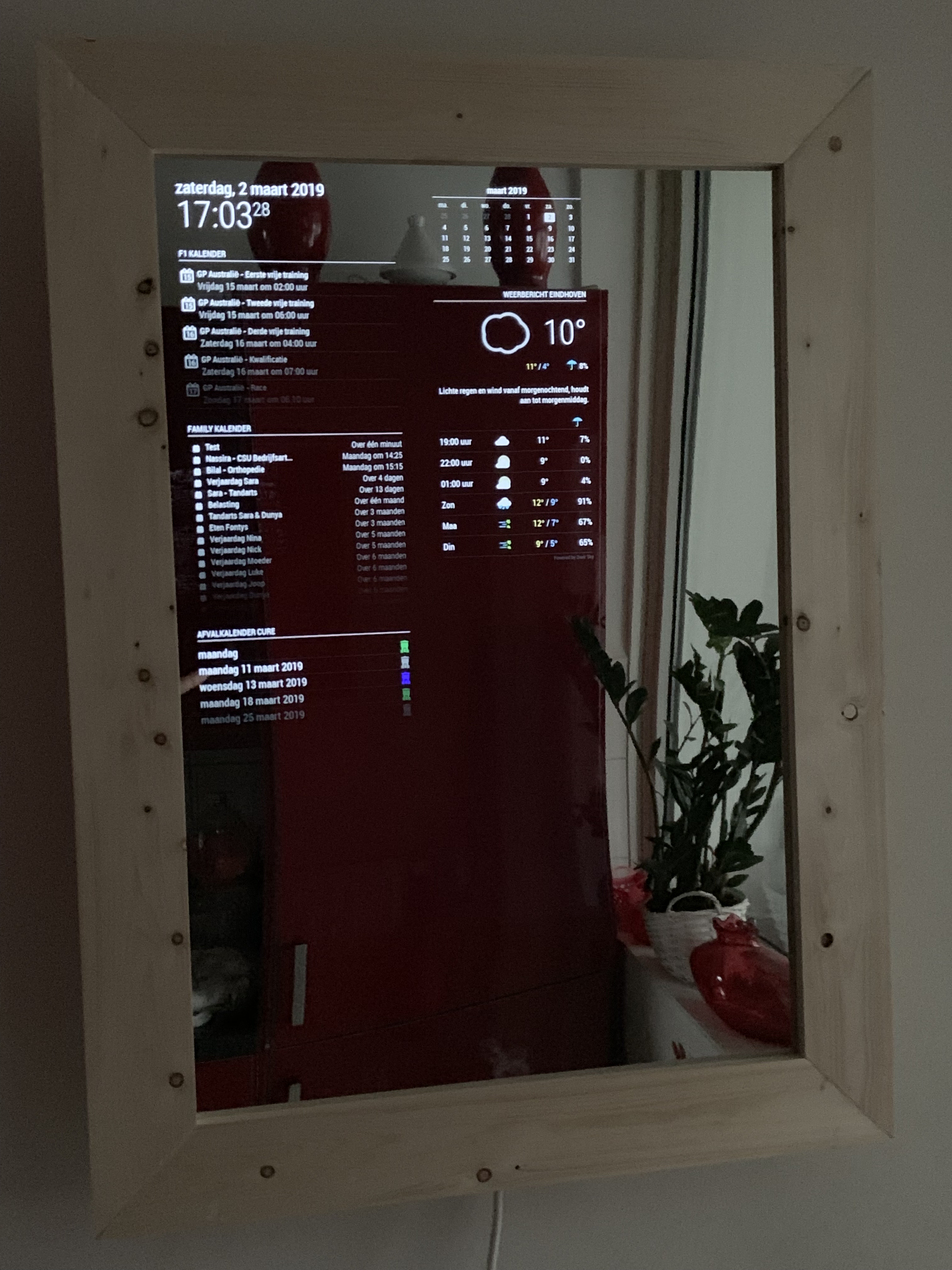
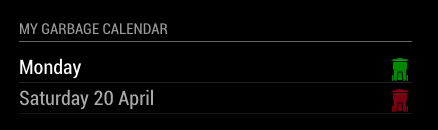
This displays the schedule for your Garbage pickup. It supports multiple types of garbage bins.
You can show the schedule using a CSV file (garbage_schedule.csv) of by using an ical URL.
Installation
Clone this repository in your modules folder, and install dependencies:
cd ~/MagicMirror/modules
git clone https://github.com/htilburgs/MMM-MyGarbage.git
cd MMM-MyGarbage
npm install
Update
When you need to update this module:
cd ~/MagicMirror/modules/MMM-MyGarbage
git pull
npm install
Configuration
Go to the MagicMirror/config directory and edit the config.js file.
Add the module to your modules array in your config.js.
{
        module: 'MMM-MyGarbage',
        position: 'top_right',
        header: "My Garbage Calendar",
        disabled: false,
        config: {
                weeksToDisplay: 4,
                limitTo: 99,
                dateFormat: "dddd LL",
                alert: true,
                alertThreshold: 5,
                fade:true,
                fadePoint: 0.25,
                dataSource: "csv",                          // csv (schedule_garbage.csv | ical (put URL in icalUrl)
                icalUrl: "PLACE_HERE_PUBLIC_ICAL_URL",      // only used if dataSource is "ical"
                debug: false,                               // Only set on true for debugging
                binColors: {                                // Define custom Bin Colors and match with the Bin Names
                            "GreenBin" : "#00A651",
                            "PaperBin" : "#0059FF",
                            "GarbageBin" : "#787878",
                            "PMDBin" : "#FFFF00",
                            "OtherBin" : "#B87333"
                            },
                }
},
Module configuration
Here is the documentation of options for the modules configuration:
| Option | Description |
|---|---|
weeksToDisplay |
How many weeks into the future to show collection dates. Number Default: 2 |
limitTo |
Limit the display to the spcified number of pickups Number Default: 99 |
dateFormat |
Format to use for the date of events Default: dddd D MMMM (e.g. January 18)Possible values: See https://momentjs.com/ |
alert |
Show alert, if remaining entries in CSV file fall under threshold Default: falsePossible values: true or false |
alertThreshold |
(optional) Threshold entries left in CSV file Number Default: 5 |
fade |
Fade the future events to black. (Gradient). Default: true<Possible values: true or false |
fadePoint |
Where to start fade Default: 0.25Posibble values: Between 0 (top of the list) and 1 (bottom of list) |
dataSource |
Select the datasource you’re using Default: csvPossible values: csv or ical |
icalUrl |
Fill in your (public) ical URL Only use in combination with dataSource: ical |
debug |
For debugging the module when failure or testing Default: falsePossible values: false or true |
binColors |
Define your own Bin Colors - Bin names have to EXACTLY match you’re names from CSV or iCAL. |
Creating and using your Garbage Schedule for use with dataSource CSV
You can use this module by creating your own Garbage Schedule file with the name garbage_schedule.csv
An example file garbage_schedule.csv is added.
Create a CSV based on the following template:
WeekStarting,GreenBin,GarbageBin,PaperBin,PMDBin,OtherBin
03/07/18,1,0,1,0,0
03/14/18,1,1,1,0,0
03/21/18,1,0,1,0,1
03/28/18,1,1,1,1,0
Default there are 5 bins defined. If you need more garbage bins, simply add an extra column in the garbage_schedule.csv file, with the name of the extra bin. If you only need 3, then simply remove them. When the module is started, it reads the names and will try them to match to the binColors.
As of v3.0.0 of the module you can add custom names in the CSV of rename current names. As long as you change your binColors in config.js with the correspending names, you will see the information with the correct colors.
Remark
Any Bin name that is not or not correct matched with the name in binColors, will be shown as a purple bin
Add lines for each garbage pickup date as needed.
The date format needs to be specified as MM/DD/YY (e.g.: 05/28/18 for 28-May-2018)
Colors can be defined in the config.js file:
- Legacy Values:
- GreenBin (defaults to #00A651)
- GarbageBin (defaults to #787878)
- PaperBin (defaults to #0059ff)
- PMDBin (defaults to #ffff00)
- OtherBin (defaults to #F542CE)
- Any CSS color string (red, chocolate, cornflowerblue, etc…)
- Any HEX-Color (#FF0000, #8c8c8c, etc)
- Any rgb, rgba or hsl value if in double quotes (“rgb(128,65,98)”, “rgba(134,56,32,0.5)”, “hsl(0, 100%, 50%)”, etc.)
The following is VERY important:
- The CSV file MUST be delimited using commas
- The date format MUST to be specified as
MM/DD/YY(e.g.: 05/28/18 for 28-May-2018) - The remaining fields of each line specify whether the particular waste product is scheduled to be picked up on the given date. A value of
0means no pick up. A value of ANYTHING ELSE means the product will be picked up. Using the first pick up date entry in the template above,1,0,1,0,0means thatgreenandbluewill be picked up on that date, while the others will not be picked up.
Save the file as garbage_schedule.csv in the MMM-MyGarbage directory and restart Magic Mirror²
License
The MIT License (MIT)
Copyright © 2019-2026 Harm Tilburgs
Permission is hereby granted, free of charge, to any person obtaining a copy of this software and associated documentation files (the “Software”), to deal in the Software without restriction, including without limitation the rights to use, copy, modify, merge, publish, distribute, sublicense, and/or sell copies of the Software, and to permit persons to whom the Software is furnished to do so, subject to the following conditions:
The above copyright notice and this permission notice shall be included in all copies or substantial portions of the Software.
The software is provided “as is”, without warranty of any kind, express or implied, including but not limited to the warranties of merchantability, fitness for a particular purpose and noninfringement. In no event shall the authors or copyright holders be liable for any claim, damages or other liability, whether in an action of contract, tort or otherwise, arising from, out of or in connection with the software or the use or other dealings in the software.
Note
The original script is from Jeff Clarke MMM-MyWastePickup and only for the Toronto area.
Now it has become a general script, to use in all areas all over the world.
Versions
v3.1.1 (28-03-2026)
- list itemFix weeksToDisplay For example: 2 weeks are 14 days so this could end up showing 3 weeks. Now fixed to ISO weeks.
- list itemNormalized all dates to ISO strings
- Improve CSV bin filtering (avoid garbage data)
v3.1.0 (21-03-2026)
- Add support for combined multiple same day pickups into 1 ICS event (thanks to @PlatinumPenguin)
- Clean up code to prevent crashes
v3.0.0 (07-03-2026)
- Add support for flexible numbers of Bins
- Bin names are automaticly detected
- Match bin colors to bin names for csv and ical
- Error message instead of “Loading…” when the CSV or ICAL is in wrong format
- Better debug information in console and in module
- Clean up code
v2.1.2 (02-03-2026)
- Update for rare AxiosError [AggregateError] when loading iCal
v2.1.1 (17-02-2026)
- Bugfix for the
alertTreshold
v2.1.0 (16-02-2026)
- Update for CSV file and
alertThreshold(add to config.js!)
v2.0.1 (2025)
- Update for Streamline date parsing and allow for recurring events in ical (thx to @thepagan)
v2.0.0 (2025)
- Changed for use with CSV or with iCal Calendar